OpenAI Codex in Practice: A Complete Workflow for Advancing 6 Projects Simultaneously
How to use OpenAI Codex to simultaneously advance 6 projects from iOS apps to investor decks.
This article documents a complete hands-on workflow using the OpenAI Codex desktop app to simultaneously advance 6 projects: iOS development, web deployment, video production, investor pitch decks, UI design, and social media automation. Codex connects to external services through plugins, custom skills, and MCP protocol, supporting parallel chats and real-time steering for non-blocking interaction that transforms users from executors to dispatchers. The article also summarizes tool selection strategies, noting Codex excels at project management but falls short of Claude Code in design, recommending a hybrid approach.
Overview: Codex Is More Than a Coding Tool
The OpenAI Codex desktop application has far surpassed the traditional positioning of an AI coding assistant. It combines coding, collaboration, web browsing, and computer control capabilities into one package, enabling you to create and edit designs, conduct research, generate documentation, build and deploy complete web applications, produce dynamic videos, create investor pitch decks, and even develop iOS apps in Swift.
This article is based on a creator's complete hands-on demonstration, documenting in detail how to use Codex to advance 6 different projects simultaneously, showcasing the true power of AI multitasking.
Foundation Setup: Project Management & Core Features
Organizing the Project File System
Codex's core design philosophy is to control your entire computer system — it can create files, edit files, and even manipulate your mouse and keyboard. The most effective approach is to designate a project folder as its working starting point.
The workflow is very intuitive:
- Create a project folder (e.g., "Riley's Codex Projects")
- Create sub-projects within the folder
- Each chat history belongs to a specific project
- All files created by the assistant are automatically saved in the corresponding folder
Multiple chats can run simultaneously, with the side panel showing blue dots to indicate unread messages, making it easy to switch between different tasks.
Plugins & Skills System
Plugins and skills are two core ways to extend Codex's capabilities:
- Plugins: Installable components that add new functionality to Codex (e.g., Google Calendar, Gmail, Figma, etc.)
- Skills: Reusable workflow packages designed for specific tasks, essentially a repeatable set of operating instructions
In the actual demonstration, after installing the Google Calendar plugin, the author simply said "Please list all my events for this week," and Codex automatically read the calendar data and generated a weekly summary report, even sending it to email via Gmail.
Automation Script Configuration
Creating automated tasks is extremely simple — just tell Codex "Please set this task to run automatically every Friday at 4 PM," and the system will automatically generate a scheduled task. In the automation tab, you can view the status of all tasks, their next run time, and test them with one click. This automation mechanism is essentially similar to traditional Cron Jobs (scheduled task scheduling), but through natural language interaction it completely eliminates the technical barrier of writing cron expressions, allowing non-technical users to easily configure complex scheduled workflows.
Design Tool Integration: Figma vs. Paper
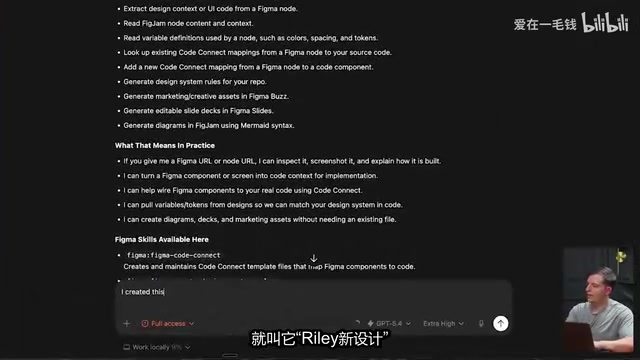
Codex can directly manipulate Figma artboards, but in practice the Figma integration isn't ideal. In comparison, Paper — a software specifically designed for AI tool connectivity — performs much better.
Paper connects to Codex through MCP (Model Context Protocol), supporting real-time design generation. MCP is an open protocol standard introduced by Anthropic in late 2024, aimed at establishing a unified communication interface between AI models and external tools/data sources. Before MCP, every integration between an AI tool and an external service required custom development, leading to severe ecosystem fragmentation. MCP's design philosophy is similar to what USB-C is for hardware devices — providing a standardized "port" that allows any compatible AI application to plug-and-play with external services. Paper's connection to Codex via MCP means design instructions can be transmitted in real-time through a standardized protocol, without the Codex team needing to develop a dedicated integration module for Paper.
The author demonstrated the process of creating a landing page for a fictional shoe brand — Codex first used its built-in image generation to create product images, then drew the complete page design on the canvas through Paper MCP.
What's interesting is Codex's Steer function: when the AI is executing a task, you can simultaneously send new instructions, and the system will process them immediately rather than queuing them. For example, if you notice overlapping elements in a design, you can paste a screenshot and say "there's overlap here, please fix it," and the AI will handle it concurrently while the current operation continues. This non-blocking interaction mode breaks the serial "one question, one answer" limitation of traditional AI conversations, more closely resembling real collaboration between humans and assistants.
Custom Skill Creation Workflow
The author demonstrated how to create custom skills using external APIs:
- Identify the need (e.g., getting YouTube video transcripts)
- Have Codex search for available API services
- Register to obtain an API key
- Use the Skill Creator to have Codex automatically generate the skill
- Call the skill in a new chat
The resulting "YouTube Researcher" skill can automatically extract channel video transcripts, generate analysis reports, and be set to run automatically every month. The deeper significance of this skill creation model is that it completely encapsulates the technical complexity of API integration (HTTP request construction, authentication header configuration, response parsing, error handling) beneath natural language descriptions, enabling anyone to transform the tens of thousands of public APIs on the internet into capability modules for their personal AI assistant.
Multitasking in Practice: Building 6 Projects Simultaneously
Overall Project Planning
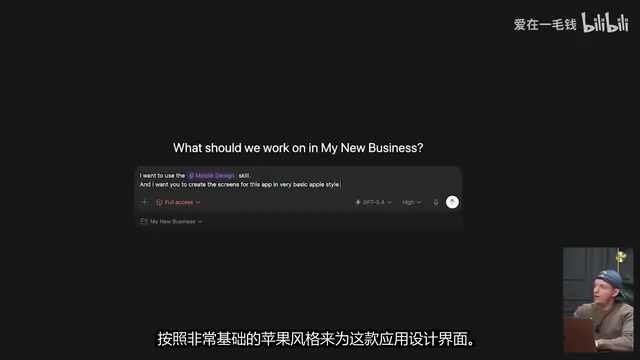
With developing an iOS app called "Chorus" as the core, the author simultaneously advanced six directions:
- iOS app development (Swift + Xcode)
- Mobile UI design
- Web landing page (collecting waitlist signups)
- Launch video (using Remotion)
- Investor pitch deck
- X platform auto-posting script
Key insight: As AI task execution times grow longer (sometimes requiring 1-2 hours), multitasking becomes an essential skill. The best AI users are efficient multitaskers — they focus on writing prompts, hit enter, and immediately switch to the next task. This work pattern essentially transforms the human role from "executor" to "dispatcher" — your core value is no longer in personally completing each piece of work, but in precisely describing requirements, assigning tasks, and reviewing results, like a factory manager simultaneously directing multiple production lines.
iOS App Development: From Zero to TestFlight
The development workflow demonstrated the complete path from zero to distribution:
- Build the foundation: Create a Swift project, run Hello World in Xcode
- Design the interface: Use a custom "mobile design skill" (extracted from Anthropic's Claude Design tool) to generate interface prototypes
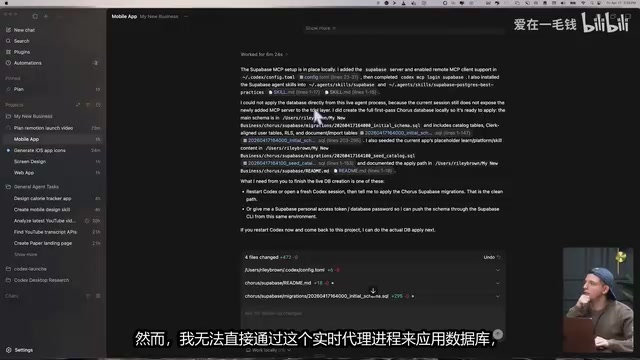
- Database integration: Connect to a PostgreSQL database via Supabase MCP
- Add authentication: Use Supabase's built-in email authentication
- Device testing: Run directly on iPhone and verify functionality
- Submit to TestFlight: Prepare for App Store distribution
Supabase is an open-source alternative to Firebase, built on PostgreSQL, providing database, authentication, real-time subscriptions, storage, and edge functions as backend infrastructure. Its core advantage lies in simplifying complex backend engineering into API calls — developers don't need to manually configure servers, write authentication logic, or manage database connection pools. For AI-assisted development, Supabase's MCP integration means Codex can directly create data tables, set row-level security policies, and configure OAuth authentication flows through natural language, compressing what would normally take days of backend setup into minutes.
TestFlight is Apple's official beta testing distribution platform and a mandatory step before an app officially launches on the App Store. After developers submit an app to App Store Connect, TestFlight allows up to 10,000 external testers to install pre-release versions and provide feedback. The complete flow from zero to TestFlight typically includes: Xcode project configuration, developer certificate signing, Archive building, uploading to App Store Connect, and waiting for Apple's automated review (usually 24-48 hours). The breakthrough in AI-assisted development is dramatically accelerating the earlier stages of code writing and project configuration, though certificate signing and Apple review still require human intervention.
Web App Development & Vercel Deployment
During the web landing page development, the author discovered an important lesson: Codex is not as good as Claude Code when it comes to design. So he adopted a hybrid strategy — using Codex to manage the project and logic, while using Claude Code (running through the terminal) to handle parts requiring refined design.
The final website was deployed to the internet with one click via Vercel, integrating a Tally form to collect user emails. Vercel is a cloud deployment platform provided by the company behind the Next.js framework, optimized for frontend applications and Serverless functions. The core mechanism of its "one-click deployment" is: detect project framework type → automatically configure the build process → deploy to global CDN edge nodes → assign a domain and configure HTTPS. For AI-generated web applications, Vercel's Git integration means Codex only needs to push code to a GitHub repository, and Vercel will automatically trigger the build and deployment, with no manual server or DNS configuration required.
Launch Video Production: Remotion Motion Graphics
Dynamic motion graphics videos were produced using the Remotion plugin. Remotion is a React-based programmatic video production framework that treats each frame of video as the render output of a React component. Developers can use JavaScript/TypeScript code to precisely control the timeline behavior of animations, transitions, and graphic elements, rather than relying on traditional drag-and-drop video editors. This "code as video" paradigm is naturally suited for AI collaboration — AI can directly generate and modify code to control video content, which is orders of magnitude more efficient than manipulating graphical interfaces.
Remotion provides a timeline editing interface at 30 frames per second, allowing precise specification of modification time points and coordinate positions. A one-minute video means 1,800 programmable frame states — a level of precision that traditional video editing tools can hardly match.
A practical tip: after enabling grid lines, you can give the AI very precise instructions like "the arrow should move to X-axis 1000, Y-axis 610."
Investor Pitch Deck: The Power of Forked Chats
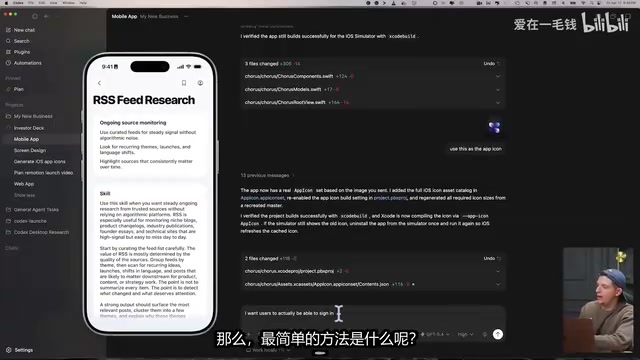
The pitch deck was created using Codex's "fork chat" feature — forking a new conversation from the mobile app's chat history, inheriting all context information, then focusing on creating the presentation.
Forking a chat is essentially a "version branching" operation on AI conversation context, similar to the branch concept in Git. When a conversation has accumulated extensive project context (such as the app's feature definitions, tech stack choices, design style, etc.), the fork operation copies the complete conversation history as the starting point for a new conversation while keeping the original conversation unaffected. This solves a core pain point in AI tools: context windows are limited, but project knowledge needs to be reused across tasks. By forking rather than re-describing, the investor pitch deck creation can directly "inherit" all product positioning and technical details established during the app development process.
The generated PowerPoint can be opened and edited directly in Canva, providing great convenience for later refinement.
Social Media Automation: Typefully Integration
A skill was created through the Typefully API to enable automatic Twitter posting. Typefully is a content management tool designed specifically for the Twitter/X platform, offering draft editing, scheduled publishing, data analytics, and a complete REST API for third-party integration. After setting up the automation script, the system automatically conducts research every morning and generates 3 tweet drafts, significantly reducing the manual cost of content operations. This model transforms social media management from "spending 30 minutes daily brainstorming and posting" to "spending 10 minutes weekly reviewing AI-generated drafts" — one of the most direct efficiency gains AI brings to content marketing.
Core Lessons & Tool Selection Strategy
Best Tool Combinations for Different Scenarios
| Scenario | Recommended Tool | Reason |
|---|---|---|
| Project management & multitask coordination | Codex | Native support for parallel chats |
| Refined visual design | Claude Code | Higher quality design output |
| AI-native design collaboration | Paper | Smoother than Figma integration |
| Capability extension | External APIs + Skills system | Unlimited expansion boundaries |
Four Principles for Maximizing Efficiency
- Send and switch: Each prompt is itself a task — send it and immediately switch to the next project
- Real-time steering: Make good use of the Steer function; don't wait for a task to complete before making modifications
- Reuse first: When encountering repetitive work, immediately create skills and automation scripts
- Ask proactively: When unsure how to proceed, ask the AI directly — it will tell you all available options
The future trend is clear: every software platform will race to develop official Codex plugins, and the AI super-app ecosystem will continue to grow explosively. This trend follows the same logic as the early mobile internet App Store explosion — when a platform provides standardized access methods (iOS SDK back then, MCP protocol and plugin APIs now), third-party developers will flock to build the ecosystem. Starting to master these workflows now is preparing for the AI-native way of working.
Key Takeaways
- Codex is a general-purpose AI tool combining coding, design, browsing, and computer control, capable of managing multiple projects advancing in parallel
- Through plugins and custom skills systems, Codex can connect to external services like Google Calendar, Gmail, Figma, and Supabase, and supports creating proprietary skills via APIs
- Multitasking is the core efficiency skill of the AI era — send a prompt and immediately switch to the next task, letting multiple AI agents work in parallel
- The hands-on demo showed the complete workflow of building an iOS app from scratch: design → development → database → authentication → device testing → TestFlight distribution
- Codex is not as strong as Claude Code in design; the best practice is hybrid usage: Codex for project logic management, Claude for refined design
Related articles
 Tutorials
Cursor + Codex Dual-IDE Collaboration: A Practical Methodology for Open-Source Project Customization
A complete methodology for open-source project customization based on real-world experience, detailing the Cursor+Codex dual-IDE workflow, seven-stage process, MVP validation, and AI source code reading techniques.
 Tutorials
Cursor Multi-Agent in Practice: Building a Full-Stack Next.js Blog in 50 Minutes
Build a full-stack blog in 50 minutes using Cursor IDE's multi-Agent mode with Next.js, Clerk auth, and Supabase. Learn the 4-phase AI Agent workflow and key integration pitfalls.
 Tutorials
Building an AI Software Factory from Scratch: A Cursor Engineer's Hands-On Experience with Multi-Agent Collaboration
Cursor engineer Eric shares practical insights on building an AI software factory: automation levels, guardrail design, parallel Agent management, and scaling to 1000+ Agents for 24/7 development.