Self-Hosting an API Proxy Platform: Free Access to Claude/GPT/Gemini LLMs Tutorial

Open-source iClient 2 API converts free LLM client quotas into standard API endpoints
iClient 2 API is a GitHub open-source project that reverse-engineers client communication protocols to convert free conversation quotas from Google Gemini, Claude, and ChatGPT into OpenAI-compatible API interfaces. Developers can deploy it via Docker on an overseas VPS, use OAuth authorization to obtain free quotas, and generate API keys to connect with various AI coding tools. While it significantly reduces AI development costs, it carries risks of account bans and service instability, making it best suited for personal learning scenarios.
Background: Surging AI Coding Demand Meets Sky-High API Costs
With the explosion of AI programming tools, developer demand for LLM APIs has grown dramatically. However, the biggest winners aren't the users—they're the model providers. Domestic Chinese tech giants' coding-related services basically require fighting for limited spots, while the three major overseas providers—Claude, Gemini, and GPT—not only charge premium API subscription prices but also strictly throttle call rates. Many users exhaust their token quota after just a few exchanges.
At its core, this is providers exploiting the demand gap to extract maximum revenue. The high costs and restricted experience have deterred many independent developers.
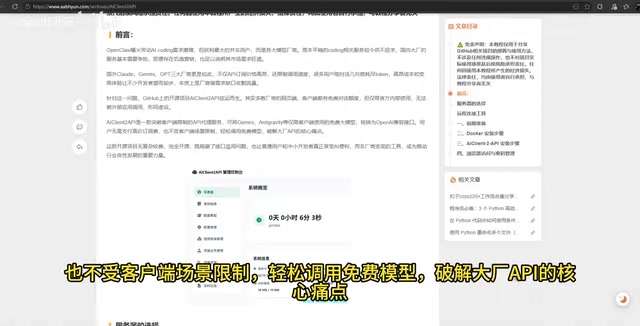
iClient 2 API: An Open-Source Solution to Break Client Limitations
Addressing this pain point, the open-source GitHub project iClient 2 API was created. Its core goal is to enable developers to call mainstream LLM APIs at zero cost.
How It Works
Most providers' web interfaces and client applications actually offer free conversation quotas, but these quotas are restricted to use within official interfaces only. They cannot be called by external applications (such as IDE plugins or custom tools), rendering them essentially useless for developers.
To understand the technical background of this limitation, you need to know that LLM providers typically enforce a strict separation between two usage scenarios: client usage and API calls. The free quotas provided by clients (like ChatGPT's web interface or the Gemini App) are a marketing strategy for user acquisition and feedback data collection, with costs cross-subsidized by advertising revenue or paying subscribers. APIs, on the other hand, are paid services for developers, billed per token with higher profit margins. Providers use technical measures (such as proprietary protocols, session binding, device fingerprinting, etc.) to isolate the two, preventing free quotas from being called programmatically.
iClient 2 API's core approach is to convert these client-only free LLM quotas into standard OpenAI-compatible API endpoints. Essentially, it reverse-engineers the client's communication protocol and "translates" it into the standard API format, thereby breaking the scenario isolation set up by providers.
What Is an OpenAI-Compatible API?
An OpenAI-compatible API refers to an interface format that follows the RESTful API specification defined by OpenAI. This specification uses /v1/chat/completions as its core endpoint, transmitting message history and model parameters in JSON format. Since OpenAI pioneered LLM API commercialization, its interface format has become the de facto industry standard. Currently, the vast majority of AI development tools, IDE plugins (such as Cursor, Continue, Cline, etc.), and chat clients natively support this format. This means that as long as your service can provide an endpoint conforming to this specification, it can seamlessly integrate with the entire ecosystem's toolchain without needing separate adapters for each model provider.
Supported Models
The project currently supports converting free quotas from the following services into APIs:
- Google Gemini (including the latest models like Gemini 2.5 Flash)
- Anthropic Claude
- OpenAI ChatGPT
- And other model services supporting OAuth authorization
Users don't need to pay expensive subscription fees or be restricted to client-only scenarios—they can call these models from any tool that supports the OpenAI interface.
Docker Deployment Tutorial: Building an API Proxy Service from Scratch
For 24/7 uninterrupted service, it's recommended to deploy the project on an overseas server. While local deployment is possible, it's more complex without a public IP address and less stable than a server-based solution.
Why Choose Docker Deployment?
Docker is an OS-level virtualization technology that packages an application and all its dependencies into a standardized container for execution. Compared to traditional manual installation, Docker deployment offers environment consistency (eliminating the "it works on my machine" problem), one-click start/stop, resource isolation, and easy migration. For projects like iClient 2 API that require multiple components working together—Node.js runtime, database, and web server—Docker encapsulates all dependencies in a single image. Users can complete deployment with just one command, dramatically lowering the operational barrier.
Server Preparation
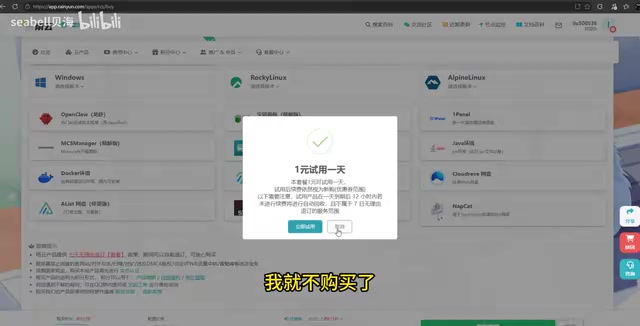
Since you need to access overseas services like GPT and Gemini, a US-node VPS is recommended. A VPS (Virtual Private Server) is an independent runtime environment partitioned from a physical server through virtualization technology. The reason for choosing a US node is that Google, Anthropic, and OpenAI's servers are primarily deployed in the United States—same-region access has the lowest latency (typically 10-50ms) and avoids cross-border network instability issues. If using a domestic Chinese server, you'd need to configure additional proxy tunnels to access these overseas services, which not only increases architectural complexity but also introduces extra network latency and failure points.
For specifications, 2 CPU cores + 2GB RAM is sufficient, with Debian recommended as the OS. The hardware requirements are modest because the API proxy service itself involves minimal computation—the main bottleneck is network I/O rather than CPU or memory.
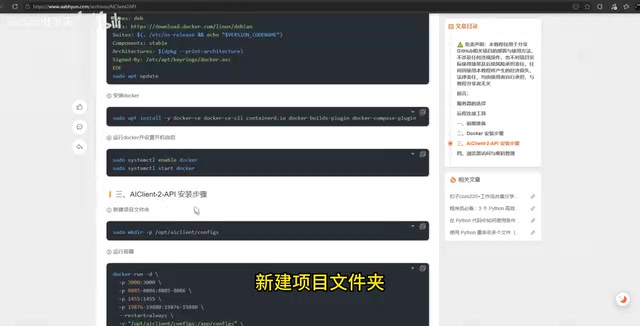
Detailed Docker Deployment Steps
After connecting to the server via SSH, execute the following operations in sequence:
- Update system packages: Ensure the system package manager is up to date
- Install certificate manager: Prepare for subsequent HTTPS configuration
- Configure Docker environment: Add Docker's official repository and install Docker
- Start Docker service: Run Docker and enable auto-start on boot
- Create project directory: Create a new folder to store configuration files
- Download and run the container: Pull the image and start the service
Once deployment is complete, access the web management panel via Server-IP:3000. The default password is admin123 (be sure to change it immediately after first login).
Configuration and Usage: Gemini Free API as an Example
OAuth Authorization for Model Services
OAuth (Open Authorization) is an open-standard authorization protocol that allows users to authorize third-party applications to access their resources on a service without exposing their passwords. In the iClient 2 API context, OAuth authorization enables the project to legitimately log into platforms like Google and Anthropic on behalf of the user, thereby obtaining the free conversation quota associated with that account. Throughout the process, the user's password is never exposed to the third-party project—identity verification is completed through a token mechanism. However, it's important to note that the access tokens obtained by third-party applications after authorization still carry certain permissions, so users should only authorize trusted projects.
After entering the web management panel:
- Click "Provider Management"
- Select the corresponding model service (e.g., Gemini)
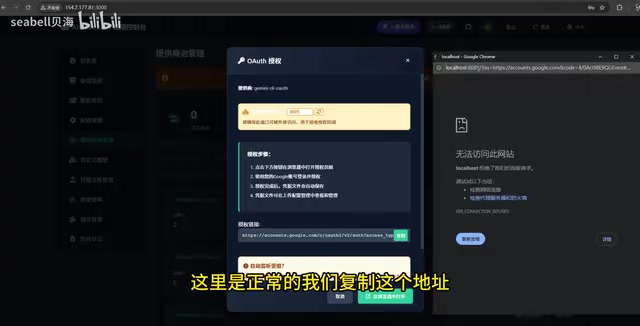
- Click "Generate Authorization" → "OAuth Authorization"
- Log in with your Google account on the popup page to complete authorization
- Copy the authorization callback URL and submit
Generate an API Key
After successful authorization, go to "Configuration Management":
- Generate an API key
- Check the models you want to use (you can select all)
- Save the configuration
Calling the API from Third-Party Tools
Using AI clients like Cherry Studio as an example:
- Go to Settings → Model Configuration
- Select any OpenAI-compatible option
- Enter the generated API key
- Set the API address to:
http://Server-IP:3000/v1 - Add models (e.g., Gemini 2.5 Flash)
- Save and enable
Any tool that supports OpenAI-compatible interfaces can connect, including various IDE programming plugins (such as Cursor, Continue, Cline, Copilot alternatives, etc.), chat clients, automation workflow tools, and more. This is the greatest advantage of adopting the OpenAI-compatible interface standard—deploy once, use across the entire ecosystem.
Considerations and Risk Warnings
Compliance Considerations
It's important to note that projects like this essentially exploit a "gray area" in providers' free quotas. While the open-source community is currently active, the following risks exist:
- Account ban risk: Providers may detect abnormal calling patterns and ban accounts. LLM providers typically monitor metrics such as API call frequency patterns, request source IPs, and session behavior characteristics. When they detect calling behavior significantly different from normal client usage patterns (such as high frequency, no browser fingerprint, fixed-interval requests, etc.), it may trigger their risk control systems.
- Service stability: The solution depends on providers' free-tier policies—any policy changes could render it ineffective. Providers may modify client communication protocols, tighten free quotas, or add verification mechanisms (such as CAPTCHA, device binding, etc.) at any time, requiring the project to frequently update its adapters.
- Rate limiting: Free quotas themselves may have call frequency caps, typically far lower than paid API rate limits.
Suitable Use Cases
This solution is better suited for individual developers in learning and lightweight development scenarios. It's not recommended for production environments or commercial projects. For teams with stable requirements, purchasing official API services is still advisable to obtain reliable SLA (Service Level Agreement) guarantees covering availability, response time, and technical support.
Conclusion
iClient 2 API provides a viable alternative path for developers constrained by high API costs. Through one-click Docker deployment combined with OAuth authorization, you can convert major providers' free client quotas into standard API interfaces, significantly lowering the barrier to entry for AI development. However, users should weigh compliance risks and plan usage scenarios accordingly.
Key Takeaways
- iClient 2 API is a GitHub open-source project that converts free client quotas from Gemini, Claude, GPT, and other providers into OpenAI-compatible API interfaces
- The deployment solution is Docker-based, recommending a US-node VPS (2 cores, 2GB RAM is sufficient), providing a web management panel on port 3000
- It uses OAuth authorization to obtain free quotas from model services; after generating an API key, it can be called from any OpenAI-compatible tool
- The solution carries risks of account bans and service instability, making it more suitable for personal learning and lightweight development scenarios
- It addresses the core contradiction between surging AI coding demand and high API costs, lowering the barrier for developers to use LLMs
Related articles
 Tutorials
Cursor + Codex Dual-IDE Collaboration: A Practical Methodology for Open-Source Project Customization
A complete methodology for open-source project customization based on real-world experience, detailing the Cursor+Codex dual-IDE workflow, seven-stage process, MVP validation, and AI source code reading techniques.
 Tutorials
Cursor Multi-Agent in Practice: Building a Full-Stack Next.js Blog in 50 Minutes
Build a full-stack blog in 50 minutes using Cursor IDE's multi-Agent mode with Next.js, Clerk auth, and Supabase. Learn the 4-phase AI Agent workflow and key integration pitfalls.
 Tutorials
Building an AI Software Factory from Scratch: A Cursor Engineer's Hands-On Experience with Multi-Agent Collaboration
Cursor engineer Eric shares practical insights on building an AI software factory: automation levels, guardrail design, parallel Agent management, and scaling to 1000+ Agents for 24/7 development.