Zero-Code in Practice: Building and Publishing a WeChat Mini Program from Scratch with AI

Build and publish a WeChat Mini Program from scratch using ChatGPT and Codex with zero coding skills.
Bilibili creator Wintermiao demonstrates a complete zero-code WeChat Mini Program development workflow: register an account with individual verification (30 RMB/year), use ChatGPT to clarify requirements through multi-round dialogue and generate an agents.md file, leverage Codex's sub-agents to batch-generate question banks, design UI, and write code, then iteratively align design mockups with implementation before uploading for review and publication. The entire process requires no handwritten code — the core skills are asking the right questions, making sound judgments, and iterating patiently.
In the AI Era, Anyone Can Build a Mini Program
Have you ever had an app idea that you shelved because you couldn't code? Bilibili creator Wintermiao (温特苗) proved with a real-world example that with AI coding tools, even someone who can't write a single line of code can develop and publish a WeChat Mini Program from scratch.
He built a certification exam practice Mini Program — supporting quick quizzes, chapter-based exercises, mock exams, study plans, and more. The entire process required zero handwritten code, flowing seamlessly from inspiration to publication. This article provides a complete breakdown of this zero-code development workflow, helping beginners master the full pipeline of AI-assisted Mini Program development.

Step 1: Register a WeChat Mini Program Account
Registration Process and Key Considerations
The first step in developing a Mini Program is registering an account on the WeChat Official Accounts Platform. Since WeChat Mini Programs officially launched in 2017, they've grown into a massive ecosystem with millions of applications. Their core advantage is "use and go" — users can access them directly within WeChat without downloading or installing anything. Mini Programs run on WeChat's proprietary JavaScript engine, using a web-like tech stack (WXML templating + WXSS styling + JavaScript/TypeScript logic). Unlike traditional web pages, however, they run in a restricted sandbox environment where direct DOM manipulation isn't possible — instead, views are updated through data binding. This architectural design gives Mini Programs near-native performance while keeping the development barrier far lower than iOS/Android native development.
The registration process is straightforward:
- Click "Register Now" and select the "Mini Program" type
- Enter an email address (each Mini Program requires a unique email — 163.com is recommended for batch registration)
- Choose the registration type: Individual or Enterprise
A practical tip: If you need multiple Mini Programs under your name, you'll need multiple email addresses. 163.com email accounts are quick and easy to register — you can batch-create them with just a phone number.
Individual vs. Enterprise Verification
This is a common dilemma for newcomers. Here are the key differences:
| Comparison | Individual | Enterprise |
|---|---|---|
| Cost | 30 RMB/year | 300 RMB/year |
| WeChat Pay | ❌ Not supported | ✅ Supported |
| AI Chat features | ❌ Cannot publish | ✅ Can publish |
| Verification difficulty | Simple: ID card + facial recognition | Requires business license |
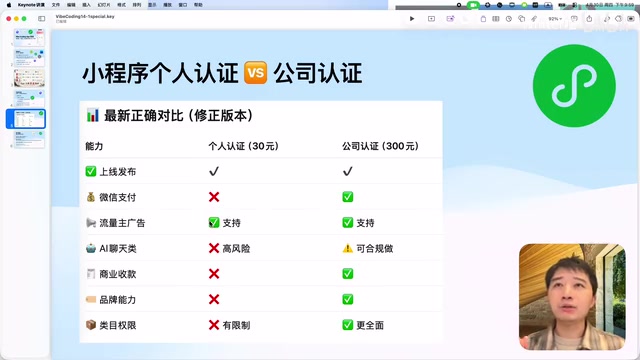
For beginners and learners, individual verification is the best starting point — the cost is minimal at 30 RMB/year, and verification can be completed the same day. Enterprise users have a money-saving trick: first verify an Official Account (300 RMB), then use the "Mini Program Management" portal within the Official Account to batch-register and verify Mini Programs, waiving the first year's fee.
ICP Filing: Simpler Than You Think
Mini Program ICP filing sounds complicated, but WeChat provides a free one-stop filing portal. Simply fill in the required information in the backend, answer WeChat's confirmation call, and complete verification following the SMS instructions. The entire filing review takes approximately 2 business days, and development work can continue during the review period.
Step 2: Use ChatGPT to Clarify Requirements and Plan
From Vague Idea to Clear Plan
Wintermiao's starting point was very typical — he only had a vague idea: "I want to build a certification exam practice Mini Program." He had no product documentation, no design mockups, and wasn't even sure what features to include.
His approach was to converse directly with ChatGPT, gradually clarifying requirements through multiple rounds of dialogue. It's important to understand the different roles ChatGPT and Codex play in AI-assisted development: ChatGPT excels at natural language understanding and generation, making it ideal for "thinking" tasks like requirements analysis, solution discussion, and technical consultation. Codex (referring here to OpenAI's code execution agent integrated within ChatGPT) is an AI Agent with actual code execution capabilities — it can read project files, write code, run commands, and create file structures. It's essentially an autonomous agent that can operate on code repositories. The combination of both creates a complete "plan-execute" loop, similar to the collaboration between a product manager and an engineer.
Here's Wintermiao's specific conversation process:
- Round 1: Told ChatGPT he wanted to develop a certification exam practice Mini Program; ChatGPT provided extensive feature suggestions
- Round 2: Narrowed the scope, explaining it was for personal use, covering only advanced-level certifications (System Architect), without needing complex features
- Round 3: Asked about technology choices, such as template selection in WeChat DevTools (TS+Sass), question bank format (JSON vs Markdown), cloud service options, etc.
This process demonstrates an important AI programming mindset: you don't need to provide perfect requirements all at once — instead, converge gradually through multiple rounds of dialogue. ChatGPT ultimately helped him generate a structured requirements description, which he saved as an agents.md file in the project root directory — this is the instruction file that Codex reads every time it executes a task.
agents.md is a special configuration file in Codex projects, similar to a "System Prompt" for the AI agent. Whenever Codex begins a new task, it first reads the agents.md file from the project root to obtain project context, technical constraints, coding standards, and other key information. This mechanism solves the "memory persistence" problem for AI agents — since each conversation's context is independent, agents.md serves as cross-session "project memory," ensuring the AI maintains consistent understanding and behavior across different tasks. This is a design pattern widely adopted by current AI coding tools (such as Cursor's .cursorrules and GitHub Copilot's .github/copilot-instructions.md).
Step 3: Complete Design and Development with Codex
Project Initialization
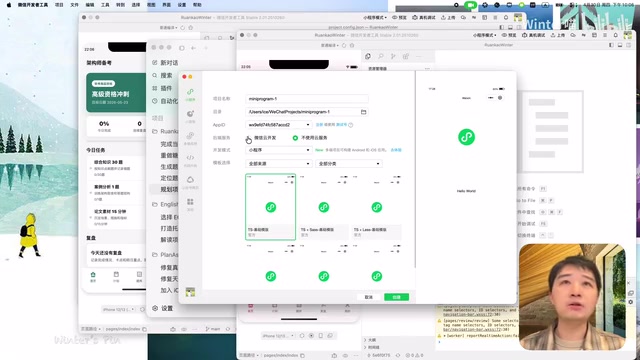
When creating a project in WeChat DevTools, there are several key choices:
- AppID: Select the ID corresponding to your registered Mini Program
- Backend service: Choose "No cloud service" (WeChat cloud services cost ~20 RMB/month; for lightweight needs, you can use Alibaba Cloud/Tencent Cloud's pay-per-use cloud functions)
- Template: Choose the TS+Sass template based on ChatGPT's recommendation
Regarding the TS+Sass template technology choice: TS refers to TypeScript, a superset of JavaScript that adds static type checking. The benefits of using TypeScript in Mini Program development are: AI-generated code comes with type annotations, reducing runtime errors, while the IDE provides better code completion and error hints. Sass (Syntactically Awesome Style Sheets) is a CSS preprocessor supporting variables, nesting, mixins, and other advanced features that make style code more modular and maintainable. For AI-assisted development, TypeScript's type system acts as additional "constraints" for the AI, making its generated code more standardized and reliable.
Batch-Generating Question Banks with Codex Sub-agents
Question bank generation was a major highlight of this project. Wintermiao used Codex's Sub-agents feature: having Codex dispatch 10 "workers," each responsible for generating 50-100 questions.
The principle behind Sub-agents is similar to task distribution in distributed computing. When the main agent receives a large task, it breaks it down into multiple independent subtasks, each executed by a separate agent instance. Each sub-agent has its own independent Context Window, meaning it won't be affected by content from other subtasks.
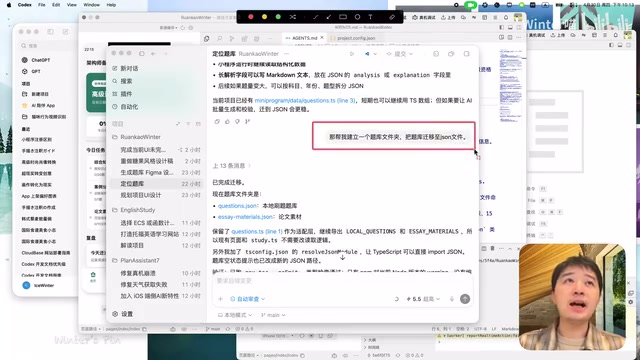
Why use sub-agents? Because AI has context length limitations (typically tens of thousands to over a hundred thousand tokens). If a single session generates all questions, the AI will experience "attention decay" in later stages — early instructions and constraints gradually get "forgotten," causing output quality to decline. Splitting into multiple subtasks with each sub-agent completing its work independently ensures better question quality.
Design Mockup Generation and Iteration
The initial UI generated by Codex was quite basic. Wintermiao employed two strategies to improve design quality:
- Using the Figma plugin: Added Figma from Codex's plugin marketplace, letting the AI generate design mockups directly
- Drawing style inspiration: He saw someone on Bilibili using a "candy style" for a Mini Program, so he asked Codex to redesign with that aesthetic
The "Gap" Between Design Mockups and Code
Here's a very real insight: there's a gap between AI-generated design mockups and AI-written code — mirroring the real-world collaboration challenges between designers and developers.
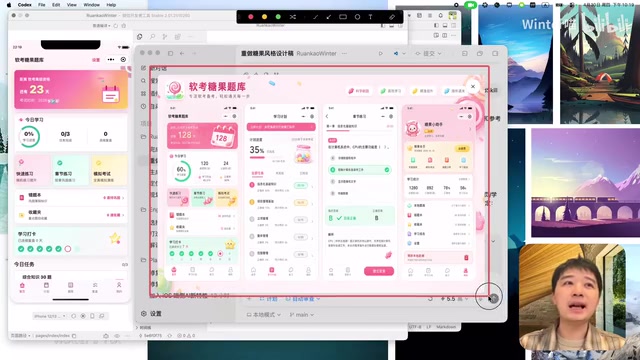
Wintermiao's solution was iterative refinement — having Codex "align" with the design mockups round after round, focusing each time on specific details like backgrounds, icons, and layouts. He shared several practical tips:
- Use Plan Mode: Have Codex propose a plan before executing, avoiding blind modifications. The core value of Plan Mode is letting developers review the AI's approach before it takes action, confirming the direction is correct before execution, significantly reducing wasted iterations.
- Add the Frontend skill pack: Search for and enable the Frontend Skill in Codex's plugins to improve front-end UI generation quality
- Use WorkTree: Create an independent code workspace to prevent iterations from breaking existing code. Codex copies the project to a new folder for modifications, then merges changes back
WorkTree is a feature of the Git version control system that allows multiple working directories to be checked out simultaneously from the same repository. In AI-assisted development scenarios, this feature is particularly important: when Codex needs to perform major UI refactoring or feature iterations, it operates in an independent WorkTree rather than directly modifying the main working directory. This way, even if the AI's modifications cause problems (such as breaking existing functionality), developers can easily roll back without losing previous work. This is essentially a "safety sandbox" strategy, allowing the AI to experiment boldly without destructive risk.
After six or seven rounds of iteration, the final Mini Program achieved a satisfying visual result.
Step 4: Upload, Review, and Publish
Code Upload
Once development is complete, click "Upload" in the upper right corner of WeChat DevTools, fill in the version number (e.g., 0.1, 1.0) and notes, and the code is uploaded to the Mini Program backend.
Review and Publishing Process
- Log in to the WeChat Official Accounts Platform backend and navigate to "Version Management"
- The development version will appear in the list — you can first set it as a "Trial Version" for testing via QR code
- Click "Submit for Review" (first-time submissions require confirming some information; if you encounter duplicate confirmation prompts, refresh the page and resubmit)
- After the review passes, WeChat sends a notification
- In Version Management, click "Publish" and confirm with a WeChat scan to complete the launch
Once published, users can access your Mini Program by searching its name in WeChat, scanning a QR code, or through shared links.
Code Hosting
WeChat also provides a free code repository. In WeChat DevTools, right-click on source control management, add a Remote address pointing to WeChat's code repository, and push your code to the cloud for backup. This is especially important for AI-assisted development — since Codex modifies numerous files with each iteration, version control allows you to revert to any historical state at any time, enabling quick recovery even if an AI modification introduces problems.
Summary: The Right Way to Approach AI Programming
This case demonstrates a complete AI-assisted development workflow:
- ChatGPT handles thinking: Requirements analysis, technology selection, solution planning
- Codex handles execution: Design mockup generation, code writing, question bank creation
- Humans handle decisions: Aesthetic judgment, feature prioritization, quality control
Throughout the process, the developer's core competency isn't writing code, but rather asking the right questions, making sound judgments, and having the patience for continuous iteration. This "human-AI collaboration" model is redefining the barrier to software development — technical implementation ability is no longer the bottleneck; clear thinking and willingness to iterate are what matter.
For newcomers looking to get started with AI programming, WeChat Mini Programs are an excellent starting point — low cost (30 RMB/year), no server or domain needed, mature publishing process, and with AI tools, you can quickly turn ideas into reality.
Key Takeaways
- Using the combination of ChatGPT for requirements + Codex for coding, complete beginners can handle the entire WeChat Mini Program pipeline from development to publication
- WeChat Mini Program individual verification costs only 30 RMB/year, requires no domain or server, making it the ideal starting point for AI programming practice
- Codex's Sub-agents feature enables efficient generation of large question banks, avoiding single-session context limitations
- A gap exists between AI-generated design mockups and code, requiring iterative alignment through techniques like Plan Mode and WorkTree
- Enterprise users can save first-year verification fees by first verifying an Official Account and then batch-registering Mini Programs through it
Related articles
 Tutorials
Cursor + Codex Dual-IDE Collaboration: A Practical Methodology for Open-Source Project Customization
A complete methodology for open-source project customization based on real-world experience, detailing the Cursor+Codex dual-IDE workflow, seven-stage process, MVP validation, and AI source code reading techniques.
 Tutorials
Cursor Multi-Agent in Practice: Building a Full-Stack Next.js Blog in 50 Minutes
Build a full-stack blog in 50 minutes using Cursor IDE's multi-Agent mode with Next.js, Clerk auth, and Supabase. Learn the 4-phase AI Agent workflow and key integration pitfalls.
 Tutorials
Building an AI Software Factory from Scratch: A Cursor Engineer's Hands-On Experience with Multi-Agent Collaboration
Cursor engineer Eric shares practical insights on building an AI software factory: automation levels, guardrail design, parallel Agent management, and scaling to 1000+ Agents for 24/7 development.