10 AI Coding Plugins Tested: From Video Animation to Product Development and Office Automation

10 AI coding plugins give AI hands-on abilities to create videos, build apps, and control computers.
This article reviews 10 plugins that significantly enhance AI coding tools, covering video animation (Hyperframe for creative animation, Remotion for data videos), product development (Figma mockups + web/iOS/Android multi-platform development), and general office automation (spreadsheet/PPT data processing, Computer Use for computer takeover, Browser Use for browser control). The recommendation is to deeply use 2-3 plugins suited to your needs.
Overview
While most people are still stuck at the "asking AI questions" stage, a wave of powerful plugins has already given AI the ability to create video animations, develop applications, and control computers and browsers. Based on a hands-on review shared by a Bilibili creator, this article covers 10 plugins that significantly enhance AI coding tools (like Codex), spanning three major categories: video animation, product development, and general office automation.
Current AI coding tools (such as OpenAI's Codex, Cursor, Windsurf, etc.) are evolving from simple code completion into "all-in-one development platforms." The plugin/extension mechanism is key to this evolution—it allows third-party developers to extend AI's capabilities in specific domains, similar to browser extensions or IDE plugins. As OpenAI's AI coding agent, Codex's plugin system lets users invoke external toolchains within conversations, breaking through the limitations of pure text interaction to accomplish complex tasks like file operations, API calls, and multimedia generation.

Video Animation Plugins: Hyperframe and Remotion
Hyperframe — Creative Animation and Visual Packaging
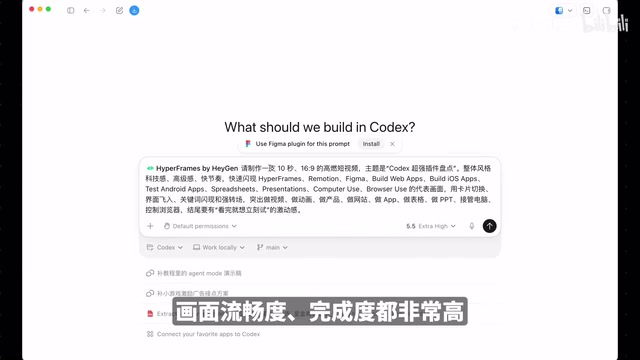
Hyperframe focuses on creative animation and visual packaging, ideal for producing product promos, title cards, motion graphics, and soft video animations—content that emphasizes visual expression. The creator showcased an Apple phone clean room animation made by a community member using Hyperframe, with smoothness and polish that rivals professional studio output.
From a technical standpoint, Hyperframe is essentially an animation generation framework built on the web technology stack (HTML5 Canvas/WebGL/CSS animations). It converts AI-generated code instructions into renderable animation sequences, supporting keyframe animations, particle systems, 3D transforms, and other visual effects. Compared to traditional After Effects or Motion Graphics workflows, Hyperframe's advantage lies in being entirely code-driven—users simply describe the desired visual effect in natural language, and the AI generates the corresponding animation code with real-time preview rendering. This approach is particularly suited for content creators who lack motion design experience but have clear visual requirements.
For content creators, operations teams, and marketing professionals, this plugin enables rapid production of high-quality visual content, dramatically lowering the barrier to video creation.
Remotion — Engineered Video and Automated Generation
Remotion leans more toward engineering and automation, ideal for creating data visualization videos, ranking videos, reusable templates, and other content that needs to be batch-generated through code. The creator demonstrated a "National Box Office Rankings" video made with Remotion, clearly showcasing its data-driven, template-based characteristics.
Remotion is an open-source React video programming framework created by Jonny Burger in 2021, with the core philosophy of "writing videos with React components." Every frame of video is the render result of a React component, allowing developers to leverage React's state management, component reuse, and data binding to build video content. This means videos can accept data input just like web pages—feed in different datasets to generate videos with different content, making it perfect for batch production scenarios (such as daily data report videos, personalized marketing videos, etc.). Remotion supports export to MP4, WebM, and other formats, and can also render in parallel on the cloud via Remotion Lambda, dramatically improving batch production efficiency.
Choosing between the two:
- Want to quickly produce visually stunning videos → Hyperframe
- Want reusable templates and data-driven videos → Remotion

Product Development Plugins: From Design to Multi-Platform Launch
Figma Plugin — From Idea to Design Mockup
The first step in building a product is creating design mockups. With the Figma plugin, AI can transform a vague idea into a complete set of product pages. The creator demonstrated the process of designing a "cute-style fitness app," where the AI produced a complete mobile interface including today's workout, schedule planning, and in-workout pages—all with consistent color schemes and unified component styles.
Figma is currently the most popular cloud-based collaborative design tool with a massive plugin ecosystem. The integration of AI with Figma represents a new design paradigm—"Conversational Design." Traditional design workflows require designers to manually draw every interface element, while AI plugins can automatically generate UI components, layouts, and color schemes that conform to design standards based on natural language descriptions. This relies on training with extensive UI design data—AI has already learned the conventions of mainstream design systems like Material Design and iOS Human Interface Guidelines, enabling it to generate well-structured, stylistically consistent interface designs.
While the generated designs are relatively simple, they already possess complete product structure and can be further refined for interactions or used directly as a foundation for development implementation.
Three Development Plugins — Web/iOS/Android Full Coverage
Once you have design mockups, the next step is actually building the product:
- Web App Plugin: The creator demonstrated making an "AI Tool Match" web game where clicking two matching AI tool cards eliminates them, complete with sound effects and animations
- iOS Development Plugin: Can directly convert web applications into iOS installation packages
- Android Development Plugin: The same approach applies to the Android platform
From a technical implementation perspective, these multi-platform development plugins typically use cross-platform technology solutions under the hood. Web apps may be generated using frontend frameworks like React/Vue; iOS packaging may use bridging technologies like Capacitor or React Native to wrap web code as native apps; the same applies to Android. While this approach doesn't match pure native development in performance and native experience, it's more than sufficient for MVP (Minimum Viable Product) validation and rapid prototyping. It's worth noting that apps generated by these plugins still need to meet each platform's review requirements to be listed on the App Store or Google Play, including privacy policies, performance standards, etc.
This means the entire product pipeline from design to multi-platform development can be completed through AI plugins, dramatically lowering the technical barrier for indie developers and entrepreneurs.

General Office Plugins: Data Processing and Automation
Spreadsheet Plugin + PPT Plugin — Data Analysis and Reporting
These two plugins cover the most frequent office scenarios: data processing and report output.
The creator demonstrated using a household expense report:
- Spreadsheet Plugin: A single sentence can complete data cleaning, categorization, statistics, and charting—outputting key metrics, spending categories, consumption charts, and even highlighting negative balances in red
- PPT Plugin: Automatically organizes spending highlights, breaks down major expenses (dining, transportation, daily necessities), identifies small but frequent purchases (work meals, rides, coffee), and provides savings recommendations
Doing this manually would take at least half a day, but with plugins it's done in a single sentence. The PPT plugin is particularly suited for reports, retrospectives, data analysis, and project presentations.
Computer Use — AI Takes Over Your Computer
Computer Use is one of the most powerful plugins introduced here. It can directly take over your computer, operating your logged-in browser, local software, and files—including moving the mouse, clicking buttons, switching windows, and cross-application operations.
Computer Use is an AI capability first introduced by Anthropic in 2024, with OpenAI and other companies following suit. Its technical principle involves screen capture recognition (visual understanding) + simulated human input (mouse movement, keyboard input, clicks, etc.) to operate computer interfaces. The AI continuously captures screen images, understands the current interface state, then decides on the next action. This is fundamentally different from traditional RPA (Robotic Process Automation) tools—RPA relies on preset fixed process scripts that break when interface layouts change; Computer Use has visual understanding and decision-making capabilities, can handle interface changes and exceptions, and offers greater robustness. However, this also introduces security risks, as the AI gains the same operational permissions as a human user and can theoretically access all local files and logged-in online accounts.
Any workflow that requires you to sit at a computer and operate can essentially be handed off to AI. This feature can completely replace some previously popular automation tools.
Browser Use — AI Controls the Browser
Browser Use lets AI control a built-in browser, specifically handling web tasks: opening pages, reading content, extracting information, and organizing materials.
Browser Use is fundamentally different from traditional web scraping. Traditional scrapers extract data by parsing HTML DOM structures, breaking when page structures change and unable to handle dynamic content requiring JavaScript rendering. Browser Use is AI-driven browser automation—it "sees" web pages, "understands" content, and "operates" interfaces like a human, handling complex scenarios like login verification, dynamic loading, and popup interactions. Its sandbox design ensures security: the AI operates an independent browser instance completely isolated from the user's local browser sessions, preventing cookie leaks and permission abuse.
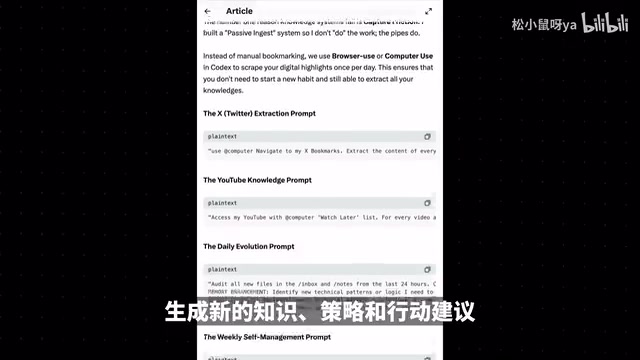
A particularly clever use case is an auto-updating personal knowledge base: users bookmark valuable content they find on social media, then set up an AI scheduled task that automatically scrapes bookmarked content daily, extracts core information, organizes it into Markdown stored in knowledge management software, and combines it with project goals for daily retrospectives and action recommendations.
Computer Use vs. Browser Use Comparison
| Feature | Computer Use | Browser Use |
|---|---|---|
| Operation Target | Local computer and browser | AI's built-in browser |
| Login State | Can access logged-in websites | Cannot use local login state |
| Use Cases | Desktop software, cross-app operations | Web browsing, information extraction |
| Permission Risk | Higher (takes over entire computer) | Lower (isolated environment) |
| Technical Principle | Screen visual recognition + input simulation | Independent browser instance + AI understanding |
| Comparable Tools | Traditional RPA (but smarter) | Traditional scrapers (but more flexible) |
If you're concerned about permission security and don't want AI directly taking over your computer but still want to handle web tasks, just use Browser Use.
Plugin Installation and Management Guide
Plugin installation is very simple, completed in three steps:
- Click "Plugins" in the Codex left sidebar to enter the plugin page
- Search for the desired plugin, click the plus icon, and optionally check "Reference memory and conversations" to improve accuracy
- Click "Install" and wait for completion
To use a plugin, type "Add" in a new conversation to select the plugin you want to invoke, then enter your task instructions.
Management tips:
- Install as needed—don't install everything at once
- Use the "Manage" page to disable or delete unneeded plugins
- Regularly clean up rarely-used plugins to keep your toolbox lean
- Pay attention to plugin permission declarations, especially those involving file access and network requests
Conclusion
These 10 plugins cover the complete workflow from content creation to product development to daily office work. The core philosophy: don't just use AI as a search engine—use plugins to give it "hands-on capabilities"—making videos, writing code, operating computers, and organizing data. Deeply using 2-3 plugins suited to your work scenarios is far more effective than installing a bunch that collect dust.
From an industry trend perspective, the AI plugin ecosystem is replicating the App Store development path from the mobile internet era: the platform provides foundational capabilities, third-party developers meet vertical scenario needs through plugins, and users combine them as needed based on their workflows. As AI Agent capabilities strengthen in the future, collaboration between these plugins will become increasingly seamless—for example, AI could automatically determine which plugin a current task requires, or even chain multiple plugins together to complete complex workflows.
Key Takeaways
- Hyperframe and Remotion video animation plugins enable AI to generate professional-grade animations and data videos purely through code
- Figma + three development plugins cover the complete product pipeline from design mockups to web/iOS/Android multi-platform development
- Computer Use can take over an entire computer for complex operations, while Browser Use handles web tasks more safely in an isolated environment
- Spreadsheet and PPT plugins compress half a day's data analysis and reporting work into a single sentence
- Plugins should be installed as needed and regularly cleaned up—deeply using 2-3 is more effective than installing a bunch that collect dust
Related articles
 Tutorials
Cursor + Codex Dual-IDE Collaboration: A Practical Methodology for Open-Source Project Customization
A complete methodology for open-source project customization based on real-world experience, detailing the Cursor+Codex dual-IDE workflow, seven-stage process, MVP validation, and AI source code reading techniques.
 Tutorials
Cursor Multi-Agent in Practice: Building a Full-Stack Next.js Blog in 50 Minutes
Build a full-stack blog in 50 minutes using Cursor IDE's multi-Agent mode with Next.js, Clerk auth, and Supabase. Learn the 4-phase AI Agent workflow and key integration pitfalls.
 Tutorials
Building an AI Software Factory from Scratch: A Cursor Engineer's Hands-On Experience with Multi-Agent Collaboration
Cursor engineer Eric shares practical insights on building an AI software factory: automation levels, guardrail design, parallel Agent management, and scaling to 1000+ Agents for 24/7 development.