20-Day Indie Game Dev with AI: A Full Godot + Cursor Postmortem
20-Day Indie Game Dev with AI: A Full …
An indie dev documents building a complete playable game with AI in just 20 days.
A veteran indie developer with nearly 20 years of experience attempted to build a complete game in 20 days using AI for nearly everything. He chose Godot with Cursor + MCP plugin to let AI directly control the game project, used GPT Image 2 for art assets, and validated core gameplay within 30 minutes. The experiment also revealed key limitations: art remains the most time-consuming and expensive phase, and the final game feel polish stage had the lowest AI involvement, relying heavily on the developer's own judgment and aesthetic sense.
A Bold Experiment: Building a Complete Game with AI in 20 Days
People often ask: can AI actually complete a full project on its own? We've all seen those "AI makes games" demo videos, but honestly, most are just a scene with a character that can run and slash — far from a truly playable, complete game.
Mr. Mengde, an indie developer with nearly 20 years of game industry experience, decided to run a more direct experiment: from project planning, programming, art, UI, and sound effects to final packaging and release, hand everything possible to AI while only handling requirements, decisions, task breakdown, and integration himself. The goal was to produce a fully downloadable, installable, and playable indie game within 20 days.
The results were both exciting and full of thought-provoking lessons.
Tech Stack: Why Godot + Cursor?
Engine Choice: Godot Wins
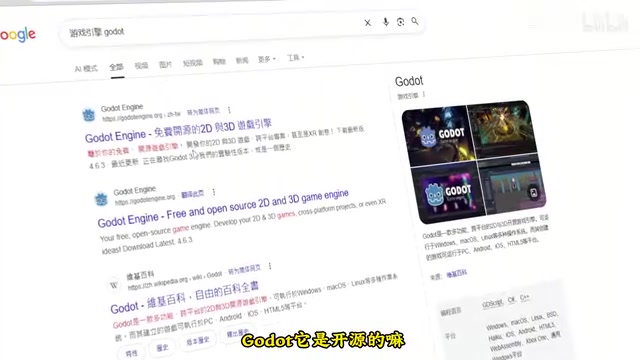
The author chose the open-source engine Godot over the more mainstream Unreal or Unity. Three reasons:
- Godot is open-source with a low barrier to entry
- UE and Unity are massive with high learning costs
- Neither engine integrates well with AI coding tools yet
Why is Godot particularly suited for AI collaboration? Godot is a fully open-source, MIT-licensed cross-platform game engine, officially open-sourced by Juan Linietsky and Ariel Manzur in 2014, with no royalties or subscription fees. It uses its own GDScript language (Python-like syntax) while also supporting C# and C++. Godot's scene system is built around node trees — every game object is a combination of nodes. This design is naturally suited for AI understanding and manipulation, because node structures are essentially tree-shaped data that can be precisely described in text. AI can directly read and write scene files to manipulate game structure, without relying on complex editor GUI interactions like Unity requires. This is the core reason it wins in AI-assisted development scenarios.
Cursor + MCP Plugin: Letting AI Directly Control the Game Project
For coding, the author chose Cursor as the primary AI programming tool. You might ask: any AI can write code, why specifically Cursor?
Cursor is an AI-native code editor deeply rebuilt on VS Code, with built-in deep integration of Claude, GPT-4, and other large models, supporting multi-file context understanding and codebase-level Q&A. MCP (Model Context Protocol) is an open protocol standard released by Anthropic in late 2024, designed to let AI models call external tools and services through standardized interfaces. In Godot development, the MCP plugin acts as a "translation layer" between AI and the engine — it wraps Godot editor operations (creating nodes, importing assets, modifying scene trees) into tool functions the AI can call.
The key point: making games with Godot isn't just writing code — it also requires building scenes, importing images, setting up nodes, connecting resources, and many other tedious operations. With Cursor plus the MCP plugin, AI can directly control the Godot project — like an invisible pair of hands reaching into your project directory, not only writing code but automatically handling scene creation, node importing, resource configuration, and all other grunt work. This means AI is no longer just "suggesting what to do" but can directly "do it," compressing dozens of manual editor steps into a single natural language instruction.
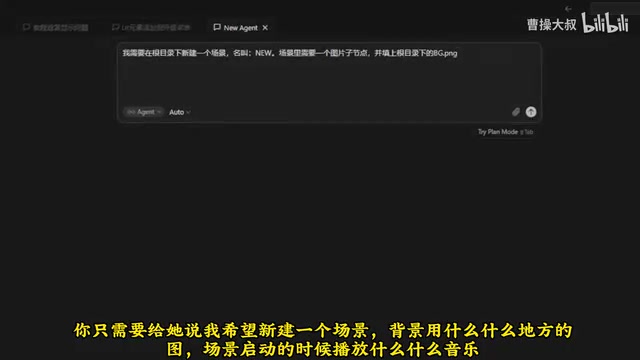
For example: previously, creating a new scene required manually creating a scene file, writing a script, dragging in assets, creating child nodes, and binding resources. Now you just tell the AI: "Create a scene, use this image as background, play this music on startup," and it handles everything in one shot. This efficiency gain is a qualitative leap.
From Idea to Prototype: Core Gameplay Validated in 30 Minutes
The game's inspiration came from a Game Jam theme: "World Lines." A Game Jam is a time-limited game development competition where participants must develop a game from scratch within a set timeframe (typically 48 hours to one month) around a given theme. This forced constraint actually aligns well with AI-assisted development workflows — AI excels at rapidly generating runnable prototypes, and Game Jam time pressure naturally filters out the urge for "infinite polishing," providing clear completion standards and time boundaries for the experiment, avoiding the scope creep common in "AI makes games" experiments.
The author initially thought of the concept of Mazu (sea goddess) protecting sailors — the player controls a gaze sweeping across the sea, protecting ships within their field of vision. He gave this idea to the AI and had it generate a locally executable prototype. The first runnable prototype was up in 20 seconds.
Though extremely rough, the prototype already had the most important thing: a core gameplay loop that could be seen and validated. Less than half an hour had passed since the competition started.
After further iteration, the author adjusted the setting: a high school student forcibly assigned the role of a local land deity, "slacking off" during class while using a magical jade tablet to protect the local area. Players switch between two dimensions — using the jade tablet to scan the mortal world and help those in need, while watching out for the teacher's gaze, since getting caught slacking brings severe punishment. This "dual-theme" design gives the game both fun and tension.
Art Production: The Most Time-Consuming and Expensive Phase
GPT Image 2 as the Art Workhorse
Art assets were almost entirely generated by GPT Image 2. GPT Image 2 (aka gpt-image-1, released by OpenAI in 2025) is OpenAI's next-generation image generation model, with significant improvements over the DALL-E series in text rendering, detail consistency, and style control. It particularly excels at handling complex composition instructions and maintaining style uniformity across multiple images. In game development, style consistency is critical — characters, props, and backgrounds must look like they come from the same visual language, or the game feels disjointed. GPT Image 2 maintains style memory within the same conversation context, enabling generation of a complete set of visually unified assets. The author also mentioned that Google's Gemini image generation models (Imagen series) are equally competitive, but GPT Image 2 was used consistently this time to maintain style coherence — in practice, small batch testing is recommended to find the best model for your target style.

Lesson Learned: Don't Give AI Vague Art Instructions
Here's an important lesson: don't vaguely tell AI "I'm making this kind of game, draw me some assets." This either produces nothing or something completely different from expectations, purely wasting tokens and money.
The correct approach is providing specific reference directions. Since the game had a mythology theme, the author referenced traditional mythological animation styles, ultimately generating a set of art assets with a stone carving texture foundation. Just like traditional game development, art remains the most time-consuming and expensive phase — most of the time and budget went here.
Polish Phase: Where AI Participation Is Lowest
Once the main structure was built and art style established, the game appeared nearly complete, but extensive polish work remained:
- Where should interaction feedback be added?
- Where should visual effects go?
- How to guide the player's gaze and attention?
- Will prompt information feel cluttered?
- How to balance development cost against polish level?
AI participation was lowest in this phase, relying entirely on the developer's own judgment and aesthetic sense. This confirms a consensus in game design: the so-called "game feel"
Related articles
 Tutorials
Cursor + Codex Dual-IDE Collaboration: A Practical Methodology for Open-Source Project Customization
A complete methodology for open-source project customization based on real-world experience, detailing the Cursor+Codex dual-IDE workflow, seven-stage process, MVP validation, and AI source code reading techniques.
 Tutorials
Cursor Multi-Agent in Practice: Building a Full-Stack Next.js Blog in 50 Minutes
Build a full-stack blog in 50 minutes using Cursor IDE's multi-Agent mode with Next.js, Clerk auth, and Supabase. Learn the 4-phase AI Agent workflow and key integration pitfalls.
 Tutorials
Building an AI Software Factory from Scratch: A Cursor Engineer's Hands-On Experience with Multi-Agent Collaboration
Cursor engineer Eric shares practical insights on building an AI software factory: automation levels, guardrail design, parallel Agent management, and scaling to 1000+ Agents for 24/7 development.