7 Practical Configurations for Claude Code + Codex Dual-AI Collaboration
Seven practical ways to combine Claude Code and OpenAI Codex for more effective AI-assisted programming.
This article systematically covers 7 configurations for Claude Code + OpenAI Codex dual-AI collaboration, ranging from simple dual-window switching and official plugin integration to advanced patterns like shared MCP Servers, API call pipelines, Skills-based knowledge loading, and bidirectional tool loops. It helps developers and creators find the optimal AI collaboration mode for their workflow.
Today's AI programming tools are emerging at a rapid pace, but many developers and creators may not realize: using a single AI tool is far less efficient than having two collaborate. Claude Code and OpenAI Codex—one from Anthropic, the other from OpenAI—may seem like competitors, but they can actually be combined into multiple powerful collaboration patterns.
Claude Code is Anthropic's command-line AI programming tool, built on the Claude large language model. It excels at long-context understanding and complex code reasoning, supporting code generation, refactoring, and debugging directly in the terminal. OpenAI Codex is OpenAI's cloud-based AI programming agent, built on the codex-1 model (a code-specialized model optimized through reinforcement learning), with the ability to execute multiple tasks in parallel within cloud sandbox environments. While both are positioned as AI-assisted programming tools, their underlying architectures and training methods are fundamentally different—Claude uses Constitutional AI for alignment, while the Codex series relies more heavily on RLHF (Reinforcement Learning from Human Feedback). This difference is precisely why they produce complementary effects when collaborating: different training paradigms mean different "blind spots in thinking," and problems one AI tends to overlook may be exactly what the other excels at catching.
This article, based on a Chinese Bilibili creator's hands-on experience, systematically covers 7 configurations for Claude Code + Codex dual-AI collaboration, from beginner to advanced, to help you find the approach that works best for you.
Beginner Level: Dual-Window Switching & Official Plugin Integration
Configuration 1: Dual-Window Switching (Zero Barrier to Entry)
The simplest approach, and the top choice for beginners—open two windows, one for Claude Code and one for Codex, and switch back and forth. No configuration needed, no code to write, purely relying on manual information and result passing between the two tools.
While this method is primitive, it wins on zero learning cost. You can have one AI write code and the other review it, with you acting as the "dispatcher" in between.
Configuration 2: One-Click Integration via Official Plugin
OpenAI engineers personally wrote a Codex plugin for Claude Code and released it as open source. This plugin garnered 700,000 views within a week of launch. It can be installed with a single command, and once installed, you can invoke Codex's capabilities directly from within Claude Code.
The official teams clearly recognize that two AIs together pack a bigger punch. As the saying goes: "Better to get roasted by AI before launch than by users after launch." Having two AIs review each other's work catches more issues before release. This kind of cross-company official collaboration is uncommon in the AI industry—typically, vendors tend to build closed ecosystems. But OpenAI proactively writing a plugin for a competitor reflects an emerging industry consensus: the value of AI tools lies not in locking in users, but in integrating into developers' real workflows.
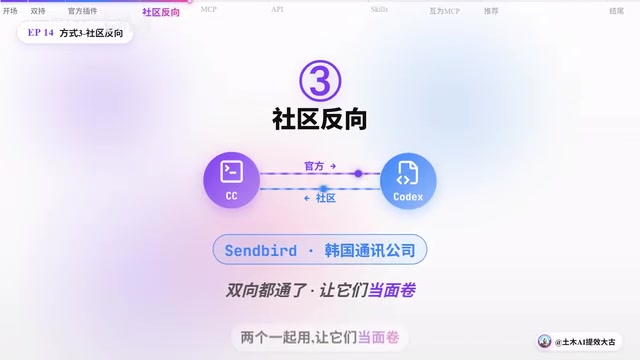
Configuration 3: Community Reverse Integration
Engineers from Korean communications company Sendbird took the opposite approach, calling Claude Code directly from the Codex side. One direction from the official team, another from the community—and just like that, a bidirectional channel is established.
Two AIs can "compete head-to-head"—you let them each work on the same project, competing against each other, and you pick the best results.
Intermediate Level: Shared Tools & API Calls
Configuration 4: Sharing Context via MCP Server
MCP (Model Context Protocol) is a standardized protocol open-sourced by Anthropic in late 2024, designed to solve the connection problem between AI models and external tools and data sources. It uses a client-server architecture, communicates via the JSON-RPC 2.0 protocol, and supports two transport methods: standard I/O (stdio) and HTTP+SSE. MCP's core design philosophy is similar to the USB-C port—providing a unified standard that allows any AI model to connect to any tool in the same way. In multi-AI collaboration scenarios, an MCP Server acts as a shared "tool layer," where multiple AI clients can connect to the same MCP Server simultaneously, sharing capabilities like file system access, database queries, and API calls.
Independent developer Eli practiced this pattern in his own projects—running 20+ AIs in parallel every day for months, and after hitting 31 pitfalls, distilled a methodology:
- Three-layer broadcast bus: Ensures efficient information passing between multiple AIs, similar to the layered design in computer bus architecture, separating global broadcasts, intra-group communication, and point-to-point messages to avoid information overload
- Kanban system: Tracks each AI's task status, borrowing from the Kanban methodology in agile development, treating each AI as a "virtual team member" and managing task flow visually
- History + constitution mechanism: Constrains AI behavior boundaries, where "constitution" refers to a set of inviolable rule files ensuring AIs don't deviate from preset safety and quality standards during autonomous task execution
His core insight: The hard part isn't the technology—it's the coordination. The biggest challenge in multi-AI collaboration is orchestration, not individual AI capability. This mirrors a classic problem in distributed systems design—single-node performance is easy to improve, but consistency, fault tolerance, and communication between nodes are the real engineering bottlenecks.
Configuration 5: API Call Mode — The Developer's Daily Workhorse
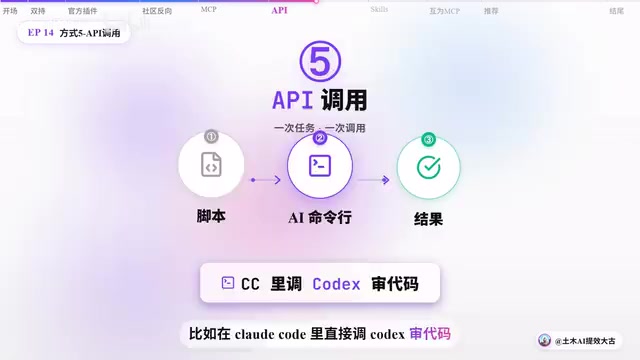
This is the most commonly used dual-AI collaboration method for developers in daily work. It essentially involves writing scripts to call AI command-line interfaces—input a prompt, AI returns a result, one task per call. Claude Code provides the claude -p command for non-interactive invocation, and Codex has a similar CLI interface. Both support returning output in structured formats (like JSON) for easy script parsing and pipeline chaining. For example, calling Codex directly from within Claude Code to review code is like two top-tier programmers working together: one writes the code, the other debugs it.
This approach is routine for programmers, but it offers a completely new perspective for content creators. The creator shared his actual workflow: Claude serves as the dispatch center, Codex handles code review, and other AIs process visual content, forming a complete creative pipeline. The official documentation provides detailed API call instructions.
Advanced Level: Skills Evolution & Bidirectional Tool Integration
Configuration 6: Skills Evolution Mode — A High-Efficiency Alternative to MCP
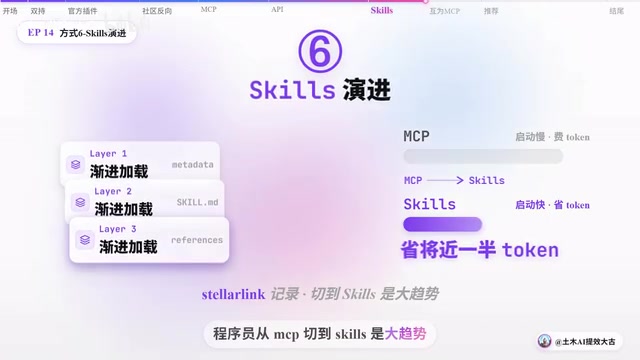
Skills is a progressive knowledge-loading mechanism introduced in Claude Code. Its core idea is to divide project knowledge into three tiers: project-level (global rules in the CLAUDE.md file), directory-level (local rules in subdirectories), and task-level (temporary instructions for specific operations). Unlike MCP, which requires maintaining persistent connections and continuously consuming the token window, Skills uses an on-demand loading strategy—knowledge fragments are loaded only when the AI enters a specific directory or performs a specific type of task.
Compared to MCP, Skills offers significant advantages:
- Nearly 50% reduction in token consumption: This "lazy loading" design means each interaction carries only the necessary context, directly reducing costs for token-based API billing
- Faster startup: No need to establish and maintain persistent connections, eliminating MCP Server initialization overhead
- More efficient context management: Three-tier progressive loading avoids the problem of stuffing all tool descriptions into the prompt at once, making better use of the limited context window
A programmer named Stellar Link in the open-source community documented the migration process from MCP to Skills in detail. Based on community trends, developers switching from MCP to Skills has become a clear trend, because Skills' advantages in resource efficiency are too significant to ignore. However, it's worth noting that MCP and Skills are not mutually exclusive—MCP is better suited for scenarios requiring real-time external data access (such as database queries and API calls), while Skills is better for managing project knowledge and coding standards. In practice, both can coexist.
Configuration 7: Bidirectional MCP Servers — The Deepest AI Collaboration Loop
This is the deepest collaboration pattern, featuring a designed four-step workflow:
- Claude plans: Develops the task plan and architecture design
- Codex executes: Writes the actual code based on the plan
- Claude re-reviews: Reviews code quality and proposes modifications
- Codex re-iterates: Optimizes based on review feedback
The two AIs serve as each other's tools, forming a closed-loop deep collaboration system. The core value of this pattern lies in adversarial review—two AIs with different architectures and different training data scrutinize each other's work, catching problems that a single AI would struggle to detect.
The concept of adversarial review originates from adversarial training in machine learning and game theory. In traditional software engineering, code review has been proven to catch 60%-90% of defects, but a single reviewer has cognitive blind spots. When two AIs based on different architectures, different training data, and different alignment methods review each other, the probability of overlapping "cognitive blind spots" drops dramatically. This is similar to the core idea in Ensemble Learning—a combination of multiple weak learners often outperforms a single strong learner. This four-step loop essentially implements an automated "plan-execute-review-iterate" cycle, closely mirroring the PDCA (Plan-Do-Check-Act) quality management cycle in software engineering.
Practical Choices: Finding the AI Collaboration Style That Fits You
With seven approaches laid out, how do you choose? The creator shared his real selection path:
Current primary choice: Configuration 5 (API call mode), for its flexibility and controllability.
Next step: Layer on Configuration 2 (official plugin), enabling Claude Code and Codex to call each other at any time.
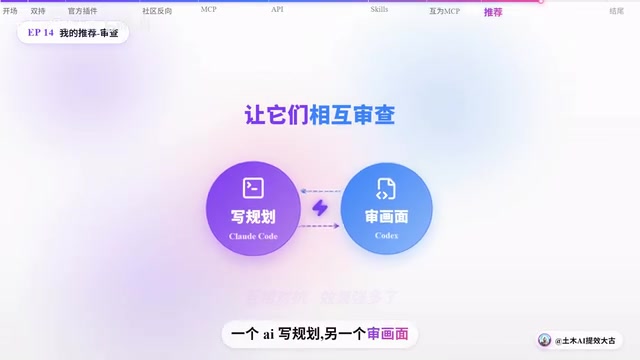
As a content creator who doesn't write code, he prefers having two AIs review each other's work. For example, when producing videos, one AI writes the plan while the other reviews the visuals—the effect of two AIs in adversarial mode is far better than reviewing everything alone.
He also made an important point: these open-source plugins can all be customized to fit your needs—what works for you is what matters most.
From a practical cost perspective, choosing a collaboration mode also requires considering token consumption and API fees. Dual-window switching and official plugin modes have the lowest additional costs, while MCP sharing and bidirectional tool modes involve significant context passing and noticeably higher token consumption. For individual developers and small teams, it's recommended to start with low-cost modes and gradually upgrade to more complex architectures after validating the collaboration benefits.
Final Thoughts: The Essence of AI Collaboration Is Orchestration
The specific method doesn't matter—what matters is how you understand the collaborative relationship between AIs. AI tools don't line up on their own—they need humans to arrange, orchestrate, and coordinate them.
This "orchestration" capability is becoming a new core skill. In traditional software development, an architect's value lies not in writing the best code, but in designing how system components collaborate. Similarly, in the AI era, the value of an "AI orchestrator" lies not in mastering any single AI tool, but in understanding the capability boundaries of different AIs and designing optimal collaboration workflows. This aligns with the "Infrastructure as Code" philosophy in DevOps—making the collaboration process itself codified, reproducible, and iterable.
This also raises a question worth everyone's consideration: Is AI helping you, or replacing you?
If you treat AI as a replacement, one is enough. But if you treat AI as a collaborative partner, then orchestrating multiple AIs together is the key to unlocking productivity. Any approach that works is a good approach.
Related articles

ChatGPT Schedule Planning Feature Explained: How AI Helps Teams Organize Work Efficiently
A deep dive into ChatGPT's schedule planning feature: coordinate team schedules and assign tasks through natural language. Learn AI planning strategies and practical tips to boost collaboration.

Vibe Coding in Practice: Three Strategies for Building an English Learning Game with Dramatically Different Results
Three controlled experiments compare pure Prompt, pre-prepared assets, and Godot engine strategies for Vibe Coding an English learning game — revealing dramatic differences in quality and Token cost.

Build an App in 30 Minutes with Zero Code: A Complete Hands-On Walkthrough Using the AI Tool Tusi
Build a fully installable mobile app in 30 minutes with zero code using AI tool Tusi. A complete walkthrough from requirements to finished product, showing how AI shifts app development from coding skills to clear communication.