Advanced AI Art: Reference Image Upload & 6 Smart Drawing Modes — A Practical Guide
A practical guide to AI art reference image upload and six smart drawing modes with use cases.
This article covers two advanced AI art features: reference image upload and smart drawing modes. Reference images use cross-modal alignment technology like CLIP to encode visual information into feature vectors, compensating for text description limitations. The six smart drawing modes — Smart Repaint, Line Art Coloring, Depth-Aware Repaint, Doodle-to-Image, Font Design, and Pose Recognition — are scenario-optimized tools that lower professional creation barriers. Combining both features significantly improves generation precision and efficiency.
Text descriptions alone sometimes can't precisely convey the image in your mind to AI. That's where reference image upload and smart drawing modes come in. This article breaks down the operation methods and use cases for these two advanced features, helping you take your AI art precision and efficiency to the next level.
Reference Image Upload: Guiding AI's Creative Direction with Images
Beyond text prompts, you can also guide AI's output by uploading reference images. The process is simple: click the upload reference image plus button in the interface and select a local image to complete the upload.
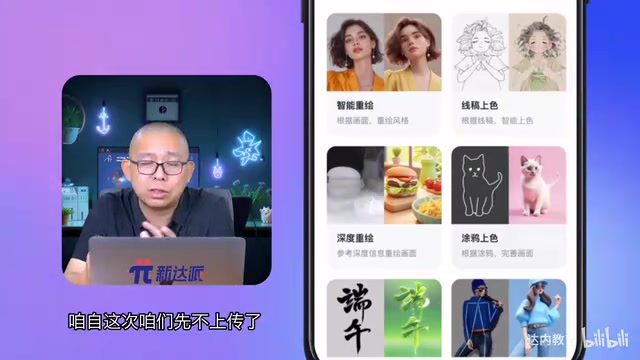
The core value of reference images lies in providing visual "anchors" for the AI. For example, if you want to generate an illustration in a specific style, it's hard to describe that subtle color palette and brushstroke texture in words. But after uploading a reference image with a similar style, the AI can quickly "get" your intent and output work with a consistent style.
This relies on image encoding and cross-modal alignment technology. Modern AI art models typically use vision-language alignment models like CLIP (Contrastive Language-Image Pre-training) to map images and text into the same semantic space. When you upload a reference image, the model encodes it into high-dimensional feature vectors that carry visual information about style, color tone, and composition. These vectors work together with the text prompt's semantic vectors to guide the denoising direction of the diffusion process. This is why reference images can convey "subtle feelings" that are hard to describe in words — they provide constraints directly at the feature level, bypassing the bottleneck of natural language expression.
Reference image upload is particularly suited for these scenarios:
- Style transfer: Applying a certain artistic style to entirely new content
- Partial modification: Making adjustments and optimizations based on an existing image
- Creative extension: Using one image as a starting point to batch-generate a series of works
Smart Drawing Modes: 6 Scenario-Based Professional Tools
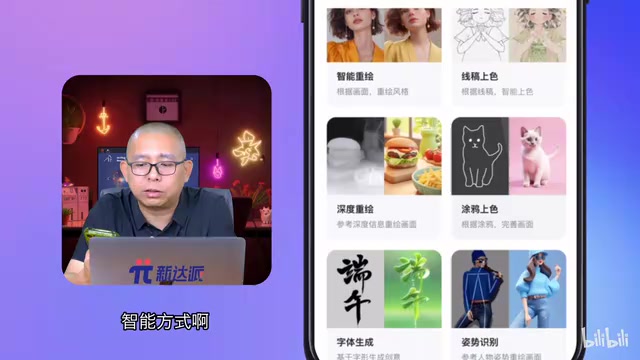
AI art tools also include a set of smart drawing modes, each optimized for specific tasks with pre-tuned parameters — ready to use out of the box with results far more stable than manual parameter adjustment.
Smart Repaint
Smart Repaint is the most frequently used mode. After uploading an existing image, the AI preserves the core content and composition while redrawing the image. By adjusting the repaint strength parameter, you can flexibly control the degree of change — from subtle style tweaks to significant image reconstruction.
Smart Repaint (img2img) is a classic application paradigm of diffusion models. Its core principle is: instead of starting from pure noise, it adds a certain level of noise to the original image, then the model gradually denoises to restore it. The repaint strength parameter (commonly called Denoising Strength, ranging from 0 to 1) controls exactly how much initial noise is added — lower strength preserves more of the original; higher strength gives the AI more creative freedom and more thorough changes. This mechanism allows users to find a precise balance between "faithful to the original" and "free creation," making it one of the most fundamental capabilities in image-editing AI tools.
Line Art Coloring
For illustrators and comic creators, the line art coloring feature is a powerful efficiency tool. Upload a black-and-white line drawing, and the AI automatically fills in appropriate colors. Combined with text prompts to specify color schemes and lighting effects, the entire coloring workflow can be dramatically shortened.
Depth-Aware Repaint
Depth-aware repaint differs from standard repaint in that the changes are more thorough. It deeply analyzes the spatial structure and depth information of the original image, then creates a more creative reinterpretation on that basis. If you need to perform a major style transformation on an image, depth-aware repaint is the better choice.
The core of depth-aware repaint lies in introducing a depth map as an additional spatial constraint. A depth map is a grayscale image that uses pixel brightness to represent how far each point in the scene is from the camera, encoding 3D spatial structure information. AI tools typically use monocular depth estimation models like MiDaS or DPT to automatically infer depth maps from the original image, then inject them into the generation process via ControlNet. This means that even with major style transformations, the spatial layering between foreground and background, the three-dimensionality of objects, and perspective relationships are preserved — avoiding the spatial structure collapse that standard repaint often suffers from at high strength settings.
Doodle-to-Image
Doodle mode lowers the creative barrier to its minimum — you don't need to draw a refined sketch. Just outline rough shapes and layouts with simple lines, and the AI transforms the doodle into a complete, high-quality image. This mode is perfect for quickly validating creative concepts.
Font Design Generation
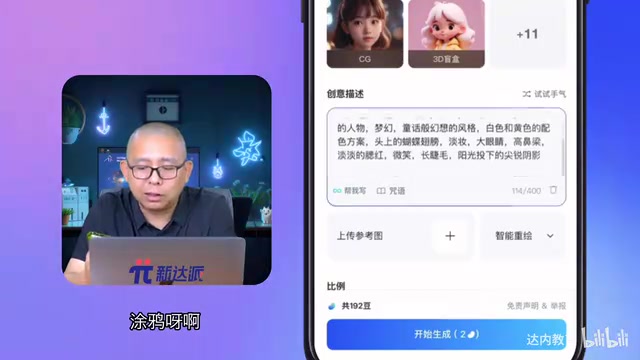
This is a dedicated module for generating artistic font effects. Poster titles, logo text, decorative fonts — all can be quickly produced in multiple style variations through this mode, saving the time of repeated manual adjustments.
Pose Recognition
Pose recognition mode extracts pose information from people in a reference image and applies it to newly generated images. In other words, you can precisely control the actions and posture of generated characters, which is extremely practical for character design and illustrations requiring specific poses.
The underlying technology of this feature is typically based on the ControlNet framework — a conditional control network proposed by Stanford University researchers in 2023 that adds a trainable control branch alongside the original diffusion model, capable of accepting structured information like skeletal keypoints, depth maps, and edge maps as additional conditions. Pose control specifically relies on human pose estimation algorithms like OpenPose, which first extracts 18 body keypoints (head, shoulders, elbows, wrists, hips, knees, ankles, etc.) from the reference image to generate a skeleton map, then feeds the skeleton map as a constraint into the generation model. This way, even when changing a character's appearance, clothing, or background, the pose can still be precisely reproduced, greatly enhancing controllability in character design.
How to Choose the Right Smart Drawing Mode
When facing multiple modes, the key to choosing is to first clarify your core need:
| Use Case | Recommended Mode |
|---|---|
| Change overall image style | Smart Repaint / Depth-Aware Repaint |
| Add color to black-and-white line art | Line Art Coloring |
| Quickly convert sketches to finished work | Doodle-to-Image |
| Create artistic font effects | Font Design Generation |
| Precisely control character poses | Pose Recognition |
The essence of these smart modes is scenario-based encapsulation of complex AI art parameters. You don't need to understand the underlying technical details — just choose the right mode, and you'll get near-optimal generation results for the corresponding task.
Summary
Reference image upload and smart drawing modes are two key advanced features in AI art. Reference images compensate for the limitations of text descriptions through visual information, while smart modes lower the operational barrier to professional creation through preset parameters. Using these two features in combination with basic text prompts can significantly improve the precision and creative efficiency of generated results, making AI a truly handy creative tool.
Key Takeaways
- AI art supports reference image upload, guiding AI to more precisely understand creative intent through visual references
- Smart modes provide six professional options: Smart Repaint, Line Art Coloring, Depth-Aware Repaint, Doodle-to-Image, Font Design Generation, and Pose Recognition
- Different smart modes are parameter-optimized for different creative scenarios, allowing users to achieve optimal results without manual tuning
- Combining reference image upload with smart modes can significantly improve AI art precision and creative efficiency
Related articles
 Tutorials
Cursor + Codex Dual-IDE Collaboration: A Practical Methodology for Open-Source Project Customization
A complete methodology for open-source project customization based on real-world experience, detailing the Cursor+Codex dual-IDE workflow, seven-stage process, MVP validation, and AI source code reading techniques.
 Tutorials
Cursor Multi-Agent in Practice: Building a Full-Stack Next.js Blog in 50 Minutes
Build a full-stack blog in 50 minutes using Cursor IDE's multi-Agent mode with Next.js, Clerk auth, and Supabase. Learn the 4-phase AI Agent workflow and key integration pitfalls.
 Tutorials
Building an AI Software Factory from Scratch: A Cursor Engineer's Hands-On Experience with Multi-Agent Collaboration
Cursor engineer Eric shares practical insights on building an AI software factory: automation levels, guardrail design, parallel Agent management, and scaling to 1000+ Agents for 24/7 development.