Agent Device: The Automation Tool That Lets AI Autonomously Operate and Verify on Mobile Phones
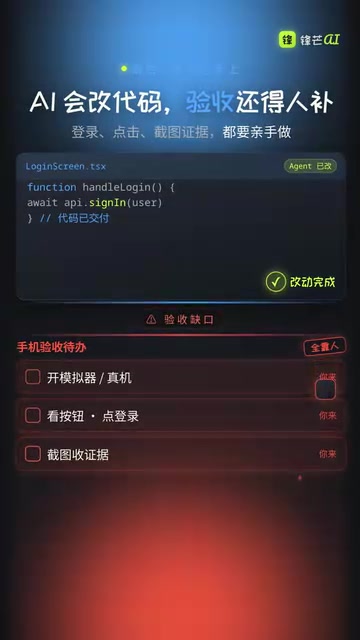
Agent Device lets AI Agents directly operate mobile phones for automated testing via accessibility snapshots.
Agent Device by Costec is a device automation CLI tool that bridges the gap between AI code generation and mobile verification. Using accessibility snapshots instead of screenshot recognition, it enables AI coding Agents to directly control iOS and Android devices — tapping, typing, and swiping with precision. Its replay mechanism turns exploratory operations into reusable CI/CD test scripts, making continuous mobile testing accessible to teams of all sizes.
The Last-Mile Problem in Mobile Development
As AI programming tools grow increasingly powerful, coding Agents like Codex and Claude can already proficiently modify React Native, Flutter, and even native code. But an awkward gap has always existed — after the code is changed, AI can't verify the results on a phone by itself.
Ask an Agent to fix a login page, and it can quickly update the code logic, but it stalls at the final step: you need to manually open the simulator, tap buttons, enter credentials, and take screenshots for documentation. On mobile, AI has been stuck in a state of "eyes but no hands."
Agent Device from Costec was built to solve exactly this problem. It's a device automation CLI tool that lets coding Agents directly launch real devices or simulators on iOS and Android, read UI elements, and perform actions like tapping, typing, and swiping. In short, it gives AI a pair of "hands" to operate phones.
Core Technology: Accessibility Snapshots, Not Screenshot Recognition
Many people's first reaction might be: isn't this just screenshots plus visual recognition? In reality, Agent Device takes a fundamentally different technical approach — it relies on Accessibility Snapshots.
An accessibility snapshot refers to a structured description tree of the current interface obtained through the operating system's assistive technology APIs — such as iOS's UIAccessibility framework and Android's AccessibilityService. This mechanism was originally designed for visually impaired users: screen readers (like iOS's VoiceOver and Android's TalkBack) read this accessibility tree to narrate interface content. Each UI element in the tree has properties like Role, Label, Value, and Action. Agent Device cleverly repurposes this existing system-level infrastructure, extending it from "serving users with disabilities" to "serving AI Agents," avoiding the enormous cost of building an entirely new interface understanding system from scratch.
Structured Interface Understanding
Traditional screenshot recognition approaches make AI "look" at pixels and guess where buttons and input fields are — not only slow but error-prone. Screenshot-based visual recognition typically relies on multimodal large models (like GPT-4o or Claude's vision capabilities) for pixel-level understanding of screen captures, but this approach faces several inherent problems: first, latency — a single screenshot plus visual reasoning usually takes several seconds or longer; second, coordinate precision issues — the click coordinates output by the model can be off by dozens of pixels, easily causing mis-taps in dense UI layouts; third, difficulty in state determination — models struggle to accurately judge from pixels whether a toggle is on or off, or whether a list has finished loading.
Agent Device takes a more direct approach: it compresses the screen into readable structured data. For example, AddE3 represents an input field, and AddE5 represents a button. The model doesn't need to guess pixel positions — it directly executes standardized operations like Fill, Press, and Scroll against element references. Accessibility snapshots provide deterministic element identifiers and state information, fundamentally bypassing the inherent flaws of visual recognition.
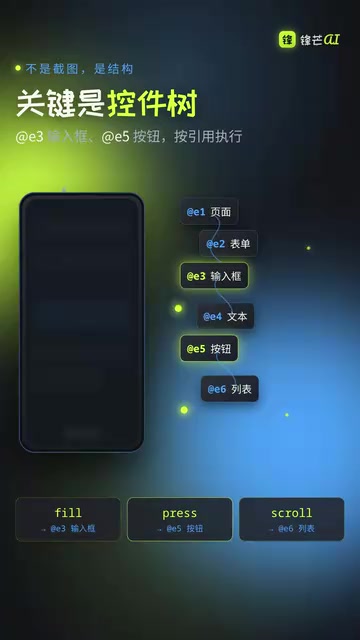
The advantages of this approach are clear:
- Fast: No image processing or visual reasoning needed, resulting in quicker responses
- Highly accurate: Based on deterministic element identifiers rather than fuzzy pixel matching
- Cross-platform consistent: Both iOS and Android support accessibility interfaces, unifying the operation logic
Replayable Automation Scripts: From Exploration to Continuous Integration
If AI could only operate a phone once, the value would be limited. Agent Device's truly powerful feature lies in its replay mechanism.
Automatic Recording and Preservation of Operation Paths
When an Agent first explores a complete workflow — such as logging in, placing an order, or sending a message — the operation path is automatically recorded as a script. These scripts can then be re-run repeatedly in local development environments or CI/CD pipelines.
CI/CD (Continuous Integration/Continuous Deployment) is a core practice in modern software engineering, referring to the pipeline that automatically triggers builds, tests, and deployments after each code commit. In web development, running automated tests in CI is already very mature (e.g., browser automation based on Selenium or Playwright), but mobile CI testing has always been an industry pain point. Key obstacles include: slow simulator startup with high resource consumption, expensive device farms, and the heavy workload of writing and maintaining test scripts. By letting AI automatically generate and maintain test scripts, Agent Device significantly lowers the human effort barrier for mobile CI testing, enabling even small and medium-sized teams to establish continuous testing capabilities for mobile.

When a test fails, the system automatically collects logs, screenshots, and screen recordings, making it easy for developers to quickly pinpoint issues. The entire workflow is divided into three phases:
- AI Exploration Phase: The Agent freely operates the phone, verifying whether features work correctly
- Script Preservation Phase: Stable operation paths are solidified into repeatable automated tests
- Continuous Integration Phase: Automatic replay verification after every code change, with alerts on failure
This workflow upgrades AI from "one-time verification" to "continuous testing," increasing value by an order of magnitude.
Prerequisites and Limitations
Accessibility Labels Are the Foundation
Agent Device has good compatibility with React Native, Expo, Flutter, and native applications, but there's one important prerequisite: your app must have proper accessibility labels.
Specifically, React Native maps to native accessibility APIs through properties like accessibilityLabel and accessibilityRole, and Expo projects inherit this same mechanism. Flutter provides accessibility semantic annotations through the Semantics Widget, which converts to corresponding platform accessibility nodes under the hood. However, in practice, many teams neglect accessibility annotations — according to WebAIM's survey, over 96% of website homepages have accessibility issues, and the situation on mobile is even worse.
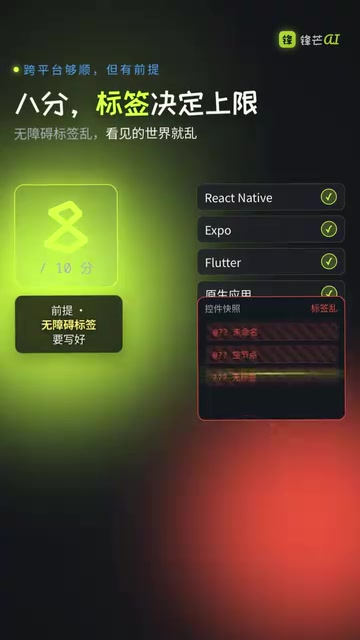
If labels are messy or missing, the interface world that Agent Device sees will also be chaotic — it can't correctly identify elements and therefore can't operate accurately. However, this also serves as a positive incentive: to let AI test for you, you have to get accessibility right, which is itself an important component of application quality. The adoption of Agent Device objectively promotes accessibility compliance in mobile applications — a win-win for apps that need to meet WCAG (Web Content Accessibility Guidelines) or national accessibility regulations.
Positioning Differences from Appium
It's worth noting that Agent Device is not a replacement for Appium. Appium is currently the most mainstream open-source framework in mobile automation testing, maintained by Sauce Labs and following the WebDriver protocol. It supports automation for iOS, Android, and even Windows desktop applications, allowing developers to write test cases in multiple languages including Java, Python, and JavaScript. Appium's core strengths lie in its mature ecosystem, rich element location strategies (XPath, Accessibility ID, Class Name, etc.), and integration capabilities with Selenium Grid. However, Appium test cases require manual writing and maintenance, have a steep learning curve, and scripts easily break when UI changes frequently.
Agent Device is positioned more as AI's "real-device verification layer":
- Appium: A mature automation testing framework, suited for manually written systematic test cases
- Agent Device: An operation interface for AI Agents — let the agent explore freely first, then preserve stable paths as tests
The two are complementary, not competitive. Agent Device's AI-driven approach precisely compensates for Appium's weakness in script maintenance — AI can adaptively explore interface changes, reducing script maintenance costs. In real projects, you can use Agent Device for quick verification and exploratory testing, while maintaining core regression test suites with Appium.
Overall Rating and Recommendations
Overall, Agent Device earns a score of 8 out of 10. It precisely targets the pain point where AI can't autonomously verify results in mobile development. The technical approach (accessibility snapshots rather than visual recognition) is pragmatic and efficient, and the replay mechanism elevates it from a standalone tool to part of a complete workflow.
The 2 points deducted are mainly due to the strong dependency on accessibility labels — in reality, many applications have incomplete accessibility support, which significantly impacts the actual user experience.
For teams already using AI coding tools for mobile development, Agent Device is worth serious evaluation and experimentation. It fills the missing critical link in the AI development process, making the complete loop of "AI writes code → AI verifies results → AI preserves tests" a reality.
Interested developers can search for Costec Agent Device to learn more. Whether a tool is good or not — real-world testing reveals the truth.
Related articles

Five Common Claude Code Mistakes — How Many Are You Making?
Five common Claude Code mistakes developers make: copy-pasting code, skipping CLAUDE.md, inefficient prompting, ignoring docs, and poor context management — with fixes.

Andrew Ng's New Course Explained: A Practical Guide to Using OpenAI's O1 Reasoning Model
Deep dive into Andrew Ng and OpenAI's Reasoning with O1 course covering test-time scaling, new prompting paradigms, multi-model orchestration, and practical applications for developers.

Learning AI After College Entrance Exams: A Complete Path from Zero to Freelancing
How to efficiently learn AI skills during summer break after exams? A complete path from mastering prompts and hands-on projects to freelancing on platforms.