Five Common Claude Code Mistakes — How Many Are You Making?

Five common Claude Code mistakes and how to fix them to unlock its full potential.
Most developers underutilize Claude Code due to five key mistakes: copy-pasting code snippets instead of letting it read the full project, skipping CLAUDE.md configuration, asking complex questions one at a time instead of guiding systematic reasoning, not checking latest documentation before coding, and failing to manage context windows. This article explains each mistake with correct approaches to transform Claude Code into a true AI development partner.
Most developers are probably using only a fraction of Claude Code's true capabilities. The problem isn't the tool itself — it's how you use it. This article covers the five most common mistakes and shows you how to turn Claude Code from a mere "chat box" into a real development partner.
Before diving into the mistakes, it's important to understand what Claude Code actually is. Claude Code is a command-line development tool from Anthropic. Unlike the web-based Claude, its key differentiator is the ability to run directly in your local file system — reading and writing files, executing terminal commands, browsing project structures, and more. At its core, it's an agentic coding assistant that can autonomously plan tasks, invoke tool chains, and iteratively verify results, rather than just passively answering questions. Understanding this is the prerequisite for avoiding every mistake listed below.
Mistake #1: Treating Claude Code Like a Web Chat Box, Copy-Pasting Code Snippet by Snippet
This is the most widespread misuse. Many people habitually copy and paste code snippets one by one into Claude Code, asking it to analyze or modify them. The problem? It has no idea what your overall project looks like — file structure, dependency relationships, configuration logic — it knows nothing. With such severely insufficient information, the suggestions it gives are naturally way off the mark.
The right approach is to let Claude Code read your project directory directly, allowing it to find entry files, examine configurations, and trace dependency relationships on its own. Having it work inside your project environment versus guessing from isolated snippets through a screen are two completely different things. When it can see the full context, the code suggestions it provides will actually fit your project's reality.
The principle behind this: Claude Code has file system access capabilities. It can proactively traverse directory structures, read configuration files like package.json, tsconfig.json, .env, and even trace import chains to understand inter-module dependencies. This "immersive" project understanding is far more comprehensive than manually feeding it a few code snippets. A typical example: when you ask it to fix a bug in a component, it can automatically check which pages reference that component, what props it receives, and which stores it depends on — information that's nearly impossible to cover completely through manual copy-pasting.
Mistake #2: Never Writing a CLAUDE.md File
Every time you start a new conversation, you have to re-explain everything: what framework the project uses, what coding conventions to follow, which files are off-limits, which directories contain core modules... This repetitive communication not only wastes time but also risks missing critical information.

The right approach is to create a CLAUDE.md file in your project root and put all the project background information in it. Claude Code automatically reads this file on every startup — think of it as handing over a "project briefing document." You can include:
- Tech stack and framework versions
- Code style and naming conventions
- Files or directories that must not be modified
- Core architecture overview
- Commonly used commands and workflows
The design philosophy of CLAUDE.md draws from the convention-based configuration paradigm developers are already familiar with, similar to .editorconfig or .eslintrc. Notably, Claude Code supports multi-level CLAUDE.md configurations: you can place a global config in the project root, module-level configs in specific subdirectories (e.g., frontend/, backend/), and even personal preference configs in your home directory at ~/.claude/. This layered mechanism is similar to Git's configuration priority system, allowing each team member to retain personal preferences while sharing project-wide standards. A well-written CLAUDE.md not only improves AI output quality — it also doubles as excellent project documentation.
This single file can save you enormous amounts of repetitive communication time, ensuring every conversation starts from a high baseline.
Mistake #3: Asking One Question at a Time for Complex Problems
When you hit a bug and can't tell whether it's a frontend issue, backend issue, or configuration problem, many people resort to asking one question at a time. The result? Things get more confusing with each question, and Claude Code gets led astray.
This "search bar style" of questioning might work for simple problems, but it falls short for complex engineering issues. You should let Claude Code work like a senior engineer, conducting systematic analysis and reasoning.
The right approach is to guide it through a step-by-step investigation:
- First, confirm the symptoms: Have it clearly identify the specific manifestation of the problem
- Then form hypotheses: List possible causes based on the symptoms
- Investigate each one: Verify each hypothesis systematically
Use prompts like "think harder" or "extended thinking" to trigger its deep reasoning mode, rather than rushing for a potentially inaccurate quick answer. Having it slow down and think is far more reliable than getting an instant response.
The Extended Thinking mentioned here is an important advanced capability of the Claude model. When triggered, the model performs longer chains of internal reasoning before generating its final answer — academically known as Chain-of-Thought reasoning. Think of it as a human "working things out on scratch paper before speaking" when facing a complex problem. In engineering debugging scenarios, extended thinking enables the model to systematically enumerate hypotheses, cross-validate evidence, and eliminate red herrings, rather than pattern-matching from training data to give the first answer that comes to mind. In practice, you'll find that while responses take a few seconds longer with deep thinking enabled, the accuracy and logical rigor improve dramatically — especially in complex scenarios involving multi-file interactions, asynchronous logic, and state management.
Mistake #4: Asking It to Write Code Without Ever Checking Documentation First

Frontend frameworks, backend libraries, cloud service APIs — these things are constantly being updated. But large language models have a training data cutoff date, meaning the syntax in their memory may well be outdated. If you ask it to write code directly, the API calls it produces might not work at all, or worse, introduce deprecated usage patterns.
This is the Knowledge Cutoff problem — all LLMs derive their knowledge from training data, which has a clear temporal boundary. API changes, new framework versions, and deprecated methods released after the cutoff date are simply unknown to the model. This problem is especially acute in the frontend ecosystem: React's evolution from Class Components to Hooks to Server Components, Next.js from Pages Router to App Router, Vue from Options API to Composition API — a single major version difference can mean entirely different syntax and best practices. The backend is no different: Python's FastAPI, Node.js ORM libraries, and others frequently introduce breaking changes across versions.
The right approach is to have it consult the latest official documentation before writing any code. You can:
- Have it use built-in search tools to find the latest API documentation
- Directly provide key sections of official documentation for reference
- Explicitly tell it the library version you're currently using
"Check before you write" saves far more time than "write and then rework." Once you build this habit, code accuracy will immediately level up.
Mistake #5: Running One Conversation from Start to Finish Without Managing Context

Many people use a single conversation window from the start of a project to the very end, refusing to open a new one no matter how sluggish things get. The result: context keeps piling up, Claude Code starts forgetting earlier content, and responses become increasingly "drifty" — contradictions, repeated suggestions, lost key decisions. These are all classic symptoms of context overflow.
To understand this problem, you need to know about the Context Window mechanism of large language models. The context window refers to the total number of tokens the model can process simultaneously in a single conversation (a token can be roughly understood as the smallest unit of text processing; in Chinese, one character typically corresponds to 1-2 tokens). Although Claude's context window is already very large (up to 200K tokens, roughly equivalent to a medium-length book), it's not infinite. More critically, even within the window's capacity, when conversation content gets too long, the model experiences "attention dilution" — the Transformer architecture's attention mechanism naturally reduces the weight given to earlier information when processing very long sequences, leading to "remembering what was said recently but forgetting what was said at the beginning." This isn't a bug; it's an inherent characteristic of the current architecture.
The right approach is to proactively manage context. When context usage reaches around 40%, you should have it write a "handoff document" that clearly organizes:
- Current development progress
- Key decisions made and their rationale
- Specific next steps
- Outstanding issues and important notes
Then open a new conversation, feed it this document, and continue working. This way, it stays "clear-headed" throughout, without performance degradation from excessive context length. This practice is essentially a "manual memory management" strategy — you're helping the model do something it can't do well on its own: filtering and compressing key information. This is also why 40% is the recommended threshold rather than 80% or 90% — leaving enough headroom ensures the new conversation has ample space to handle subsequent complex tasks.
Summary: It's Not About the Tool — It's About How You Use It
Looking back at these five mistakes, the core logic is actually quite clear:
| Mistake | Right Approach |
|---|---|
| Copy-pasting code snippets | Let it read the complete project directly |
| Re-explaining background every time | Write a proper CLAUDE.md config file |
| Asking about complex problems one question at a time | Guide it through systematic reasoning |
| Having it write code directly | Check the latest documentation first |
| Running one conversation to the end | Organize handoff documents promptly, start new conversations |
How powerful Claude Code is doesn't depend on the tool — it depends on whether you know how to use it. Avoid these five pitfalls — let it read your project, configure your standards, reason systematically, check documentation, and manage context well — and it can transform from a simple chat box into your true AI development partner.
Ultimately, these five best practices point to the same underlying principle: you need to manage your AI tool the same way you'd manage a real team member. Give it sufficient project context (Mistake #1), provide clear working standards (Mistake #2), guide it to solve problems with the right methodology (Mistake #3), ensure it works based on the latest information (Mistake #4), and hand off before it gets "fatigued" (Mistake #5). When you start using Claude Code with this mindset, you'll discover its capability ceiling is far higher than you ever imagined.
Related articles
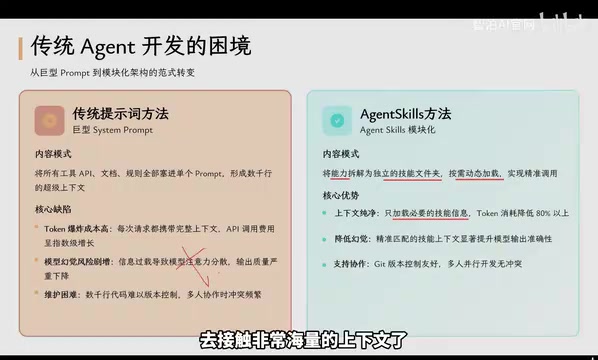
Agent Skills: Folders as Skills — Making AI Produce Precise, Template-Based Output
Agent Skills splits AI capabilities into independent skill folders with on-demand loading and progressive disclosure, cutting token costs by 80% and reducing hallucinations for template-based output.

Andrew Ng's New Course Explained: A Practical Guide to Using OpenAI's O1 Reasoning Model
Deep dive into Andrew Ng and OpenAI's Reasoning with O1 course covering test-time scaling, new prompting paradigms, multi-model orchestration, and practical applications for developers.

Learning AI After College Entrance Exams: A Complete Path from Zero to Freelancing
How to efficiently learn AI skills during summer break after exams? A complete path from mastering prompts and hands-on projects to freelancing on platforms.