Agent Skills Decision Trees: Enabling Autonomous Decision-Making for AI Coding Assistants

Embed decision tree logic in Agent Skills to give AI coding assistants autonomous decision-making capabilities.
This article introduces an advanced technique for embedding structured decision tree logic in Agent Skills Markdown files for AI coding assistants, reducing manual intervention by 50%-80% through explicitly defined conditional branches, priorities, and exception handling. Using a Code Review Router as an example, the Skill automatically routes code reviews to Gemini CLI or Codex CLI based on complexity scoring and hard rule matching, with built-in failover mechanisms for automatic tool switching on failure.
When using AI coding assistants like Antigravity, Claude Code, and others, do you frequently encounter this frustration — the AI keeps asking "what should I do next," turning what should be an automated workflow into an inefficient back-and-forth Q&A session? This article introduces an advanced technique that the developer community calls a "soul technique": embedding decision tree logic within Agent Skills, giving AI coding assistants true autonomous decision-making capabilities and reducing manual intervention by 50%-80%.
What Are Decision Trees in Agent Skills
The "decision tree" here is not a machine learning algorithm that requires training data. Instead, it's a technical approach that embeds structured if-else conditional branches within a Skill's Markdown file. By explicitly defining conditional branches, priority ordering, and exception handling, AI coding assistants can autonomously judge and select the optimal execution path.
Two Paradigms of Decision Trees: In machine learning, a Decision Tree is a supervised learning algorithm that induces splitting rules from training data, with node thresholds automatically calculated using metrics like information gain or Gini coefficient. The "decision tree" described in this article follows an expert system approach — explicitly encoding human expert experience as conditional branches, a classic paradigm of symbolic AI. In the AI coding assistant context, the latter is more suitable: a development team's engineering standards are themselves the best "training data," and directly encoding them as rules is more efficient than retraining a model, while being completely transparent, controllable, and zero-cost to train.
Here's an everyday analogy: deciding whether to bring an umbrella based on the weather forecast — if rain is expected, check the intensity (heavy rain → full-size umbrella, light rain → folding umbrella); if no rain, decide whether to bring a jacket based on how long you'll be out. This layered conditional judgment is the core logic of a decision tree.
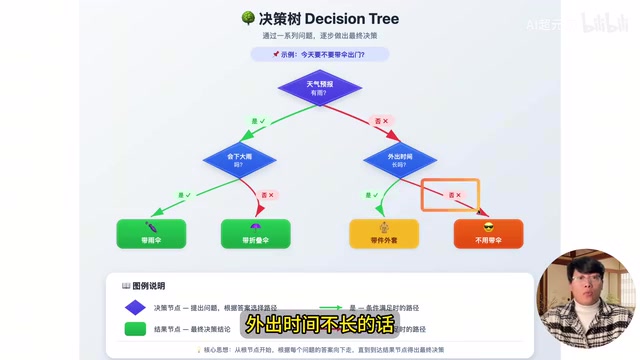
According to Anthropic's official documentation, Agent Skills essentially teach AI Agents to complete specific tasks through Markdown files.
Why Use Markdown to "Program" AI Behavior: Agent Skills represent a "structured upgrade of prompt engineering." Traditional prompts are one-time natural language instructions, while Agent Skills persist and modularize task logic through Markdown files. When Anthropic designed Claude's Agent framework, they drew from the software engineering principle of "separation of concerns" — decoupling "what to do" (task objectives) from "how to do it" (execution logic). Markdown was chosen as the medium because it's both human-readable and efficiently parseable by LLMs, with its heading hierarchy (H1/H2/H3) naturally mapping to task structure. This design allows even non-engineers to "program" AI behavior by writing documents, significantly lowering the barrier to AI automation.
Decision tree optimization means explicitly defining conditional branches, priority ordering, and exception handling within this Markdown file, thereby giving AI coding assistants the ability to autonomously judge and select the best approach. This technique applies not only to Antigravity but equally to Claude Code, Codex CLI, and any AI coding assistant that supports Agent Skills.
Practical Case Study: Code Review Router
Design Philosophy
To demonstrate the practical effect of decision trees, let's examine an Agent Skill called Code Review Router. Its core function is: enabling the AI coding assistant to intelligently assess the type and complexity of code changes, then automatically route them to the most suitable code review tool — Gemini CLI or Codex CLI.
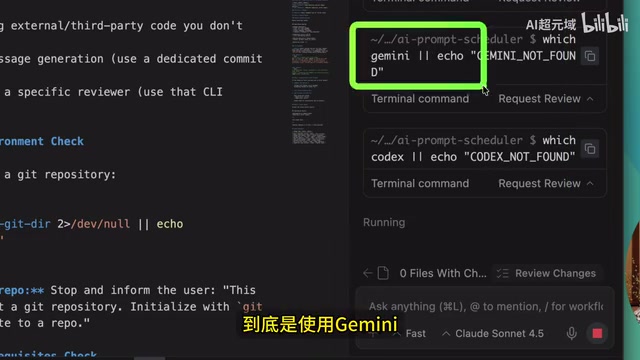
Why is such routing needed? In practice, Codex CLI is slower at code reviews but better suited for complex changes or backend tech stacks, while Gemini CLI is more appropriate for quick frontend code reviews.
Technical Positioning Differences Between the Two Tools: Gemini CLI is Google's command-line tool based on the Gemini model, with underlying advantages in multimodal understanding and long-context processing. Google also provides developers with relatively generous free quotas, making it suitable for high-frequency, lightweight code review tasks. Codex CLI is OpenAI's code-specific command-line tool, based on models with specialized code training, offering deeper analysis of complex architectural relationships, database schema changes, and API contract analysis — but with slower inference speed and higher cost. This differentiated positioning corresponds precisely to the dual needs of "fast feedback" and "deep analysis" in software engineering — similar to the division between "automated lint checks" and "manual code review" in review workflows.
If all tasks were completed using Antigravity's built-in model, it would be not only inefficient but also consume large amounts of token quota. Delegating some tasks to external CLI tools achieves dual optimization of efficiency and cost.
Complete Seven-Step Execution Flow
This Skill's decision flow is designed with considerable precision, containing the following key steps:
Step 1: Environment Check — Determine whether the current directory is a Git repository; if not, run git init to initialize one.
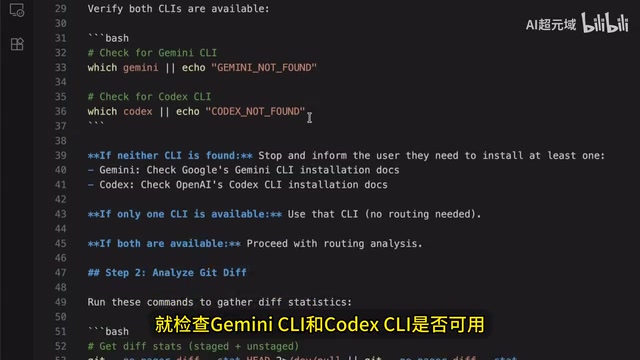
Step 2: Tool Availability Detection — Check whether Gemini CLI and Codex CLI are installed. If neither is available, install them automatically; if only one is available, use that tool directly.
Step 3: Analyze Git Diff — Run git diff to get code changes; if there are no changes, report "no review needed."
Step 4: Complexity Scoring — Assess code changes on a 1-10 complexity scale, with scoring dimensions including number of changed files, lines of code, tech stacks involved, etc.
Engineering Significance of Complexity Quantification: Quantitative assessment of code change complexity has deep theoretical foundations in software engineering. The classic Cyclomatic Complexity was proposed by Thomas McCabe in 1976, measuring complexity by counting independent paths through code. The 1-10 scoring system in this Skill is a more practical "heuristic evaluation" that comprehensively considers multiple dimensions including number of changed files, lines of code, and tech stack breadth. This multi-dimensional scoring approach is highly consistent with "change risk assessment" in modern CI/CD systems — for example, Google's internal Critique system and Meta's Phabricator both include similar change impact analysis mechanisms. Codifying this engineering experience into an AI Skill essentially transforms "senior engineer intuition" into "reusable automation rules."
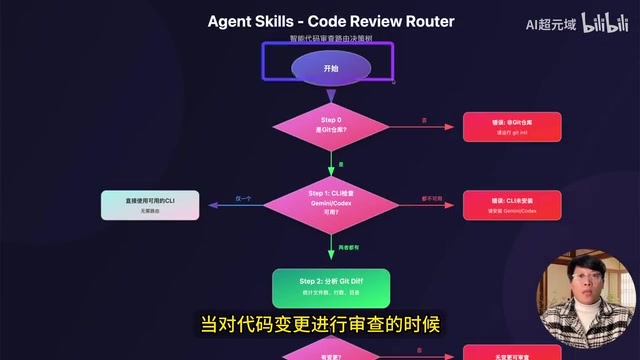
Step 5: Routing Decision (Core Decision Tree Node) — This is the key to the entire Skill, containing two layers of logic: hard rule matching and score-based decisions:
- Codex CLI Hard Rules: Code contains sensitive files, file count > 20, line count > 500, involves database migrations/API service layer modifications, spans 3+ top-level directories, complex TypeScript generics, etc.
- Gemini CLI Hard Rules: Pure frontend code, Python ecosystem, pure documentation changes
- Score-Based Decision: Score ≥ 6 goes to Codex for deep analysis, < 6 goes to Gemini for quick feedback
- Default Strategy: When no clear match exists, default to Gemini CLI
Step 6: Execution and Fault Tolerance — Call the selected CLI to perform the review. If execution fails (e.g., network issues), automatically switch to the backup CLI and re-execute.
Fault Tolerance from a Systems Engineering Perspective: The automatic failover design reflects the core concept of "Failover" in distributed systems. In microservice architectures, this is typically implemented through the Circuit Breaker Pattern — when the primary service fails consecutively beyond a threshold, it automatically switches to a degraded service. Introducing this pattern into AI Agent workflows addresses a key pain point in AI automation deployment: external tool instability (network fluctuations, API rate limiting, service outages) can interrupt the entire automation pipeline. By explicitly defining the recovery path "execution failure → detect error type → switch to backup tool → re-execute" in the Skill file, the AI Agent gains robustness similar to production-grade software systems. This also demonstrates that excellent Agent Skill design must consider not only the "happy path" but systematically plan for "exception paths."
Step 7: Formatted Output — Generate a structured review report with severity classifications.
Actual Demo Results
In the demonstration, the author added a new feature to a Chrome extension project (clicking log entries to open corresponding task records), then triggered the code review Skill via the slash command /review.
The AI detected changes across 9 files, with a complexity score of 3/10 (code lines < 300), classified as pure frontend JS changes with no sensitive code, no database or API modifications. Based on these assessments, the decision tree automatically selected Gemini CLI for the review.
To test fault tolerance, the author deliberately disconnected the network while Gemini CLI was executing. The Skill immediately detected the error, automatically switched to Codex CLI as the fallback, completed the review, and output a comprehensive report including performance issues, security concerns, and fix recommendations.
Slash Command Configuration: Quick Agent Skill Invocation
Configuring an Agent Skill as a slash command significantly improves usage efficiency. Here are the specific steps:
- Ensure Agent Skills files are placed in the project working path (Antigravity, Claude Code, and Codex all prioritize loading Skills from the project path)
- Click the three dots in the upper right of Antigravity → Customize → Workflow → Workspace
- Create a new workflow named
review - Fill in the description: "Code review, following team standards"
- In the content, use the
@symbol to reference the code review Skill file and set review rules (e.g., "Review files specified by the user; if none specified, review all changes") - After saving, type
/reviewin the input box to quickly invoke it
More Application Scenarios for Decision Tree Technology
Code review is just one application scenario for decision tree Agent Skills. This pattern can be extended to many more development workflows:
- Test Strategy Routing: Automatically select unit tests, integration tests, or end-to-end tests based on code change type
- Deployment Decisions: Automatically choose canary releases or full rollouts based on change scope and risk level
- Documentation Generation: Automatically select generation templates for API docs, user manuals, or internal technical documentation based on code type
- Performance Optimization: Automatically select different performance analysis tools and optimization strategies based on code characteristics
The core value of decision trees lies in codifying developers' experience and judgment logic into Skill files, upgrading AI coding assistants from "passive executors" to "active decision-makers." This not only improves the degree of automation but more importantly ensures decision consistency and predictability — the AI will make the same optimal choice every time it faces the same conditions.
Related articles
 Tutorials
Cursor + Codex Dual-IDE Collaboration: A Practical Methodology for Open-Source Project Customization
A complete methodology for open-source project customization based on real-world experience, detailing the Cursor+Codex dual-IDE workflow, seven-stage process, MVP validation, and AI source code reading techniques.
 Tutorials
Cursor Multi-Agent in Practice: Building a Full-Stack Next.js Blog in 50 Minutes
Build a full-stack blog in 50 minutes using Cursor IDE's multi-Agent mode with Next.js, Clerk auth, and Supabase. Learn the 4-phase AI Agent workflow and key integration pitfalls.
 Tutorials
Building an AI Software Factory from Scratch: A Cursor Engineer's Hands-On Experience with Multi-Agent Collaboration
Cursor engineer Eric shares practical insights on building an AI software factory: automation levels, guardrail design, parallel Agent management, and scaling to 1000+ Agents for 24/7 development.