AI App Development Tutorial: Complete Guide from Zero Experience to App Store Launch

A complete guide from AI-powered app development to App Store launch for non-programmers
This article systematically covers the complete process for non-programmers to develop iOS apps using AI tools and publish them on the App Store. It introduces three types of AI coding tools (chat-based, integrated editors, and fully managed platforms), recommends integrated editors like Cursor as the top choice, details publishing requirements and review mechanism essentials, UI design communication techniques, and post-launch growth strategies including ASO optimization.
Introduction
Using AI to develop applications and successfully publish them on app stores is no longer a skill exclusive to programmers. An increasing number of creators without technical backgrounds are completing app development and publishing within just a few days using AI coding tools. However, between "getting AI to write code" and "actually seeing your app on the App Store," there are numerous details to figure out. This article systematically walks through the complete process from zero-experience development to successful launch, helping you avoid common pitfalls.
Three Types of AI Coding Tools
AI tools that can help you write code currently fall into roughly three categories:
Type 1: Chat-based web tools. You describe your requirements in a web chat window, AI generates code, and you manually copy it into your project. The problem with this approach: you need to understand the project's file structure, and the back-and-forth copying is highly inefficient.
Type 2: Integrated editor tools. Examples include Cursor and the Chinese-developed Trae. After downloading and installing, you interact with AI directly within the editor. The AI not only generates code but also automatically creates files, sets up environments, and reads existing code to understand context. This is the truly "hands-free" development approach and currently the top choice for zero-experience users building apps.
Technical Background: Why Are Integrated Editors More Powerful? The reason integrated editor tools like Cursor and Trae are more powerful than chat-based tools comes down to "Codebase Awareness." These tools vectorize the entire project's file structure, function definitions, and dependency relationships into a local index. When you ask a question, the AI doesn't just answer in isolation—it generates code based on understanding the entire project context. This relies on RAG (Retrieval-Augmented Generation) technology—first retrieving relevant snippets from the codebase, then feeding them to the large language model to generate answers. Additionally, these tools support "Agent mode," where AI can autonomously execute terminal commands, install dependency packages, and create new files, forming a closed loop of "think → execute → observe results → think again," drastically reducing manual intervention.
Type 3: Fully managed platforms. Examples include Bolt and Replit, which handle everything from coding to deployment in the browser. These are suitable for web applications but offer limited support for native iOS apps.
For developers looking to publish on the App Store, Type 2 tools (especially Cursor) offer the best value. They let AI handle the vast majority of coding work while allowing you to retain full control over your project.
Publishing to the App Store: The Review Mechanism You Must Understand
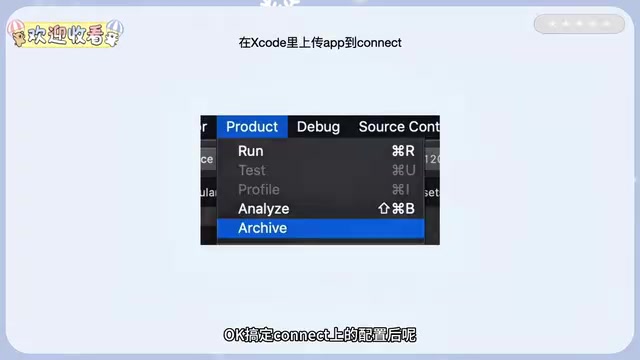
iOS publishing requires a $99/year developer account, a Mac computer, and Xcode. Individual identity publishing is supported. The publishing process consists of four core steps: creating an App in App Store Connect, packaging and uploading with Xcode, configuring the listing page, and submitting for review.
Before submitting for review, it's important to understand how Apple's review system works. Apple's App Store review mechanism was established in 2008 and initially relied entirely on manual review, with average wait times of up to two weeks. After years of iteration, it has evolved into a hybrid "machine review + human follow-up" mechanism, with 90% of apps receiving results within 24-48 hours. Review standards are governed by the App Store Review Guidelines, covering five dimensions—safety, performance, business model, design, and legal compliance—with over 100 specific rules.
For apps with AI-generated code, reviewers pay special attention to:
- Privacy data handling: Whether a complete privacy policy link is provided
- In-app purchase compliance: Whether there are attempts to bypass Apple's payment system
- Functional completeness: Apps cannot be empty shells or mere web wrappers
Understanding these rules helps you perform self-checks before submission, avoiding rejections due to basic mistakes and saving valuable review wait time.
UI Design: Showing AI Reference Images Is More Efficient Than Descriptions
For UI design communication, it's recommended to provide AI with reference images rather than pure text descriptions. You can use Figma or Pinterest for design inspiration. Visual references help AI understand your desired style, layout, and color direction far more accurately than vague descriptions like "clean modern style."
Post-Launch Growth Strategy: ASO and Promotion
Publishing your app is just the starting point—the real challenge is acquiring users. After launch, focus on ASO keyword optimization, limited-time free promotions, promo code marketing, and other operational strategies.
ASO (App Store Optimization) is the mobile app equivalent of SEO and deserves deep understanding. Apple's App Store search algorithm considers multiple signals to determine rankings: keywords in the app name carry the highest weight, followed by the subtitle, then the 100-character keyword field filled in the backend (invisible to users). Notably, text in the app description has almost no direct impact on Apple search rankings, but it does affect user download conversion rates.
The algorithm also factors in behavioral signals such as the number of user ratings, average rating score, and download growth velocity. For keyword research, you can use professional tools like AppFollow and Sensor Tower to find "long-tail keywords" with moderate search volume and lower competition. This approach makes it easier to gain organic traffic in the early stages compared to competing directly for popular terms.
Key Takeaways
- AI coding tools fall into three categories: chat-based, integrated editors (Cursor/Trae), and fully managed platforms. Beginners should use integrated editor tools; their core advantages lie in codebase awareness and Agent autonomous execution mode
- iOS publishing requires a $99/year developer account, a Mac computer, and Xcode, with individual identity publishing supported
- The publishing process includes four steps: creating an App in Connect, packaging and uploading with Xcode, configuring the listing page, and submitting for review; review focuses on privacy policies, in-app purchase compliance, and functional completeness
- For UI design communication, provide AI with reference images rather than pure text descriptions; use Figma/Pinterest for inspiration
- After launch, focus on ASO keyword optimization (name > subtitle > keyword field), limited-time free promotions, promo code marketing, and other operational strategies to acquire users
Related articles
 Tutorials
Cursor + Codex Dual-IDE Collaboration: A Practical Methodology for Open-Source Project Customization
A complete methodology for open-source project customization based on real-world experience, detailing the Cursor+Codex dual-IDE workflow, seven-stage process, MVP validation, and AI source code reading techniques.
 Tutorials
Cursor Multi-Agent in Practice: Building a Full-Stack Next.js Blog in 50 Minutes
Build a full-stack blog in 50 minutes using Cursor IDE's multi-Agent mode with Next.js, Clerk auth, and Supabase. Learn the 4-phase AI Agent workflow and key integration pitfalls.
 Tutorials
Building an AI Software Factory from Scratch: A Cursor Engineer's Hands-On Experience with Multi-Agent Collaboration
Cursor engineer Eric shares practical insights on building an AI software factory: automation levels, guardrail design, parallel Agent management, and scaling to 1000+ Agents for 24/7 development.