AI-Assisted APP Reverse Engineering in Practice: IDA MCP Automates Reverse Analysis

AI combined with IDA MCP automates APP reverse engineering, dramatically lowering technical barriers.
This article explains how to combine AI with IDA MCP (Model Context Protocol) services to automate APP reverse engineering analysis. Traditional reverse engineering requires high-barrier steps like packet capture, decompilation, and manual encryption algorithm analysis. With IDA MCP, AI can directly read IDA Pro's decompilation results, automatically locate encryption functions, and generate runnable Python code. Combined with Skill behavioral constraints to reduce token consumption and improve efficiency, the entire workflow can even skip manual packet capture entirely.
Introduction: AI Is Breaking Down the Barriers of APP Reverse Engineering
For many developers and security researchers, APP reverse engineering has always been a high-barrier technical discipline. From configuring packet capture environments, analyzing data packets, and locating encryption algorithms, to using disassembly tools like IDA to examine low-level implementations—every step requires extensive experience. However, with the combination of AI tools and MCP (Model Context Protocol) services, this is undergoing a fundamental transformation.
Based on a practical demonstration by a Bilibili content creator, this article provides a detailed breakdown of how to use AI + IDA MCP to automate APP reverse engineering analysis. Even if you're not proficient in reverse engineering, you can get started quickly.
The Traditional APP Reverse Engineering Workflow
Environment Setup and Packet Capture
Traditional APP reverse analysis typically requires the following steps:
- Configure the packet capture environment: Install and configure capture tools like ReqCap, Charles, or Fiddler
- Start the capture proxy: Route the target APP's network requests through the proxy tool
- Trigger target requests: Perform actions in the APP to generate the network requests you need to analyze
- Locate target endpoints: Find the key APIs among numerous domains and data packets
The core principle of packet capture tools is a Man-in-the-Middle (MITM) attack—they act as a proxy between the client and server, decrypting HTTPS traffic by installing a self-signed CA certificate. It's worth noting that since Android 7.0, the system no longer trusts user-installed CA certificates by default. Reverse engineers need to handle Certificate Pinning or modify the APK's network security configuration file (network_security_config.xml), which itself constitutes the first technical barrier in traditional reverse engineering.
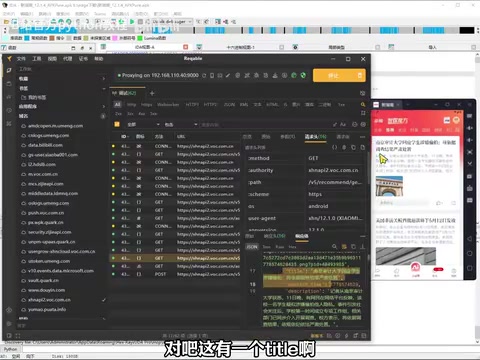
In the demonstration, the creator used the ReqCap packet capture tool, located the target API domain (XHN API) among numerous domains, and confirmed that the response data matched the APP's page content through keyword search (e.g., "南京审计").
Analyzing Encrypted Parameters
After finding the target endpoint, the next step is to analyze the dynamic parameters in the request. In this demonstration, the request headers contained two key dynamic fields:
- RMT Hash: A signature/encrypted value, clearly generated by some kind of hash algorithm
- Request timestamp: A 13-digit millisecond-level timestamp
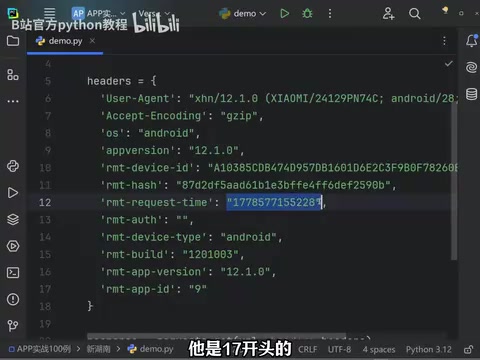
These two parameters change with every request, and you must understand their generation logic to successfully simulate requests. The traditional approach requires:
- Decompiling the APK to view smali code or Java source code
- Using IDA Pro to analyze the native layer (.so files) algorithm implementation
- Manually reading large amounts of assembly or pseudocode to understand the encryption logic
Sensitive logic in Android applications (such as signature algorithms and encryption key generation) is typically implemented through JNI (Java Native Interface) calls to native C/C++ code. This code is compiled into .so (Shared Object) files stored in the APK's lib directory. Compared to Java layer code that can be easily decompiled into readable source code by tools like jadx, reversing .so files requires analyzing ARM or x86 assembly instructions—an exponentially harder task. Developers also frequently use OLLVM obfuscation, anti-debugging detection, string encryption, and other techniques to further increase analysis difficulty. This is why native layer reverse engineering is considered the most challenging aspect of APP security analysis.
This process is extremely painful for beginners, and even experienced reverse engineers need to spend considerable time on it.
AI + IDA MCP: A New Paradigm for Reverse Analysis
What Is IDA MCP
IDA MCP is a service that exposes IDA Pro's analysis capabilities to AI models through the MCP protocol.
About IDA Pro: IDA Pro (Interactive Disassembler) is the industry-standard tool in the reverse engineering field, developed by Hex-Rays. A single-user license costs several thousand dollars. It can disassemble compiled binary files into assembly code and further generate C-like pseudocode through the Hex-Rays Decompiler plugin (the F5 feature). IDA supports virtually all mainstream processor architectures and file formats, making it an essential tool for professional reverse engineers.
About the MCP Protocol: MCP (Model Context Protocol) is an open protocol released by Anthropic in late 2024, designed to standardize communication between AI models and external tools/data sources. It uses a client-server architecture: MCP Servers encapsulate specific tool capabilities (such as IDA's decompilation features), while MCP Clients (such as Claude Desktop, Cursor, etc.) make calls on behalf of AI models. The core value of MCP lies in standardizing tool invocation—developers only need to write an MCP Server once, and any MCP-compatible AI client can use that tool, similar to how the USB protocol unified peripheral interfaces.
In simple terms, IDA MCP allows AI to directly "see" and operate on decompilation results in IDA, including:
- Reading function lists and decompiled code
- Analyzing algorithm logic and data flow
- Automatically locating key functions
- Generating executable Python code
Practical Steps
Step 1: Prepare the Environment
Import the target APP's APK into IDA Pro for decompilation, and start the IDA MCP service. Ensure the following services are running properly:
- IDA Pro has loaded the target file (typically a .so file extracted from the APK)
- The MCP service is started and connectable (usually listening on a local port)
- The AI client (such as Cursor/Claude) has the MCP connection configured
Step 2: Ask the AI
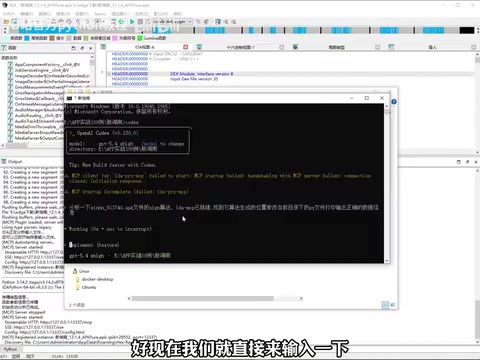
Once the environment is configured, send your analysis requirements directly to the AI as a prompt. The AI will automatically invoke IDA's analysis capabilities through the MCP protocol without any manual IDA interface operations. The key here is prompt quality—you need to clearly describe the objective (e.g., "analyze the RMT Hash generation algorithm") rather than vaguely saying "help me reverse this APP."
Step 3: AI Automatic Analysis
During the AI analysis process, you can observe IDA's output window at the bottom working in sync. The AI will:
- Automatically traverse the function list
- Locate code related to signature generation (through function names, string references, and other clues)
- Analyze algorithm implementation details (identifying hash algorithm types, key concatenation methods, etc.)
- Generate complete Python reproduction code
Verifying the Results
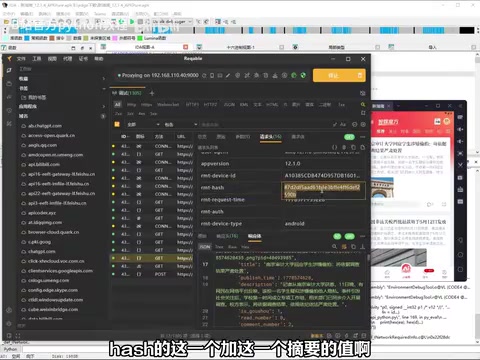
The AI ultimately concluded that the so-called "signature" field is not a traditional sign value, but rather an encryption key named "RMTHC." This perfectly matches the field name observed during packet capture, validating the accuracy of the AI's analysis.
The AI not only located the algorithm but also directly generated runnable Python code containing the Hash value calculation logic and complete request construction.
Key Technique: Skill Constraints to Improve Analysis Efficiency
In practice, the creator mentioned an important technique—configuring Skills (behavioral constraints) for the AI.
The background of this technique is closely related to the token consumption mechanism of large language models. When using LLMs for reverse analysis, each API call consumes tokens (the text units processed by the model). Pseudocode decompiled by IDA often contains thousands or even tens of thousands of lines. If the AI indiscriminately analyzes every function, token consumption becomes staggering. Taking Claude as an example, a single call processing large amounts of context can cost several dollars, and a complete reverse analysis without constraints could consume tens of dollars in API fees.
An unconstrained AI tends to "take detours," manifesting as:
- Analyzing irrelevant functions (such as UI rendering, log printing, and other unrelated code)
- Attempting too many invalid paths (such as analyzing meaningless obfuscated function names)
- Consuming large amounts of tokens without producing results
By providing the AI with a "behavioral guideline" that explicitly tells it:
- Which types of functions to prioritize (e.g., functions containing keywords like 'sign', 'hash', 'encrypt', 'key')
- What situations to skip immediately (e.g., obvious third-party library code, system framework code)
- Output format and code standards (e.g., requiring Python code with comments)
This can significantly reduce token consumption and improve analysis efficiency, compressing what might otherwise require dozens of interactions into just a few.
Final Verification: Code Runs Successfully
After simple debugging (resolving an SSL verification issue), the AI-generated code successfully retrieved data from the target APP. The SSL verification issue is a common obstacle in reverse engineering practice—many APPs implement SSL Pinning (certificate pinning), which hardcodes the server certificate fingerprint in the client code, rejecting all HTTPS connections with unexpected certificates. When reproducing requests in Python, you typically need to set the verify=False parameter to skip local certificate verification, or extract the APP's built-in certificate for the request.
The returned results contained title information like "南京审计" that matched the APP's page content, proving the entire reverse analysis workflow was completely correct.
You might not have noticed, but throughout the entire process, manual packet capture wasn't even necessary—the AI inferred the endpoint addresses, request parameters, and encryption logic autonomously by analyzing the APK's code structure. This means that even if an APP uses strong anti-capture measures (such as mutual certificate verification, custom protocols, etc.), the pure static analysis path remains viable.
Summary and Outlook
AI-assisted APP reverse engineering represents a major upgrade to the security research toolchain. Its core value lies in:
- Lowering the barrier: You don't need to master assembly language or reverse engineering—AI can "translate" low-level code for you
- Improving efficiency: Analysis that would traditionally take hours can be completed by AI in minutes
- End-to-end automation: From algorithm location to code generation in one step
Of course, this doesn't mean reverse engineering knowledge becomes unimportant. Understanding fundamental principles remains a prerequisite for asking the right questions and verifying results. AI is a powerful assistive tool, not a complete replacement. For learners, observing the AI's analysis process is actually an excellent way to understand reverse engineering principles—you can see how AI infers functionality from function names, traces data flow, and identifies common encryption patterns. These are all core thinking approaches in reverse engineering.
From an industry trend perspective, the MCP ecosystem is expanding rapidly. Beyond IDA MCP, tools like Ghidra (NSA's open-source reverse engineering tool) and Frida (a dynamic instrumentation framework) are also being connected to the MCP protocol. In the future, AI-driven automated security analysis will become a standard workflow for penetration testing and vulnerability research.
Key Takeaways
- Through the IDA MCP service, AI can directly read and analyze decompiled code in IDA Pro, enabling automated reverse analysis
- Traditional APP reverse engineering requires packet capture, decompilation, manual algorithm analysis, and many other steps—AI can dramatically simplify the workflow
- Configuring Skill behavioral constraints for AI reduces token consumption and prevents analysis from going off track
- AI can not only locate encryption algorithm positions but also directly generate runnable Python scraping code
- The entire workflow can even skip manual packet capture—AI autonomously infers endpoints and encryption logic
- The MCP protocol is becoming the standard interface for AI integration with professional tools, and the level of automation in reverse engineering will continue to increase
Related articles
 Tutorials
Cursor + Codex Dual-IDE Collaboration: A Practical Methodology for Open-Source Project Customization
A complete methodology for open-source project customization based on real-world experience, detailing the Cursor+Codex dual-IDE workflow, seven-stage process, MVP validation, and AI source code reading techniques.
 Tutorials
Cursor Multi-Agent in Practice: Building a Full-Stack Next.js Blog in 50 Minutes
Build a full-stack blog in 50 minutes using Cursor IDE's multi-Agent mode with Next.js, Clerk auth, and Supabase. Learn the 4-phase AI Agent workflow and key integration pitfalls.
 Tutorials
Building an AI Software Factory from Scratch: A Cursor Engineer's Hands-On Experience with Multi-Agent Collaboration
Cursor engineer Eric shares practical insights on building an AI software factory: automation levels, guardrail design, parallel Agent management, and scaling to 1000+ Agents for 24/7 development.