AI-Built Websites Look Ugly? This Design Reference Tool Fixes That
AI-Built Websites Look Ugly? This Desi…
styles.referraldesign turns top website design specs into Markdown files for AI-powered web development
AI coding tools excel at functionality but lack design sense. styles.referraldesign solves this by organizing popular websites' color schemes, fonts, spacing, and other design specs into downloadable Markdown files with visual UI previews. Simply download and feed them to your AI agent to generate professionally designed website interfaces—no design skills required.
Building Websites with AI: Aesthetics Is the Biggest Bottleneck
When we use AI tools (like Cursor, Bolt, etc.) to build or update websites, we often run into an awkward problem: the functionality works, but the interface just doesn't look good. Asking an AI agent to design your page typically produces results that lack aesthetic sense—messy color schemes, rough layouts, clearly far from professional standards.
There's a technical root cause behind this. AI coding tools like Cursor and Bolt are essentially code generation engines that excel at logical reasoning and syntax rules, but "aesthetics" is a highly subjective ability that depends on extensive visual sample training. Even multimodal models like GPT-4o or Claude tend to output "functionally correct but visually mediocre" results when generating UI code—because their training data contains far more "code that runs" than "code that looks great."
The core issue is that AI doesn't inherently possess design taste. It needs an explicit "design specification" to guide its output—including color schemes, font choices, spacing rules, etc. This structured constraint transforms the vague concept of "looking good" into a precise rule set that AI can execute, which is the key to solving the aesthetics problem. Most people, however, don't have the ability to write such a specification from scratch.
Is there a way to directly "borrow" excellent website designs that have been market-validated and convert them into a format AI can understand? Yes, there is.
Hidden Gem Tool: styles.referraldesign
While helping clients update their brand websites with AI, I stumbled upon a site called styles.referraldesign. Its core value is simple—it organizes the design specifications of the most popular websites into downloadable Markdown files.
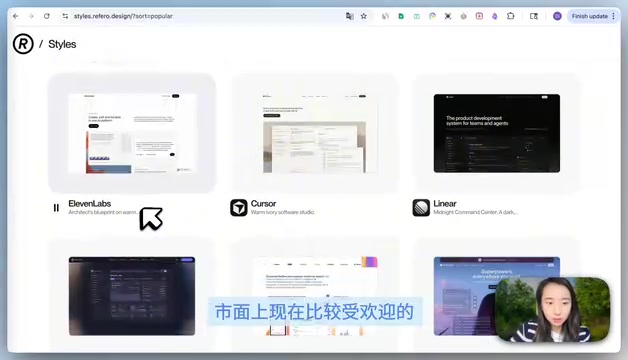
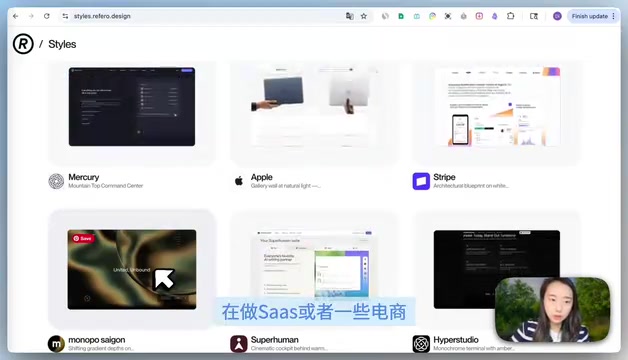
This site deconstructs and archives the page designs of numerous popular products. You can browse through Popular and Trending tabs to quickly find design references suited to your industry. Whether you're building a SaaS product, an e-commerce brand, or any other type of website, you can find comparable design solutions.
What Does It Actually Provide?
Taking Cursor's official website as an example, clicking into the detail page reveals two core areas:
Left Side: Visual Design Specification
The left side fully displays the website's UI interface and clearly lists key design elements:
- Color scheme: Complete palette including primary, secondary, and background colors
- Font choices: Which font families are used
- Font sizes and line heights: Typography parameters for headings, body text, captions, etc.
- Spacing rules: Whitespace logic between elements
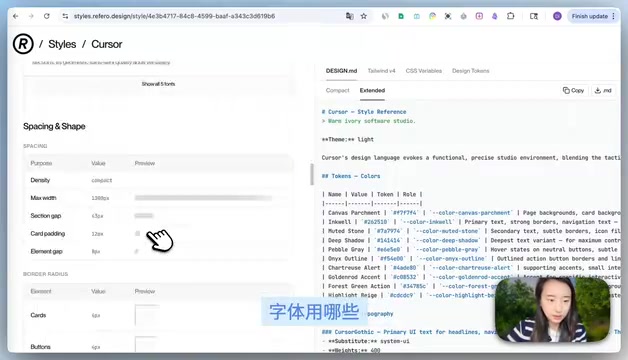
This visual interface is not only convenient for developers to understand but, more importantly, can be shown directly to clients to give them intuitive expectations of the final result.
Right Side: Downloadable design.markdown File
The right side is where the tool truly shines—a structured design.markdown file containing:
- Complete Design Guidelines
- CSS Design Tokens
- Design instructions for AI agents
It's worth explaining the concept of "CSS Design Tokens" here. Design Tokens are a method of abstracting design decisions into named variables, such as --color-primary: #6366F1 or --spacing-md: 16px. Originally popularized by Salesforce's Lightning Design System, they've become standard practice in mainstream tools like Figma and Tailwind CSS. For AI, the value of Design Tokens lies in being a "machine-readable design language"—AI doesn't need to understand "this blue looks professional," it just needs to know "the primary color is #6366F1, used on buttons and links," dramatically improving the consistency of generated interfaces.
You might wonder why design specs use Markdown format instead of PDF or images. There's a deep engineering logic behind this. Markdown is plain text that can be directly input into a large language model's Context Window without additional parsing steps. By contrast, PDFs require OCR conversion, and images need visual model processing—both introduce information loss. More importantly, Markdown's hierarchical structure naturally aligns with how LLMs understand information—the model can clearly identify "this is the color specification" and "this is the font specification," then precisely apply the corresponding rules when generating code.
All you need to do is download this Markdown file and feed it to your AI coding tool, and it will generate pages following this mature design specification.
Compared to the Previous Solution: awesome design.markdown
Previously, a project called awesome design.markdown circulated in the community, collecting over fifty design.markdown files also meant to guide AI in interface design.
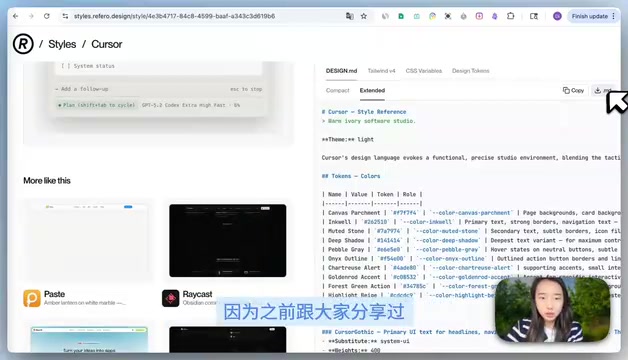
But it had an obvious shortcoming: only plain-text Markdown files with no visual UI preview. You couldn't intuitively see what actual interface the design spec would produce—choosing was pure guesswork.
The advantage of styles.referraldesign is that it perfectly combines "visible UI effects" with "machine-readable design specifications," significantly lowering the barrier to selection and use.
Practical Workflow: 5 Steps to Nail AI Website Design
The entire workflow is straightforward:
- Browse and filter: Use the Popular/Trending tabs on styles.referraldesign to find website designs matching your industry
- Preview and confirm: Use the left-side visual interface to confirm the design direction meets expectations
- Download the spec: Download the right-side design.markdown file locally
- Feed it to AI: Provide this Markdown file as context to your AI agent (Cursor, Claude, etc.)
- Generate pages: AI will strictly follow the design specification to output interface code
The core logic of this workflow is: Use excellent designs already validated by humans to constrain AI's output quality. You don't need to understand design yourself—just know how to pick references and download files, and you can get AI to produce professional-level interfaces.
It's worth noting that when using others' design specifications as reference, the boundaries are clear: design style itself (color preferences, spacing ratios) is generally not copyright-protected. What styles.referraldesign provides is a "deconstruction and synthesis" of publicly available website design languages, similar to a designer manually analyzing competitors. It's recommended to use these as a "starting point for design language" and then adjust based on your own brand characteristics—leveraging mature design experience while maintaining brand uniqueness.
Final Thoughts
As AI-assisted development becomes increasingly common, "design specifications" are becoming a new type of productivity resource. Whoever can more efficiently acquire and use these specs can pull ahead in AI website quality.
Tools like styles.referraldesign are essentially solving one core problem: enabling people who don't understand design to build good-looking websites with AI. If you're using AI for web development, I strongly recommend bookmarking this tool—it will save you enormous time spent repeatedly tweaking designs.
Related articles
 Tutorials
Cursor + Codex Dual-IDE Collaboration: A Practical Methodology for Open-Source Project Customization
A complete methodology for open-source project customization based on real-world experience, detailing the Cursor+Codex dual-IDE workflow, seven-stage process, MVP validation, and AI source code reading techniques.
 Tutorials
Cursor Multi-Agent in Practice: Building a Full-Stack Next.js Blog in 50 Minutes
Build a full-stack blog in 50 minutes using Cursor IDE's multi-Agent mode with Next.js, Clerk auth, and Supabase. Learn the 4-phase AI Agent workflow and key integration pitfalls.
 Tutorials
Building an AI Software Factory from Scratch: A Cursor Engineer's Hands-On Experience with Multi-Agent Collaboration
Cursor engineer Eric shares practical insights on building an AI software factory: automation levels, guardrail design, parallel Agent management, and scaling to 1000+ Agents for 24/7 development.