AI Code Explanation: Quickly Understand Someone Else's C# Code
AI Code Explanation: Quickly Understan…
Use AI code explanation to quickly understand others' C# code and boost development efficiency.
This article explains how AI code explanation solves the common pain point of understanding someone else's code. Using C# development and Tongyi Lingma as examples, it demonstrates a simple workflow: select code, right-click, and get a natural language explanation. Powered by large language models, this feature accurately identifies business logic and execution flow, making it ideal for code handoffs, Code Review, and open-source project learning — while also highlighting data security considerations.
The Pain of Inheriting Someone Else's Code
In software development, there's a scenario that nearly every programmer dreads: inheriting someone else's code. Whether it's a code handoff after a colleague leaves the company, or modifying someone else's code during team collaboration, reading and understanding another person's code logic is often a time-consuming and labor-intensive task.
According to statistics from software engineering research institutions, developers spend an average of about 58% of their working time reading and understanding code, rather than writing new code. In team collaboration, poor code readability also leads to the "Bus Factor" problem — when a key team member leaves, the modules they were responsible for become a maintenance nightmare because no one else understands them. Traditional solutions rely on comprehensive documentation standards and code review processes, but in fast-paced development environments, these standards are often difficult to enforce consistently.
This is especially true when code lacks comments — understanding it becomes exponentially harder. You need to read line by line, decipher the meaning behind variable names, and trace the logic chain of function calls. This process can consume enormous amounts of time with very little output.
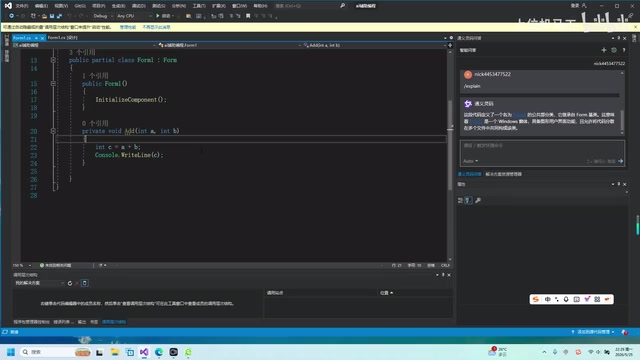
The good news is that, thanks to the rapid advancement of AI technology, we now have an efficient solution — AI code explanation. This article uses C# development as an example to demonstrate how AI-assisted tools can help you quickly understand code written by others.
What Is AI Code Explanation?
AI code explanation, as the name suggests, lets AI read a piece of code and then tell you in natural language what that code does. It's not a simple syntax translation — it can understand the code's business logic and execution flow, describing it in a way that's easy for humans to understand.
This capability is powered by large language models (LLMs) and their deep understanding of code semantics. Modern code intelligence tools are typically built on models specifically trained on code data, such as OpenAI Codex, DeepSeek Coder, and Tongyi Qianwen Code Edition. These models ingested billions of lines of open-source code from GitHub during training, enabling them to understand the syntax structures, common design patterns, and business semantics across different programming languages. Unlike earlier rule-based static analysis tools, LLMs can capture the "intent" of code rather than just its "structure," which makes them perform well even when explaining legacy code with poor naming conventions and no comments.
Currently, mainstream AI programming assistants all support this feature, each with its own strengths:
- GitHub Copilot: Jointly developed by Microsoft and OpenAI, deeply integrated into VS Code and Visual Studio, powered by the GPT-4 series models, with better support for English comments and internationalized projects;
- Cursor: A standalone IDE with built-in AI capabilities, supporting multiple model switching, ideal for developers seeking the ultimate AI experience;
- Tongyi Lingma: Developed by Alibaba Cloud, based on the Tongyi Qianwen large model, with better adaptation for Chinese business scenarios and the Alibaba Cloud ecosystem, offering a free version that's more accessible to developers in China.
These tools are typically integrated into the development environment as IDE plugins, making them very convenient to use. When choosing a tool, consider not only features but also data privacy policies, enterprise licensing, and compatibility with your existing development environment.
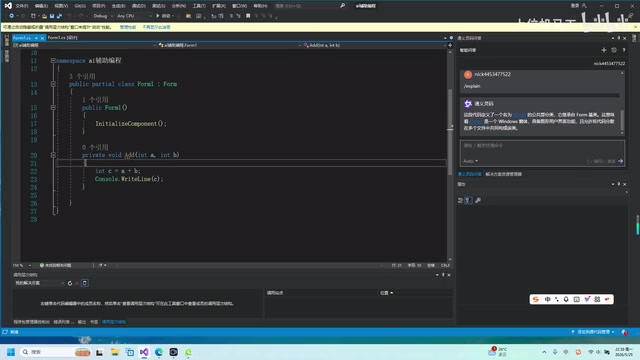
About C# and the .NET Ecosystem
C# (pronounced C Sharp) is an object-oriented programming language released by Microsoft in 2000 and serves as the core language of the .NET platform. It combines the performance advantages of C++ with Java's cross-platform philosophy, while introducing modern language features such as LINQ, async/await, and pattern matching. In enterprise development, C# is widely used in web backends (ASP.NET Core), desktop applications (WPF/WinForms), game development (Unity engine), and cloud service development.
Due to the long history of the .NET ecosystem, many enterprises have large volumes of legacy systems written with earlier versions of .NET Framework. These systems often lack documentation and their original developers have long since left — making them the quintessential scenario where AI code explanation delivers the most value.
Hands-On Demo: Explaining C# Code with Tongyi Lingma
Steps
Using Tongyi Lingma as an example, the entire process is straightforward and requires just three steps:
- Select the code: Drag your mouse to highlight the function or code block you want to understand
- Right-click menu: Right-click on the selected code and find the "Tongyi Lingma" option
- Click Code Explanation: Select the "Code Explanation" feature from the submenu
After clicking, the AI will automatically generate a detailed explanation of the code in the sidebar.
Analysis of the Explanation
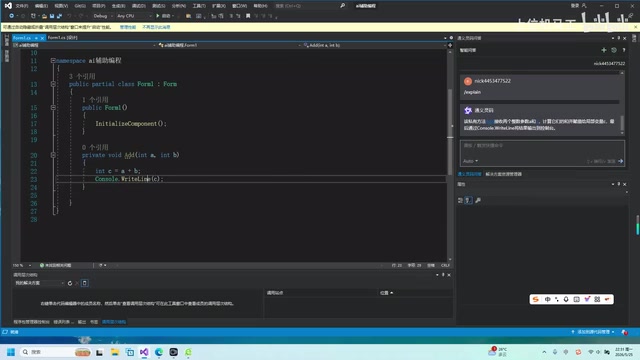
In the demo case, there's a private C# method called Add with the following logic: it receives two integer parameters, calculates their sum, and outputs the result. The AI's explanation was highly accurate:
- Method modifier: Correctly identified it as a
privatemethod - Method signature: Accurately described the method name as
Add, accepting two integer parametersAandB - Calculation logic: Explained that the result of
A + Bis assigned to the local variableC - Output operation: Pointed out that the result is output to the console via
Console.WriteLine
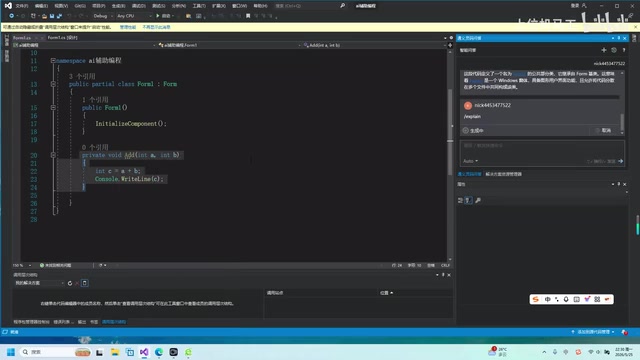
As you can see, the AI's explanation of this code was completely accurate, fully reconstructing the code's execution logic. While this example is relatively simple, in real-world scenarios involving complex methods spanning dozens or even hundreds of lines, AI code explanation can still provide structured logical breakdowns, significantly reducing the effort needed to understand the code.
Practical Use Cases and Recommendations
Use Cases
AI code explanation is particularly useful in the following scenarios:
- Code handoffs: Taking over a project from a departing colleague and quickly understanding each module's functionality
- Code review: Quickly understanding code changes submitted by others during Code Review
- Learning open-source projects: Reading open-source code on GitHub and understanding implementation approaches
- Legacy system maintenance: Dealing with old system code that's been around for years and lacks documentation
Recommendations
While AI code explanation is powerful, there are a few things worth keeping in mind:
- Explain in segments: For large blocks of code, it's better to select and explain by function or logical block for more effective results
- Verify with context: AI explanations are accurate in most cases, but for complex business logic, it's advisable to cross-check with the surrounding context
- Combine with other AI features: Code explanation can be used alongside AI-powered comment generation, code refactoring, and other features to create a complete code comprehension workflow
- Mind code security: When code is sent to a cloud-based AI service for explanation, the code content is actually being transmitted to third-party servers, which may pose risks of exposing trade secrets, core algorithms, or user data. Current mainstream tools address this by offering private deployment versions, committing not to use user code for model training, and providing Data Processing Agreements (DPAs) for enterprise compliance review. It's recommended that enterprises have their legal and security teams evaluate the tool's data processing policies before adopting AI programming tools, and establish clear internal usage guidelines that distinguish which code can be submitted to external AI services.
Summary
AI code explanation is one of the most practical features in today's AI-assisted programming landscape. It reduces the code comprehension process — which traditionally required extensive line-by-line reading and repeated analysis — down to just a few seconds. Behind this capability is the deep learning of massive code corpora by large language models, enabling them to not only recognize syntax structures but also understand the business intent behind the code.
For C# developers, whether using Tongyi Lingma or other AI programming tools, mastering this technique can significantly boost development efficiency — especially in work scenarios that require frequently reading and understanding other people's code. While enjoying the productivity gains that AI brings, it's also important to align with your organization's data security policies and choose the right tools and usage approaches.
Leveraging AI tools isn't cutting corners — it's a smarter way to work.
Key Takeaways
- AI code explanation is powered by large language models that automatically translate selected code into natural language descriptions, helping developers quickly understand code logic
- Using AI plugins like Tongyi Lingma, you only need to select code and right-click "Code Explanation" to complete the operation — an extremely streamlined workflow
- This feature is especially useful for code handoffs, Code Review, reading open-source projects, and other scenarios that require understanding someone else's code
- AI explanations are highly accurate, correctly identifying method modifiers, parameters, calculation logic, output operations, and other details
- When using this feature, it's recommended to explain code in segments, critically evaluate results, and follow your company's data security policies — choosing enterprise tools with private deployment options when necessary
Related articles
 Tutorials
Cursor + Codex Dual-IDE Collaboration: A Practical Methodology for Open-Source Project Customization
A complete methodology for open-source project customization based on real-world experience, detailing the Cursor+Codex dual-IDE workflow, seven-stage process, MVP validation, and AI source code reading techniques.
 Tutorials
Cursor Multi-Agent in Practice: Building a Full-Stack Next.js Blog in 50 Minutes
Build a full-stack blog in 50 minutes using Cursor IDE's multi-Agent mode with Next.js, Clerk auth, and Supabase. Learn the 4-phase AI Agent workflow and key integration pitfalls.
 Tutorials
Building an AI Software Factory from Scratch: A Cursor Engineer's Hands-On Experience with Multi-Agent Collaboration
Cursor engineer Eric shares practical insights on building an AI software factory: automation levels, guardrail design, parallel Agent management, and scaling to 1000+ Agents for 24/7 development.