AI Full-Stack Development Platform Project Structure Explained: Backend Modules & Frontend Directory Organization

Architecture and project structure breakdown of an AI full-stack development platform.
This article covers the three core components of an AI full-stack development platform: Java backend service, Vue.js PC admin console, and UniApp mobile app. It focuses on the backend MVC layered architecture (Controller→Service→DAO→Database) and the System core business module's directory organization, emphasizing how understanding project structure helps developers precisely reference files and quickly locate issues during AI-assisted development.
Why You Need to Understand the Overall Platform Structure
When using AI for development, we input prompts through a chat window to have AI generate code and files. While AI can get the job done without you knowing the project structure, understanding where generated code should go—which backend module, which frontend directory—gives you much better control over the entire development process.
This knowledge is valuable for two types of people: for experienced developers, it enables precise file references during AI-assisted development, such as telling AI "this file has an issue, please fix it"; for non-developers, at least knowing the approximate file locations helps quickly pinpoint problems when troubleshooting is needed.
Three Core Components of the Platform
The entire AI full-stack development platform consists of three core parts:
Backend Service
The backend is a Java program that, once started, provides API endpoints for data queries and business processing. It's the core engine of the entire system, responsible for receiving frontend requests, processing business logic, accessing the database, and returning results.
Technically, such backend services are typically built on the Spring Boot framework. Spring Boot greatly simplifies the configuration and deployment of Spring applications—developers don't need to write extensive XML configuration files and can quickly set up services through annotations and the convention-over-configuration principle. API endpoints generally follow RESTful design conventions, using HTTP methods like GET, POST, PUT, and DELETE to correspond to data query, creation, update, and deletion operations respectively. Once started, the backend service listens on a specific port (e.g., 8080), continuously waiting for and processing requests from the frontend.
PC Admin Console
A management system accessed through a web browser, used to operate various system functions including user management, role configuration, organizational structure, and menu management. Such admin panels are typically developed using modern frontend frameworks like Vue.js, adopting the Single Page Application (SPA) pattern where page transitions don't require full reloads, providing a user experience close to desktop applications.
Mobile App
Built with the UniApp technology framework, it can adapt to H5, mini-programs, and native apps, achieving multi-platform deployment from a single codebase. UniApp is a cross-platform development framework from DCloud, based on Vue.js syntax, allowing developers to write one set of code and compile it to iOS, Android, H5, WeChat Mini Programs, Alipay Mini Programs, and more. This "develop once, deploy everywhere" capability significantly reduces mobile development costs—compared to native development requiring separate Swift/Kotlin codebases for iOS and Android, UniApp only needs one codebase to cover all major platforms.
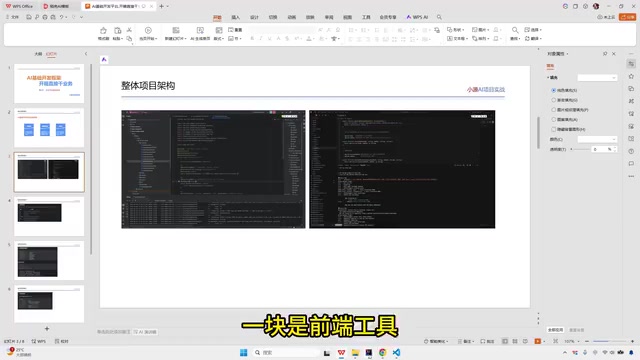
Backend Project Structure Breakdown
The backend project (AI Platform) has a clearly defined module structure, containing the following core modules:
Base Command - Foundation Module
Responsible for the project's base commands and common utility classes, serving as the underlying support for the entire project. This layer typically contains shared utility methods (such as date handling, string operations, encryption/decryption), global constant definitions, and base entity classes, depended upon and referenced by all other modules.
Framework - Framework Layer
Primarily handles framework-level configuration and entry point definitions, including integration configurations for various middleware and global exception handling. Specifically, this is where you configure the database connection pool (e.g., Druid), caching middleware (e.g., Redis), security framework (e.g., Spring Security or Sa-Token), CORS policies, logging frameworks, and more. These configurations determine the runtime environment and foundational capabilities of the entire system.
System - Core Business Module
This is the module we interact with most during daily development—core business code goes here. Feature modules generated by AI are also primarily placed under the System directory. For example, the SystemUserController for user management resides in this module.
When adding new business modules (such as a product module), the system automatically generates corresponding directory structures under System—for instance, a Product directory for product management code and an Order directory for order-related code, organized by business domain. This approach of dividing directories by business domain is known as "vertical slicing" in software engineering. Compared to horizontal slicing by technical layer (grouping all Controllers together, all Services together), it keeps related code co-located, making it easier to understand and maintain individual business features.
Work Flow - Workflow Service
Integrates the Flowable workflow engine, providing process approval and other business capabilities. Flowable is a lightweight business process engine based on the BPMN 2.0 (Business Process Model and Notation) international standard, used to implement common enterprise approval workflows such as leave requests, expense reimbursements, and contract signing. It allows visual process definition through flowcharts, with the system automatically routing tasks according to predefined nodes and conditions, supporting complex approval scenarios like co-signing, counter-signing, rejection, and delegation. Flowable forked from the Activiti project with significant improvements in both performance and functionality, making it one of the most active open-source workflow engines in the Java ecosystem.
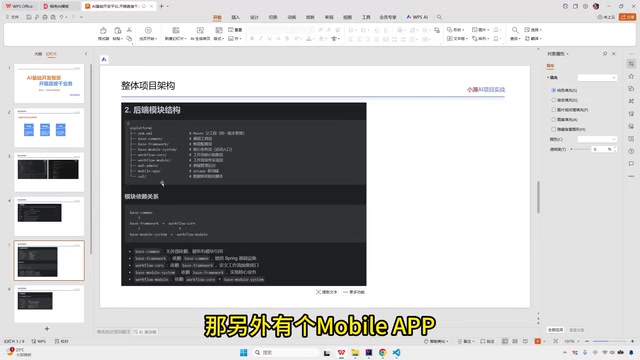
Frontend Project Structure Breakdown
The frontend consists of two independent projects:
- Web Admin: PC admin console project
- Mobile App: Mobile application project
Frontend-backend separation is the mainstream architecture pattern in modern web development. Frontend projects are developed and deployed independently, calling backend APIs via Ajax or Fetch API to retrieve data, while the backend returns only JSON-formatted structured data rather than complete HTML pages. The advantages of this architecture include: parallel frontend and backend development for improved efficiency, independent technology stack choices for the frontend (e.g., Vue, React), backend APIs serving both web and mobile clients simultaneously, and more flexible deployment and scaling.
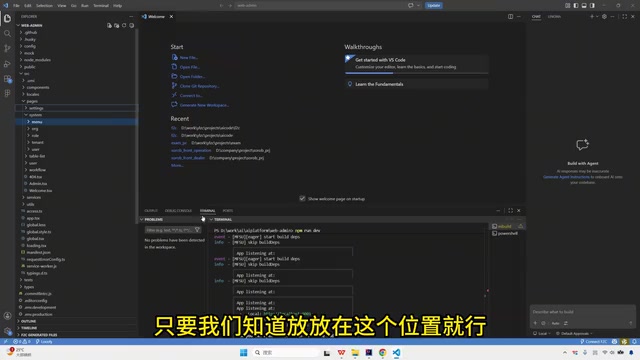
Frontend code is organized by functional modules under the src directory. Taking the System module as an example, it contains:
- User (User Management)
- Role (Role Management)
- Organization (Organization Management)
- Menu (Menu Management)
- Dictionary (Dictionary Management)
- Monitor (System Monitoring)
Each functional module directory typically contains page components (.vue files), API definitions (api.js), and local state management files, forming self-contained functional units.
Additionally, the project includes a SOCO directory that stores SQL scripts accumulated during development. These SQL scripts record the creation and modification history of database table structures, facilitating quick database initialization in new environments or version migrations.
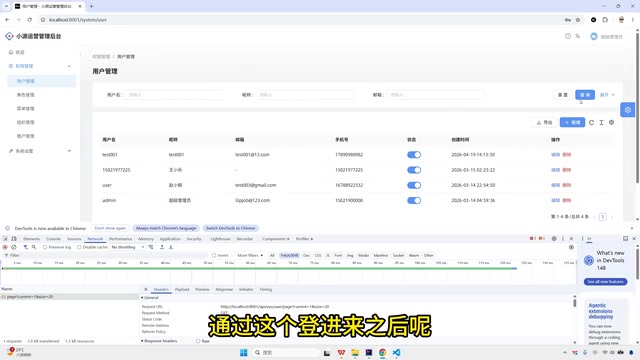
Request Processing Flow (MVC Layered Architecture)
Understanding the complete request flow is crucial for development and debugging. When a user performs an action in the browser (such as creating, deleting, or querying), the data flows through the following process:
- Browser initiates request → User action triggers an HTTP request (viewable via F12 Developer Tools)
- Controller Layer → Receives request parameters, performs parameter validation
- Service Layer → Processes core business logic
- Data Access Layer (DAO) → Executes database operations
- Database → Stores and retrieves data
- Returns layer by layer → Database → Data Access Layer → Service Layer → Controller Layer → Browser display
This is the classic MVC (Model-View-Controller) layered architecture, where each layer has its own responsibility. The MVC pattern was first proposed by Trygve Reenskaug in 1979 and has evolved over decades into a more fine-grained layering practice in Java web development: Controllers handle routing and parameter validation, the Service layer encapsulates business rules (such as permission checks, data calculations, and transaction management), and the DAO layer (Data Access Object) maps Java objects to SQL operations through ORM frameworks like MyBatis or JPA.
The core value of this layering lies in separation of concerns—modifying the database structure doesn't affect business logic, modifying business logic doesn't affect interface definitions, and each layer can be independently tested and replaced. When AI generates code, it also strictly follows this layered structure, automatically placing files in their corresponding locations: Controller classes go in the controller package, Service interfaces and implementations go in the service package, and data access classes go in the mapper or dao package.
Regarding F12 Developer Tools—this is the essential debugging tool for frontend work. The Network panel shows detailed information about all HTTP requests, including request URL, method, parameters, response status codes, and returned data. When a page has issues, the Network panel helps quickly determine whether it's a frontend rendering problem or the backend returning incorrect data—if the API returns correct data but the page displays abnormally, it's a frontend issue; if the API itself returns error messages, the backend code needs investigation. This is also a very practical troubleshooting method even for non-developers.
Development Tool Configuration
Two tools are used in daily development:
- IDE (e.g., IntelliJ IDEA): Manages backend Java code. IntelliJ IDEA is a Java integrated development environment by JetBrains, offering intelligent code completion, refactoring, debugging, version control integration, and other powerful features—it's the preferred tool for Java developers. It automatically recognizes project module structures and dependencies, providing visual project navigation.
- VSCode: Manages frontend code. Visual Studio Code is a lightweight code editor from Microsoft that dominates frontend development thanks to its rich plugin ecosystem. By installing plugins like Vue, ESLint, and Prettier, you can achieve a near-IDE-level development experience.
Both tools use a tree-structured directory on the left side to organize code files. When using AI programming tools (such as Claude Code) to generate code, they automatically explain which files were generated, what changes were made, and where they were placed—developers can directly view the corresponding code through the programming tool. The advantage of AI tools is that they understand the project's layered architecture and can automatically place generated code in the correct directory locations while handling cross-layer references.
Summary
Understanding the overall project structure isn't a prerequisite for AI-assisted development, but it significantly improves development efficiency and troubleshooting capabilities. The key takeaways are: business code primarily lives in the System module, frontend and backend are deployed separately, and requests follow a layered processing flow. With this foundational knowledge, you'll have a clear picture when using AI to generate features—knowing what AI is doing, where the code is placed, and where to look when issues arise.
Related articles
 Tutorials
Cursor + Codex Dual-IDE Collaboration: A Practical Methodology for Open-Source Project Customization
A complete methodology for open-source project customization based on real-world experience, detailing the Cursor+Codex dual-IDE workflow, seven-stage process, MVP validation, and AI source code reading techniques.
 Tutorials
Cursor Multi-Agent in Practice: Building a Full-Stack Next.js Blog in 50 Minutes
Build a full-stack blog in 50 minutes using Cursor IDE's multi-Agent mode with Next.js, Clerk auth, and Supabase. Learn the 4-phase AI Agent workflow and key integration pitfalls.
 Tutorials
Building an AI Software Factory from Scratch: A Cursor Engineer's Hands-On Experience with Multi-Agent Collaboration
Cursor engineer Eric shares practical insights on building an AI software factory: automation levels, guardrail design, parallel Agent management, and scaling to 1000+ Agents for 24/7 development.