AI-Generated 2D Game Animations & Scenes: A Practical Guide for Indie Developers
AI-Generated 2D Game Animations & Scen…
Use combined AI tools to create low-cost 2D game character animations and parallax scene maps.
This article covers a complete AI-assisted workflow for 2D game art production. For character animation, two approaches are presented: a free method using AI video generation plus keyframe extraction, and a paid dedicated AI animation tool (about $0.70 generates over a dozen animations). For scene maps, DeepSeek generates prompts paired with AI image tools to create far and near background layers, using parallax scrolling in Godot to achieve depth effects. The entire workflow dramatically lowers the art production barrier for indie developers.
Introduction
For indie game developers, creating 2D game art assets has always been one of the most time-consuming tasks. Character animations require frame-by-frame drawing, and scene maps demand careful design—work that typically requires professional art skills or expensive outsourcing.
By combining AI tools, we can significantly lower the barrier to 2D game art production. This article provides a detailed look at two methods for AI-generated character animations, as well as how to quickly generate game scene maps with parallax effects using AI, and ultimately import them into the Godot engine.
AI-Generated Character Animations: Two Approaches Compared
Approach 1: AI Video Generation + Keyframe Extraction (Free)
This is a completely free approach that's relatively tedious to execute, suitable for developers on a tight budget.
Technical Background on AI Image-to-Video
AI Image-to-Video technology is an extension of diffusion models. The core idea is to predict pixel changes in subsequent frames through a temporal diffusion process based on a static image, generating coherent dynamic sequences. Tools like Doubao and Wenxin Yiyan typically use models similar to Stable Video Diffusion or proprietary video generation models. The main challenge for these models is temporal consistency—ensuring the character's appearance doesn't drift or deform during motion. This is the fundamental reason why combat action animations have a low success rate: complex limb movements involve numerous occlusion relationships and perspective changes, and current models still tend to produce deformation or flickering when handling such high-degree-of-freedom actions. Dedicated AI animation tools partially circumvent this issue through pre-trained skeletal binding data for specific action types, resulting in more stable and controllable output.
Workflow:
-
Generate animation video: Use AI image-to-video tools like Doubao or Wenxin Yiyan, input character descriptions to generate animation videos. This step requires repeated attempts ("gacha rolling"), especially for combat action animations where the probability of satisfactory results is low.
-
Extract keyframes: Upload the generated video to a dedicated web tool to extract the keyframe sequence with one click.
-
Batch background removal: Use an online batch background removal tool to remove backgrounds (free version processes up to 6 images at a time).
-
Import into Godot: Import the processed frame sequences into the game engine.
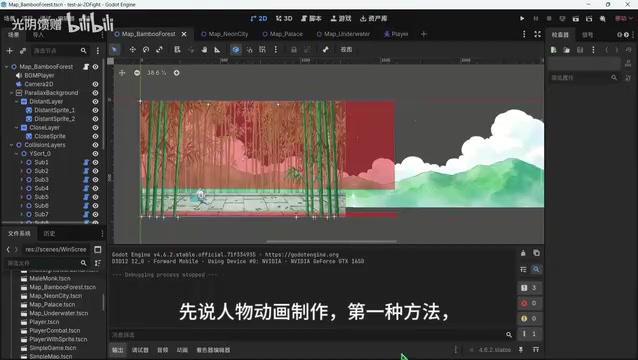
Pros: Completely free Cons: Tedious workflow, low success rate, difficult to precisely control combat actions
Approach 2: Dedicated AI Animation Generation Tool (Paid, Recommended)
This is the more recommended approach. While it requires a small payment, the results and efficiency far surpass Approach 1.
Workflow:
- Upload a character image
- Quick-select the desired animation type (or custom input)
- Click generate and wait for the AI to complete the animation sequence
- One-click background removal supported
- One-click export of frame sequences
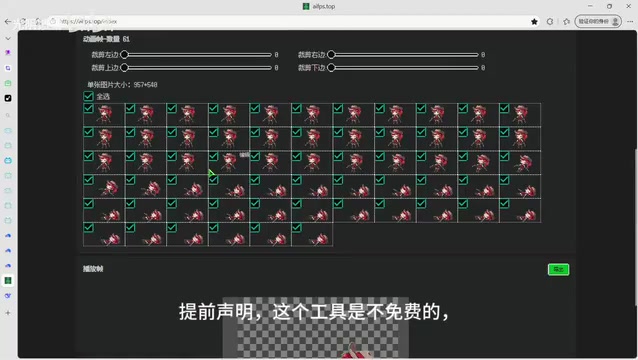
Sprite Sheet Animation in Games
Sprite Sheet Animation is the most classic animation implementation method in 2D games, with a history dating back to the early arcade era. Developers draw each action frame of a character as an individual image, then switch between them at fixed time intervals, leveraging the persistence of vision effect to create the sensation of movement—essentially the same principle as traditional film. In modern game development, these frames are typically packed into a single large image (Sprite Atlas/Texture Atlas) to reduce GPU texture switching overhead and improve rendering performance. Godot's AnimatedSprite2D node natively supports sprite sheet animation—developers simply need to import frame images into a SpriteFrames resource and set the playback frame rate (typically 8-24 FPS) to achieve smooth character animation. AI-generated frame sequences are usually in PNG format with transparent backgrounds, making them directly compatible with this workflow.
Cost breakdown: Credits need to be purchased—5 yuan (approximately $0.70 USD) buys 500 credits, and each generation costs 35 credits. In other words, 5 yuan is enough to generate over a dozen complete animations—excellent value for money.
Pros: Simple operation, stable results, supports multiple animation types Cons: Requires a small payment
AI-Generated Game Scene Maps: Parallax Background Creation
How Parallax Scrolling Works
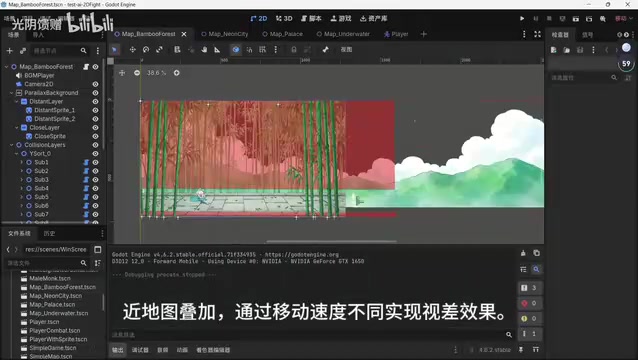
To achieve impressive map effects in 2D fighting games, the key technique is Parallax Scrolling. By dividing the scene into multiple layers of foreground and background, each moving at different speeds, you create a sense of depth. In practice, just two images—one for the far background and one for the near foreground—are sufficient to achieve a basic parallax effect.
Technical Background on Parallax Scrolling
Parallax scrolling is a visual technique originating from traditional animation production, dating back to Disney's multiplane camera used in 1937. In video games, this technique became widely known in the 1980s through arcade games like Moon Patrol (1982), and was later extensively used in classic side-scrolling games like Sonic and Super Mario. Its core principle is based on binocular parallax perception: nearby objects move faster while distant objects move slower. By simulating this natural phenomenon, 2D visuals can produce a strong sense of spatial depth. Modern game engines like Godot and Unity have built-in parallax layer (ParallaxLayer) components—developers simply need to set different scroll speed ratios for each layer to easily achieve this effect.
Complete AI Image Generation Workflow
The tool used here is an AI image/video generation editor created during a programming hackathon. It's free to use and produces good results.
Steps:
- Generate prompts: First use DeepSeek to generate detailed image generation instructions. Use a specific prompt template to have the AI plan descriptions for both the far background and near foreground.
DeepSeek's Role in Creative Workflows
DeepSeek is a large language model series developed by DeepSeek (the company). Its R1 and V3 versions have demonstrated capabilities comparable to GPT-4o and Claude 3.5 Sonnet across multiple benchmarks, attracting widespread industry attention due to their extremely low training costs. In AI-assisted game development workflows, large language models serve as "prompt engineers"—transforming developers' vague creative intentions into structured descriptions that image generation models can precisely understand. A high-quality image generation prompt typically needs to include multiple dimensions: subject description, style reference, lighting conditions, color tendencies, composition requirements, and negative prompts. For non-professional users, writing such prompts directly presents a significant barrier. Using an LLM for prompt generation and optimization effectively bridges the gap between natural language intent and the image model's "language"—this is one of the most common collaboration patterns in current multimodal AI workflows.
-
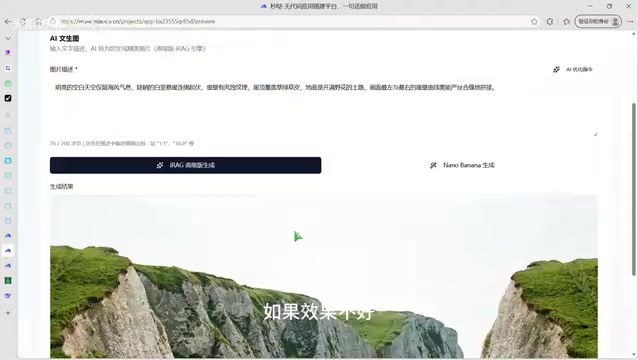
Generate images: Copy individual prompts into the image generation tool to create images. If the results aren't satisfactory, you can click "AI Optimize Prompt" to automatically adjust the prompt, or generate several more rounds.
-
Format conversion: Due to a minor bug in the tool, generated images may not be in standard PNG format and need to be processed with a format conversion tool.
-
Import into Godot: Import the processed background images into Godot and set different scroll speeds to achieve the parallax effect.
Background on Godot Engine
Godot is a completely open-source, free, cross-platform game engine officially open-sourced in 2014 by Argentine developers Juan Linietsky and Ariel Manzur. Unlike Unity and Unreal Engine, Godot uses the MIT license, meaning developers don't need to pay any royalties or subscription fees—commercial projects are equally free. Its unique Node and Scene system along with its dedicated scripting language GDScript (with Python-like syntax) give it a relatively gentle learning curve, making it ideal for indie developers getting started. After Unity announced pricing policy changes in 2023, a large number of indie developers flocked to the Godot community, causing its GitHub star count to double within weeks and further driving the engine's ecosystem growth. Currently, Godot 4.x supports publishing to 2D, 3D, mobile, and web platforms, making it one of the most popular free engines in the indie game development space.
Scene Creation Tips
- Far background images should use soft, low-saturation tones to create a sense of distance
- Near foreground images can include more detail and higher contrast
- Image width should be 2-3 times wider than the screen resolution to ensure no edges are exposed during scrolling
Complete Workflow Summary
The entire AI-assisted 2D game art production workflow can be summarized as:
- Character animation: Upload character concept art → AI generates animation sequence → Background removal and export → Import into Godot
- Scene maps: DeepSeek generates prompts → AI image tool generates far/near backgrounds → Format conversion → Import into Godot with parallax settings
- Follow-up work: Use AI to assist with writing Godot code, adding collision bodies and segmentation
The core advantage of this approach is low cost and high efficiency. Even programmers without any art background can quickly produce usable game art assets. While AI-generated assets may not match the refinement of professional hand-drawn work, they're more than sufficient for prototype validation, indie game development, or Game Jams.
Final Thoughts
AI tools are rapidly changing game development workflows. From character animation to scene design to code writing, AI can participate in virtually every aspect of 2D game development. For indie developers, leveraging these tools effectively means dedicating more energy to game design and gameplay innovation rather than being bogged down by art asset production.
AI-generated content still requires manual curation and adjustment, and the "gacha" process demands patience. But the reality is that this pathway is already several times more efficient than traditional methods.
Related articles
 Tutorials
Cursor + Codex Dual-IDE Collaboration: A Practical Methodology for Open-Source Project Customization
A complete methodology for open-source project customization based on real-world experience, detailing the Cursor+Codex dual-IDE workflow, seven-stage process, MVP validation, and AI source code reading techniques.
 Tutorials
Cursor Multi-Agent in Practice: Building a Full-Stack Next.js Blog in 50 Minutes
Build a full-stack blog in 50 minutes using Cursor IDE's multi-Agent mode with Next.js, Clerk auth, and Supabase. Learn the 4-phase AI Agent workflow and key integration pitfalls.
 Tutorials
Building an AI Software Factory from Scratch: A Cursor Engineer's Hands-On Experience with Multi-Agent Collaboration
Cursor engineer Eric shares practical insights on building an AI software factory: automation levels, guardrail design, parallel Agent management, and scaling to 1000+ Agents for 24/7 development.