AI Programming Spec Sheets: 30 Lines of Configuration Saves Five Rounds of Rework
AI Programming Spec Sheets: 30 Lines o…
Replace vague prompts with spec sheets to dramatically reduce AI programming rework.
Repeated AI programming rework stems from vague prompts that force the AI to guess requirements. The solution is upgrading prompts to spec sheets covering six elements: commands, testing, project structure, code style, Git workflow, and boundaries. A green/yellow/red three-tier boundary mechanism defines the AI's safety zone. Following three iron rules—precision over comprehensiveness, modular splitting, and verifiable requirements—30 lines of configuration eliminates multiple rounds of rework, and project-level spec files provide lasting benefits once configured.
Why Does Your AI Keep Reworking?
Using the same AI to write code, some people get production-ready results with a single sentence, while others go back and forth six or seven rounds and still end up worse than the first version. The problem isn't the AI—it's what you're giving it to work with.
When you say "build me a todo app," the AI has to make at least 25 decisions on its own: Should there be filtering? Where does data get stored? Does it persist after refresh? What colors to use? How to organize files? Everything you don't specify, it can only guess.
Why does AI "guess" your requirements? This is determined by how large language models work. When input information is incomplete, the model fills in gaps based on the most common patterns in its training data—what's called "maximum likelihood estimation" in statistics. For requests like "build a todo app," the model defaults to the most frequently occurring implementation in its training corpus: white background, simple list, no persistent storage. This isn't an AI mistake—it's a rational choice when information is missing. If it guesses right, you're lucky. If it guesses wrong, you're in for round after round of rework.
The solution: upgrade your prompts to spec sheets. This isn't some fringe hack—Google Cloud's AI Director wrote a dedicated article on this methodology, which was republished by O'Reilly; GitHub officially launched an open-source tool called SpecKit for this purpose, which has garnered nearly 100,000 stars in just over half a year since release.
Three Cases Showing the Gap: Vague Prompts vs. Spec Sheets
Case 1: Todo App—Night and Day in Appearance and Functionality
Building the same todo app with Claude Code, two approaches yield drastically different results:
Vague version (one sentence): "Build me a todo app." Result: glaring white background, no filtering, no counter, data lost on refresh, all code crammed into one file. It runs, but you'll need at least five or six more rounds of changes.
Spec version (30 lines): Specifies dark theme, rounded card design, five core features, local data persistence that survives refresh, and code split into five files. Result: what you get is basically what you wanted. 30 lines of text, five or six rounds of rework saved.
Case 2: User Registration—It's Not Just About Looks, It's About Security
A vague "build a user registration and login feature" can bury three fatal vulnerabilities:
- Plaintext password storage: You didn't say to encrypt, so the AI might store passwords as-is in the database—if breached, everything is exposed. Industry standards require using slow hashing algorithms like bcrypt, Argon2, or PBKDF2 with salting, rather than storing plaintext or using fast hashes like MD5/SHA1—the latter have long been proven crackable in seconds via rainbow table attacks.
- Error messages leaking information: Returning "this email doesn't exist" tells attackers which emails are real, enabling credential stuffing. This is a User Enumeration Attack, listed by OWASP (Open Web Application Security Project) as a common security risk. The correct approach is to return a unified ambiguous message.
- No rate limiting: Attackers can try thousands of passwords per second with zero resistance to brute force. Rate Limiting is a fundamental defense against brute force and credential stuffing attacks, typically combined with IP blocking and account lockout mechanisms.

The spec version explicitly states: passwords must be at least 8 characters with upper/lowercase and numbers, must be encrypted for storage, failed logins return a unified "email or password incorrect" message, and rate limiting is required to prevent attacks. These vulnerabilities aren't the AI being malicious—you just didn't tell it these things matter.
Case 3: Project-Level Specs—Configure Once, Govern All Conversations
The first two cases are single-task specs. But if you have an ongoing project, rewriting specs every time is exhausting. The solution: write a project-level spec sheet, configure it once, and the AI automatically follows it in every subsequent conversation.
Taking Claude Code as an example, place a claude.md file in the project root directory—it's just a plain text file, editable with Notepad. Claude Code reads it before starting any work, then follows the rules inside.
The technical principle behind this is worth understanding. LLMs have no persistent memory across conversations—each session starts from zero. claude.md artificially constructs a "persistent context" by automatically injecting project specifications at the start of each session, compensating for the model's inherent lack of memory. Similar mechanisms exist in other AI coding tools: Cursor uses .cursorrules files, GitHub Copilot supports .github/copilot-instructions.md, and Windsurf uses .windsurfrules. This design pattern is becoming an industry convention in AI-assisted development, essentially engineering, versioning, and team-sharing "system prompts."
What happens without this file? Today you say use TypeScript, tomorrow you forget to mention it, and it writes JavaScript—two languages mixed in one project. You ask it to create a file, it dumps it in the root directory, while your convention is to put it in the components folder. Files scattered everywhere, the project increasingly resembles a junkyard.
The Six-Element Framework: Standard Format for Spec Sheets
This framework comes from analyzing and summarizing over 2,500 AI programming configuration files on GitHub. A good spec sheet needs to cover six elements:
1. Commands
Common project operations—how to start, how to build, how to lint code. Once specified, the AI knows how to verify after completing each step.
2. Testing
What testing tools? How to run them? Where do test files go? After modifying code, the AI will automatically run tests to confirm nothing broke.
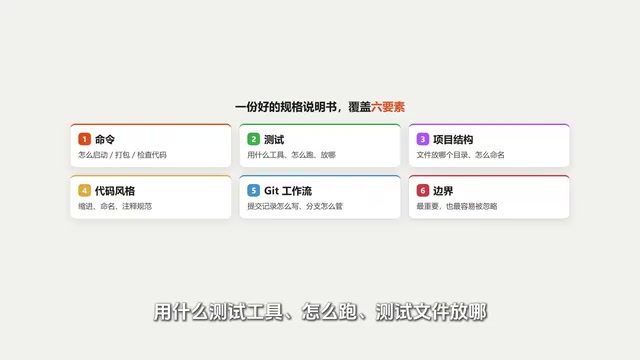
3. Project Structure
Which directory do files go in? How are they named? Once this is written, the AI won't randomly place new files.
4. Code Style
How many spaces for indentation, how to name variables, how to write comments. Without this, your code and the AI's code mixed together creates inconsistent styles and skyrocketing maintenance costs.
5. Git Workflow
How to write commit messages, how to manage branches. Similar to document version history—without clear rules, it'll make a mess.
6. Boundaries (Most Important)
This is the most easily overlooked yet most valuable element. Boundaries tell the AI: what it can do directly, what requires asking you first, and what it must never touch.
Three-Tier Boundaries: Defining the AI's Safety Zone
Boundary settings come in three tiers—this is the most critical design in the entire spec sheet:
🟢 Green Light—Do it directly, no need to ask. For example: running tests, installing dependencies, creating new files. Low risk, let it go ahead freely to boost efficiency.
🟡 Yellow Light—Ask me first, then do it. For example: changing database schema, deleting files, modifying configurations. Some risk involved—you want to confirm before it acts.
🔴 Red Light—Absolutely never do this. For example: pushing code directly to production, deleting test files, changing password configurations. Under no circumstances should it touch these.
This mechanism defines a safety zone for the AI: within the zone, it can work freely; outside the zone, it must report to you. This ensures both efficiency and safety.
Three Iron Rules: Pitfall-Avoidance Guide for Writing Spec Sheets
Iron Rule 1: Precision Beats Comprehensiveness
Spec sheets aren't better when longer. The more instructions you stuff in, the lower the probability the AI follows each one. Community experience suggests: keep project-level specs around 100 lines; beyond 200 lines, the AI starts "selectively forgetting."
This phenomenon has technical roots. Research shows that LLMs exhibit a "Lost in the Middle" effect when processing long contexts—information in the middle portion of input text is utilized with significantly lower probability than content at the beginning and end. Stanford's 2023 research confirmed that as context length increases, the model's attention weights on middle information systematically decrease. This means in a 500-line spec file, the 300 lines in the middle are likely being ignored by the model. The community experience of "keeping it under 100 lines" is precisely a practical adaptation to this technical limitation.

Key principle: Don't write what the AI already knows how to do—only write what it would guess wrong if you didn't specify.
Iron Rule 2: Modular Splitting
Don't create one monolithic file. Put a master spec in the root directory, frontend-specific specs in the frontend directory, backend-specific specs in the backend directory. The AI reads whichever spec corresponds to the directory it's working in, without being distracted by irrelevant information.
Iron Rule 3: Every Requirement Must Be Verifiable
Every requirement should be written as a checkable standard. This principle aligns closely with Test-Driven Development (TDD) in software engineering—TDD requires writing tests before code, essentially pre-defining "success criteria." Verifiable requirements in spec sheets play the same role: they provide the AI with a self-checking loop, allowing it to run tests for verification after completion rather than relying on subjective human judgment. When AI output doesn't meet expectations, you can precisely identify which spec wasn't followed, instead of facing a vague "something feels off."
There's only one criterion: Can the AI check whether it met the standard after completing the work?
- ❌ "Code quality should be good"—that's a wish
- ✅ "After changes, all tests pass"—that's a standard
- ❌ "Error handling should be thorough"—that's a wish
- ✅ "All API endpoints return a unified format, errors use corresponding status codes"—that's a standard
Core Philosophy: You Make Decisions, AI Executes

Starting today, remember three things:
- You make decisions, AI executes. You're not pitching ideas for the AI to decide on your behalf.
- 30 precise lines of instructions are far more effective than one vague sentence.
- Configure project specs once, benefit from every conversation thereafter.
Practical tip: Even if you're not a programmer, you can hand a spec sheet template directly to the AI and say "help me fill out this template based on my project." The AI will analyze your project structure, auto-fill the content, and you just need to review and confirm.
The essence of a spec sheet is transforming those "obvious" requirements in your head into clear instructions that the AI can read, execute, and self-verify. This 30-line investment pays off with the long-term benefit of never starting from zero in any conversation again.
Key Takeaways
- Upgrading vague prompts to spec sheets—30 lines of configuration saves 5-6 rounds of rework, dramatically improving AI programming efficiency
- Spec sheets should cover six elements: commands, testing, project structure, code style, Git workflow, and boundary definitions
- The three-tier boundary mechanism (green light = do it, yellow light = confirm first, red light = never touch) is the most valuable design in a spec sheet
- Three iron rules: precision beats comprehensiveness (keep under 100 lines), modular directory management, every requirement must be verifiable
- Project-level spec files (like claude.md) can be configured once for long-term effect, eliminating the need to repeat requirements in every conversation
Related articles
 Tutorials
Cursor + Codex Dual-IDE Collaboration: A Practical Methodology for Open-Source Project Customization
A complete methodology for open-source project customization based on real-world experience, detailing the Cursor+Codex dual-IDE workflow, seven-stage process, MVP validation, and AI source code reading techniques.
 Tutorials
Cursor Multi-Agent in Practice: Building a Full-Stack Next.js Blog in 50 Minutes
Build a full-stack blog in 50 minutes using Cursor IDE's multi-Agent mode with Next.js, Clerk auth, and Supabase. Learn the 4-phase AI Agent workflow and key integration pitfalls.
 Tutorials
Building an AI Software Factory from Scratch: A Cursor Engineer's Hands-On Experience with Multi-Agent Collaboration
Cursor engineer Eric shares practical insights on building an AI software factory: automation levels, guardrail design, parallel Agent management, and scaling to 1000+ Agents for 24/7 development.