AI Vibe Coding in Practice: Porting a Claude Code Usage Meter to the LiChuang DevBoard

AI Vibe Coding successfully ports a Claude Code usage display project to the LiChuang DevBoard
A Bilibili creator used AI Vibe Coding to port a GitHub project that displays Claude Code API usage on hardware to the LiChuang DevBoard (ESP32-S3), also converting the communication method from Bluetooth to WiFi. The entire process required no manual line-by-line code rewriting—just providing the original project materials and target hardware specs for AI to handle the adaptation, demonstrating AI's practical value in lowering the barrier to embedded development.
Project Background: A Fun Usage Display Device
There's a creative project on GitHub that displays Claude Code's API usage, reset time, and pixel-art animations on a hardware screen in real time. Claude Code is Anthropic's command-line AI programming tool that uses a subscription-based billing model, where users have usage quotas within a given cycle and get rate-limited once they exceed them. This makes API usage monitoring especially important for power users. The original project parses data from Anthropic's usage API and transforms abstract numbers into an intuitive hardware display. This approach of visualizing software data on physical hardware—similar to CI/CD status lights or server load dashboards commonly used by developers—has always been a popular direction in the maker community.
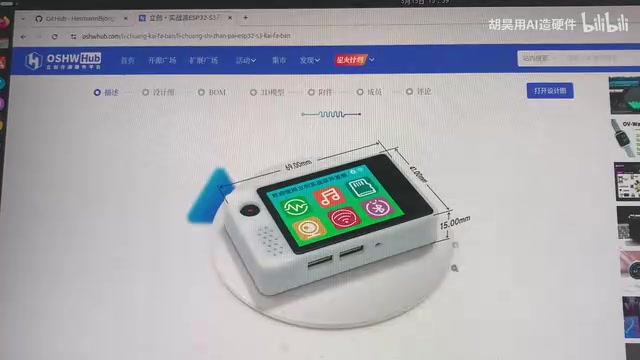
However, the original project uses specific hardware that not everyone has. A Bilibili content creator only had a LiChuang DevBoard (立创实战派) on hand, so he made a bold attempt: feed the project materials directly to AI and let it handle the code porting. The LiChuang DevBoard is an ESP32-S3-based development board released by the LCEDA open-source hardware community, featuring an integrated LCD color display, touch functionality, WiFi/Bluetooth modules, buttons, and expansion interfaces. The ESP32-S3 is powered by a dual-core Xtensa LX7 processor running at up to 240MHz with AI acceleration instruction set support. Thanks to its high integration and low cost (typically under 100 RMB), this board is widely popular in China's maker community and commonly used for IoT prototyping and embedded systems learning.
The Porting Process: A Real-World AI Vibe Coding Case Study
The core approach of the entire porting process is remarkably simple—provide the AI with the original project's materials (including code, hardware interface documentation, etc.) and have it regenerate adapted code based on the LiChuang DevBoard's hardware specifications. This "Vibe Coding" approach eliminates the tedious process of manually reading documentation, understanding hardware differences, and rewriting code line by line.
Vibe Coding is a concept coined by Andrej Karpathy in early 2025, referring to a programming style where developers describe requirements in natural language and rely entirely on AI to generate code, without directly writing or even fully understanding every line. The core philosophy is "if it feels right, it's good enough"—developers focus on the end result rather than implementation details. It fundamentally differs from traditional AI-assisted programming (like GitHub Copilot's code completion): in Vibe Coding, AI takes the leading role rather than a supporting one.
Results After Porting
The ported version retains all core features of the original project:
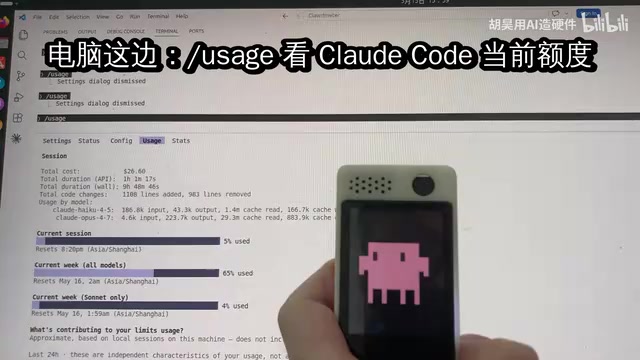
- Pixel-art animation display: The screen plays smooth pixel-art animations, and users can switch between different animations using buttons. The visual effects are quite impressive.
-
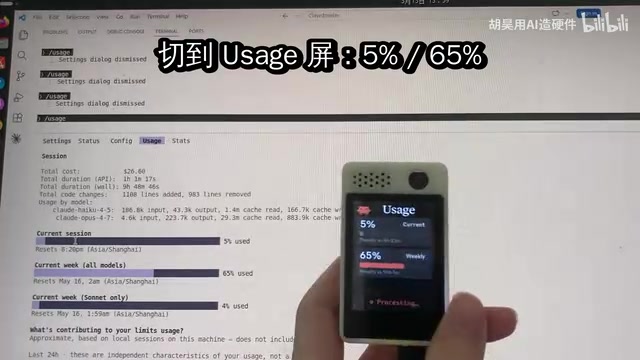
Real-time usage viewing: Touching the screen displays Claude Code's current usage information. Verification confirmed the data closely matches actual usage figures, proving that both the data retrieval and parsing logic work correctly.
-
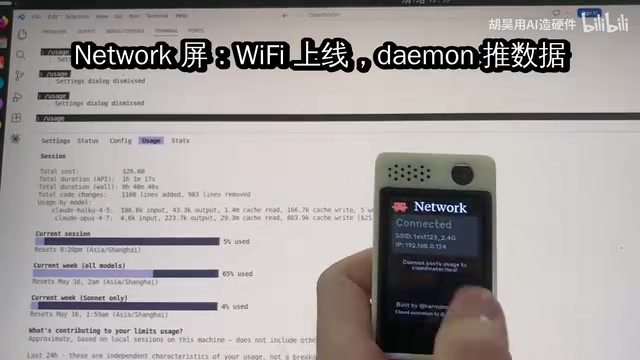
Connection status display: Pressing a specific button shows the current network connection status, making it easy to troubleshoot issues.
Communication Overhaul: From Bluetooth to WiFi
Notably, the original project uses Bluetooth to communicate with the computer, but since the creator's computer supports WiFi, he asked the AI to change the communication method from Bluetooth to WiFi. This requirement change was also handled entirely by AI, demonstrating its ability to understand context and perform adaptive modifications.
From a technical perspective, Bluetooth (especially BLE) and WiFi each have their strengths in embedded communications. BLE offers extremely low power consumption and simple pairing, making it ideal for short-range point-to-point communication, but it has limited bandwidth (BLE 5.0 theoretical max of 2Mbps) and requires a pairing program running on the computer. WiFi provides higher bandwidth and longer range, supports standard protocols like HTTP/WebSocket, and allows devices to connect directly to the local network without a dedicated pairing process. For scenarios requiring frequent cloud API data retrieval, WiFi is the more sensible choice since the device can access the internet directly for usage data without routing through a computer. This explains why the creator chose to switch to WiFi—it not only simplifies the architecture but also improves the user experience.
Implications for Hardware Developers
AI Lowers the Barrier to Embedded Development
Traditional embedded project porting requires developers to simultaneously possess: understanding of the original project's code, familiarity with the target hardware, and experience handling various compatibility issues. Specifically, porting involves adaptation at multiple levels: first, differences in the Hardware Abstraction Layer (HAL), where different MCUs have different GPIO numbering, SPI/I2C bus configurations, and interrupt mechanisms; second, display driver adaptation, where different screens have different resolutions, driver ICs (such as ST7789, ILI9341, etc.), and color formats that need corresponding modifications; and third, development framework differences, where APIs differ completely across frameworks like Arduino, ESP-IDF, and MicroPython. A seemingly simple port might involve modifying dozens of files and extensive debugging.
Now, AI can handle most of this "translation" work—developers only need to provide correct input materials and clear requirement descriptions. AI can understand the differences between hardware platforms and automatically complete pin mapping, driver replacement, and interface adaptation.
Practical Tips: How to Use AI for Hardware Project Porting
If you have a LiChuang DevBoard or any other development board, you can absolutely try a similar approach:
- Find an interesting hardware project on GitHub
- Collect the project source code, hardware documentation, interface specifications, and other materials
- Provide these materials along with your target hardware specifications to AI
- Have AI generate adapted code, then fine-tune based on actual runtime behavior
This approach is especially suitable for hardware enthusiasts who "have lots of ideas but limited time." AI won't replace your creative vision for a project, but it can dramatically accelerate the journey from idea to implementation. It's worth noting that while AI can handle most code-level adaptation, physical-layer concerns like hardware wiring, power supply design, and signal integrity still require the developer's own judgment.
Conclusion
This case demonstrates the practical value of AI-assisted programming in the embedded systems domain. Switching communication protocols from Bluetooth to WiFi, adapting code from one hardware platform to another—tasks that previously took hours or even days can now be completed quickly through AI Vibe Coding. As AI programming capabilities continue to improve, the barrier to hardware development will keep dropping, and more interesting DIY projects will emerge. For embedded developers, the core competitive advantage is shifting from "being able to write correct low-level code" to "being able to propose valuable ideas and accurately describe requirements"—perhaps the most profound transformation in hardware development in the AI era.
Related articles
 Tutorials
Cursor + Codex Dual-IDE Collaboration: A Practical Methodology for Open-Source Project Customization
A complete methodology for open-source project customization based on real-world experience, detailing the Cursor+Codex dual-IDE workflow, seven-stage process, MVP validation, and AI source code reading techniques.
 Tutorials
Cursor Multi-Agent in Practice: Building a Full-Stack Next.js Blog in 50 Minutes
Build a full-stack blog in 50 minutes using Cursor IDE's multi-Agent mode with Next.js, Clerk auth, and Supabase. Learn the 4-phase AI Agent workflow and key integration pitfalls.
 Tutorials
Building an AI Software Factory from Scratch: A Cursor Engineer's Hands-On Experience with Multi-Agent Collaboration
Cursor engineer Eric shares practical insights on building an AI software factory: automation levels, guardrail design, parallel Agent management, and scaling to 1000+ Agents for 24/7 development.