Six Pitfalls and a Three-Layer Solution for Implementing AI-Powered API Test Automation
Six Pitfalls and a Three-Layer Solutio…
AI-generated API automation scripts need human expertise to identify flaws and ensure real-world success.
Through a real interview scenario, this article reveals the huge gap between "using AI to generate scripts" and "making AI automation actually work." AI-generated API automation scripts suffer from six common pitfalls: business logic misunderstanding, hardcoded dynamic parameters, missing pre/post dependencies, overly simplistic assertions, absent exception handling, and environment mismatches. The article presents a systematic five-step diagnostic method and six optimization strategies, centered on the core principle: use AI for efficiency, use people for quality.
Introduction: The Dividing Line Between Using AI and Actually Implementing It
A software test engineer with four years of experience was asked during an interview: "What problems do you encounter when actually implementing API automation scripts generated by AI?" His answer was, "The generated scripts can be used directly." When the interviewer pressed further about prompt optimization, dynamic parameter handling, and environment switching, he was instantly stumped.
This real interview scenario precisely reveals a critical dividing line in the testing industry today: Being able to use AI to generate scripts and being able to actually implement AI automation in a real project are two entirely different levels of competence.
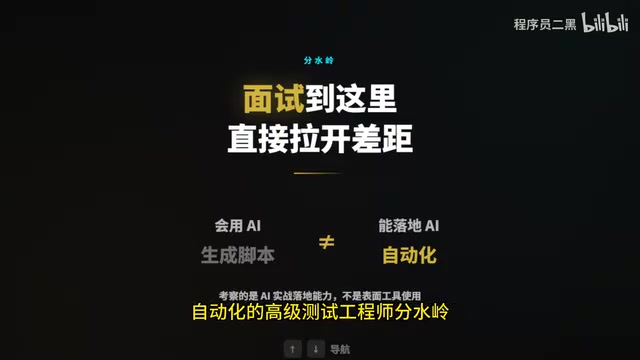
Many test engineers simply copy and run AI-generated scripts, only to face repeated failures in production. Interviewers aren't testing whether you know how to use ChatGPT or Copilot — they're testing whether you can identify AI's limitations, backstop them with hands-on experience, and truly bring AI-powered API automation into a production environment.
Layer One: Six Common Pitfalls of AI-Generated API Automation
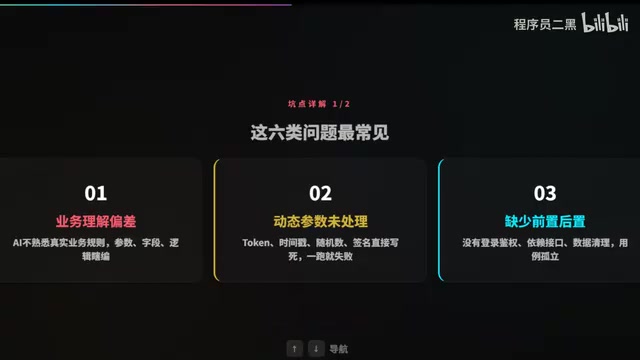
1. Business Logic Misunderstanding — AI Is "Making Things Up"
AI doesn't understand your actual business rules. The parameters, fields, and logic it generates are often "reasonable guesses" based on generic patterns. For example, with an e-commerce order placement API, AI might fabricate non-existent field names or mark required parameters as optional. The script might appear to run fine, but the business logic is completely wrong.
2. Unhandled Dynamic Parameters — Hardcoding Is a Recipe for Failure
Dynamic parameters like tokens, timestamps, random numbers, and signatures are often hardcoded by AI with fixed values. The first run might pass by luck, but the next time the token expires or the timestamp becomes invalid, the script immediately breaks. This is the most common and most easily overlooked pitfall in API automation implementation.
3. Missing Pre/Post Dependencies — Test Cases Running in Isolation
AI-generated scripts typically focus only on calling a single API, without automatically handling login authentication, data preparation for dependent APIs, or test data cleanup. A test case for querying order details is a house of cards if no order has been created first.
4. Overly Simplistic Assertions — A 200 Status Code Doesn't Mean Success
AI-generated assertions usually only verify whether the HTTP status code is 200, but that's far from sufficient. An API might return 200 while the response body contains an "insufficient balance" error message. Truly effective assertions need to cover core business fields, data consistency, and the completeness of returned data across multiple dimensions.
5. Missing Exception Scenarios — Works on Sunny Days, Crashes When It Rains
AI-generated test scripts almost never account for unstable factors like timeout retries, exception handling, or network fluctuations. In CI/CD pipelines, occasional API response timeouts are the norm. Scripts without fault tolerance mechanisms cause the entire pipeline to fail frequently, seriously impacting team efficiency.
6. Environment Mismatch — Pointing Directly at Production
AI might generate production environment addresses and configurations directly. Running these without review could result in data contamination at best, or a production incident at worst. Environment switching (development, testing, staging, production) configuration management is something AI can hardly adapt to automatically.
Layer Two: A Five-Step Method for Precise Problem Diagnosis
When AI-generated scripts have issues, you can't simply "tweak them manually." You need a systematic diagnostic approach:
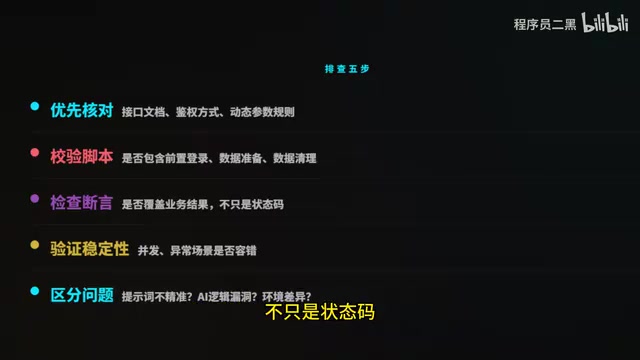
Step 1: Cross-check the API documentation. First verify whether the request method, parameter types, authentication method, and dynamic parameter rules match the documentation. Many problems stem from AI "imagining" API specifications that don't exist.
Step 2: Validate pre/post workflows. Check whether the script includes the complete workflow: pre-login, data preparation, dependent API calls, and post-test data cleanup. Missing any step can make test cases non-reproducible.
Step 3: Review assertion coverage. Do the assertions cover business outcomes, not just status codes? Do they validate key business fields? Do they verify data consistency at the database level?
Step 4: Verify script stability. Run the script under concurrent and unstable network conditions to observe whether it has reasonable fault tolerance handling.
Step 5: Identify the root cause. Determine whether the problem stems from imprecise prompts, inherent logical flaws in the AI, or environmental differences. Different root causes require different resolution strategies.
Layer Three: Six Optimization Strategies for Lasting Implementation
Precision Prompt Engineering
Don't just tell AI "generate a test script for XX API" and call it done. High-quality prompts should include: complete API documentation, authentication rules, environment URLs, field constraints, and business rule descriptions. The more precise the prompt, the higher the quality of the AI's output.
Mandatory Dynamic Parameter Handling
Explicitly require in your prompts that AI implements automatic token retrieval and refresh, dynamic timestamp generation, real-time signature calculation, and random generation of unique data (such as order IDs). Include these as hard requirements in your prompt templates.
Standardized Script Structure

Require AI-generated scripts to follow a standardized structure: Setup data → Core API call → Assertion validation → Cleanup. Achieve data isolation between test cases to ensure each can run independently without interfering with others.
Custom Business Assertions
Require AI to validate not just status codes, but also the values, data types, and data ranges of key business fields, as well as database-level insertion consistency. For example, with a create-user API, you should not only check that the returned user ID is not empty, but also verify that a corresponding record was actually added to the database.
Add Fault Tolerance and Retry Mechanisms
Incorporate timeout settings, failure retries (2-3 attempts recommended), exception handling, and detailed logging into scripts. These fault tolerance mechanisms significantly improve script stability in CI/CD environments.
Human Review as a Closed Loop
This is the most critical step: AI produces the first draft, humans verify the business logic, then integrate it into the automation framework. Never skip the human review step. AI is an efficiency tool, not a replacement.
Conclusion: Use AI for Efficiency, Use People for Quality
The core of this interview question is whether you can identify AI's limitations and compensate with professional expertise. Average test engineers copy and paste AI scripts directly. Senior test engineers understand:
- Identify the six common pitfalls of AI-generated scripts and mitigate risks at the generation stage
- Use a systematic five-step diagnostic method to pinpoint root causes instead of blindly "tweaking things manually"
- Leverage prompt engineering and process standards to get higher-quality automation scripts from AI
- Always maintain a human review closed loop to ensure business logic correctness
In the AI era, a test engineer's core competitiveness isn't about whether you can use AI tools — it's about whether you can make AI tools truly serve project quality. Use AI for efficiency, use people for quality — that's the right approach to implementing AI-powered API test automation.
Related articles
 Tutorials
Cursor + Codex Dual-IDE Collaboration: A Practical Methodology for Open-Source Project Customization
A complete methodology for open-source project customization based on real-world experience, detailing the Cursor+Codex dual-IDE workflow, seven-stage process, MVP validation, and AI source code reading techniques.
 Tutorials
Cursor Multi-Agent in Practice: Building a Full-Stack Next.js Blog in 50 Minutes
Build a full-stack blog in 50 minutes using Cursor IDE's multi-Agent mode with Next.js, Clerk auth, and Supabase. Learn the 4-phase AI Agent workflow and key integration pitfalls.
 Tutorials
Building an AI Software Factory from Scratch: A Cursor Engineer's Hands-On Experience with Multi-Agent Collaboration
Cursor engineer Eric shares practical insights on building an AI software factory: automation levels, guardrail design, parallel Agent management, and scaling to 1000+ Agents for 24/7 development.