Alibaba Cloud Bailian Platform Hands-On: Complete Tutorial from API Calls to Multi-Turn Conversations

Complete developer guide to Alibaba Cloud Bailian platform from API setup to multi-turn conversations
This article provides a hands-on guide to Alibaba Cloud's Bailian platform, covering API Key setup, basic calls with deep thinking mode, streaming output implementation, multi-turn conversation mechanics (which rely on resending full history rather than model memory), and prompt engineering with system/developer/user/assistant roles for safety guardrail configuration. The platform's OpenAI-compatible interface ensures low migration costs for developers.
Introduction
Alibaba Cloud Bailian is Alibaba Cloud's core platform for providing LLM services, integrating models like the Qwen (Tongyi Qianwen) series. This article walks you through hands-on code examples covering API Key setup, basic calls, streaming output, multi-turn conversations, and prompt engineering to help developers quickly get started with LLM application development.
Alibaba Cloud Bailian, officially launched in 2023, is a one-stop LLM service platform designed as a unified entry point for enterprises and developers to access large model capabilities. The platform offers not only Alibaba's proprietary Qwen series but also third-party open-source models like DeepSeek and Llama. Its core value lies in abstracting away complex infrastructure work—model deployment, inference acceleration, API management—into standardized services, so developers don't need to worry about GPU scheduling or model loading details.
Environment Setup: Getting Your API Key and Basic Configuration
Registration and API Key Generation
The first step is obtaining an API Key. Go to the Alibaba Cloud website, click "Try Now" to enter the Bailian platform, find the "My API Key" option, and click "Create" to generate a new key if you don't have one.
Important: The API Key is the sole identifier for billing. Never share it with others, or your balance may be consumed by someone else. For learning purposes, a top-up of 10-20 RMB is more than enough for daily experiments—excellent value for money.
Basic Code Configuration
The Bailian platform is compatible with the OpenAI standard interface, making configuration straightforward:
- Import the OpenAI standard SDK
- Enter your API Key (can be set as a system environment variable)
- Set the Base URL to Alibaba Cloud's service endpoint (same for all users)
The Chat Completions API established by OpenAI in 2022-2023 has become the de facto standard for LLM calls. It defines a unified request format (with parameters like model, messages, temperature) and response format (with choices array, usage statistics, etc.). Many domestic and international LLM providers (such as Alibaba Cloud, Zhipu AI, Moonshot, etc.) have adopted this standard, meaning developers can seamlessly switch between models by simply changing the base_url and api_key, greatly reducing migration costs. This compatibility also allows applications built on the OpenAI SDK to directly connect to domestic model services.
Basic Calls: Full Output and Deep Thinking Mode
Your First API Call
Using the Qwen 3.5-32B model as an example, let's build a simple Q&A request—say, asking "Which is larger, 9.9 or 9.11?" a classic LLM test question.
With deep thinking mode disabled, the model returns a direct answer (which may be incorrect). With deep thinking mode enabled, the model first performs a reasoning process before returning the final answer, though response time increases noticeably.
Deep thinking mode (also known as reasoning mode or Chain-of-Thought reasoning) originates from the paradigm pioneered by OpenAI's o1 model. The core idea is to have the model perform explicit step-by-step reasoning before giving a final answer. Technically, these models are trained via reinforcement learning (such as RLHF or GRPO) to first output thinking tokens, then the final answer. Since thinking tokens also consume compute and time, deep thinking mode significantly increases response latency and token usage. Qwen's QwQ and Qwen3 series support this capability, showing markedly better performance on math reasoning, code generation, and logical analysis tasks compared to direct-answer mode.
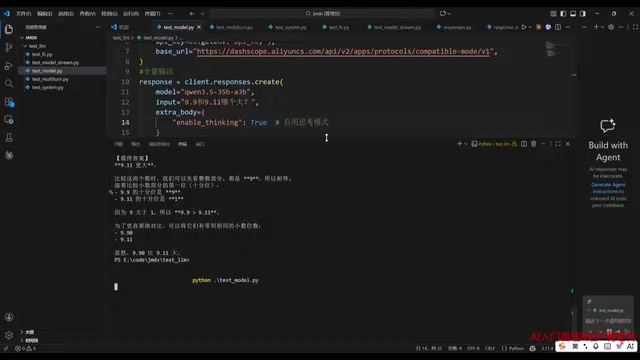
Practical tip: Disable thinking mode for simple tasks to improve response speed; only enable deep thinking for complex reasoning tasks.
Model Selection Guide
In the Bailian platform's "Model Gallery," you can browse all available models. Note that if you're using the text conversation interface, you cannot select image models—doing so will cause errors. To switch models, simply copy the model name and replace the model parameter in your code.
Streaming Output: A Key Technique for Better User Experience
Full Output vs. Streaming Output
In Bailian's online playground, you'll notice text appears character by character—that's streaming output. The default full output in code waits for all content to be generated before returning everything at once.
The core advantage of streaming is user experience—users see the generation process in real time instead of staring at a blank screen.
Implementing Streaming Output
To enable streaming, simply set the stream parameter to true, and data will flow back token by token. When iterating over the response, handle reasoning content and regular text content separately.
Streaming output is implemented using Server-Sent Events (SSE) in the HTTP protocol. Traditional HTTP follows a request-response pattern where the server must generate complete content before responding. SSE allows the server to continuously push data fragments while maintaining the connection. In LLM scenarios, models use autoregressive generation—predicting the next token one at a time—and each generated token can be immediately pushed to the client via SSE. For a response requiring 500 tokens, full output might take 10 seconds of waiting, while streaming begins returning after the first token is generated (typically within a few hundred milliseconds), dramatically reducing the perceived Time to First Token (TTFT).
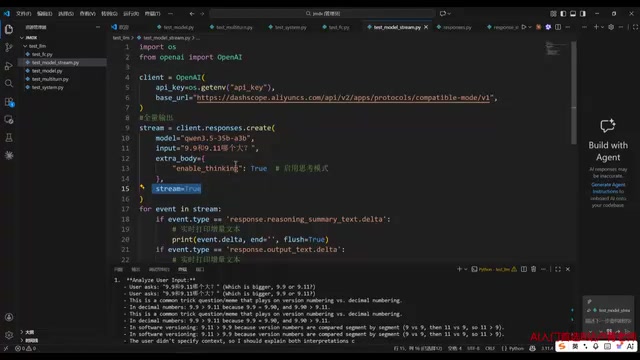
These code structures follow a fixed pattern—developers can use the template directly without needing to understand the underlying protocol details.
Multi-Turn Conversations: How AI "Remembers" Context
Implementation Mechanism
LLMs don't actually have true "memory." Multi-turn conversation is implemented in the most straightforward way possible—every request includes the entire conversation history re-sent to the model.
LLMs are based on the Transformer architecture, and their inference process is stateless—each request is an independent forward pass, and the model retains no information between requests. This is fundamentally different from traditional databases or session management. So-called "multi-turn conversation" relies entirely on concatenating historical messages and re-submitting them. This introduces the concept of context window: the maximum number of tokens a model can process is limited (e.g., Qwen series supports 8K to 128K). When conversation history exceeds the context window, truncation or summary compression is needed; otherwise, API errors or loss of early information will occur. This is why long conversation scenarios require RAG (Retrieval-Augmented Generation) or external memory mechanisms.
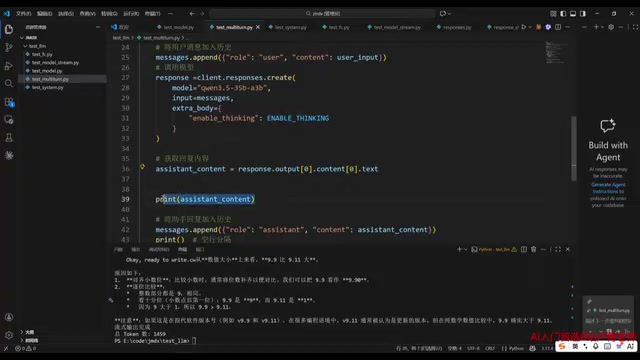
The approach involves maintaining a messages array:
- Start with the system role's persona definition
- Append each user input with the user role
- Append each model response with the assistant role
- Send the complete array as input for the next turn
Verification
For example, first ask "Who am I?"—the model naturally doesn't know. Then tell it "I'm Pidan's Dad." When you ask "Who am I?" again, the model answers correctly because the previous conversation history is included in the current request.
Prompt Engineering: Four Roles Explained
Bailian's Role System
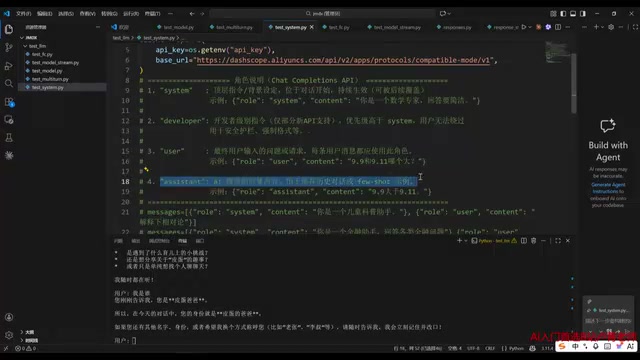
The Bailian platform supports four roles (using any other name will cause errors):
| Role | Purpose |
|---|---|
| system | Persona definition—defines "what kind of entity you are" |
| developer | Safety settings such as guardrails and enforced formats |
| user | The user's input question |
| assistant | The model's response |
Bailian's four-role system reflects a layered permission architecture in LLM applications. The system role sets the model's base persona and capability boundaries, typically fixed by the developer at deployment. The developer role is Alibaba Cloud's extension beyond the OpenAI standard (corresponding to the split of OpenAI's system role in newer API versions), specifically for safety policies and output constraints with higher priority than system. The user role represents end-user real-time input, and the assistant role records the model's historical responses. This layered design allows developers to independently configure safety guardrails without modifying user interaction logic, implementing the engineering principle of Separation of Concerns. In production environments, the developer role is commonly used to prevent prompt injection attacks and enforce content compliance.
Practical Example: Safety Guardrail Configuration
A typical use case is a financial assistant. When the system is set to "You are a financial assistant that answers all kinds of financial questions," asking "How do I transfer 10,000 RMB to the US?" yields a detailed cross-border remittance guide.
But if you add "Refuse to answer questions about cross-border transfers" as a safety constraint in the developer role, the same question gets rejected. Meanwhile, questions like "Transfer 10,000 RMB from Alipay to a bank card" that don't involve cross-border transfers are answered normally.
This demonstrates the model's precise control over safety boundaries—strict compliance, no over-blocking or under-blocking.
Summary
Through this hands-on tutorial, we've covered the core usage of the Alibaba Cloud Bailian platform:
- API Key setup and environment configuration are the entry-level basics
- Streaming output is essential for product experience
- Multi-turn conversation relies on repeatedly sending complete history
- Role separation in prompt engineering enables flexible behavior control
For developers, the Bailian platform's compatibility with the OpenAI interface standard means minimal migration costs. Combined with highly competitive pricing (10-20 RMB is sufficient for learning), it's an excellent choice for LLM application development in China.
Key Takeaways
- Alibaba Cloud Bailian is compatible with OpenAI's standard interface; setup is simple and learning costs only 10-20 RMB
- Streaming output is enabled by setting stream=true, significantly improving user experience
- Multi-turn conversation works by re-sending the full conversation history—the model has no actual memory
- Prompt engineering supports four roles: system, developer, user, and assistant; the developer role enables safety guardrails
- Deep thinking mode is suited for complex reasoning tasks; disable it for simple tasks to improve response speed
Related articles
 Tutorials
Cursor + Codex Dual-IDE Collaboration: A Practical Methodology for Open-Source Project Customization
A complete methodology for open-source project customization based on real-world experience, detailing the Cursor+Codex dual-IDE workflow, seven-stage process, MVP validation, and AI source code reading techniques.
 Tutorials
Cursor Multi-Agent in Practice: Building a Full-Stack Next.js Blog in 50 Minutes
Build a full-stack blog in 50 minutes using Cursor IDE's multi-Agent mode with Next.js, Clerk auth, and Supabase. Learn the 4-phase AI Agent workflow and key integration pitfalls.
 Tutorials
Building an AI Software Factory from Scratch: A Cursor Engineer's Hands-On Experience with Multi-Agent Collaboration
Cursor engineer Eric shares practical insights on building an AI software factory: automation levels, guardrail design, parallel Agent management, and scaling to 1000+ Agents for 24/7 development.