Android 17 New Developer Tools: A Practical Guide to Performance Optimization and Cross-Device UI Development
Android 17 New Developer Tools: A Prac…
Google I/O 2025 brings major Android updates in memory management, cross-device UI, and media processing.
Google I/O 2025 delivered three core updates for Android developers: Android 17 introduces RAM-based enforced memory limits paired with the R8 Configuration Analyzer for performance optimization (Monzo achieved 30% faster cold starts and 35% fewer ANRs); Jetpack Glance unifies declarative UI development across phone widgets, Wear OS, and automotive systems; and the Media3 end-to-end solution covers CameraX capture, AI FX editing, and CodecDB-powered intelligent playback, dramatically simplifying media processing workflows.
Google I/O 2025 brought a series of important updates for Android developers, spanning performance optimization, cross-device UI development, and simplified end-to-end media processing. These tools and libraries are designed to help developers build truly differentiated, premium experiences across phones, watches, cars, and other form factors.
Android 17 Memory Management: Performance Optimization Becomes a Hard Requirement
Android 17 introduces a memory limit enforcement mechanism based on device RAM, meaning keeping your app's memory footprint lean is no longer optional—it's a critical hard requirement. For developers, optimizing memory usage and startup performance has become mandatory.
The Android system has long set heap memory caps for each app through parameters like dalvik.vm.heapsize, but actual enforcement has varied across OEMs and device configurations. Android 17's new mechanism ties memory limits directly to the device's actual RAM capacity, meaning apps running on low-end devices (such as those with 2-4GB RAM) will face stricter memory ceilings. This change is driven by the continued growth of Android Go and emerging market devices—Google needs to ensure apps remain smooth and usable on these devices.

To make optimization work more efficient, Google has introduced the new R8 Configuration Analyzer in Android Studio. This tool provides real-time optimization scores, obfuscation scores, and code shrinking scores, precisely identifying overly broad keep rules—which are often the primary culprits behind bloated APK sizes and slow startup times.
R8 is the code shrinking and optimization compiler in the Android build toolchain. It analyzes the app's code reference graph at compile time, removing unreachable classes, methods, and fields. Keep rules tell R8 which code cannot be removed (typically classes accessed via reflection or entry points required by third-party SDKs). The problem is that many developers, to avoid runtime crashes, write overly broad rules like -keep class com.example.** { *; }, which essentially disables code shrinking for an entire package. The Configuration Analyzer statically analyzes the coverage of these rules, quantifies each rule's impact on the final APK size, and provides specific recommendations for narrowing them. The real-time scoring mechanism lets developers immediately see how optimization results change after modifying rules.
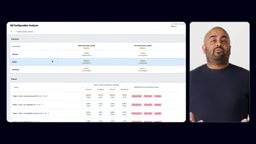
The real-world results are quite impressive: the UK digital bank Monzo team achieved a 30% improvement in cold start time and a 35% reduction in ANR (Application Not Responding) events after using these tools. These numbers clearly demonstrate that systematic performance optimization tools can deliver immediate user experience improvements.
It's worth understanding in depth that ANR (Application Not Responding) is a protective mechanism in Android: when an app's main thread (UI thread) fails to respond to an input event within 5 seconds, or a BroadcastReceiver doesn't complete processing within 10 seconds, the system displays an ANR dialog. There's a direct correlation between memory optimization and ANR reduction: when an app's memory usage is too high, GC (garbage collection) triggers more frequently, and each GC can cause brief thread pauses. The cumulative effect leads to main thread response timeouts. Monzo's 35% ANR reduction likely stems from less GC pausing due to lower heap memory pressure.
Jetpack Glance Cross-Device UI: Unified Glanceable Interaction Experiences
User interactions with devices are shifting toward quick, glanceable fragmented moments—checking a gate change on a watch, viewing flight status on a car display. These scenarios all require highly responsive and battery-friendly interfaces.

Google's solution is to unify the development experience for home screen widgets, watches, and automotive systems through Jetpack Glance. Developers can cover multiple platforms with a single codebase while maintaining each platform's native responsiveness and battery friendliness.
Jetpack Glance is built on Android's RemoteViews framework but provides a Jetpack Compose-style declarative API. Traditional App Widget development requires using RemoteViews—a restricted view system that only supports limited layout and control types and cannot use custom Views. Glance converts Compose-style code into RemoteViews-compatible layout trees at compile time, letting developers enjoy the modern declarative UI development experience while maintaining compatibility with the system Widget host process. The key constraint in this design is that Widgets run in the Launcher process rather than the app's own process, so cross-process UI updates must be performed through serialized RemoteViews.
Remote Compose Rendering on Wear OS
On the Wear OS platform, Glance is now powered by Remote Compose. This technology allows developers to define UI logic using familiar Compose tools, which then renders natively on remote surfaces. Developers no longer need to learn a separate UI framework for watches, significantly lowering the barrier to cross-device development.
Wear OS watch face complications and Tiles have always faced unique technical challenges: watches have extremely limited computational resources, battery capacity is typically only 300-500mAh, and UI needs to render in the watch face process rather than the app process. The traditional approach required developers to write constrained layout descriptions using the Tiles API, with a steep learning curve and limited expressiveness. The core idea behind Remote Compose is: developers define UI logic in the familiar Compose environment, the framework compiles it into a lightweight sequence of rendering instructions, and these instructions are sent to the system rendering process for execution. This ensures battery efficiency (avoiding launching a full app process) while letting developers use a unified Compose mental model.
The value of this unified development model is clear: when your app needs to provide information displays simultaneously on phone home screen widgets, Wear OS watch face complications, and Android Auto car interfaces, you no longer need to maintain three completely different codebases.
Media3 End-to-End Media: A One-Stop Solution from Capture to Playback
Google is simplifying the entire Android media lifecycle, covering the complete flow from capture, editing, to playback.

Capture Layer: CameraX Viewfinder Composable
Using the CameraX Viewfinder Composable, you can quickly build adaptive capture UIs that automatically adjust the interface layout based on different devices' camera capabilities.
Android camera development has historically been one of the most fragmented areas. While the Camera2 API is powerful, implementation differences across devices are enormous—some devices don't support specific autofocus modes, some have inconsistencies between preview and capture resolutions, and foldable devices' camera orientations change between folded and unfolded states. CameraX, as a Jetpack library, builds a compatibility layer on top of Camera2 with built-in adaptation logic for hundreds of devices (through device-specific quirk fixes). The Viewfinder Composable further integrates preview display with the Compose layout system, automatically handling Surface lifecycle, rotation compensation, and aspect ratio adaptation. Developers only need to declare intent rather than manage low-level details.
Editing Layer: Media3 Transformer and AI FX Library
Media3 Transformer provides powerful video editing capabilities, while the new Media3 AI FX library lets developers easily integrate advanced AI features, including:
- Image Enhance: AI-powered image enhancement
- Studio Sound: Professional-grade audio processing
Media3 Transformer is a pipeline-based media transcoding and editing framework that chains input demuxing, decoding, frame processing (via OpenGL ES or Vulkan), encoding, and muxing into an efficient processing pipeline. The AI FX library exists as an effects plugin for Transformer, with its underlying implementation relying on MediaPipe or TensorFlow Lite models for inference. Image Enhance likely uses super-resolution or HDR tone mapping models, while Studio Sound probably integrates noise reduction, echo cancellation, and voice enhancement audio ML models. The key innovation is that these models are pre-optimized for mobile GPU/NPU execution formats. Developers don't need to worry about model quantization, hardware acceleration delegates, or other low-level details—they simply plug them into the Transformer pipeline through the Effect interface.
These capabilities, which previously required extensive machine learning expertise to implement, can now be accessed through standard APIs.
Playback Layer: CodecDB and ExoPlayer Optimizations
Playback experience has also seen significant improvements:
- CodecDB: Provides data-driven codec recommendations, helping apps choose the optimal decoding solution across different devices
- ExoPlayer improvements: Delivers silky-smooth seek operations, enhancing the user experience for video scrubbing previews
Hardware codec support across Android devices is extremely complex: different SoCs (such as Qualcomm Snapdragon, MediaTek Dimensity, Samsung Exynos) support different codec Profiles and Levels, and some devices' hardware decoders have known bugs at specific resolutions or frame rates. Previously, developers could only query supported codecs through MediaCodecList, but this couldn't reflect actual runtime quality. CodecDB's innovation lies in being a cloud database that aggregates codec performance and compatibility data from real devices, providing recommendations like "on this specific device, when playing this specific format, which decoder should be used." This data-driven approach is more reliable than static capability queries.
Developer Action Items: Priority Ranking
The core theme of this update is "standing out on every form factor." For Android developers, here are the recommended priorities:
- Immediately use the R8 Configuration Analyzer to audit your existing project's ProGuard/R8 rules—this is likely the optimization with the highest return on investment
- Evaluate whether Jetpack Glance fits your cross-device scenarios, especially for apps that already have home screen widgets
- Pay attention to the Media3 AI FX library—if your app involves media processing, these out-of-the-box AI capabilities can significantly boost product competitiveness
As Android 17 tightens memory management, performance optimization will shift from a "nice-to-have" to a "must-have." The earlier you adapt, the greater your advantage in user experience.
Related articles
 Tutorials
Cursor + Codex Dual-IDE Collaboration: A Practical Methodology for Open-Source Project Customization
A complete methodology for open-source project customization based on real-world experience, detailing the Cursor+Codex dual-IDE workflow, seven-stage process, MVP validation, and AI source code reading techniques.
 Tutorials
Cursor Multi-Agent in Practice: Building a Full-Stack Next.js Blog in 50 Minutes
Build a full-stack blog in 50 minutes using Cursor IDE's multi-Agent mode with Next.js, Clerk auth, and Supabase. Learn the 4-phase AI Agent workflow and key integration pitfalls.
 Tutorials
Building an AI Software Factory from Scratch: A Cursor Engineer's Hands-On Experience with Multi-Agent Collaboration
Cursor engineer Eric shares practical insights on building an AI software factory: automation levels, guardrail design, parallel Agent management, and scaling to 1000+ Agents for 24/7 development.