Android Skills Explained: An Open-Standard Instruction Set System for AI
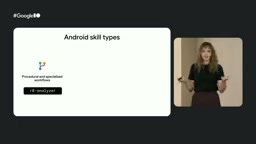
Google's Android Skills provides structured Markdown-based instructions to give AI tools up-to-date Android development knowledge.
Google introduced Android Skills, an open-standard system of structured Markdown files that feeds AI tools like Gemini and Android Studio with current Android development knowledge. It addresses LLM training data cutoff limitations through modular, on-demand instruction sets covering scenarios like XML-to-Compose migration, Navigation 3 integration, and Gradle analysis, with a lazy-loading design that optimizes token usage.
Google officially introduced Android Skills at its latest Android developer conference — an open-standard AI instruction set system. Through structured Markdown files, it provides AI tools like Gemini and Android Studio with up-to-date Android development knowledge and workflow guidance, solving the core pain point where large language models (LLMs) lack knowledge of the latest frameworks due to training data cutoff dates.
LLM training data has a fixed cutoff point, meaning the model is completely unaware of APIs, framework updates, best practice changes, and other information released after that date. This problem is particularly acute in the fast-iterating mobile development space — Android releases new SDK versions annually, Jetpack libraries update frequently, yet model retraining cycles typically span quarters or even years. Traditional solutions include RAG (Retrieval-Augmented Generation) and fine-tuning, but the former requires complex vector database infrastructure, while the latter is expensive and difficult to iterate quickly. Skills offers a lighter-weight alternative: injecting context directly through structured plain text files.
What Are Skills? Modular Knowledge Carriers for AI Agents
Skills are open-standard Markdown files (skill.md), essentially modular instruction sets designed for AI Agents and tools. Unlike traditional documentation aimed at human learning, Skills specifically tell AI "how to execute" — providing precise, actionable technical specifications.
Traditional documentation is designed to teach humans to think and understand "why," while Skills focus on telling AI "what to do" and "how to do it." This fundamental difference in positioning makes Skills far more efficient than regular documentation in LLM interaction scenarios.
The working mechanism is quite elegant: users obtain Skills files from trusted sources and place them in designated locations such as the project root directory or user home directory. The AI Agent maintains a metadata list of all available Skills, sending the metadata to the LLM with each user query. The LLM automatically matches and activates the most appropriate Skill based on user intent, without manual searching and attaching — though you can also choose to specify manually.
This automatic matching mechanism works similarly to a search engine index. When the AI Agent starts up, it scans all installed Skills files, extracts YAML header metadata (including name, description, applicable scenario tags, etc.), and builds a lightweight index manifest. When a user initiates a request, this index manifest is sent to the LLM as part of the system prompt. The LLM uses semantic understanding to determine which Skills are relevant to the current task, then requests loading the full Skill content. This "lazy loading" design avoids stuffing all Skills content into the context window at once, effectively conserving precious token budget.
What Real Development Problems Do Android Skills Solve?
Google launched the official Android Skills repository with the core goal of addressing several key challenges in AI-assisted Android development:
Training data lag. LLMs are often completely unaware of the latest Android framework and API changes. For example, if you ask it to migrate a legacy navigation component, it might have no knowledge of the latest Navigation 3 framework. Navigation 3 is the newest generation of the Android Jetpack navigation component architecture, with fundamental design changes compared to its predecessors — early Navigation components were based on XML navigation graphs and Fragment transactions, Navigation 2 introduced Compose support but retained many legacy concepts, while Navigation 3 was completely redesigned with more declarative and type-safe APIs, supporting multiple back stacks, predictive back animations, and other modern interaction patterns. Since these changes occurred after most LLMs' training cutoff dates, AI tools can barely guide developers through migration correctly without additional context. Skills can instantly deliver these updates to AI tools.
Lack of structured workflows. When you ask an LLM to analyze project configuration, the results are often unstructured and impractical. Android Skills guide LLMs to execute complex but important workflows following standardized processes.
Currently released Skills cover multiple high-value scenarios: AGP 9 migration, XML to Compose migration, Navigation 3 integration, Gradle configuration analysis, Edge-to-Edge support, and more.
Three Types of Skills and File Structure Specifications
Android Skills can be roughly categorized into three types:
- Procedural: Define step-by-step processes for completing specific tasks, such as Gradle configuration analysis
- Reference/Knowledge-based: Serve as resource collections providing domain knowledge to LLMs, such as Edge-to-Edge implementation guides
- Hybrid: Contain both process guidance and knowledge references, such as XML to Compose migration
Each Skill file also has a clear structural specification. The top must include YAML metadata, where name and description are the two most important fields. The main file must be named SKILL.md (uppercase), and the body must contain at least some content. The rest — goal definitions, constraints, execution requirements, etc. — are all optional, written as needed.
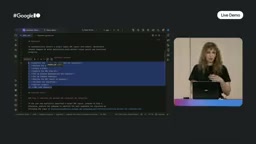
A well-designed Skill directory typically contains a main file and multiple supporting files. The key design principle is: the main file explicitly specifies when and how the LLM should use these supporting files, ensuring they are activated on demand rather than loaded all at once.
Practical Demo: XML to Compose Migration Workflow
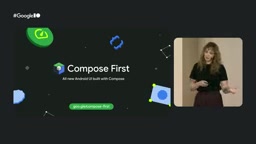
Google announced that Android is now "Compose First," recommending developers write all new code in Compose and gradually migrate legacy XML views — because Views are entering maintenance mode. This marks a fundamental shift in the Android UI development paradigm. Jetpack Compose is a fully Kotlin-based declarative UI framework that differs fundamentally from the traditional imperative XML layout system in its programming model. The core idea of declarative UI is: developers describe what the interface "should look like," and the framework handles computing state changes and efficiently updating the UI, rather than manually manipulating the view tree. Views entering maintenance mode means Google will no longer add new features to the traditional view system, only providing security fixes. This presents a massive migration challenge for enterprise applications with large amounts of legacy XML code, and is precisely the scenario where Skills can deliver the most value.
In the demo, the team used the classic Sunflower sample project (written entirely with Views) to showcase the migration Skill's actual effectiveness. After issuing the "migrate a layout from XML to Compose" instruction, the Skill automatically activated and executed according to the predefined workflow:
- Identify the optimal migration candidate layout — if the user doesn't specify, the LLM automatically selects based on evaluation criteria
- Create a migration plan and capture the initial XML view state
- Set up Compose dependencies and theme (automatically skipped if already configured)
- Execute layout conversion step by step

You might not have noticed, but LLMs already perform reasonably well at basic mappings (such as XML layouts to Compose, RecyclerView to LazyColumn). The real value of Skills lies in providing a structured workflow that remains consistent across multiple runs. Demo results showed that the AI successfully migrated the PlantDetail Fragment to a Compose composable function. While some manual fine-tuning was still needed, it completed most of the repetitive work.
Best Practices for Writing Custom Skills
The Google team shared several important recommendations based on their own experience:
Don't write Skills for tasks LLMs already excel at. Skills are meant to supplement LLM default knowledge. Forcing Skills for already-known tasks only adds unnecessary overhead. Use thorough testing to determine which scenarios truly need Skills.
Don't let LLMs generate Skills from scratch. If an LLM already understands a topic and can generate a Skill using default knowledge, that Skill has no reason to exist.
Distinguish between agents.md and skills.md use cases. The entire content of agents.md is sent as context with every query, while Skills are activated on demand. In the AI-assisted development configuration hierarchy, agents.md (sometimes also called .cursorrules, .github/copilot-instructions.md, etc.) plays the role of a "global system prompt" — its content is fully injected in every interaction, suitable for project-level coding standards, tech stack constraints, team conventions, and other rules that must always be followed. Skills, on the other hand, are "expert knowledge loaded on demand," activated only when the LLM determines the current task requires them. This layered design is similar to the relationship between resident system services and on-demand applications in an operating system, achieving optimal information density within a limited context budget. Good Skill candidates are typically brand-new APIs, version behavior changes, domain-specific workflows, or large-scale migration tasks.
Less is more. Find the minimum scope and length that provides maximum benefit. Concise Skills typically perform better than verbose ones because LLMs start to "forget" when context becomes too long. The technical reason behind this is that while LLM context windows have expanded to hundreds of thousands or even millions of tokens, research shows a "Lost in the Middle" phenomenon: when context is too long, the model's attention to information in the middle positions drops significantly, tending to better remember content at the beginning and end. Overly verbose instructions not only waste token budget but may cause the model to overlook critical information, actually reducing output quality.
Be precise with language. Avoid vague and subjective words; if you must use subjective terms (like "optimal"), always provide quantifiable evaluation criteria.
Mind version management when customizing. If you customize based on an official Skill, make sure to extract the modified version to a different location and rename it, otherwise your custom content may be overwritten during batch updates.
Tool Integration and Cross-Platform Ecosystem Outlook
Android Skills are currently integrated into Android Studio and Android CLI. In Android Studio, a curated selection of Skills comes preloaded — simply enable them in settings for automatic activation. Through Android CLI, you can install, update, list, find, and manage Skills, and can also specify installation to a specific Agent's dedicated directory.
More importantly, as an open standard, Skills are designed to work across any AI tool that supports the specification — whether it's Google AI Studio, third-party IDE plugins, or other Agent frameworks. This means Google is attempting to establish a universal knowledge distribution mechanism for AI-assisted development, rather than simply locking into its own toolchain.
This approach of standardizing, modularizing, and instantly distributing domain expertise to AI will likely be adopted by other technology ecosystems. For Android developers, now is the best time to start exploring and using Android Skills.
Key Takeaways
Related articles

Remotion: The Open-Source Framework for Code-Driven Video Production with React
Deep dive into Remotion, the open-source framework for writing videos with React components. Covers core principles, use cases, comparison with traditional editors, and quick start guide.
Nex N2 Pro Real-World Testing: Top 5 on Official Benchmarks, Only 12th in Independent Tests
Deep-dive testing of Nex N2 Pro open-source Agent model comparing official benchmarks vs independent results. The 397B parameter model shows decent frontend generation but ranks 12th independently, not top 5 as claimed.
Claude Code Workflow in Practice: From Requirement Grilling to AFK Agent Auto-Coding
A detailed walkthrough of building real features with Claude Code: Grill Me requirement interrogation, auto-generated PRDs, AFK agent coding, and QA iteration loops with DDD and TDD strategies.