Remotion: The Open-Source Framework for Code-Driven Video Production with React
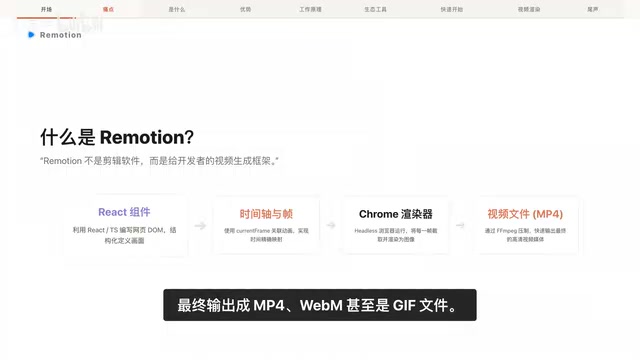
Remotion lets frontend developers create videos programmatically using React components and code.
Remotion is an open-source framework that enables developers to create videos using React components, offering frame-level precision control, component-based architecture, and programmable rendering. It excels at structured, data-driven video production with full CI/CD integration and distributed rendering support via AWS Lambda.
When Frontend Engineers Start "Writing" Videos
If you ask a frontend engineer how to create videos in the most natural way, the answer might be surprising — with code. Remotion is exactly this kind of open-source video creation framework built on React and browser engines. It has earned over 49K stars on GitHub, with weekly NPM downloads reaching 940K.
To be clear, Remotion is not a traditional video editing tool. It's not designed for video editors — it's a video generation framework built for developers. In Remotion's world, video is essentially the flow of time, and frames are React components rendered over time.
Remotion's Core Principles: Three Technical Pillars
Remotion's technical architecture can be summarized by three core design principles:
Full Component-Based Architecture
Every frame, text element, or graphic in a video is a standard React component in code. This means the component design patterns, state management, and Props passing you've already mastered can be directly applied to video creation.
React's component-based philosophy originates from the "separation of concerns" design principle in UI development — breaking interfaces into independent, reusable components, each managing its own state and rendering logic. In traditional web development, a page is composed of Header, Sidebar, Content, and other components; in Remotion, a video is similarly composed of TitleCard, CodeBlock, TransitionEffect, and other components. This mapping works because each frame of a video is essentially a static image, and React is inherently designed to render deterministic UI based on state. When "state" becomes "current frame number," React's declarative rendering paradigm naturally extends from the spatial dimension (page layout) to the temporal dimension (video timeline).
High-Precision Frame-Level Control
Using Remotion's useCurrentFrame Hook, the state and styling of every single frame can be precisely determined through mathematical formulas or state machines. No more vague "around this time point" — it's pixel-perfect control down to every frame.
useCurrentFrame is Remotion's most essential Hook, returning the current rendering frame number (an integer starting from 0). Combined with the video's frame rate setting (e.g., 30fps), developers can convert frame numbers into precise time points. For example, at 30fps, frame 90 corresponds to the 3-second mark. Remotion also provides the interpolate() utility function, which is essentially a mathematical mapping function that maps frame number ranges to arbitrary value ranges, enabling smooth property transitions — such as mapping frames 0-30 to an opacity fade-in from 0 to 1. This math-function-based animation control approach offers higher precision and predictability compared to keyframe animations, and is also much easier to unit test.
Programmable Rendering
Animation logic, dynamic data, external audio, and subtitles can all be dynamically assembled at runtime, achieving truly code-driven video generation. Videos are no longer static finished products — they're program outputs that can be dynamically generated based on input parameters.
Remotion Use Cases: The Perfect Solution for Structured Video

Remotion excels particularly in the following scenarios:
- Technical product demos: Scenarios requiring core code or command-line operation displays, where code highlighting and terminal animations can be precisely controlled
- Personalized data videos: Data analysis videos generated in real-time from databases, with customized content for each user
- Batch automated production: Social media templates with unified brand standards — develop once, produce in bulk
- Dynamic interactive reports: Combining data visualization with video narratives to create dynamic reports
In short, any structured, data-driven video is Remotion's sweet spot.
The Fundamental Difference Between Remotion and Traditional Editing Software
In traditional software like Premiere or CapCut, editors need to manually drag and drop audio/video tracks. While this workflow is intuitive, it becomes inefficient and difficult to reuse when facing large-scale modifications or batch generation tasks.
Remotion's code-driven approach brings fundamental advantages:
| Dimension | Traditional Editing | Remotion |
|---|---|---|
| Version Control | Chaotic file naming | Precise Git tracking |
| Reusability | Manual copying | Modular components |
| Batch Production | One by one | Parameterized templates |
| Automation | Nearly impossible | Native CI/CD support |
Remotion Ecosystem and Engineering Capabilities
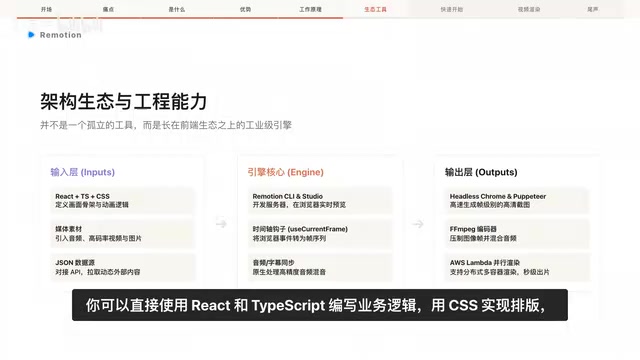
Remotion is not an isolated library — it's built on top of the mature frontend ecosystem:
- Development layer: Write business logic directly with React + TypeScript, use CSS for layout
- Asset layer: Import audio and video assets with support for high-precision automatic subtitle generation
- Rendering layer: Supports large-scale distributed rendering on AWS Lambda or standard servers
- Output layer: Export MP4, WebM, or even GIF files
AWS Lambda is Amazon's serverless computing platform where users don't need to manage servers — just upload code for on-demand execution. Remotion cleverly leverages Lambda's elastic scaling capabilities for distributed rendering: a video is split into multiple frame ranges, each rendered in parallel by an independent Lambda function instance, then all segments are merged into the complete video. For example, an 1800-frame video can be distributed across 20 Lambda instances, each rendering only 90 frames, theoretically reducing render time to 1/20th of the original. This architecture is particularly suited for on-demand video generation in SaaS products — after a user submits a request, rendering is automatically triggered in the backend, delivering the finished video within minutes, with costs billed by actual computation time and no need to maintain dedicated rendering server clusters.
With ready-made templating frameworks, thousands of HD videos can be batch-produced within a minute — extremely attractive for teams that need content production at scale.
Remotion Quick Start Guide
Getting started with Remotion is simple — just three steps:
# 1. Create a project
npm create video@latest

# 2. Enter the directory and start preview
cd my-video
npm start

# 3. Render output
npx remotion render
npm start launches Remotion Studio, where you can debug and preview videos in real-time in the browser. Once you're satisfied with the result, npx remotion render starts a Headless browser, converts each frame into an image, and calls FFmpeg to encode the final MP4 file.
Remotion's rendering pipeline is an elegantly designed process. First, it launches Headless Chrome (a headless browser driven by Puppeteer or Playwright), sets the current frame number frame by frame, triggers React component re-renders, then takes a screenshot of each frame, generating a series of PNG or JPEG image sequences. These image sequences are then passed to FFmpeg — an industry-standard open-source multimedia processing tool — which encodes the image sequence into H.264/H.265 format video files while mixing in the audio track. Since its inception in 2000, FFmpeg has supported virtually all mainstream audio/video codecs, earning its reputation as the Swiss Army knife of video processing. This "browser screenshot + FFmpeg encoding" architecture allows Remotion to leverage the browser's powerful CSS layout and Web API capabilities while achieving professional-grade video encoding quality.
Why Remotion Deserves Frontend Developers' Attention

Remotion's value for frontend developers can be distilled into three points:
Ultimate reusability — Accumulated React components and animation templates can be seamlessly reused across other projects, turning video assets into code assets.
Automation capability — Particularly suited for large-scale batch customization through API endpoints combined with databases, upgrading from a "craft workshop" to a "video factory."
Engineering-ready properties — Video production workflows can be perfectly integrated into existing Git repositories and CI/CD automation pipelines, making video creation as natural as writing business code. CI/CD (Continuous Integration/Continuous Delivery) is a core practice in modern software engineering, referring to automated pipelines that automatically trigger builds, tests, and deployments after code commits. Common tools include GitHub Actions, GitLab CI, and Jenkins. Incorporating video production into CI/CD means: when video template code is pushed to a Git repository, the pipeline can automatically run render tasks, output video files, and even auto-upload to CDNs or social media platforms. This completely transforms the traditional "export-transfer-upload" manual workflow in video production. More importantly, Git's version control capabilities give every video modification a complete change history, enabling teams to conduct Code Review of video content through Pull Requests — something nearly unimaginable in traditional video production workflows.
For developers already proficient in React, Remotion provides an extremely low-barrier entry point into cross-disciplinary creation. The official documentation (remotion.dev) and GitHub repository (remotion-dev/remotion) offer rich examples and templates worth exploring in depth.
Related articles
Trae + WPS: Building a Zero-Code JSA Login Authorization System — A Practical Tutorial
Learn how to use Trae AI programming tool with WPS Bitable to build a JSA login authorization system with zero handwritten code, covering online tables, Web API auth scripts, and remote user management.

Superpowers: Installing Work Standards for Your AI Coding Assistant
How the Superpowers methodology constrains AI coding assistants through requirement clarification, task decomposition, TDD, and verification loops — with setup tips for Trae.

Scientific Achievements Deserve Public Applause: Why We Should Give Standing Ovations for Scientific Breakthroughs
Scientific achievements receive far less public attention than entertainment and sports. This article explores why we should applaud scientific breakthroughs and how AI is leading a new celebration culture.