Android Studio Gemini Usage Limits Increased: Pro/Ultra Subscribers Get Higher Quotas

Google AI Pro/Ultra subscribers now get higher Gemini token quotas in Android Studio automatically.
Google has increased Gemini usage limits in Android Studio for Google AI Pro and Ultra subscribers. The higher token quotas activate automatically upon sign-in, requiring no extra configuration. This update is designed to support extended Agentic development sessions where AI agents perform multi-step coding tasks, addressing a key bottleneck for developers working on complex projects.
Google recently announced that Google AI Pro and Ultra subscribers will receive higher usage limits when using Gemini in Android Studio. This update is a substantial benefit for Android developers who need extended AI-assisted development sessions.
Higher Gemini Usage Quotas for Subscribers
The Gemini model built into Android Studio is part of the Google AI subscription service. Previously, all users faced certain token usage limits when using Gemini for coding assistance, which could become a bottleneck during complex development tasks.
To understand this, it helps to know what tokens are: Tokens are the basic units that large language models use to process text. A single English word is typically split into 1–3 tokens, while a Chinese character usually corresponds to 1–2 tokens. In AI-assisted coding scenarios, token consumption includes both input (the user's code context and queries) and output (the model's generated code and explanations). A medium-sized code file alone can contain thousands of tokens, and when the AI needs to understand an entire project's context, token consumption grows exponentially. Therefore, token limits directly determine how much code context the AI can "see" and how long its responses can be.
Now, if you have a Google AI Pro or Google AI Ultra subscription, the usage limits for the default Gemini model in Android Studio will be automatically increased. This means you can consume more tokens in a single session without constantly worrying about hitting the cap.
Why This Matters: A Must-Have for Agentic Development
The core value of this improvement lies in supporting extended Agentic development sessions. Agentic development refers to AI that goes beyond single code completions or Q&A — instead acting as an intelligent agent that continuously participates in multi-step development workflows, such as automatically analyzing codebases, generating modification plans across multiple files, and executing debugging suggestions.
Agentic AI is one of the most important trends in the AI field today, and it's fundamentally different from traditional single-turn conversational AI. In the traditional model, AI passively responds to individual user requests. In the Agentic model, AI has the ability to autonomously plan, invoke tools, and perform multi-step reasoning. For example, an AI Agent might independently decide to first read a project's architecture documentation, then analyze relevant code modules, generate a modification plan, and finally verify whether the changes introduced any new bugs. This process can involve dozens of rounds of internal reasoning and tool invocations, each consuming a significant number of tokens. The Gemini Agent capabilities that Google highlighted at its 2025 I/O conference are a direct manifestation of this direction.

These deep interactive sessions naturally consume large amounts of tokens. Under previous limits, developers might exhaust their quota while working on a single complex feature, forcing them to interrupt their AI-assisted workflow. Higher usage limits directly address this pain point, enabling developers to complete end-to-end AI-assisted development more smoothly.
How to Enable: Automatic Subscription Detection, No Extra Configuration Needed
Enabling this is extremely simple — in fact, it requires virtually no extra action. Android Studio automatically detects your subscription status when you sign in with your Google account. If the system recognizes that you have a Google AI Pro or Ultra subscription, the higher usage limits take effect automatically.
Regarding the Google AI subscription tiers: the free tier provides basic Gemini access; Google AI Pro (previously known as Google One AI Premium) costs approximately $20 per month and provides Gemini Advanced access along with higher usage quotas; Google AI Ultra is the top-tier plan for power users and professional developers, offering the highest priority model access and maximum usage limits. These subscriptions cover not just the Gemini chat interface but extend to AI features across the entire Google ecosystem, including Google Workspace, Android Studio, and more.
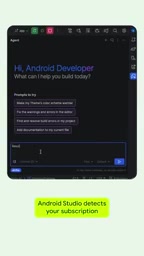
Specific steps:
- Make sure you have a Google AI Pro or Google AI Ultra subscription
- Sign in with your Google account in Android Studio
- The system automatically identifies your subscription tier and applies the higher limits
- Start using Gemini for development
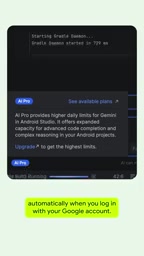
No need to manually switch models or modify any settings — the entire process is completely transparent to the user.
What This Means for Android Developers
From a broader perspective, this update reflects Google's strategic direction for AI-assisted development tools:
- Clear paid tiering strategy: By differentiating usage by subscription level, Google is further refining the business model for AI development tools. Free users can still access basic features, while paying users get stronger productivity support.
- Agentic AI is becoming a mainstream development paradigm: Google is clearly paving the way for deeper AI Agent development experiences, and higher token limits are a necessary infrastructure-level preparation.
- Competitive differentiation: In today's fierce competition among AI coding tools like GitHub Copilot and Cursor, Android Studio offers Android developers a native and seamless option through deep integration with the Google AI subscription ecosystem.
The AI-assisted coding market is currently intensely competitive. GitHub Copilot, backed by Microsoft and built on OpenAI's models, was the first AI coding assistant to achieve large-scale commercial adoption and currently has over a million paying users. Cursor is an AI-native editor based on a VS Code fork, known for its powerful codebase comprehension and Agentic coding experience, and has quickly become a popular choice among indie developers and startup teams. There's also Amazon's CodeWhisperer (now Amazon Q Developer), JetBrains' AI Assistant, and others. Android Studio's choice to deeply integrate Gemini essentially leverages Google's dominant position in the Android ecosystem — millions of Android developers worldwide are already using Android Studio, and natively integrated AI eliminates the friction of switching tools.
For engineers who work on Android development daily, if you're already using a Google AI subscription, this update further unlocks the value of your subscription. If you're still on the fence about subscribing, the enhanced Gemini experience in Android Studio might be a factor worth considering.
Key Takeaways
Related articles

Five Common Claude Code Mistakes — How Many Are You Making?
Five common Claude Code mistakes developers make: copy-pasting code, skipping CLAUDE.md, inefficient prompting, ignoring docs, and poor context management — with fixes.

Andrew Ng's New Course Explained: A Practical Guide to Using OpenAI's O1 Reasoning Model
Deep dive into Andrew Ng and OpenAI's Reasoning with O1 course covering test-time scaling, new prompting paradigms, multi-model orchestration, and practical applications for developers.

Learning AI After College Entrance Exams: A Complete Path from Zero to Freelancing
How to efficiently learn AI skills during summer break after exams? A complete path from mastering prompts and hands-on projects to freelancing on platforms.