Antigravity Android Plugin: A Hands-On Guide to AI-Powered Android Development

Google's Antigravity Android plugin enables AI-driven full-lifecycle Android development with CLI automation and Skills.
Google's Antigravity Android plugin auto-installs the Android CLI, empowering AI agents to handle project scaffolding, code generation, and emulator deployment. Its Skills system bridges LLM knowledge gaps with hot-swappable modules for Compose Style and Nav 3, enabling developers to build modern Android apps with up-to-date AI assistance.
Google recently launched an Android plugin for its AI coding tool Antigravity, enhancing AI agent development capabilities through automatic Android CLI installation. This update means developers can leverage AI for intelligent assistance across the entire workflow—from project creation and code implementation to app deployment.
What Is the Antigravity Android Plugin?
Antigravity is an AI-assisted development tool from Google, and its latest Android plugin brings native Android development support. Unlike traditional code completion tools (such as early versions of GitHub Copilot), Antigravity falls into the category of AI Agent development tools, capable of autonomous planning, tool invocation, and multi-step task execution. It doesn't just generate code snippets—it understands developers' high-level intent, automatically breaks down tasks, and calls the appropriate command-line tools to complete operations. This leap from "code suggestions" to "task execution" represents the evolution of AI coding tools from assistive to autonomous.
The plugin's core feature is the automatic installation of the Android CLI (command-line tools), giving the AI agent stronger Android development capabilities—not only understanding Android project structures but also executing build and deployment operations. The Android CLI covers core functions including project creation, dependency management, code building, APK signing, and emulator management. Traditionally, Android developers primarily work through Android Studio, a graphical IDE, while CLI tools are better suited for automation workflows and CI/CD pipelines. For AI agents, the CLI is a natural interaction interface—AI can't operate graphical interfaces like humans, but it can very efficiently generate and execute command-line instructions. Antigravity's automatic installation of the Android CLI essentially provides the AI agent with a programmable Android development toolchain.
Enabling it is straightforward: go to Settings, select Configurations, find the Android option under "Build with Google plugins," and toggle it on. The entire process requires no complex environment setup, significantly lowering the barrier to entry.
Hands-On Example: Building a Mountain Biking App from Scratch
In a demo by Google developer Florina, she shared her complete experience building a mountain biking app using the Antigravity Android plugin. The Android CLI played a role from the very beginning of the project:
- Project scaffolding: The AI agent automatically generated the project's foundational structure, including Gradle build scripts, module organization, dependency declarations, and other standardized configurations
- Feature implementation: Various Skills were invoked during development to assist with coding, covering UI construction, business logic, and the data layer
- App deployment: The app was installed directly onto the emulator through the AI agent for testing, eliminating the need to manually execute build and install commands
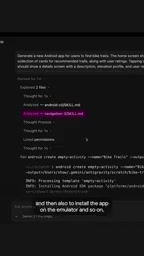
Developers only need to describe their requirements in natural language, and the AI agent can handle everything from code generation to emulator deployment, significantly boosting development efficiency.
The Skills System: Bridging AI Model Knowledge Gaps
One of Antigravity's standout features is its Skills system. Large language models (LLMs) have a definitive training data cutoff date (knowledge cutoff), meaning the model knows nothing about APIs, framework versions, and best practices released after that date. In software development, this problem is particularly acute—major frameworks typically update on a monthly cycle, while model retraining happens on a quarterly or even annual basis.
The industry currently has several solutions: Retrieval-Augmented Generation (RAG) supplements model knowledge through real-time document retrieval; fine-tuning teaches models new knowledge through additional training; and Antigravity's Skills system takes a lighter-weight, plugin-based approach—packaging domain-specific, up-to-date knowledge into hot-swappable skill modules that extend the model's capability boundaries without retraining.

Compose Style Skill
Jetpack Compose is a declarative UI framework officially released by Google in 2021 that fundamentally changed the paradigm of Android interface development. Traditional Android development uses XML layout files to define interfaces, while Compose uses pure Kotlin code to describe UI declaratively, similar to the design philosophy of React and SwiftUI. Compose's Styles API is a more recently introduced styling system that allows developers to manage component visual styles in a more structured way, enabling unified theme management and dynamic switching.
Since the Compose ecosystem is still rapidly iterating with frequent new API releases, standard AI models may not be aware of these latest features. By installing the Compose Style skill, the AI agent can correctly understand and use these newest styling APIs. Developer feedback indicates that this skill not only helps AI write more accurate code but also teaches developers themselves new things—demonstrating the additional value of AI tools as "learning companions."
Nav 3 Navigation Skill
When building the mountain biking app, the Nav 3 skill proved to be "very, very useful." Navigation 3 (Nav 3) is the latest-generation architecture of the Jetpack Compose navigation component. Android app navigation—page transitions, parameter passing, back stack management—has always been a complex aspect of development. From early Fragment transaction management, to Navigation Component's XML navigation graphs, to Compose Navigation's type-safe routing, Google has continuously worked to simplify the navigation development experience. Nav 3 further embraces Compose's declarative philosophy, introducing more flexible navigation state management and deep link support.
Because Nav 3's APIs differ significantly from previous versions, traditional AI models generating navigation code based on older training data are likely to produce compilation errors or runtime exceptions. With the corresponding skill installed, the AI agent can accurately implement app navigation logic, avoiding outdated or incorrect navigation code.

Google recommends that developers install relevant skill packages based on their project needs. This modular design allows AI agents to continuously keep up with the latest tech stack, unconstrained by model training data cutoff dates.
What the Antigravity Android Plugin Means for Developers
The launch of the Antigravity Android plugin marks a new phase in AI-assisted Android development. Here are several trends worth noting:
Full-lifecycle AI assistance: From project initialization to emulator deployment, AI is no longer just a code completion tool—it's an intelligent assistant that spans the entire development lifecycle. This end-to-end capability means developers can focus more energy on product design and user experience decisions while delegating repetitive engineering implementation to the AI agent.
Real-time knowledge updates: The Skills system elegantly solves the problem of AI model knowledge lag. Unlike model retraining that takes months, skill packages can be quickly released and installed as frameworks update. As Google continues to expand the skills catalog, the AI agent's capability boundaries will keep growing, forming a continuously evolving developer tool ecosystem.
Lowering the learning curve: For developers who need to quickly get up to speed with new frameworks like Jetpack Compose and Navigation 3, an AI agent paired with the latest skill packages can serve as a real-time learning and development companion. Developers not only get correct code implementations but can also learn new API usage patterns and best practices through AI-generated code, achieving a "learn by doing" experience.
Google is continuously expanding the Android CLI and Skills catalog. For Android developers, now is a great time to start integrating AI tools into your daily development workflow.
Related articles
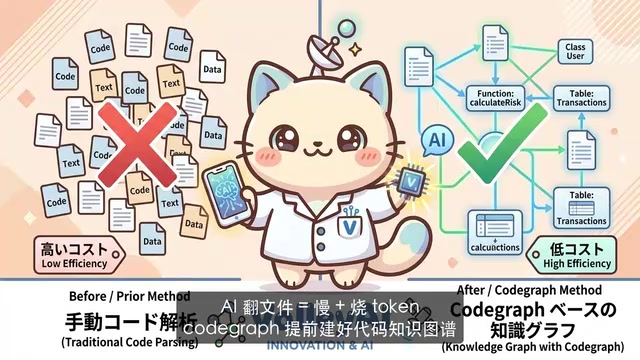
CodeGraph: The 50K-Star Open-Source Tool That Cuts AI Coding Token Usage in Half
CodeGraph is a 50K-star open-source tool that builds a code knowledge graph so AI coding assistants can locate code instantly—cutting Token usage by 47%, boosting speed by 22%, all running 100% locally.

VibeCoding Beginner's Guide: A Complete Guide to Building Software with Natural Language from Scratch
VibeCoding lets anyone build software through natural language conversations with AI. Learn the core concepts, learning path, and practical methods to get started.

Using UU Accelerator to Speed Up Cursor: A Compliant Solution for Stable AI Coding in China
Learn how to use NetEase UU Accelerator to speed up Cursor AI coding tool in China, with step-by-step setup including node selection and launch configuration.