CodeGraph: The 50K-Star Open-Source Tool That Cuts AI Coding Token Usage in Half

CodeGraph builds a code knowledge graph to cut AI coding assistant Token usage nearly in half.
CodeGraph is a rapidly rising open-source tool (50K+ GitHub stars) that constructs a code knowledge graph from your codebase, enabling AI coding assistants like Claude Code and Cursor to query code relationships via a graph instead of brute-force file searching. Real-world benchmarks show ~47% Token reduction, ~22% faster responses, and ~58% fewer tool calls. It runs 100% locally using Tree-sitter for syntax parsing, ensuring complete code security.
Every time you ask an AI coding assistant to modify your code, it has to rummage through the entire project from scratch—reading files, searching code, piecing together context. The bigger the project, the more it has to dig through, and the more Tokens it burns. Is there a smarter way?
An open-source tool called CodeGraph racked up over 50,000 stars on GitHub in just one month, offering an incredibly clever answer: instead of having AI sift through code, build a map of the code first, and let the AI simply read the map.
The "Brute-Force Search" Problem of AI Coding Assistants
Today's mainstream AI coding assistants—whether Claude Code, Cursor, or Codex—all fundamentally operate in a "brute-force search" mode. Every time you ask a question, they have to traverse files, search through code, and piece together context bit by bit.
Here's a key concept to understand: Tokens are the basic unit of measurement for how large language models process text. A single English word is typically split into 1–3 Tokens, while each Chinese character consumes roughly 1.5–2 Tokens. When an AI coding assistant needs to understand your code, it must feed the contents of code files into the model as context—and all of that content is billed by Token. With Claude or GPT-4, for example, the cost per million input Tokens ranges from $3 to $15, and a single conversation on a medium-to-large project can consume tens or even hundreds of thousands of Tokens. This means every unnecessary file the AI reads adds another charge to your bill.
This approach is tolerable for small projects, but once a project scales up, the problems become glaringly obvious: Token consumption skyrockets, response times slow down, and API bills stay stubbornly high. For developers who live and die by their API quotas, this is real, tangible cost pressure.
CodeGraph takes a completely different approach. It scans the entire codebase upfront and builds a code knowledge graph—which function calls which function, which class inherits from which, how files depend on each other—all transformed into nodes and edges. When the AI needs to look up a relationship, it queries this graph and gets an instant answer, no more searching for a needle in a haystack.
A code knowledge graph is essentially a graph data structure where nodes represent code entities (functions, classes, modules, variables, etc.) and edges represent relationships between entities (calls, inheritance, imports, dependencies, etc.). This follows the same philosophy as Google's Knowledge Graph for organizing world knowledge, except the domain shifts from general knowledge to code structure. The core advantage of a graph lies in the efficiency of relationship queries—to find all callers of a given function, you simply traverse along the edges, with time complexity far lower than full-text search. Traditional code indexing tools like ctags can only do simple symbol lookups, whereas a knowledge graph can express complex, multi-layered, multi-dimensional relationship networks.
Real-World Benchmarks: Nearly Half the Tokens, 22% Faster
Actions speak louder than words. CodeGraph's author ran tests across 7 real projects over the course of a day, completing ten rounds, and the results were impressive:

- Average cost reduced by ~16%
- Token consumption reduced by ~47%—nearly cut in half
- Response speed improved by ~22%
- Tool call count reduced by ~58%
That last metric is particularly noteworthy. A 58% reduction in tool calls means the AI no longer needs to repeatedly probe through files—it can go straight to the graph to locate the answer. This doesn't just save money; more importantly, it reduces the probability of the AI "getting lost," which indirectly improves the accuracy of generated code.
For development teams working on medium-to-large projects, cutting Token consumption in half translates to very significant cost savings. If you're spending several hundred dollars a month on AI-assisted coding, this tool could directly save you half of that.
100% Local Execution: Not a Single Byte of Code Gets Uploaded
This is the point developers care about most—CodeGraph runs 100% locally and doesn't connect to any external services.
It uses Tree-sitter for syntax parsing, supporting over 20 programming languages, extracting functions, classes, and call relationships from actual syntax trees rather than relying on regex matching or AI guessing. The entire knowledge graph is built on your own machine, and not a single byte of code gets uploaded to the cloud.
Tree-sitter is an incremental parsing framework originally developed by GitHub's Atom editor team, now widely adopted in modern editors like Neovim, Zed, and Helix. Unlike traditional regex matching, Tree-sitter parses source code into a complete Abstract Syntax Tree (AST), precisely identifying every syntactic structure—function definitions, class declarations, variable assignments, conditional branches, and more. Even more critically, it has "incremental parsing" capability: when you only modify a few lines in a file, Tree-sitter doesn't need to re-parse the entire file—it only updates the affected parts of the syntax tree, making real-time parsing possible. By contrast, extracting code structure with regex is not only error-prone (e.g., matching function signatures inside comments) but also incapable of handling complex syntax scenarios like nesting and scoping.
This is crucial for enterprise teams whose code cannot leave the premises. Many companies' biggest concern when using AI coding tools is code security, and CodeGraph perfectly addresses this—you get the AI acceleration while keeping your code assets entirely in your own hands.
Impact Analysis: Check the "Blast Radius" Before Changing Code
What's the biggest fear before modifying a function? That one small change could have a ripple effect, and you have no idea what it might break.

CodeGraph's impact analysis feature is built exactly for this. It traces through the graph to lay out the target function's callers, callees, and the entire impact radius all at once. Before making any changes, you can clearly see which modules will be affected.
Impact Analysis is a classic topic in software engineering, and the core question is: if you modify a certain element in the code, what parts of the system will experience a chain reaction? In large systems, a low-level utility function might be called by dozens of modules, and reckless modifications could cause widespread regression defects. The traditional approach relies on developer experience and manual searching, or running the full test suite to discover problems—but that's often an after-the-fact remedy. CodeGraph's graph-based approach moves impact analysis to before the modification, using graph reachability analysis to automatically calculate the "blast radius" of a change. This is fundamentally similar to dependency analysis in compilers and incremental compilation strategies in build systems.
Additionally, it offers two practical bonus capabilities:
- Automatic route detection for 17 web frameworks, precisely mapping URLs to their handler functions—extremely handy for web developers
- Automatic file change monitoring with real-time graph rebuilding—you write code, and it silently updates, keeping the graph always up to date
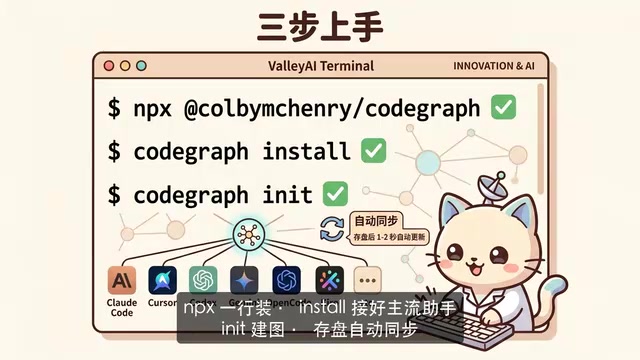
This "seamless update" design is incredibly thoughtful. You don't need to manually rebuild after every code change. CodeGraph leverages the operating system's file monitoring mechanism—the moment you save, it quietly updates the affected portion of the graph within a second or two, without ever interrupting your development workflow.
Under the hood, this relies on OS-level file system monitoring APIs—inotify on Linux, FSEvents on macOS, and ReadDirectoryChangesW on Windows. These APIs allow a program to register listeners on specific directories, and when files within those directories are created, modified, or deleted, the operating system proactively notifies the listening program rather than requiring the program to poll for changes on a timer. This event-driven mechanism consumes virtually no extra CPU resources, which is exactly why CodeGraph can achieve "seamless updates"—it only triggers an incremental rebuild when you actually save a file, rather than continuously scanning the file system.
Installing and Using CodeGraph: One Command Is All It Takes
CodeGraph has an extremely low barrier to entry:
- Launch with a single
npxcommand - Run
codegraph install, and it automatically integrates with mainstream AI assistants like Claude Code, Cursor, Codex, Gemini, and more - Navigate to your project directory and run
initto start building the graph - Once built, you barely need to touch it—it maintains itself in the background
It's important to emphasize that CodeGraph is not here to replace AI coding assistants—it's an enhancement tool that supports them. It doesn't write code itself; what it does is "draw a precise code map for the AI."
Use Cases and Limitations
CodeGraph is especially well-suited for the following types of developers:
- Large project developers: Scenarios with many files and complex modules where AI file traversal is slow
- Cost-conscious teams: Those who wince at their Token bills every day
- Teams with strict security and compliance requirements: Where code cannot leave the premises and must run locally
But to be fair: if your project only has a handful of files, CodeGraph's improvement may not be noticeable. Its value scales proportionally with project complexity—the larger the project and the more complex the dependency relationships, the more significant the benefits.
Conclusion
CodeGraph uses a simple yet elegant idea to solve the core efficiency problem of AI coding assistants: rather than having the AI brute-force search every time, build a code knowledge graph in advance and let the AI "read the map." Over 50,000 GitHub stars prove that the developer community highly endorses this approach.
As AI coding tools become increasingly mainstream, the question of how to make AI understand your code more efficiently, more affordably, and more securely is one that CodeGraph answers with a solution well worth trying.
Related articles

VibeCoding Beginner's Guide: A Complete Guide to Building Software with Natural Language from Scratch
VibeCoding lets anyone build software through natural language conversations with AI. Learn the core concepts, learning path, and practical methods to get started.

Using UU Accelerator to Speed Up Cursor: A Compliant Solution for Stable AI Coding in China
Learn how to use NetEase UU Accelerator to speed up Cursor AI coding tool in China, with step-by-step setup including node selection and launch configuration.

EasyPhone AI: Teaching Seniors to Use Smartphones with Voice — and Hitting the Brakes on Scams
EasyPhone AI is a voice-powered smartphone coach for seniors, featuring large-text UI, step-by-step guidance, and error tolerance. It auto-blocks scam scenarios and generates family help cards.