EasyPhone AI: Teaching Seniors to Use Smartphones with Voice — and Hitting the Brakes on Scams
An AI voice coach that teaches seniors to use phones and auto-blocks scam scenarios.
EasyPhone AI is an AI-powered voice smartphone coach designed for seniors. It features large-text interfaces, progressive step-by-step guidance, and robust error tolerance to lower the barrier to phone use. When high-risk scenarios like scams are detected, the system stops teaching and triggers red alerts with auto-generated family help cards, bridging the digital divide while maintaining a safety baseline.
The Real Pain Points of Seniors Using Smartphones
Many people assume that older adults can't use smartphones because they "don't want to learn," but the reality is far more complex — they don't know how to search, can't understand visual tutorials, and often can't even articulate what problem they're encountering. Most phone tutorials on the market either contain too much information or assume users already have basic digital literacy, making them virtually useless for elderly populations with low literacy levels.
According to data from the China Internet Network Information Center (CNNIC), as of 2024, China has over 170 million internet users aged 60 and above, yet a large portion of them remain stuck at the most basic level of functionality. "Digital Literacy" refers to an individual's comprehensive ability to understand, use, and evaluate digital technologies, encompassing multiple dimensions including information retrieval, interface navigation, and risk identification. For elderly populations with low literacy levels, the challenge goes beyond technical operation — it's a fundamental difference in cognitive models. They lack intuitive understanding of digital interface metaphors like "search bars," "dropdown menus," and "pop-ups." These interaction paradigms that younger users take for granted represent entirely new cognitive burdens for older adults.
EasyPhone AI (Chinese name: "爸妈别急," roughly meaning "Don't Worry, Mom and Dad") was designed specifically to address this problem. It's an AI-powered voice-based smartphone coach for seniors, and its core philosophy isn't about "teaching seniors everything" — it's about knowing when the AI should stop.
Minimalist Interaction Design: Large Text, Fewer Buttons, One Step at a Time
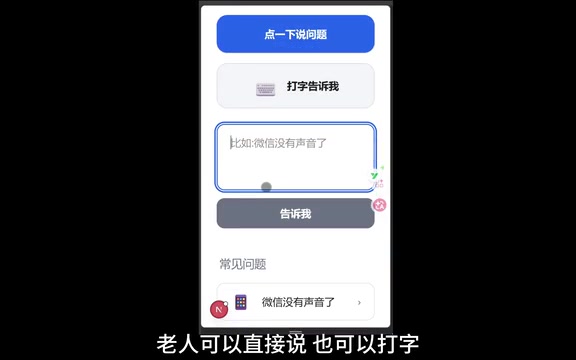
The product's entry point is extremely simple: seniors can speak their questions directly or type them in. The entire interface uses large fonts, high-contrast colors, and minimal buttons to reduce operational pressure as much as possible.
Voice User Interface (VUI) refers to the technology of interacting with systems through natural language voice input, relying primarily on two core modules: Automatic Speech Recognition (ASR) and Natural Language Understanding (NLU). For elderly users, the advantage of voice interaction is that it bypasses the barrier of typing — many seniors are unfamiliar with pinyin input methods or handwriting recognition, but verbal expression is their most natural form of communication. However, voice interaction with elderly users also faces unique challenges: regional accents, slower speech rates, and vague descriptions (such as "that thing isn't working") all place higher demands on the robustness of ASR and NLU. EasyPhone AI's choice of voice as the primary entry point is essentially about building trust through the user's most comfortable interaction channel.
Take "WeChat has no sound" — a typical low-risk problem — as an example. The system's handling process reflects thoughtful design considerations:
- Understand the problem first, rather than immediately throwing out a solution
- Step-by-step guidance, displaying only one step at a time, never dumping an entire tutorial at once
- Seniors can tap "Done" to proceed to the next step, or tap "Read it to me" to have the system read the current step aloud
This "one step at a time" design philosophy is known in interaction design as "Progressive Disclosure," first proposed by IBM researcher John M. Carroll in the 1980s. The core idea is: don't present all information and options to users at once; instead, progressively reveal the most relevant content based on the user's current task stage. Cognitive psychology research shows that older adults' Working Memory Capacity declines with age, reducing their ability to process multiple pieces of information simultaneously. Breaking complex operations into single-step instructions, each paired with a clear completion confirmation, significantly reduces the risk of Cognitive Overload. Therefore, the goal of this design isn't to complete operations as quickly as possible, but to give seniors the confidence to move forward one step at a time.
Error Tolerance: No Need to Fear Mistakes
For elderly users, "fear of tapping the wrong thing" is one of the biggest psychological barriers to using smartphones. Techno-anxiety is a widespread psychological phenomenon among older adults using digital devices, manifesting as fear that operational mistakes will lead to irreversible consequences — such as accidentally deleting photos, sending wrong messages, or even making erroneous transfers. Research shows that this anxiety often hinders elderly people's digital participation more severely than the actual operational difficulties.
EasyPhone AI addresses this with multiple layers of error tolerance:
- If a senior can't find a button on the screen, they can tap "Can't see it," and the system will re-describe it in more specific terms
- If a senior taps the wrong thing, the system first prompts "Hold on" before guiding them back to a safe path
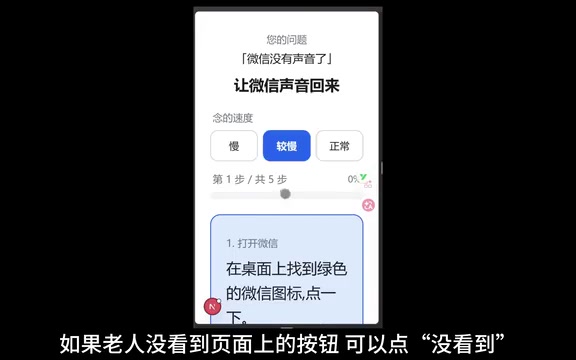
In user experience design, Error Tolerance is one of Nielsen's Ten Usability Heuristics, emphasizing that systems should help users recognize, diagnose, and recover from errors. EasyPhone AI's "Can't see it" and "Tapped wrong" buttons essentially upgrade error tolerance from a passive "undo" operation to a proactive "safety net" — the system anticipates difficulties users might encounter and prepares alternative paths in advance, significantly lowering users' psychological safety threshold.
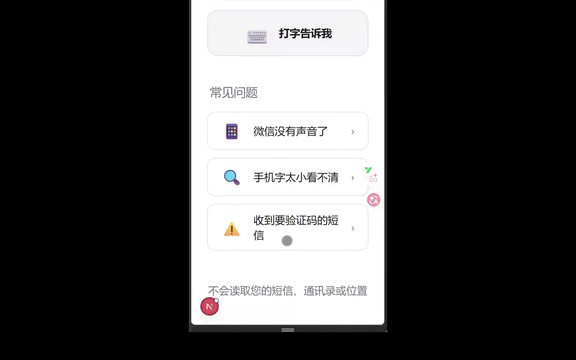
For another example, with typical age-friendly issues like "phone text is too small," the system maintains the same set of principles: large text display, short sentences, one step at a time. For elderly users with low literacy, less information matters more than "feature-rich."
High-Risk Scenario Protection: AI Hits the Brakes
This is EasyPhone AI's most core and valuable design feature. The background to this design is China's increasingly severe telecom and internet fraud landscape. According to data from the Ministry of Public Security, among all telecom fraud cases nationwide in 2023, the proportion of victims aged 60 and above continued to rise, with individual loss amounts often higher than those of other age groups. Common scam tactics targeting the elderly include: impersonating law enforcement to demand transfers, fake investment schemes, impersonating children with urgent requests for help, and remotely controlling phones through "screen sharing" features.
When a senior encounters the following scenarios:
- A text message requesting a verification code
- Someone asking them to enable screen sharing
- An unfamiliar link requesting a click
- Any transfer-related operation
The system will not continue teaching the senior how to proceed. Instead, it immediately enters a red risk warning page with clear instructions:
❌ Do not transfer money ❌ Do not share verification codes with anyone ❌ Do not click unfamiliar links ❌ Do not enable screen sharing
The "screen sharing" scam is particularly insidious — once scammers trick seniors into enabling screen sharing, they can see verification codes, banking app operations, and other sensitive information on the senior's phone in real time, completing fund transfers without the victim's knowledge. EasyPhone AI's classification of these scenarios as red alert zones reflects a deep understanding of real-world scam chains.
Family Help Card: A Communication Bridge Between Seniors and Their Children
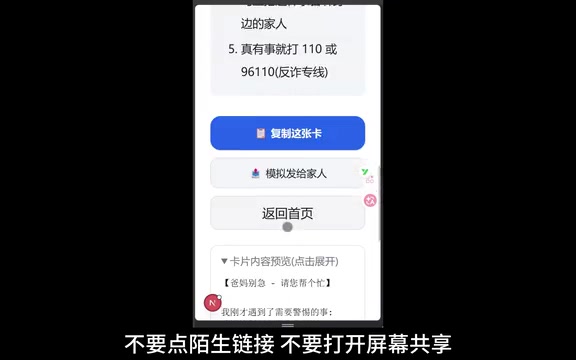
When a risk alert is triggered, the system automatically generates a "Family Help Card" that organizes the problem — which the senior may struggle to explain — into structured information that their children can quickly understand, including:
- What happened: A brief description of the event
- Risk level: The system's assessed danger level
- What family members should verify: Specific recommended actions
The senior only needs to tap once to copy it and send it to a family member. This design elegantly solves a long-standing communication gap — when seniors encounter problems, they often can't describe them clearly, and their children can't assess the situation remotely. The help card makes information transfer efficient and accurate.
Design Philosophy: AI Isn't Omnipotent, But It Can Be Safe
EasyPhone AI's core philosophy deserves reflection across the entire industry: The value of AI lies not only in answering every question, but in knowing when to stop.
This philosophy aligns closely with the "Responsible AI" framework advocated in the current AI ethics field. Responsible AI emphasizes that technology systems should possess transparency, fairness, safety, and accountability. In practice, a critical but often overlooked dimension is "knowing what you don't know" — AI systems should be able to recognize the boundaries of their own capabilities and adopt safe degradation strategies when those boundaries are exceeded, rather than providing potentially harmful answers. This is especially important in applications targeting vulnerable populations, as these users often lack the ability to independently judge the quality of AI outputs.
In an era where AI products generally strive to be "all-powerful," this product takes the opposite approach, choosing to proactively "show restraint" at critical moments — not continuing to teach, not making decisions on behalf of users, but sounding the alarm and connecting family members. EasyPhone AI's choice to "not answer" but instead "refer to family" in high-risk scenarios is essentially an elegant safe degradation mechanism that returns decision-making power to humans with better judgment. This restraint is precisely the quality most needed in AI products designed for vulnerable populations.
From a product design perspective, EasyPhone AI has made meaningful explorations on at least three levels:
- Age-friendly interaction: Rather than simply enlarging fonts, it systematically reduces cognitive burden across dimensions including information density, operational steps, and error tolerance mechanisms
- Risk-tiered response: Patient teaching for low-risk issues, decisive intervention for high-risk scenarios, reflecting a clear prioritization of user safety
- Family collaboration mechanism: Organically combining AI assistance with family intervention through help cards, acknowledging the boundaries of AI capabilities
Against the backdrop of China's accelerating aging population, the digital divide will only become more prominent. As of the end of 2023, China's population aged 60 and above had reached 297 million, accounting for 21.1% of the total population, and is projected to exceed 400 million by 2035. Since 2021, the Ministry of Industry and Information Technology has been promoting the "Special Action for Age-Friendly and Accessibility Transformation of Internet Applications," requiring mainstream apps to launch age-friendly versions with features including large text modes, simplified modes, and voice assistance. However, most transformations remain at the surface level of UI adjustments without fundamentally rethinking the interaction logic and safety needs of elderly users. The value of EasyPhone AI lies in the fact that it's not a superficial modification of existing apps, but rather adds an "AI middle layer" between users and their phones, serving the multiple roles of translator, coach, and security guard.
Although EasyPhone AI is currently still in the demo stage, the design philosophy it represents — using AI to bridge the digital divide while using AI to maintain a safety baseline — points to a direction well worth pursuing for age-friendly technology products.
Key Takeaways
Related articles
CodeGraph: The 50K-Star Open-Source Tool That Cuts AI Coding Token Usage in Half
CodeGraph is a 50K-star open-source tool that builds a code knowledge graph so AI coding assistants can locate code instantly—cutting Token usage by 47%, boosting speed by 22%, all running 100% locally.
VibeCoding Beginner's Guide: A Complete Guide to Building Software with Natural Language from Scratch
VibeCoding lets anyone build software through natural language conversations with AI. Learn the core concepts, learning path, and practical methods to get started.

Using UU Accelerator to Speed Up Cursor: A Compliant Solution for Stable AI Coding in China
Learn how to use NetEase UU Accelerator to speed up Cursor AI coding tool in China, with step-by-step setup including node selection and launch configuration.