BMad-Method: Building an AI Agile Development Team with a Multi-Agent Framework
BMad-Method: Building an AI Agile Deve…
BMad-Method simulates a full agile team via multi-agent collaboration across the entire software development lifecycle.
BMad-Method is an open-source multi-agent collaboration framework that simulates a complete agile development team through seven AI roles (Business Analyst, Product Manager, UX Expert, Architect, Scrum Master, Developer, QA), covering the full workflow from requirements analysis to quality assurance. It supports mainstream AI programming tools, allows planning phases to be completed on free platforms like Gemini to save costs, and ensures development quality through standardized documentation and a development-testing-iteration loop, enabling solo developers to truly become a one-person team.
The Next Evolution of AI Programming Tools
In today's flourishing landscape of AI programming tools, Claude Code, Cursor, Windsurf, and others can already dramatically boost coding efficiency. But a key problem persists: real software development is far more than just writing code. Requirements analysis, product planning, architecture design, user story breakdown, quality assurance—these phases often consume enormous time and effort throughout the development cycle.
BMad-Method (Breakthrough Mad Agile Development Method) is an open-source project born to solve this pain point. It's not yet another code generation tool, but rather a complete multi-agent collaboration framework that simulates all roles of an agile development team, covering the entire software development lifecycle from business analysis to quality assurance.
Core Design Philosophy of BMad-Method
Multi-Agent System: Teaching AI to "Divide Labor"
Multi-Agent Systems (MAS) represent an important research direction in artificial intelligence. The core idea is to decompose complex tasks among multiple agents with specialized capabilities working collaboratively. In the era of Large Language Models (LLMs), this concept has been reinvigorated—research shows that compared to a single "omnipotent" prompt, agents assigned specific roles and contexts for different tasks can significantly improve output quality. Research from OpenAI, Anthropic, and other institutions has confirmed that Role Specialization enables models to demonstrate stronger reasoning depth and consistency in specific domains. BMad-Method is a prime example of engineering this academic finding into practical application.
Seven Agent Roles and Their Responsibilities
BMad-Method's most distinctive feature is its carefully designed multi-role agent system, with each role serving a specific function:
- Business Analyst (Analyst): Responsible for requirements research and business analysis in the early project stages
- Product Manager (PM): Generates detailed PRDs (Product Requirements Documents)
- UX Expert: Develops UI/UX design specifications
- Architect: Produces technical architecture plans and project structure
- Scrum Master: Breaks down requirements into executable user stories
- Developer: Implements actual code based on user stories
- QA Engineer: Performs automated testing and quality reviews
Each role has independent instruction sets and workflows, achieving seamless handoffs between roles through standardized document formats. This design transforms AI from merely a "code completion tool" into a genuine participant in every phase of software engineering.
This role system directly maps from Agile Development methodology. Agile development was born from the 2001 Manifesto for Agile Software Development, with its core principle being iterative, incremental software delivery that prioritizes individual collaboration and responding to change over processes and documentation. Scrum is one of the most popular agile frameworks, defining roles such as Product Owner, Scrum Master, and Development Team, along with practices like Sprint cycles, User Stories, and Kanban boards. BMad-Method directly maps this methodology to AI agent design, giving the AI collaboration process the inherent rigor of agile engineering rather than casual "conversational development."
Cross-Platform Compatibility and Cost Optimization Strategy
BMad-Method supports mainstream AI programming tools including Claude Code, Cursor, Cline, Windsurf, and Roo Code, allowing users to work directly within their familiar development environments.
Even more noteworthy is its cost optimization strategy: during the project planning phase (requirements analysis, PRD generation, architecture design), users can complete everything in free or low-cost web chat interfaces like Gemini or ChatGPT, without consuming tokens from paid tools like Claude Code. Only when entering the actual coding phase do you need to switch to a professional AI programming IDE.
There's deep technical logic behind this design. Tokens are the basic unit of measurement for LLM text processing, roughly corresponding to 0.75 English words or 1.5 Chinese characters. Mainstream AI programming tools like Claude Code charge based on token consumption, and complex project planning conversations can consume hundreds of thousands of tokens—a non-trivial cost. The deeper technical constraint comes from Context Window limitations—the maximum amount of information a model can "remember" in a single session. Completing the planning phase in free web interfaces not only saves money but also leverages the ultra-long context advantages of models like Gemini (e.g., Gemini 1.5 Pro supports 1 million tokens) for processing large documents, then passing structured output to the coding phase—an engineering wisdom that balances both cost and capability.
Hands-On Demo: Building a Smart Vocabulary Learning App from Scratch
Step 1: Installation and Environment Setup
BMad-Method installation is straightforward, accomplished with a single command provided officially:
- Run the official installation command in the VSCode terminal
- Select the installation path (typically the current project root directory)
- Choose feature modules (core agile development system, with an optional game development module)
- Select the target development environment (Claude Code, Cursor, etc.)
After installation, entering a slash command in Claude Code reveals all commands prefixed with "BMad," confirming the framework is ready.
Step 2: Complete Project Planning in Gemini
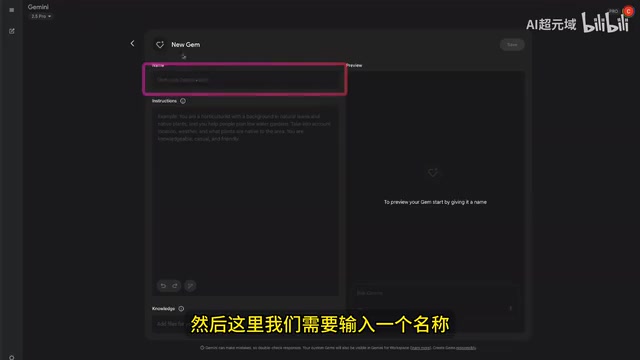
This is BMad-Method's most innovative phase. Users can leverage Gemini's Gems feature to create a BMad agent. Gemini Gems is a personalized AI assistant feature launched by Google in 2024, allowing users to create specialized AI agents with specific expertise by uploading knowledge documents and custom instructions—similar in positioning to OpenAI's GPTs, though Gems offers certain advantages in knowledge base file size and context processing capability. BMad-Method uses the Gems feature to encapsulate the framework's role instruction sets into reusable agents, eliminating the need to manually paste complex system prompts each time and significantly lowering the barrier to entry.
Specific configuration steps:
- Create a new Gem in Gemini, named "BMad"
- Download configuration files from the
Dist/Teamsdirectory in the BMad-Method official repository - Upload the files to the Gem's knowledge base
Once configured, the entire planning workflow progresses sequentially by role:
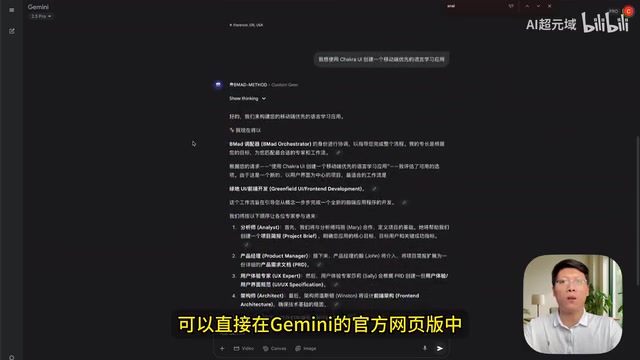
Business Analyst Phase: Input the analysis command and project description (e.g., "Create a mobile-first language learning app using Chakra UI"). The system supports both interactive mode (asking for details step by step) and direct generation mode, ultimately outputting a Project Brief.
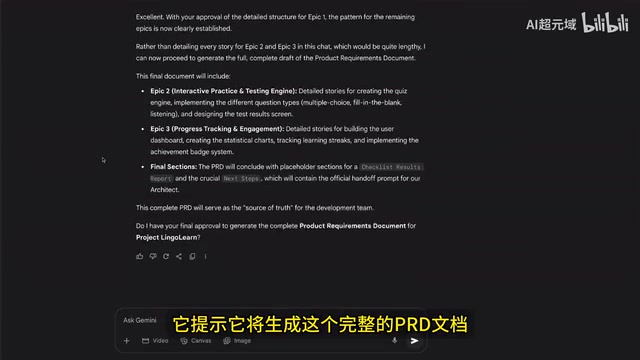
Product Manager Phase: After switching to the PM role, the system automatically generates a PRD document based on the Project Brief, including project goals, background description, functional requirements (top navigation bar, bottom tab bar, vocabulary learning module, etc.), UI design specifications, Epics and User Stories, and other complete content. Users can supplement requirements at any time, such as specifying the app name, target users, and main features.
It's worth noting that the PRD (Product Requirements Document) is the core bridge connecting business goals to technical implementation. In traditional software engineering, PRD quality directly determines the directional accuracy of subsequent development—according to McKinsey research, the cost of fixing errors in the requirements phase is 5-10 times that of the coding phase. The challenge of AI-generated PRDs lies in maintaining logical consistency and actionability. BMad-Method effectively constrains the LLM's tendency toward "creative divergence" through structured role handoffs and document templates, making output documents executable for real engineering projects.
UX Expert and Architect Phase: UI/UX specification development and technical architecture design are completed sequentially, ultimately outputting complete PRD documents and full-stack architecture documents.
Step 3: Document Chunking and User Story Breakdown
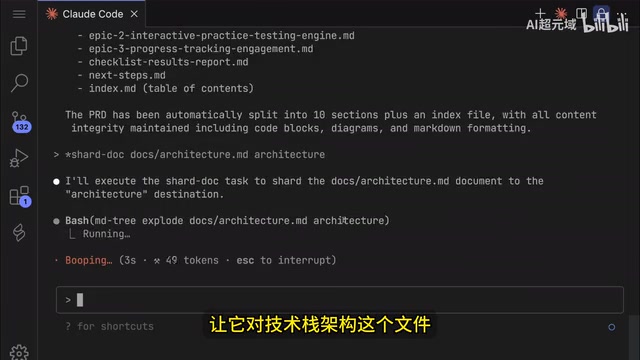
After importing the PRD and architecture documents generated in Gemini into the VSCode project's docs folder, enter Claude Code for document chunking. This step's purpose is to split large documents into smaller, manageable units for subsequent incremental development.
Then switch to the Scrum Master role and execute the user story generation command. User Stories are the standard format for describing functional requirements in agile development, typically following the template "As a [user role], I want to [accomplish something], so that [I gain some value]." The accompanying Acceptance Criteria for each story define clear boundaries for "done" and serve as direct basis for QA testing. The value of this format lies in anchoring technical requirements to user value, avoiding over-engineering. BMad-Method's Scrum Master agent automatically performs the breakdown from PRD to user stories, essentially executing the most time-consuming "requirement granularization" work in requirements analysis—something that traditionally requires both senior product managers and technical leads working together.
The system automatically breaks down PRD requirements into specific development stories (e.g., Story 1.1, Story 1.2, etc.), each containing clear acceptance criteria and implementation requirements. After review, marking the story status as "approved" moves it into the development phase.
Step 4: Coding Development and Quality Assurance Loop
The development phase workflow is highly standardized:
- Activate Developer Role: Enter the slash command to activate the Developer Agent
- Execute User Stories: Specify the story number to implement (e.g., "execute story 1.1"), and the AI automatically reads the story file and writes code
- Status Update: After development is complete, change the story status to "review"
- Quality Review: Switch to the QA role and execute the review command for automated testing
- Iteration Progress: After review passes, return to Scrum Master to generate the next story, repeating the cycle
The entire process forms a clear development-testing-iteration loop, with each phase having explicit inputs, outputs, and state management. This closed-loop design aligns closely with the Sprint iteration concept in agile development: each user story is equivalent to a micro-Sprint with its own independent development, acceptance, and delivery cycle, ensuring both controllable development rhythm and flexible space for requirement changes.
Final Results and Value Analysis
Through the BMad-Method framework, the final smart vocabulary learning app developed is quite feature-complete:
- Learning progress visualization
- Flashcard flip learning (with pronunciation playback)
- Multiple practice modes (multiple choice, fill-in-the-blank, listening exercises)
- Points system and achievement notifications
- Personalized settings (study reminders, sound effects control, etc.)
- Mobile-first responsive design
Starting from a brief project description, going through the complete multi-agent collaboration workflow, and ultimately delivering a fully-featured application product—this is precisely the core value that distinguishes BMad-Method from ordinary AI programming tools.
Conclusion: Why BMad-Method Deserves Attention
BMad-Method's true value lies not in how well it can write code, but in how it systematically integrates software engineering best practices into the AI-assisted development workflow. It addresses several core pain points of current AI programming tools:
- Leaping from "writing code" to "building products": Covering the complete chain from requirements analysis to quality assurance
- Cost control: Planning phases can use free tools; only the coding phase consumes paid tokens
- Quality assurance: Reducing chaos from AI "freestyle" through standardized documents and processes
- Reproducibility: Output at every stage is structured documentation, facilitating review and iteration
For individual developers and small teams, BMad-Method essentially uses AI to simulate a complete agile development team, making "one person equals one team" truly possible. If you're currently using Claude Code or other AI programming tools for project development, BMad-Method is worth serious consideration.
Related articles
 Tutorials
Cursor + Codex Dual-IDE Collaboration: A Practical Methodology for Open-Source Project Customization
A complete methodology for open-source project customization based on real-world experience, detailing the Cursor+Codex dual-IDE workflow, seven-stage process, MVP validation, and AI source code reading techniques.
 Tutorials
Cursor Multi-Agent in Practice: Building a Full-Stack Next.js Blog in 50 Minutes
Build a full-stack blog in 50 minutes using Cursor IDE's multi-Agent mode with Next.js, Clerk auth, and Supabase. Learn the 4-phase AI Agent workflow and key integration pitfalls.
 Tutorials
Building an AI Software Factory from Scratch: A Cursor Engineer's Hands-On Experience with Multi-Agent Collaboration
Cursor engineer Eric shares practical insights on building an AI software factory: automation levels, guardrail design, parallel Agent management, and scaling to 1000+ Agents for 24/7 development.