Bolt DIY + Claude 3.7: Complete Guide to Building a Zero-Cost AI Coding Environment
Bolt DIY + Claude 3.7: Complete Guide …
Bolt DIY paired with Claude 3.7 Sonnet enables near-zero-cost, high-quality AI coding.
Bolt DIY is a free, open-source alternative to Bolt.new that runs locally, bypassing subscription and token limits. Paired with Claude 3.7 Sonnet via OpenRouter, it generates interactive applications successfully on the first attempt for just 11 cents in API costs. Completely free models like Gemini are also available. With multi-tab parallel coding, project history rollback, GitHub integration, and Netlify deployment, it's a highly cost-effective solution for rapid prototyping and tool building.
Introduction: Why Bolt DIY Deserves Your Attention
In today's flourishing landscape of AI coding tools, Bolt.new has won over a large user base with its powerful online programming capabilities. However, its subscription fees and token limits have deterred many developers. Bolt DIY—the open-source, free version of Bolt.new—paired with one of the strongest coding models available, Claude 3.7 Sonnet, is emerging as an extremely competitive alternative.
It's worth understanding that Bolt.new itself was developed by the StackBlitz team as a browser-based AI full-stack programming platform. Its core technology relies on WebContainers—a revolutionary technology that runs a complete Node.js environment directly in the browser without any server-side support. Bolt DIY (also known as bolt.diy) is a community-built open-source fork based on the same concept, allowing users to self-host and connect any API-compatible large language model, completely bypassing official subscription limits and token quotas.
This article provides a detailed walkthrough of setting up a Bolt DIY environment from scratch, connecting Claude 3.7 API, and demonstrating the coding capabilities of this combination through real-world examples. Most importantly, the entire process can be accomplished at virtually zero cost.
Setting Up Bolt DIY: From GitHub to Local Deployment
Step-by-Step Installation Guide
The Bolt DIY installation process is straightforward—just follow the instructions in the GitHub repository step by step:
- Navigate to the Bolt DIY project page on GitHub
- Follow the Direct Installation guide in the README, copying and pasting each command into your terminal
- Once installation is complete, run
pnpm run devto start the development server - The terminal will output a local address—open it in your browser to start using the tool
About pnpm: The
pnpmused here is a high-performance package manager in the Node.js ecosystem. Compared to traditional npm and yarn, pnpm uses hard links and symbolic links to achieve globally shared dependency storage, significantly reducing disk usage and installation time. Bolt DIY chose pnpm primarily for its excellent performance in complex project structures and its stricter dependency isolation mechanism, ensuring consistency in local development environments.
The entire process is free and runs completely locally. Compared to Bolt.new's subscription model, Bolt DIY is not only free but also has no token usage limits, and projects can be saved and rolled back at any time.
Configuring Claude 3.7 API Access
After launching Bolt DIY, select OpenRouter as the API provider from the dropdown menu. OpenRouter is a unified LLM API gateway that aggregates models from dozens of AI providers through a single interface, including Anthropic, Google, Mistral, Meta, and more. Its core value lies in the standardized OpenAI-compatible API format—developers don't need to maintain separate SDKs for each model. The platform uses a pay-per-use billing model and offers free quotas for some models, making it an excellent tool for individual developers to control AI costs.
In the model list, find the Anthropic section where you'll see three different versions of Claude 3.7 Sonnet:
- Claude 3.7 Sonnet (Standard): Faster speed, suitable for routine coding tasks
- Claude 3.7 Sonnet Thinking (Thinking mode): Higher output quality, but slower
- Claude 3.7 Sonnet Extended: Extended version
Claude 3.7 Sonnet is a hybrid reasoning model released by Anthropic in 2025. Its biggest innovation is integrating standard response mode and Extended Thinking mode within the same model. For coding tasks, Claude 3.7 leads on the SWE-bench Verified benchmark and can handle complex multi-file project structures. In thinking mode, the model performs internal chain-of-thought reasoning before outputting, significantly improving accuracy on complex logical tasks—but at the cost of increased response latency and token consumption. This is precisely why Bolt DIY offers both versions for users to choose based on their needs.
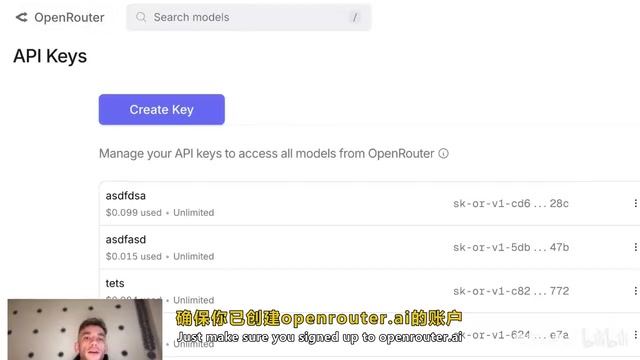
Getting an API Key is also simple: click the "Get API Key" button in the interface, which redirects you directly to OpenRouter's key management page. Register an account and you can create a key immediately.
Free AI Coding Solutions: Zero-Cost Model Alternatives
If you don't want to spend a single cent on API calls, OpenRouter also provides several free models:
- Google Gemini Flash 2.0 Experimental: Completely free with excellent coding capabilities
- Gemini Experimental 1206: Also free with outstanding performance
- Mistral: Free version of the open-source model
- DeepSeek R1: Some versions available for free
While these models may not match Claude 3.7 Sonnet on complex tasks, they're more than sufficient for everyday web and tool development. This means the entire pipeline from environment setup to actual coding can be completely free.
Hands-On Demo: Building Complete Apps from a Single Prompt
Case 1: Interactive SEO Audit Checklist
In the first test, a single prompt was used to request an interactive SEO audit checklist application where users can check off completed tasks (such as optimizing title tags, fixing dead links, improving page speed, etc.).
Using the standard Claude 3.7 Sonnet, the application was coded quickly. The finished product includes:
- Checkable task list
- Real-time progress bar
- Report download functionality
- Responsive design with mobile preview support
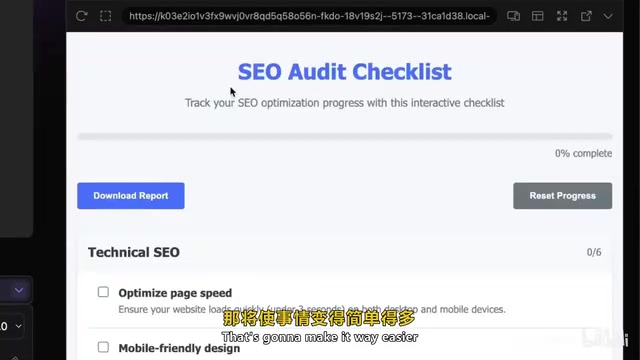
Most impressively, this application worked perfectly on the first generation, requiring no debugging or modifications. In contrast, when using models like Grok or ChatGPT, extensive back-and-forth debugging is often needed—especially with complex prompts. Claude 3.7's first-attempt success rate is noticeably higher. The reason behind this is Claude 3.7's stronger holistic understanding of code context, enabling it to simultaneously consider UI structure, state management, and interaction logic consistency within a single inference pass.
Case 2: SEO Knowledge Quiz Game
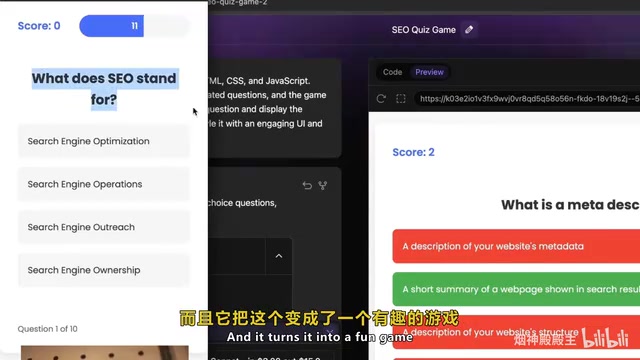
The second case was an SEO knowledge quiz game. A single brief prompt generated a fully functional quiz application. Surprisingly, the model even automatically added a timer feature—this wasn't in the prompt requirements, but Claude 3.7 determined it would enhance the gaming experience and proactively included it. This kind of "exceeding expectations" proactive optimization demonstrates the engineering judgment that Claude models exhibit beyond mere instruction following.
Case 3: SEO Pricing Calculator
The third case was a fairly complex SEO service pricing calculator, featuring multiple calculation mode switches, detailed quote generation, and lead collection functionality through inquiry forms. Applications of this complexity typically require multiple rounds of debugging in other AI coding tools, but Claude 3.7 again achieved first-attempt success.
API Cost Analysis: Building a Complete App for 11 Cents
You can check API usage costs on OpenRouter's Activity page. Based on actual test data, generating a complete interactive application using Claude 3.7 Sonnet costs approximately $0.11 (about 11 cents) in API fees.
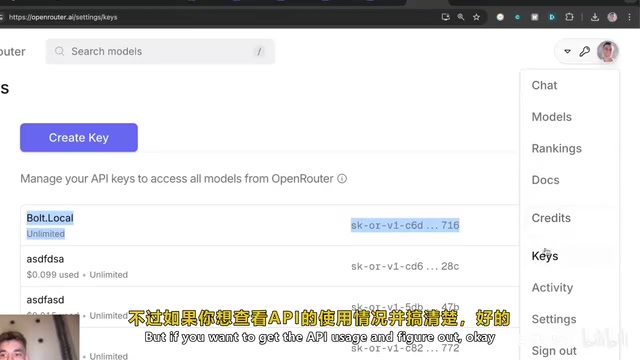
This cost is virtually negligible. Even building multiple projects daily, monthly expenses remain far below the subscription costs of Bolt.new or Cursor. And if you use free models, the cost drops directly to zero. OpenRouter's pay-per-use billing model shows a clear advantage here—you only pay for tokens actually consumed, rather than paying for a fixed subscription quota.
Multi-Task Parallelism and Project Management Features
Bolt DIY supports multi-tab simultaneous coding—you can build complex applications using Thinking mode in one tab while quickly generating simple tools in standard mode in another. This parallel workflow dramatically improves development efficiency.
On the project management front, Bolt DIY also excels:
- Chat History: The left sidebar saves all project conversations, allowing you to switch and roll back at any time
- 30-Day Records: View all project progress from the past 30 days
- Code Export: One-click download of complete code in ZIP format
- GitHub Integration: Publish projects directly to GitHub repositories
- Netlify Deployment: Download the code and drag it to Netlify to complete deployment and get a test domain
Going Live: The Complete Workflow from Local to Public
Deploying Bolt DIY-generated projects online is equally simple. Netlify, recommended here, is a cloud deployment platform designed specifically for frontend and JAMstack applications. Its core advantage is an extremely simple deployment process—supporting drag-and-drop folder publishing (Netlify Drop) with automatic CDN distribution, HTTPS certificates, and custom domain binding. The free tier provides 100GB/month bandwidth and an automatically assigned .netlify.app subdomain, fully meeting the needs of prototype showcases and small tool launches.
Here are the specific steps:
- Click "Download Code" in the code view to download the ZIP file
- Go to Netlify and select "Import Existing Project"
- Use the Netlify Drop feature to drag in the extracted folder
- The project will automatically deploy to a test domain
- For custom domains, you can purchase and bind them directly in Netlify
The entire workflow from coding to going live can be completed in just a few minutes.
Conclusion: What Development Scenarios Is Bolt DIY Best For?
The core advantages of the Bolt DIY + Claude 3.7 Sonnet combination come down to three points:
- Extremely low cost: Free environment setup, negligible API fees, and completely free model options available
- High code quality: Claude 3.7 Sonnet's coding ability ranks in the top tier among current large language models, capable of generating complex applications in a single pass
- High development efficiency: Supports multi-task parallelism, comprehensive project management, and simple deployment workflows
Of course, this doesn't mean it can completely replace professional IDE-level AI coding tools like Cursor. For continuous development and maintenance of large projects, professional tools still have irreplaceable advantages—such as deep indexing of local codebases, cross-file refactoring capabilities, and more granular version control integration. However, for rapid prototyping, tool building, landing page creation, and similar scenarios, Bolt DIY + Claude 3.7 is undoubtedly one of the most cost-effective solutions available today.
Key Takeaways
- Bolt DIY is a free, open-source alternative to Bolt.new that runs locally using WebContainers technology with no token limits, delivering powerful AI coding capabilities when paired with Claude 3.7 Sonnet
- Through OpenRouter's unified API gateway, you can access both standard and thinking modes of Claude 3.7 Sonnet, plus completely free models like Google Gemini, Mistral, and DeepSeek
- Real-world testing shows Claude 3.7 Sonnet generating interactive applications (audit checklists, quiz games, pricing calculators) successfully on the first attempt, with API costs of only about 11 cents
- Supports multi-tab parallel coding, 30-day project history rollback, GitHub integration, and one-click Netlify deployment
- For rapid prototyping and tool-building scenarios, Bolt DIY + Claude 3.7 is one of the most cost-effective AI coding solutions available today
Related articles
 Tutorials
Cursor + Codex Dual-IDE Collaboration: A Practical Methodology for Open-Source Project Customization
A complete methodology for open-source project customization based on real-world experience, detailing the Cursor+Codex dual-IDE workflow, seven-stage process, MVP validation, and AI source code reading techniques.
 Tutorials
Cursor Multi-Agent in Practice: Building a Full-Stack Next.js Blog in 50 Minutes
Build a full-stack blog in 50 minutes using Cursor IDE's multi-Agent mode with Next.js, Clerk auth, and Supabase. Learn the 4-phase AI Agent workflow and key integration pitfalls.
 Tutorials
Building an AI Software Factory from Scratch: A Cursor Engineer's Hands-On Experience with Multi-Agent Collaboration
Cursor engineer Eric shares practical insights on building an AI software factory: automation levels, guardrail design, parallel Agent management, and scaling to 1000+ Agents for 24/7 development.