Build a DIY Parts Management System with Zero Code: A Vibe Coding Case Study

AI-generated code delivers a DIY parts management app, showcasing the Vibe Coding paradigm
A Bilibili creator shared a DIY parts management application entirely generated by AI, featuring a parts library with category management (drag-and-drop sorting, automatic color changes across categories) and a bill of materials module (BOM generation, total price calculation, image export). The project exemplifies the Vibe Coding philosophy — describing requirements in natural language and using CodeX or Claude to generate a complete application with zero hand-written code.
Overview
When your workbench is piled high with electronic components, screws and nuts, and 3D-printed parts, efficiently managing these components becomes a pain point for every DIY enthusiast. Bilibili creator Zhang Airui shared a parts management application entirely generated by AI — no hand-written code required, yet delivering smooth interactions and a complete feature set.
This project is a textbook example of the "Vibe Coding" philosophy: describe your requirements in natural language and let AI (such as CodeX or Claude) generate the complete application code. Vibe Coding is a concept proposed in late 2024 by Andrej Karpathy (former Tesla AI Director and OpenAI co-founder). The core idea is that developers no longer write code line by line but instead generate, debug, and iterate on software through natural language conversations with AI. The rise of this approach depends on the leap in code generation capabilities of large language models — from GitHub Copilot's line-level completions to Claude and GPT-4 generating complete multi-file projects. The entire system has a clear design philosophy and high modularity, making it an excellent reference case for learning AI-assisted programming.
Parts Library Management: Categorization, Entry, and Visual Operations
Categorization and Entry
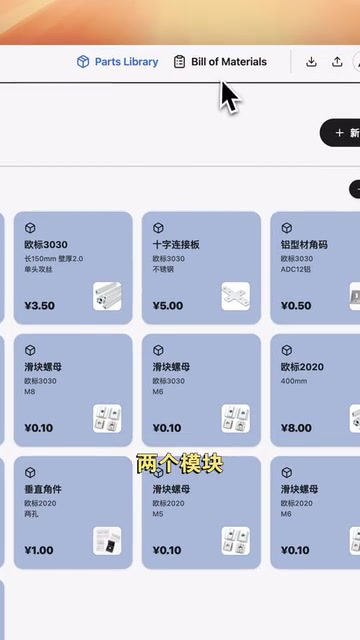
The parts library is the foundational module of the entire system. Users can create different categories (such as electronic components, mechanical structural parts, fasteners, etc.) and then add various DIY parts one by one. Each part card contains the following information:
- Name: The common name of the part
- Model: Specific specifications and model number
- Unit Price: Procurement cost
- Reference Image: Upload a photo or diagram
The system also includes a built-in AI assistant that can batch-import parts and solutions, significantly improving data entry efficiency.
Drag-and-Drop Sorting and Visual Management
This application puts considerable effort into interaction design. Users can assign color labels to each card and reorder them via drag-and-drop. When a card is dragged across categories, it automatically changes to the target category's color — the visual feedback is highly intuitive. Entire categories can also be moved as a whole, making it easy to reorganize the structure at any time.
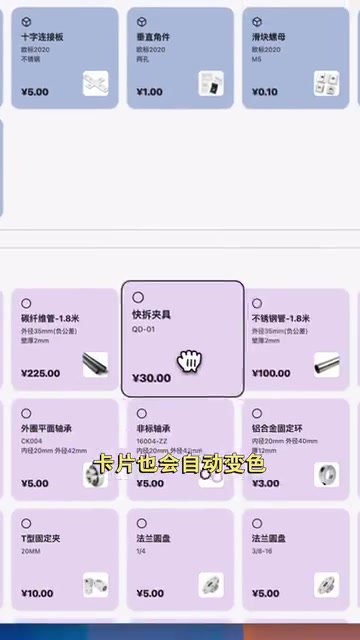
Drag-and-drop sorting in web applications is typically implemented using the HTML5 Drag and Drop API or third-party libraries (such as dnd-kit or SortableJS). The core principle involves listening for drag events on elements, calculating positions in real time, and updating the DOM order. Cross-container dragging also requires handling data model changes — when a part is dragged from one category to another, not only must the visual position be updated, but the underlying category assignment in the data must also be modified. This type of interaction requires handling numerous edge cases in traditional development (such as animation transitions and touch device compatibility), but through AI generation, you can quickly obtain a working baseline implementation.
This design makes parts management as intuitive as organizing a card wall — even when the number of parts grows to hundreds, clear visual hierarchy is maintained.
Bill of Materials: From Parts Library to Project BOM
From Parts Library to Project List
The bill of materials module is oriented toward specific DIY projects. BOM (Bill of Materials) is a core document in manufacturing and engineering that details all raw materials, components, and their quantities needed to manufacture a product. In the DIY and maker community, a BOM is typically used to record the complete procurement list for a project, including specific model numbers, quantities, and supplier information for electronic components. A well-prepared BOM not only makes it convenient to repurchase and replicate projects but is also standard practice when sharing projects in the open-source hardware community.
When you start a new project, create a new list and click the "Add Parts" button — the part cards will fan out below like a hand of playing cards, with category-based filtering support.
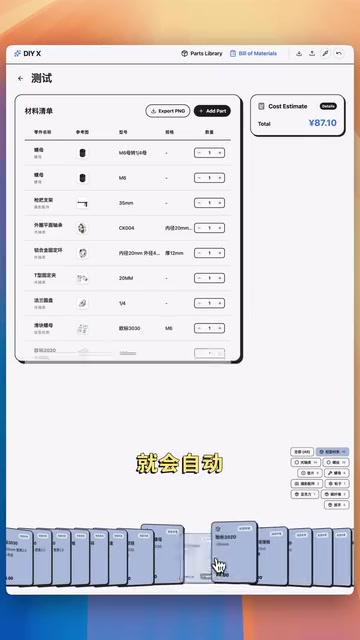
Simply click a part card and it's automatically added to the current list. You can enter the required quantity, reorder items via drag-and-drop, and swipe left to delete (deleted part cards return to the "hand" for reselection). This interaction logic is highly intuitive with virtually zero learning curve.
Export and Sharing
Once the list is complete, click the total price button on the right side, and the entire list is formatted like a supermarket receipt, clearly displaying the quantity and price of each part. Using the export function, the system generates a shareable image, making it easy to share your BOM in community groups.
Personalization and Data Management
UI Color Customization
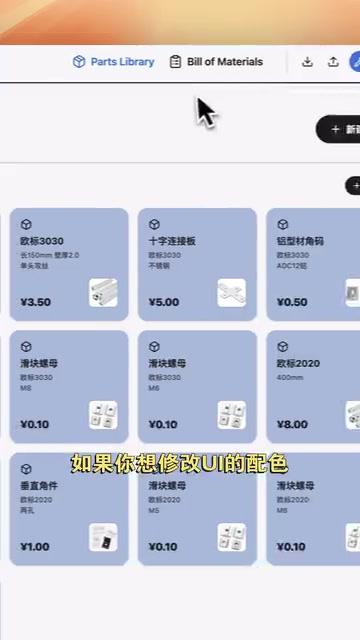
The application provides an eyedropper tool that allows users to pick any color and directly set a new interface color scheme. This detail reflects attention to user experience — every DIY enthusiast has their own aesthetic preferences.
Data Backup and Migration
All data can be exported as a compressed archive for backup and import on other devices. Data persistence in purely front-end web applications is a classic challenge: common approaches include localStorage (simple key-value storage with approximately 5-10MB capacity) and IndexedDB (a browser-built-in NoSQL database supporting large-capacity structured data). The shared limitation of these approaches is that data is bound to a single browser — clearing browser data results in loss. Therefore, the export-as-archive feature essentially packages application data and image resources for download, implementing a lightweight cross-device migration solution without requiring a backend server for data synchronization.
What Vibe Coding Means for Zero-Code Development
What's most noteworthy about this project isn't just the final product but how it was developed. The creator emphasizes "no hand-written code required" — the entire application was generated by AI. In the video, he shares the complete thought process and structure so that viewers can replicate and further develop it using CodeX or Claude.
CodeX is OpenAI's AI coding agent based on the codex-1 model, capable of autonomously completing coding tasks in a cloud sandbox environment — including writing feature code, fixing bugs, and running tests — with developers only needing to issue instructions in natural language. Claude is a large language model developed by Anthropic whose Artifacts feature can generate runnable front-end applications directly within a conversation. Both share the common characteristic of supporting multi-turn conversational development — developers can continuously propose modifications, and the AI iterates and optimizes on the existing codebase, making the gradual construction of complex applications possible.
This represents a new software development paradigm:
- Requirements description IS development: Describe feature modules and interaction logic in clear natural language
- Modular thinking: Break the application into independent modules (parts library, lists) to reduce the complexity AI needs to understand
- Iterative refinement: Progressively refine details through conversational interaction (such as drag-and-drop, animations, color schemes, etc.)
For the maker community — people with clear requirements but lacking programming experience — Vibe Coding is opening a new door. You don't need to learn React or Vue; you just need to clearly describe "what I want," and AI can help you build it. Of course, this doesn't mean programming knowledge is worthless — understanding basic front-end concepts (such as components, state management, and event handling) helps you describe requirements more precisely to AI and obtain higher-quality output.
Conclusion
While this DIY parts management system isn't overly complex in functionality, it demonstrates the complete application pipeline of AI-assisted programming in a real-world scenario — from requirements analysis and module design to interaction implementation, all driven by AI. For readers looking to get started with Vibe Coding, this is an excellent starting project: clear functionality, well-defined modules, and rich interactions — well worth replicating hands-on.
Key Takeaways
- The entire parts management application is fully AI-generated with zero hand-written code, comprising two major modules: parts library and bill of materials
- The parts library supports category management, drag-and-drop sorting, and automatic color changes when dragging across categories for a smooth interaction experience
- The bill of materials module supports quick selection from the parts library, quantity editing, total price calculation, and image export for sharing
- A built-in AI assistant enables batch part entry, with support for data export/backup and UI color customization
- The project demonstrates the Vibe Coding development paradigm: describe requirements in natural language and generate complete applications via CodeX or Claude
Related articles
 Tutorials
Cursor + Codex Dual-IDE Collaboration: A Practical Methodology for Open-Source Project Customization
A complete methodology for open-source project customization based on real-world experience, detailing the Cursor+Codex dual-IDE workflow, seven-stage process, MVP validation, and AI source code reading techniques.
 Tutorials
Cursor Multi-Agent in Practice: Building a Full-Stack Next.js Blog in 50 Minutes
Build a full-stack blog in 50 minutes using Cursor IDE's multi-Agent mode with Next.js, Clerk auth, and Supabase. Learn the 4-phase AI Agent workflow and key integration pitfalls.
 Tutorials
Building an AI Software Factory from Scratch: A Cursor Engineer's Hands-On Experience with Multi-Agent Collaboration
Cursor engineer Eric shares practical insights on building an AI software factory: automation levels, guardrail design, parallel Agent management, and scaling to 1000+ Agents for 24/7 development.