Build AI Apps Without Code: A Practical Guide to Rapid Development with No-Code Platforms
Build AI Apps Without Code: A Practica…
No-code platforms with integrated LLMs let anyone build and monetize AI applications without coding.
This article introduces a no-code development platform integrating multiple large models including NanoBanana and GPT, enabling users with zero programming experience to build AI applications through visual drag-and-drop. The platform offers rich templates, AI-assisted data modeling, behavior flow logic configuration, and one-click payment integration, creating a complete pipeline from product development to commercial monetization and significantly lowering the barrier to AI application entrepreneurship.
Introduction: The Era of No-Code Development Has Arrived
While most people are still debating which programming language to learn, no-code development platforms have quietly transformed the barrier to software development. Today, with visual drag-and-drop interfaces and one-click access to LLM APIs, even complete beginners with zero coding experience can build a fully functional, commercially viable AI application in just minutes.
The rise of no-code development platforms stems from a long-standing "developer gap" in software engineering. According to predictions from institutions like IDC, the global demand for software applications is growing far faster than the supply of professional developers. These platforms abstract underlying code logic into visual components, essentially "crystallizing" years of engineering experience into the platform itself, allowing non-technical users to directly leverage these encapsulated capabilities. From a technical architecture perspective, no-code platforms are typically built on a "Metadata-Driven" design philosophy—every drag-and-drop and configuration action by the user generates a corresponding structured description file in the backend, which the platform engine then renders in real-time into a running application.
This article introduces a no-code development platform that integrates multiple large models (including NanoBanana, GPT, and others), walking you through how to build, publish, and even monetize a mini-program or website from scratch—without writing a single line of code.
Core Platform Capabilities: No-Code + AI LLM Integration
The platform's core value proposition can be summarized in two keywords: no-code development and LLM integration.
On the no-code side, the platform provides a complete graphical editing interface. All product development work—from UI layout and data binding to behavior logic configuration—is accomplished through mouse dragging and visual operations. Developers never need to touch any code, and the entire process is WYSIWYG (what you see is what you get).
On the AI capability side, the platform has built-in support for dozens of mainstream large models including NanoBanana, GPT, and others, all accessible with one click. Integrating LLM capabilities into no-code platforms has been the core direction of platform evolution over the past two years. Traditionally, calling APIs like GPT requires developers to have engineering skills in HTTP requests, token management, streaming output handling, error retry logic, and more. No-code platforms pre-package these technical details, simplifying LLM calls into a configurable "behavior node." It's worth noting that different large models have different strengths: the GPT series excels at general text understanding and generation, image generation models (like the Stable Diffusion series) focus on text-to-image tasks, while vertical models like NanoBanana may be specifically optimized for particular scenarios. The value of multi-model integration is that it allows developers to "choose the right model for the job" based on specific business scenarios, rather than being locked into a single vendor. This means you can easily add AI chat, AI image generation, intelligent Q&A, and other features to your application without having to integrate complex API interfaces yourself.

Hands-On Workflow: From Project Creation to Launch
Step 1: Create a Project
After entering the platform, click the "New Project" button on the right, then select "Create Blank Project" to enter the graphical editing interface. Of course, if you don't want to start from scratch, the platform also offers a rich template library to choose from.
Step 2: Build the Interface Visually
In the editing interface, the core operational logic is very intuitive:
- Drag and drop elements: Drag buttons, text boxes, images, lists, and other UI elements onto the canvas as needed
- Layout adjustment: Arrange element positions and adjust styles according to your design vision
- Data binding: Link interface elements to backend data models
- Behavior configuration: Add click events, navigation logic, conditional judgments, and other interactive behaviors
Throughout the process, you can preview your product in real-time across different devices—desktop, mobile, and tablet—ensuring multi-device compatibility.
Step 3: Quick Start with Templates
If you're not skilled at interface design, the platform offers numerous ready-made templates covering various common business scenarios:
- AI application templates (e.g., NanoBanana image generation tools)
- E-commerce (product display, ordering and payment)
- Knowledge monetization (course sales, content subscriptions)
- Ordering systems (food & beverage, service appointments)
- Studio showcase (portfolios, corporate websites)
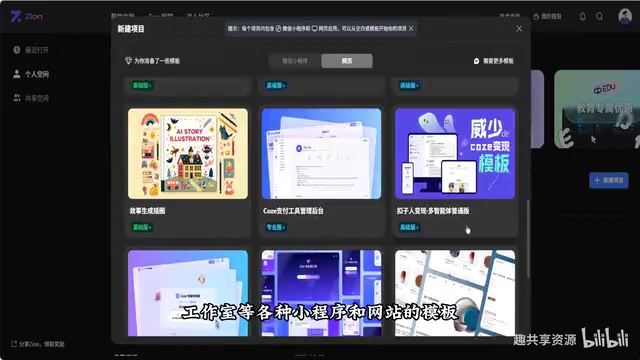
After selecting a template, you can see the complete structure and functionality of each page, and every element supports free editing and modification, offering high flexibility.
Backend Capabilities: Data Management and Business Logic Configuration
A complete AI application isn't just about the frontend interface—backend data management and business logic are equally critical. This platform has also provided comprehensive visual encapsulation for backend capabilities.
Data Models and Database Management
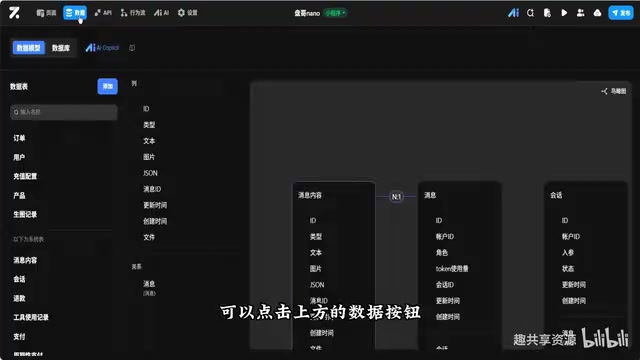
Click the "Data" button at the top to enter the backend management interface. A Data Model is the skeleton of an application, defining the structure, types, and relationships of all data within the app. In traditional development, designing a database schema requires developers to have expertise in SQL or NoSQL and a deep understanding of business logic. This platform uses an AI assistant to automatically generate data models, essentially leveraging the LLM's ability to understand business descriptions and automatically infer reasonable table structures and field definitions—this is backed by the "engineering common sense" accumulated from training on massive amounts of software engineering documentation and database design cases. For beginners, this is like having a database architect available 24/7, significantly reducing the rework costs caused by poorly designed data structures.
Here you can:
- View and edit the entire product's data model
- Use the AI assistant to automatically generate complete data model structures, eliminating the hassle of manual database design
- Manage all information in the database, including order data, user information, AI image generation records, etc.
- Support batch import and export of data
Behavior Flows and Permission Control
"Behavior flows" are essentially visual business logic orchestration tools, corresponding to the "Workflow Engine" concept in software engineering. They allow users to define business rules in a flowchart format: "when a certain event occurs, execute certain actions under certain conditions." This design pattern has decades of history in enterprise software (such as the BPMN standard), and no-code platforms have further simplified it and made it accessible to ordinary users.
In AI application scenarios, behavior flows are particularly important: for example, after a user initiates an AI image generation request, the system needs to sequentially complete "verify user balance → call image generation API → wait for results → deduct credits → return image" and other steps. All of this complex asynchronous logic can be chained together through behavior flow nodes without writing any asynchronous programming code. In the "Behavior Flow" module, you can configure various business logic judgments, such as:
- Payment success verification workflows
- Checks for whether a user has AI image generation permissions
- Subsequent actions triggered by different operations
In "Settings," you can also fine-tune the user permission system, distinguishing access and usage rights for different roles such as visitors, regular users, and premium users—this is crucial for commercial operations.
Monetization: One-Click Payment Integration
For creators looking to monetize their AI applications, one of this platform's major highlights is its support for one-click payment integration.
Payment integration has always been a high-barrier task for independent developers. Taking the Chinese market as an example, integrating WeChat Pay or Alipay requires completing merchant qualification reviews, API key management, signature algorithm implementation, asynchronous callback handling, order status synchronization, and a series of other complex tasks—this single step alone could take experienced developers several days. No-code platforms pre-complete the integration with payment service providers and encapsulate payment capabilities as standard components, so creators only need to configure their receiving account and pricing rules to go live.
You can set up paid models for your AI tools—such as pay-per-use or subscription plans. From a business model perspective, "pay-per-use" is suitable for high-frequency, essential-need scenarios where users have clear willingness to pay; "subscription" is better suited for products with continuously updated content, helping establish stable cash flow and user retention. Users complete payments directly within your mini-program or website, with clear and transparent fund flows.
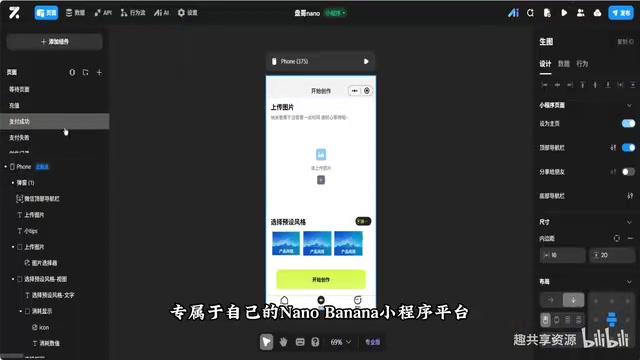
This means the entire chain from product development to business closure can be completed on a single platform, significantly lowering the entrepreneurial barrier for independent developers and small teams.
Target Audience and Usage Recommendations
This type of no-code AI development platform is particularly suitable for the following groups:
- AI application entrepreneurs: Quickly validate product ideas with low-cost experimentation
- Content creators / influencers: Build your own AI tool sites and expand monetization channels
- Small and medium businesses: Rapidly launch internal tools or customer-facing AI services
- Non-technical users: Participate in the AI application development wave with zero background
However, it's important to note that while no-code platforms lower the development barrier, a product's success still depends on your understanding of user needs, the soundness of your product design, and your operational and marketing capabilities. Tools are just means to an end—the real value lies in what problems you solve with them.
Conclusion
The combination of no-code development platforms and AI large models is turning "everyone can build AI products" from a slogan into reality. For those looking to quickly enter the AI application space, these platforms offer an extremely low-barrier path—no programming background needed, no server operations knowledge required, and not even UI design skills necessary—to complete the entire journey from idea to launch. The key is to take action, identify real user needs, and ship your product with minimal cost.
Related articles
 Tutorials
Cursor + Codex Dual-IDE Collaboration: A Practical Methodology for Open-Source Project Customization
A complete methodology for open-source project customization based on real-world experience, detailing the Cursor+Codex dual-IDE workflow, seven-stage process, MVP validation, and AI source code reading techniques.
 Tutorials
Cursor Multi-Agent in Practice: Building a Full-Stack Next.js Blog in 50 Minutes
Build a full-stack blog in 50 minutes using Cursor IDE's multi-Agent mode with Next.js, Clerk auth, and Supabase. Learn the 4-phase AI Agent workflow and key integration pitfalls.
 Tutorials
Building an AI Software Factory from Scratch: A Cursor Engineer's Hands-On Experience with Multi-Agent Collaboration
Cursor engineer Eric shares practical insights on building an AI software factory: automation levels, guardrail design, parallel Agent management, and scaling to 1000+ Agents for 24/7 development.