Building a Browser Extension with Cursor from Scratch: A Beginner's Guide to Indie Development as a Side Hustle
Building a Browser Extension with Curs…
Use AI tools to turn personal pain points into small tools and kickstart your indie development journey.
This article demonstrates how a complete beginner can leverage AI tools for indie development through a real example of building a batch link-opening browser extension with Claude + Cursor. The core message: don't obsess over business models from the start. Instead, begin with pain points in your own workflow, practice with small projects, learn AI's capability boundaries through hands-on experience, and gradually develop your sense for identifying needs and building development skills.
It All Started with a Frustrating Moment
Have you ever had this experience: a browser extension you relied on suddenly gets taken down, and it feels like discovering Ctrl+C has stopped working mid-report?
That's exactly what happened to the video author — a browser extension for batch-opening multiple links suddenly disappeared. But instead of waiting around, he used Claude + Cursor and built a replacement with just a single prompt. While the project was small, it perfectly demonstrates how a complete beginner can leverage AI tools to start indie development from scratch.
Hands-On: Building a Browser Extension with AI
Simple Requirements, But Plenty of Details
The plugin's core functionality seems modest: the user holds down the Z key while dragging the mouse to select and batch-open multiple links. While the feature is simple, it's incredibly practical for everyday web browsing.
What is a browser extension? A browser extension is a small software program built with web technologies (HTML, CSS, JavaScript) that extends a browser's native functionality. Chrome extensions follow the Manifest V3 specification and consist of core files like
manifest.json(configuration file), content scripts (scripts injected into web pages), and background service workers. This standardized file structure is precisely what allows AI to generate complete, runnable extension code in one go, without requiring developers to scaffold the project from scratch.
The author's development workflow consisted of several steps:
-
Describing requirements on the Claude website: He first described the functionality of selecting all links within a mouse-drag selection box, then realized the requirements were incomplete and added the "hold Z key while dragging" interaction. The author believes Claude's website generally produces better results than calling it directly within Cursor, so he generated the code on the website first.
-
Implementing code in Cursor: He transferred Claude's generated code to Cursor, which automatically split the code into separate local files. This involves a clear division of labor between two tools: Claude is a large language model developed by Anthropic that excels at understanding natural language requirements and generating high-quality code; Cursor is an AI code editor built on VS Code whose Agent mode allows AI to autonomously plan and execute multi-step tasks like creating files and modifying code. As an AI Agent, every operation Cursor performs requires the user to click "Accept" before it's saved, ensuring you maintain control over every step.
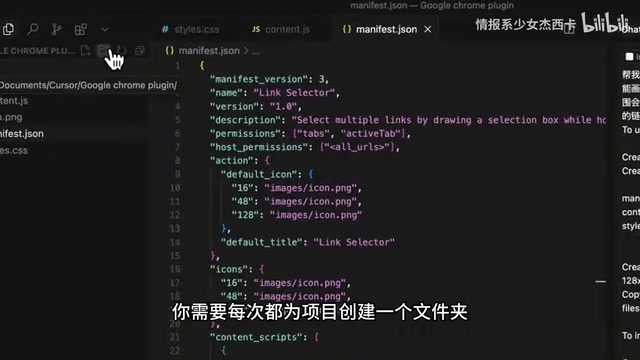
- Importing into Chrome for testing: Open developer mode in Chrome's extension management page and import the folder. If the import fails, simply copy the error message and let Cursor fix it.
The final product even included two interaction details that AI proactively added: the cursor changes to a crosshair when Z is pressed, and a tooltip appears on first use to inform users about the multi-link selection feature. These small details demonstrate that even a tiny requirement has plenty of interaction design space worth polishing.
The Biggest Mistake Beginners Make: Overthinking, Underdoing
Many people immediately get trapped in questions like "Who is my target user?" or "How do I get people to pay?" The more they think, the more complicated it gets — they try to tackle everything at once and end up completely paralyzed, not knowing where to start.
The best starting point for finding requirements is actually your own workflow.

Pay attention to the small friction points in your daily routine: maybe it's a browser extension, maybe it's a small utility, maybe it's a repetitive operation. Those moments where you think "it would be great if this could work differently" — those tiny friction points are the best entry points.
Why Start with Small Tools
Filling Gaps Left Unmaintained
Small tools like batch-opening links are great to use but don't make money. The original author may have taken down the extension for various reasons, and waiting for someone else to build the same thing could take forever. Rather than waiting passively, just build one yourself with AI. This is precisely the scenario where AI-assisted development shines.
Small Scope, Perfect for Practice
Small features mean manageable complexity. Even if you can't code and don't understand development, AI can help you get it done. It won't be like building a large-scale app where you encounter countless unsolvable problems without knowing where the bottleneck is.

But even small projects teach you a lot. For example, the author discovered that different websites use different frameworks, and some complex JavaScript styling prevents the plugin from recognizing links or activating selection mode. This involves an important software development concept — Edge Cases: different websites use React, Vue, Angular, and other frontend frameworks, each with different DOM structures and event handling mechanisms, causing the same JavaScript code to fail on certain pages. This is precisely why professional QA (Quality Assurance) engineers exist — to systematically cover various edge scenarios. AI can currently build "80-point" solutions for mainstream scenarios quickly, but handling long-tail edge cases still requires human intervention and iterative refinement. Generating a program that covers standard search results is easy, but covering all edge cases might require a dozen revisions and still not be fully resolved. These are things you only learn by doing, and they're the best way to understand the limitations of AI tools.
Ensuring Your Time Isn't Wasted
Everyone's exhausted from their day jobs, and working on side projects means squeezing time like toothpaste from a tube. By starting with small details you want to optimize, even if nobody pays for it yet, you've genuinely improved your own workflow. Every time you press Z and drag to batch-open five or six links, you get a little rush of satisfaction — "I built this myself."

Developing a "Sense for Needs" Matters More Than Writing Code
Beyond development skills themselves, the more important value of this process is cultivating your ability to identify needs. The more you pay attention to small details and notice where things feel inconvenient, the more you develop this observational skill in daily life:
- "This software makes me click three times every time just to get to the page I want — so annoying"
- "Why do I have to manually organize this data every single time?"
- "This operation could clearly be automated — why hasn't anyone done it?"
These small complaints are actually seeds of demand. You can start cultivating the habit of observing and recording these needs right now.
Opportunities to earn small money through indie development are actually abundant. Earning medium money might require some luck, skill, and insight, but the barrier to earning small money has been dramatically lowered by AI tools.
Action Steps for Zero-Experience Developers
Here's a summary of this methodology suitable for beginners:
- Don't try to tackle everything at once — start by optimizing small details in your own work
- Observe what's inconvenient and what could be better — record these tiny friction points
- Try using AI tools (Claude + Cursor) to bring your ideas to life — practice with small features
- Learn AI's capability boundaries through practice — understand what it excels at and where it gets stuck
- Gradually accumulate development experience and a sense for needs — building a foundation for bigger projects in the future
In a world where many seemingly stable jobs are no longer truly stable, exploring cash flow streams beyond your company salary is something worth taking seriously. Rather than waiting to react passively, why not start with a small extension right now?
Related articles
 Tutorials
Cursor + Codex Dual-IDE Collaboration: A Practical Methodology for Open-Source Project Customization
A complete methodology for open-source project customization based on real-world experience, detailing the Cursor+Codex dual-IDE workflow, seven-stage process, MVP validation, and AI source code reading techniques.
 Tutorials
Cursor Multi-Agent in Practice: Building a Full-Stack Next.js Blog in 50 Minutes
Build a full-stack blog in 50 minutes using Cursor IDE's multi-Agent mode with Next.js, Clerk auth, and Supabase. Learn the 4-phase AI Agent workflow and key integration pitfalls.
 Tutorials
Building an AI Software Factory from Scratch: A Cursor Engineer's Hands-On Experience with Multi-Agent Collaboration
Cursor engineer Eric shares practical insights on building an AI software factory: automation levels, guardrail design, parallel Agent management, and scaling to 1000+ Agents for 24/7 development.