Building a Financial Report Analysis AI Agent with Cursor + Skills: A Step-by-Step Tutorial from Scratch

A hands-on tutorial for building a financial report analysis AI Agent from scratch with MiniMax M2.1
This article uses a financial report analysis AI Agent as a practical case study, demonstrating how to build a vertical-scenario AI Agent with report downloading, deep analysis, and PPT generation capabilities from scratch using Cursor editor, Skills definition files, and MiniMax M2.1. With powerful coding abilities, 200K ultra-long context, and extremely low cost (starting at 9.9 RMB), M2.1 enables even programming beginners to complete a full-stack project in a single weekend.
In the Age of AI Agents, Everyone Can Be a Developer
Over the past year, AI Agent has undoubtedly been one of the hottest keywords in the tech world. An AI Agent is an AI system capable of perceiving its environment, making autonomous decisions, and executing actions to achieve goals. Unlike traditional Q&A-style large language models, Agents possess a closed-loop capability of "planning-executing-feedback": they can break down complex goals into subtasks, invoke external tools (such as search engines, code interpreters, and API endpoints), and dynamically adjust strategies based on execution results. This architecture is commonly known as the ReAct (Reasoning + Acting) framework, proposed by Princeton University in 2022, and serves as the theoretical foundation for most mainstream Agent systems today.
Imagine this scenario: your friend receives an urgent task from their boss — analyze financial reports from 10 companies and produce detailed research reports within a single day. Manual analysis simply can't keep up. That's when an AI Agent capable of automatically downloading financial reports, performing deep analysis, and generating presentations becomes a lifesaver.
This article uses a real financial report analysis AI Agent project as an example, walking you through how to build a fully functional vertical-scenario AI Agent from scratch using Cursor editor + Skills definitions + MiniMax M2.1 large model. Even if you're a programming beginner, you can follow along and build it yourself.
Why Choose MiniMax M2.1
With so many open-source large models available — GLM4, DeepSeek V3, M2.1, etc. — choosing the right one is crucial. After extensive benchmarking and comparison, MiniMax M2.1 stands out in the following dimensions:
- Powerful coding capabilities: Performance on SWE-Bench benchmarks matches or even exceeds Claude Sonnet 4.5, with stable performance across various programming frameworks
- Ultra-long context support: Native support for a 200K Token context window — tossing in hundreds of pages of PDF financial reports is no problem at all
- Multi-language programming ability: Can freely switch between Python, JavaScript, Shell, Prompt Engineering, and other languages while understanding inter-module calling relationships
- Extremely low cost: New users can get the Coding Plan for just 9.9 RMB (~$1.4), crushing the $20 price tag of overseas large models in terms of cost-effectiveness
About SWE-Bench: This is a software engineering benchmark jointly released by Princeton University and the University of Chicago, specifically designed to evaluate large models' ability to solve real GitHub Issues. The test set contains 2,294 real bug-fix tasks from 12 mainstream Python open-source projects, requiring models to read code repositories, understand problem descriptions, and generate patch code that passes unit tests. Since tasks come from real engineering scenarios rather than artificial constructions, SWE-Bench is considered one of the most authoritative evaluations reflecting a model's actual programming capabilities — far more informative than simple code completion tests.

Environment Setup: Connecting M2.1 to Cursor
Register and Subscribe to the MiniMax Developer Platform
- Open the MiniMax developer platform and log in using phone verification
- After logging in, select Coding Plan
- Click the cheapest monthly plan in the upper right corner (9.9 RMB) — the price of a bubble tea
- The Plus plan (49 RMB) offers additional features like image recognition; beginners can stick with the basic plan
Configure the M2.1 Model in Cursor
The configuration process is very straightforward — follow these steps:
- Open Cursor and create a new folder (e.g.,
MiniMax-M2.1) - Click the settings icon in the upper right → Model → scroll down to find the API Key option
- Enable the OpenAI API Key toggle
- Enter the API URL link provided in the MiniMax documentation
- Scroll up, click "Add Model," and enter the M2.1 model name

Once configured, switch to M2.1 in Cursor's model selection and type "What model are you?" to test. If it responds that it's powered by MiniMax M2.1, the connection is successful.
System Architecture Design: How the AI Agent Works
Before writing any code, let's clarify the overall system architecture. The workflow of this financial report analysis AI Agent is as follows:
- User inputs a request (e.g., "Download Apple's latest financial report and perform an in-depth analysis")
- M2.1 serves as the Agent's brain, calling the MiniMax API to deeply analyze the request and decompose it into tasks
- Sequentially invokes three core skills:
- 📥 Report Download Skill: Downloads financial reports from financial regulatory agencies and disclosure platforms
- 📊 Report Analysis Skill: Performs deep analysis of the report and generates a web-based report
- 📑 PPT Generation Skill: Automatically creates a presentation from the analysis results
- Outputs the final result: Including a complete analysis report and PPT
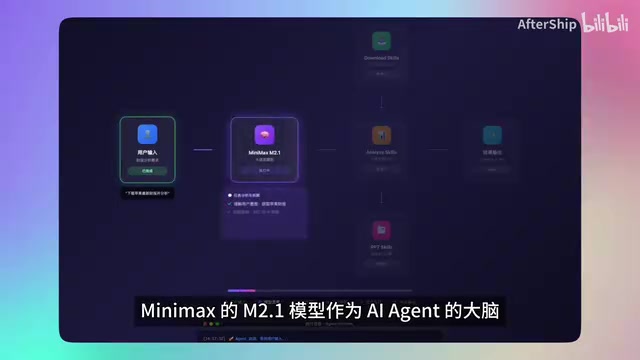
This "brain + skills" architecture pattern is the mainstream paradigm for current AI Agent development. The large model handles intent understanding and task orchestration, while Skills handle specific operations. It's worth noting that the 200K Token ultra-long context window plays a critical role in financial report analysis scenarios — a Token is the basic unit for large model text processing, with approximately 1.5 Chinese characters corresponding to 1 Token. 200K Tokens means the model can process approximately 150,000 Chinese characters in a single pass, equivalent to a medium-thickness book. Apple's annual report typically exceeds 100 pages; traditional small-window models need to chunk the document and process it in batches before summarizing, which causes cross-paragraph logical connections to be lost. Ultra-long context allows the model to understand the entire document "in one go," significantly improving analysis coherence while also simplifying engineering implementation complexity.
Core Development: Skills Definition and Code Implementation
The Skills File: The Soul of the Entire Project
This is the most critical methodology in the entire tutorial — you can't just chat aimlessly with AI when coding; you need a methodology.
The design philosophy of Skills files stems from the combination of "Prompt Engineering" and "Tool Use/Function Calling." After OpenAI introduced Function Calling in 2023, developers could tell models in a structured way "what tools are available, when to use them, and how to call them" — this is more stable and reliable than free-form conversational instructions. Skills.md is essentially a human-readable "capability specification" that makes the Agent's responsibility boundaries, trigger conditions, and data sources explicit, preventing the model from hallucinating or overstepping under ambiguous instructions. This approach is philosophically aligned with the "tool registration" mechanisms in mainstream Agent frameworks like Microsoft AutoGen and LangChain.
Create a skills.md file in the project root directory — this is the project's core skill definition file. Inside, you need to clearly specify:
- Agent role definition: What this Agent is
- Trigger scenarios: Under what circumstances to activate which skill
- Data sources: Where the data comes from
- Typical trigger words: Financial report, annual report, quarterly report, semi-annual report, prospectus, etc.
For example, the financial report download skill definition:
A professional financial report download expert, focused on downloading company financial reports from major global financial regulatory agencies and disclosure platforms.
Overall Technical Framework Setup
With the core skill definitions from Skills in place, let M2.1 help build the overall technical framework:
- Frontend: React + TypeScript
- Backend: Node.js + Express
- Database: Supabase (for storing analysis results)
This tech stack is the mainstream choice for indie developers and small teams building full-stack web applications. React is Meta's open-source frontend UI framework, with TypeScript adding static type checking that catches numerous potential errors during development; Node.js runs JavaScript on the server side, allowing frontend and backend to share the same language and reducing context-switching costs; Supabase is an open-source alternative to Firebase, providing database, authentication, real-time subscriptions, and other Backend-as-a-Service (BaaS) capabilities based on PostgreSQL — developers don't need to manage databases themselves. Its vector storage extension (pgvector) can also directly support RAG (Retrieval-Augmented Generation) scenarios, leaving room for future feature expansion.
Then implement each module one by one. From actual experience, M2.1's code generation quality is remarkably high — it writes everything in one go, and you barely need to make changes.
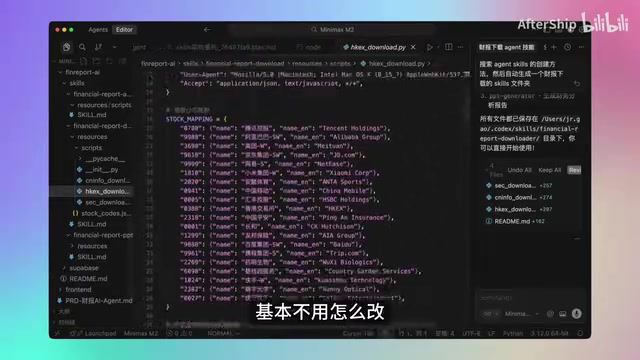
The entire project from 0 to 1, with all code generated by AI, took roughly just one weekend — and most of that time was actually spent tweaking UI colors. This demonstrates that M2.1 is already sufficiently reliable at the logic and functionality implementation level.
Technical Challenges and M2.1's Real-World Performance
This project may seem simple, but it actually involves several core technical challenges:
Multi-Source Data Acquisition
Financial report data is scattered across different sources with varying formats. M2.1's 200K long context window plays a key role here — hundreds of pages of PDFs can be fed directly into the model without additional chunking, greatly simplifying engineering complexity.
Multi-Language Mixed Programming
This project simultaneously uses Python (data processing), JavaScript (frontend and backend), Shell (deployment scripts), Prompt Engineering (skill definitions), and various SDKs. M2.1 can freely switch between different languages and accurately understand inter-module calling relationships — this is genuinely first-tier performance among open-source large models.
Summary and Reflections
After completing this project, here are some key takeaways:
Vertical-scenario AI Agents are the future. General-purpose large models are powerful, but what truly helps us solve specific problems are often AI Agents that go deep into particular scenarios. Whether it's investors reviewing financial reports, analysts conducting research, or students writing papers, tools like these can save enormous amounts of time.
MiniMax M2.1 makes it possible for open-source models to build commercial-grade products. Strong enough performance, low enough cost, fast enough deployment — when all three conditions are met simultaneously, it's tremendously significant for indie developers and small teams.
The Skills methodology is the key to AI-assisted programming. Rather than chatting aimlessly with AI, it's better to first define clear skill files and let AI work within a well-defined framework — efficiency will multiply. This mirrors the software engineering best practice of "write the interface documentation before writing the implementation" — clear boundary definitions are always the prerequisite for complex systems to operate reliably.
If you'd like to try building your own AI Agent, start with this financial report analysis example and experience the true power of open-source large models for just 9.9 RMB.
Key Takeaways
- MiniMax M2.1 matches or exceeds Claude Sonnet 4.5 on SWE-Bench, supports 200K long context and multi-language programming
- The Skills definition file (skills.md) methodology for building AI Agents decomposes complex tasks into three core skills: download, analysis, and PPT generation
- The entire financial report analysis Agent project was built from scratch in just one weekend, with all code AI-generated, using a tech stack covering React + Node.js + Supabase
- Vertical-scenario AI Agents are the best path for large model deployment; open-source models are now capable of producing commercial-grade products
- New users can access M2.1's Coding Plan for just 9.9 RMB, offering far superior cost-effectiveness compared to overseas large models
Related articles
 Tutorials
Cursor + Codex Dual-IDE Collaboration: A Practical Methodology for Open-Source Project Customization
A complete methodology for open-source project customization based on real-world experience, detailing the Cursor+Codex dual-IDE workflow, seven-stage process, MVP validation, and AI source code reading techniques.
 Tutorials
Cursor Multi-Agent in Practice: Building a Full-Stack Next.js Blog in 50 Minutes
Build a full-stack blog in 50 minutes using Cursor IDE's multi-Agent mode with Next.js, Clerk auth, and Supabase. Learn the 4-phase AI Agent workflow and key integration pitfalls.
 Tutorials
Building an AI Software Factory from Scratch: A Cursor Engineer's Hands-On Experience with Multi-Agent Collaboration
Cursor engineer Eric shares practical insights on building an AI software factory: automation levels, guardrail design, parallel Agent management, and scaling to 1000+ Agents for 24/7 development.