Building an Agent Framework from Scratch: Breaking Down the Four Core Modules with Code Implementation
Building an Agent Framework from Scrat…
Split AI Agent capabilities into four core modules to build a reusable small Agent framework.
This article explains how to decompose AI Agent core capabilities into four modules: Tool Registry, Message Store, Agent Runtime, and Built-in Tools, building a small but complete Agent framework. By using the @tool decorator to simplify tool definitions and generalized state management for business decoupling, it demonstrates engineering principles like separation of concerns and the open-closed principle, laying the foundation for understanding mainstream frameworks like LangChain.
Why Do We Need an Agent Framework?
When building an AI Agent from scratch, we typically go through a process like this: first enable the Agent to call an LLM, then add conversation memory, integrate tool calling, and finally get the Reason-Action loop running.
The Reason-Action loop (also known as the ReAct pattern) is the core paradigm of Agent architecture, originating from the 2022 paper "ReAct: Synergizing Reasoning and Acting in Language Models" jointly published by Google and Princeton University. Its core idea is to have the LLM alternately execute two steps: "Reasoning" and "Acting." The model first analyzes the current state and decides on the next action, executes the action, observes the result, and then enters the next round of reasoning. This loop enables the model to handle complex tasks requiring multiple steps and multi-tool collaboration, rather than generating an answer in one shot.
But once you reach this point, you'll discover a serious problem — all the code is tangled together.
Runtime logic, message management, and tool management are coupled in the same file. Extending new tools requires modifying large chunks of code, and switching to a different task scenario becomes nearly impossible. This is exactly why we need to abstract these capabilities into a reusable framework.
This article walks you through how to split validated Agent capabilities into four clear modules, building a small but complete Agent framework.
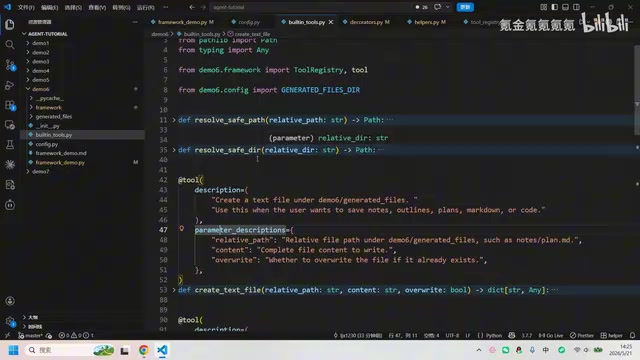
The Four Core Modules of an Agent Framework
The entire framework revolves around four abstraction layers, each with its own responsibility, without interfering with one another.
Tool Registry: The Tool Registration Center
The Tool Registry handles three things: registering tools, generating tool specifications (for LLM recognition), and executing tool calls.
Its core data structure is a dictionary where the key is the tool name and the value is the complete tool definition (ToolDefinition), containing the name, description, parameter list, and the actual execution function (handler).
The upper-level Reason-Action loop doesn't need to care about how each tool is implemented internally, and the lower-level tool functions don't need to know the runtime details of the main loop. This decoupling makes adding new tools extremely simple — just write the function and register it.
Message Store: The Message Manager
The Message Store is responsible for saving conversation history, managing context memory, and automatically performing trimming on each append operation to ensure the model's context window isn't exceeded.
Large language models have a Context Window limit — the maximum number of tokens they can process in a single call. GPT-4o supports approximately 128K tokens, and Claude 3.5 Sonnet approximately 200K tokens. In long conversations or multi-turn tool calling scenarios, historical messages accumulate continuously, and once the limit is exceeded, the API call will fail directly. Common trimming strategies include: sliding window (keeping the most recent N messages), summary compression (summarizing old messages into a digest), and importance filtering (prioritizing tool call results). Encapsulating trimming logic within the Message Store makes strategy upgrades completely transparent to upper layers — the main loop only needs to call store.append(message), and changes to the trimming strategy won't affect other modules.
Agent Runtime: The Runtime Engine
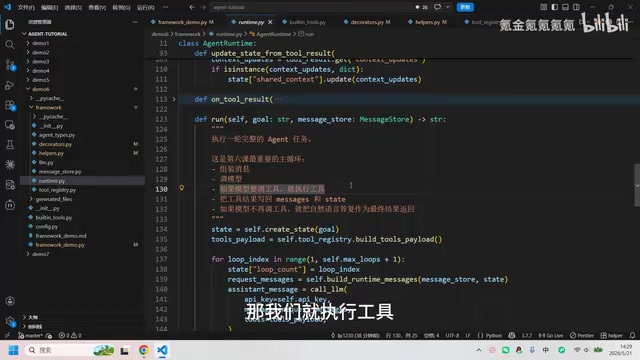
The Agent Runtime is the heart of the entire framework, encapsulating the complete Reason-Action main loop:
- Assembles messages for each LLM interaction (system prompt + history + current state)
- Calls the LLM to get a response
- Determines whether the model needs to call a tool
- If yes, executes the tool and writes the result back to messages and state
- If no, returns the model's response as the final result
- Supports Hook interfaces for executing custom logic after tool calls
Built-in Tools: The Built-in Tool Collection
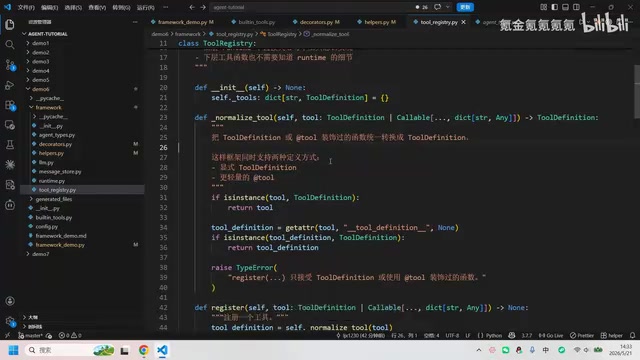
The framework provides a module for housing concrete tool implementations, such as file creation, file reading, etc. These tools are registered via the decorator pattern, and users can easily add their own tools.
Python Decorator Pattern: Making Tool Definitions More Elegant
One of the framework's most clever designs is the @tool decorator. In the traditional approach, defining a tool requires manually writing tool descriptions in JSON Schema format. OpenAI's Function Calling feature requires developers to describe a tool's name, purpose, and parameter structure in JSON Schema format, which the LLM uses to determine when to call which tool and what parameters to pass. Manually writing JSON Schema is not only verbose but also requires precise descriptions of each parameter's type, whether it's required, and other metadata — making it error-prone and difficult to maintain. With the @tool decorator, an ordinary Python function can instantly become an Agent-recognizable tool, completely eliminating this pain point.
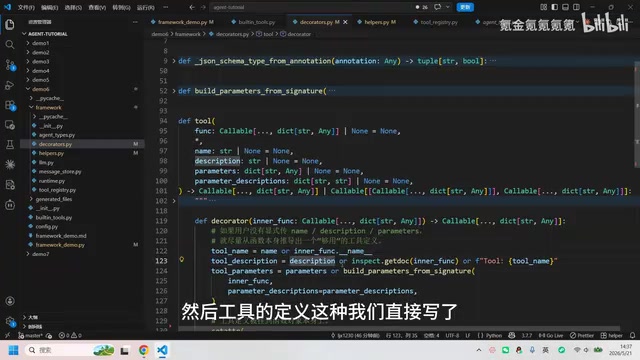
Implementation Principles of the @tool Decorator
The @tool decorator is essentially a higher-order function that takes description information and parameter descriptions as input, then performs the following steps:
- Automatically derives the tool name: If not explicitly specified, it directly uses the function name (e.g.,
create_text_file) - Automatically extracts description information: If no description is provided, it reads the function's docstring (the documentation string wrapped in triple quotes)
- Builds a ToolDefinition object: Packages the name, description, parameter list, and the function itself into a standard structure
- Attaches it to the function object: Adds a
__tool_definition__attribute to the function object viasetattr
Python decorators leverage the language's metaprogramming capabilities: by using setattr to attach a __tool_definition__ attribute to the function object, the function carries self-describing information at runtime. This is highly similar to Java's Annotation mechanism — Java reads annotation information at runtime through Reflection, while Python achieves the same effect by inspecting object attributes. This "data as code" design keeps tool definition and implementation always in sync, eliminating the risk of documentation drifting from code.
In the Tool Registry's standardization method, you only need to check whether a function has the __tool_definition__ attribute to determine if it has been decorated with @tool, and automatically complete registration.
Convenience of Batch Tool Registration
The framework also supports batch registering tools from an entire module. Simply pass in a Python module (file), and the framework will automatically scan all functions decorated with @tool, convert each one into a ToolDefinition, and register it. This means you can centralize all tool functions in a single file and complete all registrations with one line of code.
Generalized Agent State Management
In earlier versions, the Agent's state often contained numerous business-specific fields, such as particular file paths, file contents, etc. This meant the state structure had to be rewritten when switching to a different task scenario.
The framework splits state into two parts:
- General state: The name of the last tool call, the result of the last tool call, whether it's complete, loop count, task objective — these are needed by all Agent tasks
- Extended context (extra context): Business-specific state goes into an extensible dictionary, where different tasks can freely add fields
This design ensures the framework's state is no longer tied to specific business logic, truly achieving generalization.
Simplicity of the Main Entry Point
After modular decomposition, the program's main entry point becomes extremely concise:
- Read the API Key (from environment variables)
- Create the Agent Runtime and Message Store
- Enter the interaction loop: get user input → add to message store → call
runtime.run()→ output result
The entire main file is no more than a few dozen lines, with all framework logic encapsulated in internal modules.
Summary: Design Commonalities from Small Frameworks to Mainstream Architectures
Although this small Agent framework has a modest codebase, it embodies several important engineering principles:
- Separation of Concerns: Tool management, message management, and runtime logic are each independent and non-invasive
- Open-Closed Principle: Adding new tools doesn't require modifying the main loop code — just register them
- Decorator Pattern: Reduces the cognitive burden of tool definition through metaprogramming
- Generalized Abstraction: State management isn't bound to specific business logic, supporting customization through extension fields
Understanding these design principles not only helps you build your own Agent framework but also helps you better understand the internal architecture of mainstream frameworks. LangChain's AgentExecutor is highly similar in design to this article's Agent Runtime, also encapsulating tool registration, message management, and the Reason-Action loop; AutoGen (by Microsoft) focuses more on multi-Agent collaboration scenarios, supporting message passing and role division between multiple Agents; CrewAI further abstracts the concepts of "roles" and "tasks" on top of this. Understanding the small framework built in this article is equivalent to mastering the "minimum viable version" of these mainstream frameworks, enabling you to see through the essential design behind their complex APIs more clearly — their core ideas are consistent, differing only in scale and feature richness.
Related articles
 Tutorials
Cursor + Codex Dual-IDE Collaboration: A Practical Methodology for Open-Source Project Customization
A complete methodology for open-source project customization based on real-world experience, detailing the Cursor+Codex dual-IDE workflow, seven-stage process, MVP validation, and AI source code reading techniques.
 Tutorials
Cursor Multi-Agent in Practice: Building a Full-Stack Next.js Blog in 50 Minutes
Build a full-stack blog in 50 minutes using Cursor IDE's multi-Agent mode with Next.js, Clerk auth, and Supabase. Learn the 4-phase AI Agent workflow and key integration pitfalls.
 Tutorials
Building an AI Software Factory from Scratch: A Cursor Engineer's Hands-On Experience with Multi-Agent Collaboration
Cursor engineer Eric shares practical insights on building an AI software factory: automation levels, guardrail design, parallel Agent management, and scaling to 1000+ Agents for 24/7 development.