Building an On-Chain Trading Bot Management Dashboard with AI — Zero Coding Required
Building an On-Chain Trading Bot Manag…
Use Bolt + DeepSeek to build a Web3 trading bot control panel via natural language with zero coding.
This article demonstrates how to use the open-source AI programming framework Bolt combined with LLM APIs like DeepSeek to generate a fully functional on-chain trading bot visual control panel through natural language conversation in just minutes. It covers the three-step environment setup, model selection recommendations, iterative AI communication strategies, and important notes on project saving and production security audits — all for just a few dollars in API costs.
Introduction: AI Has Lowered the Frontend Development Barrier to Its Minimum
For developers working in Web3 and crypto automated trading, a common pain point is: the backend scripts are ready, but there's no intuitive visual management interface. Traditional solutions involve either hiring frontend engineers on freelance platforms or grinding through frontend frameworks yourself — both costly in time and money.
Now, with the open-source AI programming framework Bolt (the open-source version of bolt.new), combined with LLM APIs like DeepSeek, you can generate a fully functional, visually polished management system in minutes using natural language — even with zero frontend coding knowledge. This article walks through the entire process.
About the Bolt Framework: Bolt is an AI-driven full-stack development environment created by the StackBlitz team. Its core technology is based on WebContainers — a sandbox technology that runs a complete Node.js environment inside the browser. The open-source version of bolt.new allows developers to deploy locally and privately, avoiding exposure of code and API Keys to third-party services. Unlike code completion tools like GitHub Copilot, Bolt adopts a "conversation as development" paradigm: it doesn't just generate code snippets — it directly manages project file structures, installs npm dependencies, and runs build commands, essentially functioning as a complete AI-driven IDE.
Environment Setup: Launch Bolt in Three Steps
Download and Installation
Bolt's open-source code is hosted on GitHub and is continuously maintained. The installation process is straightforward:
- Download the project: Download the ZIP archive directly from the GitHub repository and extract it to any local directory
- Install dependencies: Open a terminal in the project root directory and run
npm install(Mac/Linux users may needsudofor elevated permissions; Windows users should right-click and run as administrator) - Start the service: Run
npm run dev, and the project will launch on local port 5173
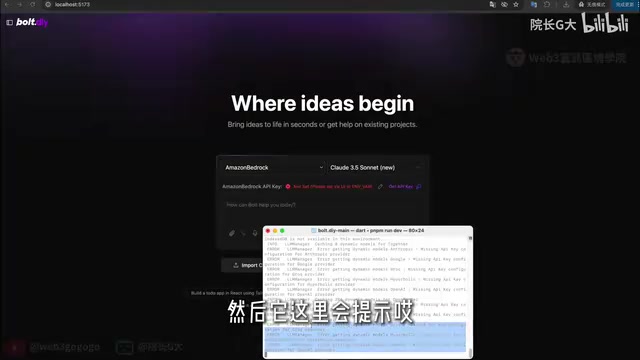
Configuring the API Key
After startup, the system will prompt that an API Key is missing. Here's how to configure it:
- Find the
.envtemplate file in the project root directory, copy it and rename it to.env.local - Enter your API Key in the file — supports OpenAI, DeepSeek, Google, and many other models
- If using a third-party LLM aggregation platform (such as OpenAI Lite, etc.), you'll need to configure both the
base_urland the corresponding API Key
After saving, run npm run dev again, and you'll see all available AI models in the left-side model selection panel.
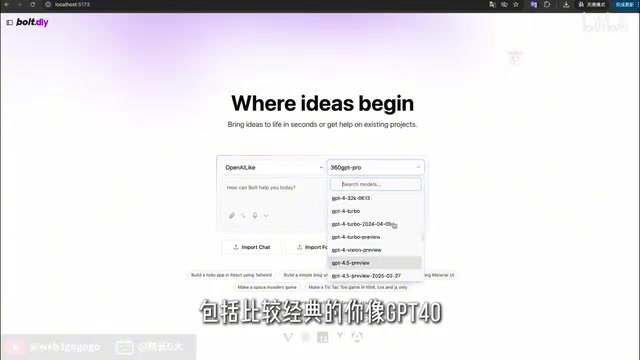
Model Selection Recommendations
From hands-on testing, Grok 3 slightly outperforms DeepSeek in code generation quality, but DeepSeek offers the best cost-effectiveness. The recommended strategy: use a more powerful model (like Grok 3 or GPT-4o) for initial framework scaffolding, then switch to DeepSeek for subsequent detail adjustments to save costs. The total API call expense for the entire process might only be a few dollars.
Model Comparison: DeepSeek is a large language model series from DeepSeek AI. Its code generation capabilities approach GPT-4 levels on multiple benchmarks, but API pricing is roughly 1/10 to 1/20 of OpenAI's — extremely cost-effective. Grok 3 is a model from xAI (Elon Musk's company) that excels in reasoning and code tasks. Third-party aggregation platforms (such as OpenAI Lite, One API, etc.) proxy multiple model services through a unified API interface, allowing developers to switch between different models by maintaining just one base_url and API Key — this is the practical use case for Bolt's multi-model configuration support.
Hands-On: Building a Trading Bot Control Panel with Natural Language
Industry Context: Why This Control Panel Is Needed
On-chain Trading Bots are critical infrastructure in the Web3 space. Common types include Arbitrage Bots, MEV Bots (Maximal Extractable Value), Grid Trading Bots, and Sniper Bots. These programs are typically written in Python or Rust and trigger trades by monitoring blockchain node mempools or price movements on DEXs (Decentralized Exchanges). Since they require simultaneous management of multiple strategy instances, P&L monitoring, and exception handling, a visual control panel has real production value for quantitative traders — not just for demonstration purposes.
First Conversation: Building the Basic Framework
When sending the first instruction to the AI, the key is to describe your requirements in a structured manner:
Please use the Vue framework to create a control panel for an on-chain bot. The entire page should be responsive in width and height, displayed in fullscreen. The page is divided into left and right modules: the left side has a Logo (use any placeholder Logo), with "Bots" and "Settings" options below the Logo; the right side is the corresponding route page, defaulting to the Bots page. The Bots page contains a list of currently running bots and a button to create new bots.
Technical Note: Vue is a progressive JavaScript framework led by Evan You, known for its gentle learning curve and clean component-based design — it's one of the most widely used frameworks in the Chinese frontend ecosystem. The "left-right module + route page" structure mentioned in the instruction relies on Vue Router — Vue's official client-side routing library. It allows switching between different view components via URL paths in a Single Page Application (SPA) without reloading the entire page. This architecture is ideal for admin dashboard applications: the left navigation bar stays fixed while the right content area dynamically renders based on routes, providing a smooth user experience and easy extensibility for new feature modules.
After receiving the instruction, the AI automatically generates the complete project code using the Vue framework. You can watch it edit files in real-time — green markers indicate added code, red markers indicate deleted code.
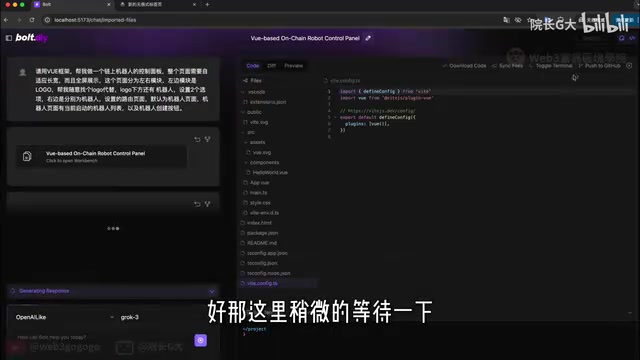
If runtime errors occur (such as missing dependencies), simply click the "Ask AI" button to let it troubleshoot and fix the issue. The AI will automatically identify the problem, install missing dependencies, and restart the project.
Second Conversation: Optimizing Visual Design
The first version often isn't visually appealing — there might be extra white margins, black backgrounds making text unreadable, etc. Simply describe the changes in everyday language:
The page needs to be displayed fullscreen — remove the white margins around the edges. Don't use a black background; switch to a white or light gray theme to ensure text is clearly readable. Output the interface in Chinese.
The results are immediate — the entire control panel looks refreshed with proper layout and harmonious color schemes.
Third Conversation: Refining Functional Details
Once the basic framework is confirmed, continue iterating on features:
Add the following information and actions to the bot list: profit amount (Portfolio), running status (Running/Paused/Stopped/Error), action buttons (Pause, Stop, Delete). Change the table header's black background to gray. Clicking a bot in the list should navigate to a detail page showing running status and transaction logs.
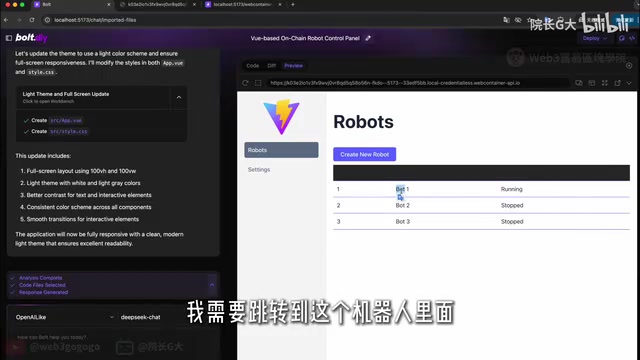
The AI quickly completed all modifications. In the final result, each bot has clear status indicators (Running/Stopped), profit data is visible at a glance, and action buttons are fully functional — clicking the delete button immediately removes the corresponding bot entry from the list, with completely correct interaction logic.
Key Tips and Considerations
Best Practices for Communicating with AI
- Iterate step by step: Don't try to describe all requirements at once — build the framework first, then refine gradually
- Specify the tech stack: Tell the AI which frontend framework to use (Vue/React, etc.) to reduce ambiguity
- Describe issues precisely: When encountering styling problems, pinpoint exactly which element, what color, and what the desired result should be
- Let AI self-repair: Don't panic when errors occur — just let the AI analyze the error messages and fix them
Saving Your Project
This is critically important: Code and chat history in Bolt are not persisted by default. After completing development, make sure to:
- Click download in the Code panel to save the complete project files
- Export chat history for future iteration
If the page is closed without saving, all work will be lost.
Conclusion
This case demonstrates the enormous value of AI programming tools in real projects. For Web3 developers, visual management of automated trading scripts is no longer a challenge requiring significant additional resources. With the Bolt + DeepSeek combination, a few dollars in API costs and a few minutes of conversation yield a responsive, fully functional management interface.
Of course, this approach is currently best suited for rapid prototyping and internal tool development. For user-facing production applications, the generated code still requires professional developers to conduct security audits and performance optimization.
Production Environment Security Considerations: AI-generated frontend code performs excellently during rapid prototyping, but carries several typical risks in production environments: First, XSS (Cross-Site Scripting) vulnerabilities — AI may generate code that directly renders user input without proper escaping. Second, sensitive information leakage, such as hardcoding API Keys in frontend code. Third, dependency security — the npm ecosystem has a history of malicious package poisoning, and AI-selected third-party library versions may contain known CVE vulnerabilities. For Web3 scenarios especially, be vigilant: if the control panel involves private key management or signing operations, any unaudited code could become an entry point for asset loss. It's recommended to perform basic scanning with ESLint security plugins and
npm auditbefore going live.
But as a productivity tool, it's already impressively powerful.
Related articles
 Tutorials
Cursor + Codex Dual-IDE Collaboration: A Practical Methodology for Open-Source Project Customization
A complete methodology for open-source project customization based on real-world experience, detailing the Cursor+Codex dual-IDE workflow, seven-stage process, MVP validation, and AI source code reading techniques.
 Tutorials
Cursor Multi-Agent in Practice: Building a Full-Stack Next.js Blog in 50 Minutes
Build a full-stack blog in 50 minutes using Cursor IDE's multi-Agent mode with Next.js, Clerk auth, and Supabase. Learn the 4-phase AI Agent workflow and key integration pitfalls.
 Tutorials
Building an AI Software Factory from Scratch: A Cursor Engineer's Hands-On Experience with Multi-Agent Collaboration
Cursor engineer Eric shares practical insights on building an AI software factory: automation levels, guardrail design, parallel Agent management, and scaling to 1000+ Agents for 24/7 development.