CC Switch Configuration Guide: Complete Tutorial for Using Claude Code and Codex in China
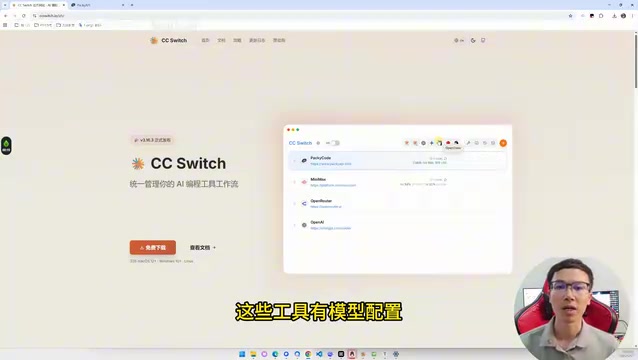
Use CC Switch to configure Claude Code and Codex with domestic APIs in minutes.
This guide walks you through using CC Switch to set up Claude Code and Codex with domestically available APIs in China. It covers installing the tools, adding models like DeepSeek, configuring API Keys, and enabling the critical local routing feature that resolves API format incompatibility between Codex and domestic model providers. The entire setup takes just minutes.
Many developers assume that using AI coding tools like Claude Code and Codex in China requires overseas accounts, foreign subscriptions, and complex network configurations. In reality, with an open-source tool called CC Switch, you can easily connect these tools to domestically available APIs and complete the setup in just a few minutes. This article breaks down the entire process in detail to help you avoid common pitfalls.
Why Use AI Coding Tools Like Claude Code and Codex
Before diving into the configuration, let's address a point many people overlook: the same large language model can deliver vastly different results depending on the tool it's embedded in.
A standard web chat interface can only handle simple Q&A, while AI coding tools like Claude Code and Codex excel at deep integration with the development workflow — they can read your project's code structure, analyze error messages, batch-modify files, execute terminal commands, and even automatically generate and run tests.
Specifically, Claude Code is a command-line AI coding assistant from Anthropic that runs in a terminal environment with direct access to the local file system and shell commands. Codex is a similar tool from OpenAI (known as Codex CLI), also emphasizing deep interaction with code in local development environments. Both are fundamentally different from GitHub Copilot's completion-style assistance — they belong to the "Agentic Coding" paradigm, where AI doesn't just suggest code snippets but acts as an autonomous agent that understands tasks, plans steps, executes operations, and verifies results. This paradigm shift is one of the most important trends in AI-assisted programming in 2025.

When these capabilities come together, that's where the true power of AI-assisted programming lies. So if you're serious about learning AI-powered development, don't stop at web-based chat — make sure to try tools that closely mirror real development workflows.
What Is CC Switch: A Model Switcher for AI Coding Tools
CC Switch can be thought of as a model switcher for AI coding tools. It provides a unified interface for centrally managing model configurations for Claude Code, Codex, and similar tools.
Its core value lies in:
- Unified management: Configure models for all your AI coding tools from a single interface
- Flexible switching: Whether you want to use DeepSeek, Qwen, or other compatible models, you can configure them as needed
- Local routing: Solves API format incompatibility issues with domestic models (this is the most critical feature)
- No manual config file editing: No need to manually modify hidden configuration files — just click through the graphical interface
Claude Code Configuration: Step-by-Step Guide
Step 1: Install Claude Code
Install Claude Code following the official documentation. It's essentially a global npm package — install it with npm install -g @anthropic-ai/claude-code, provided your system already has Node.js configured (Node.js 18 or above is recommended). After installation, the normal flow requires you to log in with an Anthropic account. If you don't have an overseas account, this is typically where you get stuck — and that's exactly the problem CC Switch solves.
Step 2: Install and Configure CC Switch
Open CC Switch, go to the download page, and select the installation package for your operating system.
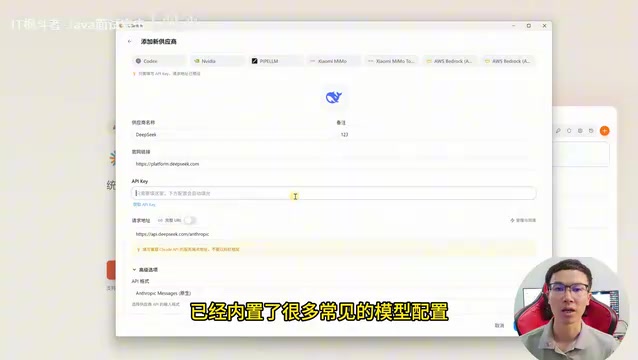
After launching the software, select Claude Code, then click "Add Model." Here's an example using DeepSeek:
- Select DeepSeek as the model provider
- Enter your API Key (create one on the DeepSeek open platform and copy-paste it)
- Choose the specific model you want to use
CC Switch comes with preset configurations for many mainstream models, so most parameters don't need manual adjustment. If you need context switching functionality, check the corresponding option.
Step 3: Enable and Verify
After saving the configuration, click "Enable," then reopen Claude Code. You can now use your configured domestic model to have conversations and process code within Claude Code.
Codex Configuration and Pitfall Avoidance Guide
The configuration approach for Codex is essentially the same as Claude Code: Open CC Switch → Select Codex → Add Model → Enter API Key → Choose Model → Save.
However, there's a common pitfall many people encounter: Codex and some domestic model APIs aren't fully format-compatible. Simply entering an API Key may result in requests that fail to send or return errors.
The Critical Step: Enable Local Routing to Resolve Format Incompatibility
This is the most important part of the entire configuration. CC Switch provides a "Local Routing" feature, which you can think of as a local translator:
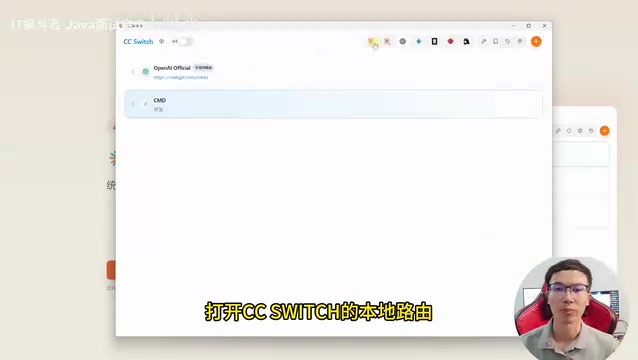
The working principle is straightforward: requests from Codex first pass through the local router, get converted into a format the target model can understand, and then are sent to the corresponding API endpoint. This resolves the format incompatibility issue.
From a technical perspective, this incompatibility manifests at several levels: while most mainstream LLM APIs generally follow OpenAI's Chat Completions API format, there are differences in specific implementations. For example, some domestic models differ from the OpenAI standard in how they handle Server-Sent Events delimiters for streaming responses, the parameter structure for Function Calling, and error code definitions. Codex uses specific request headers, parameter naming conventions, and response parsing logic under the hood — when these details don't match the target API, requests fail or response parsing errors occur. The local router essentially acts as an API proxy gateway, performing protocol adaptation on both the request and response sides so both ends can "understand" each other's language.
Here's how to set it up:
- Go to CC Switch's "Settings" → "Routing Settings"
- Enable local routing
- Select the Codex model you configured earlier
- Save and restart Codex
- When logging in, choose "API Key Login" and fill in the details as prompted
Once configured, you can fully experience all of Codex's features in a domestic environment using your own model API.
Usage Tips and Important Notes
Model Selection Recommendations
Different model platforms have varying pricing structures, stability levels, and response speeds. Here are some suggestions:
- Start with free credits: Most platforms offer credits for new users — get the workflow running before deciding whether to pay
- Pay attention to context length: AI coding tools need to read large amounts of code, so the bigger the context window, the better. The context window refers to the maximum number of tokens a model can process in a single conversation. In AI coding scenarios, the tool needs to send the project's file structure, relevant source code, error logs, conversation history, and more to the model all at once. For a medium-sized project, core code files alone can consume tens of thousands of tokens. If the context window isn't large enough, the tool has to truncate information, causing the model to "miss" critical code and give inaccurate suggestions. Currently, DeepSeek-V3 offers 128K context, Claude 4 Sonnet supports 200K, while some models only support 32K or less — the difference becomes very noticeable when working with large projects
- Compare actual performance: The same task can produce very different results across different models — try several before making your choice
Compliance Reminder
Before configuring, review the usage rules and terms of service for the relevant platforms to ensure your usage complies with their requirements. Different platforms have their own restrictions on API call frequency, permitted use cases, and more.
Advanced Usage
Once you've got the basic configuration running, you can explore further:
- Have AI automatically read your entire project structure and provide refactoring suggestions
- Batch-modify repetitive patterns across files
- Automatically generate unit tests and run them for verification
- Combine terminal commands to achieve end-to-end development automation
These advanced use cases represent the core value of Agentic Coding. Unlike traditional code completion, an AI Agent can autonomously complete the full cycle of "analyze the problem → formulate a plan → write code → run tests → iterate based on results." Developers increasingly take on the role of reviewers and decision-makers rather than line-by-line code writers.
Summary
Using Claude Code and Codex in China doesn't require complex network configurations. CC Switch handles the most tedious parts — model integration and format conversion — all packaged up for you. The core process is just three steps: Install CC Switch → Configure your model and API Key → Enable local routing (required for Codex). The entire process takes just a few minutes, and the barrier to entry is much lower than you might expect.
The real value of AI-assisted programming isn't in chat-based Q&A — it's in letting AI deeply participate in your development workflow. Getting the tools configured is only the first step. The real productivity gains come from continuously exploring the boundaries of AI's capabilities in your actual projects.
Related articles
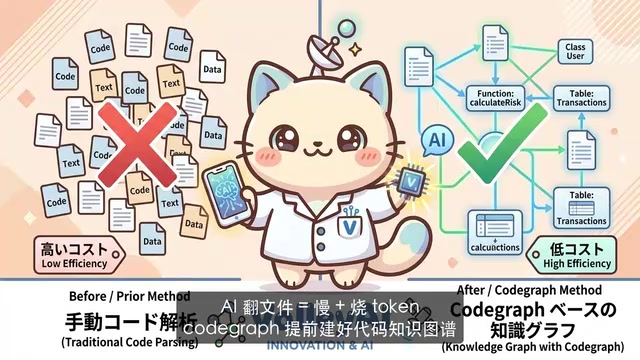
CodeGraph: The 50K-Star Open-Source Tool That Cuts AI Coding Token Usage in Half
CodeGraph is a 50K-star open-source tool that builds a code knowledge graph so AI coding assistants can locate code instantly—cutting Token usage by 47%, boosting speed by 22%, all running 100% locally.

VibeCoding Beginner's Guide: A Complete Guide to Building Software with Natural Language from Scratch
VibeCoding lets anyone build software through natural language conversations with AI. Learn the core concepts, learning path, and practical methods to get started.
Using UU Accelerator to Speed Up Cursor: A Compliant Solution for Stable AI Coding in China
Learn how to use NetEase UU Accelerator to speed up Cursor AI coding tool in China, with step-by-step setup including node selection and launch configuration.