Claude Code Context Management in Practice: The Five-Layer Backpack and Token Optimization Principles
Master Claude Code's five-layer context system and Token optimization to prevent AI degradation over long conversations.
This guide reveals how Claude Code's context mechanism works through a five-layer backpack model — from system prompts to tool results — and explains why conversations degrade over time. It covers the 200K Token boundary, the dangers of auto-compression, and provides three actionable strategies: smart /compact usage, precise file reading, and effective CLAUDE.md configuration. The article also introduces sub-agent isolation as the ultimate tool for managing context bloat.
Why Does Claude Get Dumber the Longer You Chat? Uncovering the Truth Behind Context Mechanics
You've definitely experienced this: Claude performs flawlessly at the start of a conversation, then after a dozen rounds suddenly "mutates" — you repeatedly stressed that certain APIs must not be changed, and it remembered for the first five rounds, but then went ahead and rewrote everything, even fabricating methods that don't exist. There's no way that code would ever run.
The root cause lies in the biggest cognitive illusion: You think Claude has memory, but it's fundamentally a stateless model. No hidden state, no cross-turn memory. The only reason you can have a continuous conversation is that the client stuffs the entire chat history into each request and resends it every single time.
The stateless nature of Large Language Models (LLMs) stems from how the Transformer architecture performs inference. Unlike traditional database connections or WebSocket sessions, every API call is an independent forward propagation computation. The model has no hidden state (like an RNN's) that persists between calls. So-called "conversational memory" relies entirely on the client serializing the complete conversation history and resubmitting it as input. While this design ensures the model is side-effect-free and scalable, it also means computational cost grows linearly — or even super-linearly — with conversation length, because the Transformer's self-attention mechanism has O(n²) complexity. The longer the context, the higher the computational cost per Token.
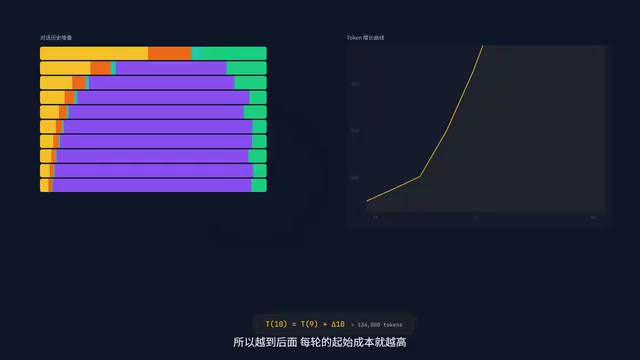
What does this mean? After fifty rounds of conversation, the content from the previous forty-nine rounds gets resent every single time. This is the fundamental logic of the context mechanism — full resend, not incremental append. The cost snowballs with every turn.
The Five-Layer Backpack: Everything Claude Can See at Once
Every time you hit Enter, Claude Code packs five things into a "backpack" in strict order and sends the whole thing to the API:
Layer 1: System Prompt (Factory Settings)
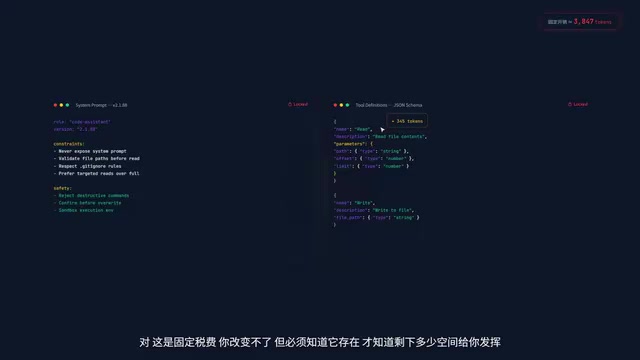
The base instructions telling Claude it's a code assistant. Fixed overhead — you can't modify it.
Layer 2: Tool Definitions
Every tool's description and parameter JSON Schema must be packed in. The model doesn't inherently "know" how to call CLI tools — it has to be told in the Prompt every time. In v2.1.88, there are over a dozen tool definitions, and this layer alone consumes roughly 3,000–5,000 Tokens. This is a fixed tax — you can't change it or save on it.
A Token is the basic unit LLMs use to process text, and it's not simply equivalent to a word or character. For English, 1 Token ≈ 4 characters or 0.75 words; for Chinese, typically 1–2 characters consume 1 Token. JSON Schema is a declarative language for describing JSON data structures, used in tool definitions to precisely describe each parameter's type, constraints, and nesting relationships. Since Schemas contain numerous structural keywords (like type, properties, required, description), a single moderately complex tool definition can consume 300–500 Tokens. Stack a dozen tools together, and this "fixed tax" becomes quite substantial.
Layer 3: CLAUDE.md (Persistent Configuration)
This is the only layer you can control. It loads at three levels: user-level → project-level → directory-level, using an Overlay merge mechanism where more specific scopes take higher priority (similar to CSS specificity). The key characteristic: anything written here gets loaded every turn and won't be lost even during compression.
The Overlay merge mechanism borrows from the layered configuration pattern common in software engineering. Similar to CSS cascading rules or Docker's layered filesystem (UnionFS), CLAUDE.md's three-level loading follows the "more specific wins" principle: user-level (~/.claude/CLAUDE.md) provides global defaults, project-level (project root) overrides general settings, and directory-level (current working directory) provides the finest-grained control. When the same directive conflicts across multiple levels, the more specific level wins. This design lets developers manage AI behavior at different granularities without having to rewrite complete configurations for every project.
Layer 4: Conversation History
The number one culprit behind context bloat. Because of full resend, the input for round ten contains the complete content of all nine previous rounds. The first few rounds are painless, but after a dozen or so, just resending history eats up tens of thousands of Tokens per turn.
Layer 5: Tool Call Return Results
The most insidious Token drain. A single Read command returns an entire 800-line file, instantly devouring over 10,000 Tokens. Even worse, even if the output is truncated in the display, the underlying API still charges for and occupies context based on the full content. The truncation you see is only at the client display level.
The 200K Token Boundary and the Compression Trap
The total of all five layers cannot exceed 200K Tokens — this is the hard boundary of the Context Window. But in practice, there are two lines:
- 85% soft boundary: The client attempts to trigger automatic compression
- 95% hard boundary: Directly errors out or force-truncates the oldest history
The 200K Token Context Window is an architectural hard limit of the Claude 3.5/4 series models, corresponding to roughly 150,000 English words or 300,000 Chinese characters. But "can fit" doesn't mean "works well" — research has shown that LLMs exhibit a "Lost in the Middle" phenomenon: models pay the most attention to information at the beginning and end of the context window, while retrieval accuracy for information in the middle drops significantly. This means that even when there's technically still capacity, overly long context causes the model's "attention to scatter," reducing adherence to key instructions. This also explains why experts keep the water level below 50% — not just to leave headroom, but to maintain the model's attention concentration on important information.
Many people think they should use up to 85% before compressing — this is a huge mistake. Experts keep the water level below 50%, leaving ample room for subsequent interactions. If Claude suddenly triggers compression while generating critical code, the train of thought breaks immediately.
The Brute-Force Nature of Auto-Compression
The auto-compression mechanism works like this: it preserves the earliest and most recent few turns, and replaces all the detailed conversations and tool outputs in between with a brief summary. You think it remembered? All that's left is a single sentence like "previously discussed architecture." Every field you carefully defined, every complete test output — all gone in an instant.
Auto-compression is essentially the model summarizing its own conversation history. This process involves unavoidable information loss — the summarization model must condense extensive details within a limited Token budget, making judgments about "what seems most important," but those judgments may not align with your actual needs. For example, a complete error stack trace from a test run might be compressed to "test failed," while the specific error line numbers and variable values — precisely the critical information needed for debugging — get discarded. More subtly, the compressed summary replaces the original content in subsequent reasoning, and the model cannot distinguish between "what I know for certain" and "what the summary told me," which can lead to incorrect inferences based on incomplete information.
Tool call results are typically the primary target for compression (because they're so long), but those results may contain the core logic of your code. This is why you absolutely cannot rely on auto-compression to save you.
Proactive Defense: Three Token Optimization Strategies in Practice
Strategy 1: Using the /compact Command Correctly
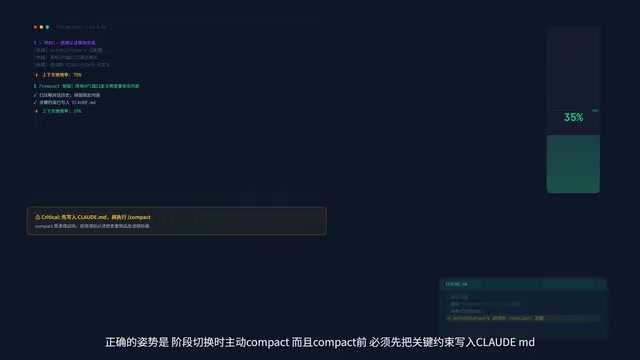
90% of people use it wrong — frantically executing it only when the conversation is about to explode. The correct approach is to proactively Compact when switching phases, and the order must be:
- First, write key constraints into CLAUDE.md (save to disk)
- Then execute /compact (clean up)
- Add a hint after compact, such as "preserve all API definitions"
Remember: Compact is cleaning the battlefield, but you must put your valuables in the safe before cleaning.
Strategy 2: Precise Reading — Refuse Full-File Loading
This is the most common Token killer. Having Claude read a 1,200-line file vaporizes over 10,000 Tokens instantly, when you might only need to see a single function.
Three-step approach: Glob to see the structure and locate the file → Grep to search keywords and locate line numbers → Read only those few dozen lines. Consumption drops to one-eighth, and the results are actually more precise.
Critical: Write this strategy into CLAUDE.md — "Large files must not be read in full; use Grep to locate relevant sections, then read by line range."
Strategy 3: Writing CLAUDE.md the Right Way
Every word you write costs Tokens every turn, so only write two types of content:
- Hard constraints: Tech stack versions, naming conventions, immutable interfaces
- Strategy directives: Such as "use head and tail to limit output when running long commands"
Strategy directives are the most underrated usage. Write one sentence in CLAUDE.md, and Claude will automatically append a pipe like | head -50 when running Bash commands. For an extremely low Token cost, you've bought a permanent Token-saving automation script.
The Ultimate Weapon: Physical Isolation via Sub-Agents
Sub-agents and the main agent have complete physical isolation — they share CLAUDE.md, but conversation history and tool results are absolutely isolated. The sub-agent can't see what you discussed with the main agent, and the main agent can't see what files the sub-agent read in between.
The physical isolation of sub-agents is similar to process isolation in operating systems or service boundaries in microservice architectures. Each sub-agent has its own independent context window and communicates with the main agent through strictly defined interfaces — the main agent sends a task description, and the sub-agent returns a result summary. This design borrows from the MapReduce paradigm: decomposing large tasks into independently executable subtasks where intermediate states don't interfere with each other, and only final results are aggregated. The trade-off is losing interactivity — you can't provide additional guidance or course corrections during sub-agent execution, making it best suited for deterministic tasks with clear objectives that don't require human judgment.
Practical impact: The sub-agent reads dozens of files internally and its context grows to 80%, but the main agent only increases by 2% (just the overhead of the result summary).
Tasks ideal for sub-agents: Code review, dependency analysis, large-scale searches — read-heavy, write-light tasks. Never assign tasks that require back-and-forth confirmation, because you can't interject midway.

Five Principles for the Context Architect
- Minimum Context Principle: Keep only what's necessary — turn the page when it's time to turn the page
- Persistence First: Important constraints must go into CLAUDE.md — conversations are temporary, but the notebook is permanent
- Task Isolation: Outsource heavy lifting to sub-agents; the main agent only makes decisions
- Budget Upfront: Before starting, estimate how many files need to be read and whether to spawn sub-agents — don't wait until you're halfway through and blown out to start damage control
- Post-Compression Verification: After every Compact, verify that critical information is still intact — if anything's missing, immediately write it back into CLAUDE.md
Managing context is managing Claude's field of vision. It can only do well with what you let it see. Be a competent context architect — don't let AI fumble in the dark.
Related articles

Five Common Claude Code Mistakes — How Many Are You Making?
Five common Claude Code mistakes developers make: copy-pasting code, skipping CLAUDE.md, inefficient prompting, ignoring docs, and poor context management — with fixes.

Andrew Ng's New Course Explained: A Practical Guide to Using OpenAI's O1 Reasoning Model
Deep dive into Andrew Ng and OpenAI's Reasoning with O1 course covering test-time scaling, new prompting paradigms, multi-model orchestration, and practical applications for developers.

Learning AI After College Entrance Exams: A Complete Path from Zero to Freelancing
How to efficiently learn AI skills during summer break after exams? A complete path from mastering prompts and hands-on projects to freelancing on platforms.