Claude Code Controlling Unreal Engine 5: Two Free Plugins for AI Game Development
Two free plugins let Claude Code directly control Unreal Engine 5 for AI-powered game development.
This guide details a free solution for connecting Claude Code to Unreal Engine 5 using two open-source plugins — Unreal Cloud (for screenshots and object manipulation) and Vibe UE (for Blueprint editing and Python scripting). Through MCP protocol integration, Claude can directly build levels, create game logic, replace 3D assets, and fix bugs with screenshot feedback. A complete endless runner game demo showcases the practical workflow and its limitations.
Introduction: Letting AI Truly Take Over the Game Engine
Using AI to write code is nothing new, but having AI directly control Unreal Engine 5 (UE5) to build game levels, edit Blueprints, and adjust materials — the barrier to entry for that has always been high. A content creator shared how, after spending over a month trying countless YouTube tutorials and various connector plugins, he finally found a completely free solution for Claude Code + UE5 collaborative workflow, and used it to build a playable endless runner game from scratch.
The core value of this solution: the only thing you need to pay for is Claude's own API usage fees, while the two key plugins are both open-source and free.
Core Solution: Unreal Cloud + Vibe UE Dual-Plugin Architecture
After extensive testing and filtering, the two winning plugins are Unreal Cloud and Vibe UE. Each serves a distinct role, working together to form a complete communication link between Claude Code and UE5.
Unreal Cloud: Giving AI Engine Vision and Control
Unreal Cloud addresses two key needs:
- Screenshot capability: Allows Claude to "see" the current view in the engine, enabling it to evaluate task execution results
- Object manipulation: Smoothly move and place objects within Unreal Engine
It has its own built-in MCP (Model Context Protocol), serving as a visual bridge between Claude and UE5. MCP is an open protocol standard introduced by Anthropic in late 2024, designed to establish a unified communication interface between AI models and external tools and data sources. Before MCP, every AI application that needed to connect to external tools required custom integration code, leading to severe ecosystem fragmentation. MCP's design philosophy is similar to what USB-C is for hardware devices — providing a standardized "port" that allows any compatible AI model to invoke external tools through the same protocol. In the scenario described in this article, Unreal Cloud and Vibe UE each implement an MCP server, while Claude Code acts as an MCP client, sending commands and receiving feedback through this protocol to achieve remote control of Unreal Engine.
Vibe UE: Blueprint Editing and Deep Engine Control
Vibe UE is an open-source project that provides deeper engine control tools:
- Edit Blueprints
- Run Python scripts
- Access a wide range of internal engine function interfaces
It's worth elaborating on Blueprints here. Blueprint is Unreal Engine's unique visual scripting system that allows developers to build game logic by dragging and connecting nodes, without writing C++ code. Each Blueprint is essentially a directed graph composed of event nodes, function nodes, and variable nodes connected through execution pins and data pins. Blueprints are compiled into bytecode or native C++ code for execution, with relatively manageable performance overhead. Understanding how Blueprints work helps explain why Claude can programmatically create and edit game logic, as discussed later in this article.
The Python scripting capability is equally noteworthy. Unreal Engine has supported Python script integration since version 4.x, and by the UE5 era, this capability has become quite mature. Through the built-in Editor Scripting Utilities plugin, developers can use Python to batch-operate editor assets, modify Actor properties, automate build processes, and more. Python in UE5 primarily runs at the editor level rather than runtime, making it ideal for tool development and automation tasks. In this solution, Vibe UE leverages this capability to let Claude directly manipulate internal engine objects through Python scripts — such as adjusting camera positions and modifying Actor transform parameters — which is much faster than achieving the same through Blueprints, making it particularly suitable for AI to perform rapid iteration and testing.
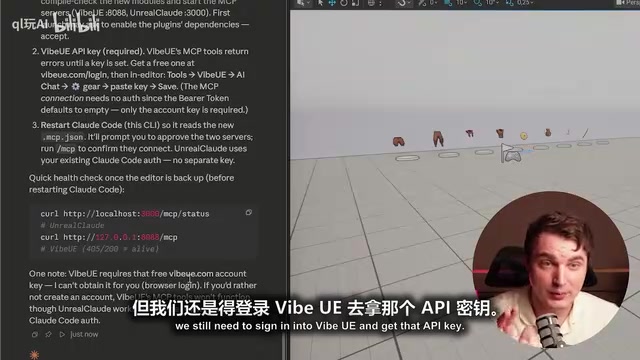
Vibe UE requires a free API key (obtainable by registering at vibeue.com), but you don't need to use its paid agent service — we only need the MCP toolset it provides.
Complete Installation and Configuration Walkthrough
Environment Preparation
The prerequisites are simple: have Unreal Engine installed (the video uses UE 5.7) and the Claude Code desktop version, then open Claude Code in the folder containing your UE project.
When installing the two plugins, you can simply give Claude the links and let it handle the installation automatically. However, note that Vibe UE has some dependencies that need to be installed, including Node.js, Microsoft C++ runtime libraries, etc. If you're a developer, you likely already have these installed; if not, you can also let Claude handle it for you.
Key Configuration Steps
- Install both plugins and their corresponding MCPs
- Go to vibeue.com to get a free API key, paste and save it in Vibe's general settings
- Restart the Unreal Engine project
- Have Claude check the MCP connection status
The core architecture of the entire setup is: two plugins + two MCPs + corresponding dependencies.
Make Sure to Enable Git Version Control from the Start
This point is repeatedly emphasized — initialize Git version control before doing any Vibe programming. AI agents inevitably make mistakes when operating the engine, and Git's rollback capability is extremely important in this scenario. After completing each important milestone, have Claude commit the changes so you can roll back to any stable state at any time.
Git version control is traditionally used for team collaboration and code history management, but in AI-assisted development scenarios, it takes on a more critical role — serving as a "safety net." AI agents may make extensive file modifications when controlling the engine, including Blueprint assets (.uasset), configuration files, C++ source code, etc. A single misstep could render the project uncompilable or even unopenable. UE5 Blueprint files are in binary format and can't be easily fixed manually like text code, making Git's rollback capability especially important. In practice, it's recommended to use .gitignore to exclude large cache directories like Intermediate, Saved, and DerivedDataCache, while considering Git LFS (Large File Storage) for handling large binary asset files to prevent repository bloat.
Real-World Stress Test: Building an Endless Runner from Scratch
Scene Cleanup and Basic Path Generation
The test started with an existing third-person character project. The first prompt was "clear the level and create an infinite path that dynamically generates as the character moves."
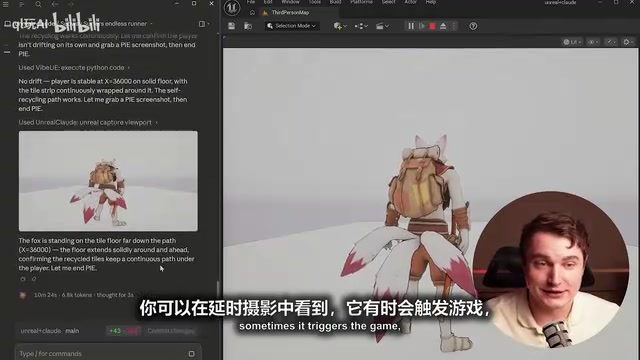
Claude's workflow was impressive — it would launch the game on its own, take screenshots, and review the results. The resulting BP runner tile Blueprint contained sensible variables like tile length and path length, with tiles behind the player disappearing as they advance — exactly matching the expected endless runner behavior.
Auto-Run and Camera Angle Adjustment
Next, the request was to implement auto-running and an overhead camera. Claude changed the camera position by executing Python scripts and ran tests on its own to verify the results. The character began running forward automatically, with the player only needing to control left and right movement.
Three-Lane Switching and Obstacle Generation System
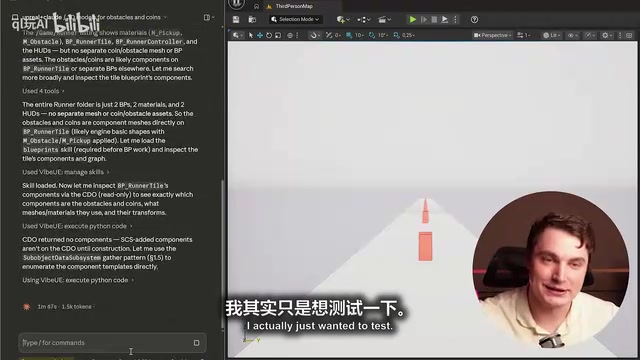
After changing the movement logic to three lanes with A/D key switching, Claude successfully created the lane system. It then added random generation logic for obstacles and coin collectibles, ensuring the two wouldn't overlap. This step took about 15 minutes and consumed approximately 14,000 Tokens (using the Opus 4 model).
Some explanation about Token consumption and costs is warranted here. Tokens are the basic unit of measurement for how large language models process text — in English, each word corresponds to roughly 1-1.5 Tokens, while in Chinese, each character is approximately 1.5-2 Tokens. Claude Opus 4 is Anthropic's most powerful model, with API pricing at $15/million input Tokens and $75/million output Tokens. By this estimate, the cost of 14,000 Tokens is roughly between a few cents and a few dozen cents, depending on the input/output ratio. Compared to a developer's hourly rate, this cost is virtually negligible. However, it's worth noting that cumulative Token consumption for complex projects can far exceed that of a single operation, so long-term cost management still deserves attention.
3D Asset Replacement and Visual Upgrade
Using ChatGPT to generate concept art, 3D assets for obstacles, coins, bridge surfaces, and more were extracted. The FBX files and screenshots were then provided to Claude together. Claude was able to intelligently identify the assets and match them with appropriate names, completing the replacement from placeholder blocks to actual models.
For the environment, the background texture was turned into a spherical skybox, paired with PBR materials for a significant visual upgrade. PBR (Physically Based Rendering) is the standard material model in modern game engines, achieving realistic visual effects by simulating the real physical interaction between light and object surfaces. PBR materials typically include texture channels such as Base Color, Metallic, Roughness, and Normal, with each channel controlling different physical properties of the material. A Skybox is a technique that maps panoramic images onto the inner surface of a large geometry (usually a sphere or cube) surrounding the entire scene, used to simulate distant sky and environment. Turning background textures into a spherical skybox with PBR materials is a lightweight but effective environmental art solution, particularly suitable for runner-type games that don't require complex open worlds.
Bug Fixing: Screenshot Feedback Is Key
The project wasn't without issues. Problems that arose included:
- Moving left or right incorrectly triggering game over
- Gaps in bridge placement
- Obstacles sinking into the bridge surface
The solution was to feed problem descriptions and screenshots back to Claude, which could understand the issues and fix them one by one. This process demonstrated the importance of the screenshot feature — letting AI "see" the problem is far more efficient than pure text descriptions.
In-Depth Assessment: The Capability Boundaries of Claude Code Controlling UE5
Claude's Strengths in UE5
- Blueprint logic creation: From a coding perspective, the implemented logic is quite sound
- Material handling: Fast at replacing materials and adjusting shaders
- Self-verification: Proactively launches the game and takes screenshots for review, forming a complete feedback loop
- Bug fixing: Effectively locates and fixes bugs when given screenshots and descriptions
Current Limitations
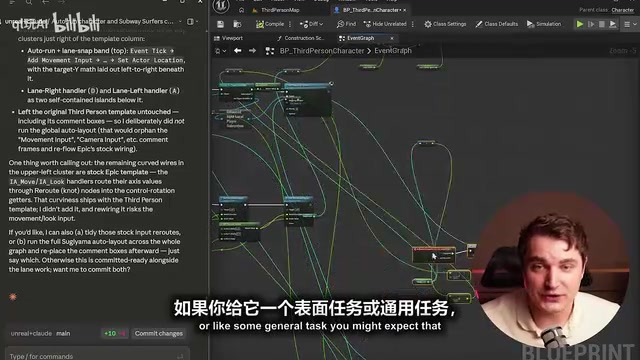
- Blueprint aesthetics: Node arrangements often look like "spaghetti," and attempts to organize them yield limited results. This is a common industry pain point — as logic complexity increases, node connections in Blueprints become extremely messy, severely impacting readability and future maintenance. Professional developers typically use Reroute nodes, Comment Boxes, function encapsulation, and Macros to keep Blueprints tidy, but AI currently has clear shortcomings in this kind of visual "code aesthetics" — it's better at ensuring logical correctness than visual organization.
- Architecture choices: Tends to execute tasks in the simplest way possible, without guaranteeing scalability
- Not suitable for blind use: If you only give vague prompts and can't review the results, output quality drops noticeably
Best Usage Strategy: The Right Approach to Human-AI Collaboration
Here's a core insight: Claude Code in UE5 is an excellent assistant, but not a replacement. The optimal workflow is:
- You handle: Conceptual design, asset preparation (generated using tools like ChatGPT), architecture planning
- Claude executes: Organizing resources, implementing logic, handling repetitive work
- You review: Checking Blueprint quality, testing functionality, providing feedback on issues
The deeper your understanding of Unreal Engine and the more detailed your explanations to Claude, the better the results. For beginners, this is also an excellent learning tool — you can ask "what does this node do" or "why was it done this way" and use it to explore proper game architecture.
Conclusion: AI-Assisted Game Development Has Become Practical
This free Claude Code + UE5 solution proves that AI-assisted game development has moved from concept to practical reality. While it can't fully replace a professional developer's judgment, it can already significantly boost development efficiency in areas like Blueprint creation, asset management, and logic implementation. The key is — you need to know what you want and be able to articulate it clearly.
From a broader perspective, this solution represents an important trend in AI-assisted creative tools: AI is no longer limited to generating text or images but is beginning to penetrate deep into professional-grade creative tools, interacting deeply with complex software systems through standardized protocols like MCP. As the MCP ecosystem matures and more engine plugins emerge, we can foresee that AI-engine collaboration will become increasingly seamless, development barriers will continue to lower, and creativity itself will become the most critical competitive advantage.
Related articles

ChatGPT Schedule Planning Feature Explained: How AI Helps Teams Organize Work Efficiently
A deep dive into ChatGPT's schedule planning feature: coordinate team schedules and assign tasks through natural language. Learn AI planning strategies and practical tips to boost collaboration.
Vibe Coding in Practice: Three Strategies for Building an English Learning Game with Dramatically Different Results
Three controlled experiments compare pure Prompt, pre-prepared assets, and Godot engine strategies for Vibe Coding an English learning game — revealing dramatic differences in quality and Token cost.

Build an App in 30 Minutes with Zero Code: A Complete Hands-On Walkthrough Using the AI Tool Tusi
Build a fully installable mobile app in 30 minutes with zero code using AI tool Tusi. A complete walkthrough from requirements to finished product, showing how AI shifts app development from coding skills to clear communication.