Claude Code Deep Dive: A Comprehensive Review of Code Accuracy, Context Understanding, and Automated Debugging

A comprehensive review of Claude Code's accuracy, context understanding, and auto-debugging capabilities.
This article provides an in-depth analysis of Claude Code, Anthropic's terminal-native AI programming assistant. It examines three core advantages — exceptional code accuracy powered by Claude Sonnet, full project context understanding via 200K-token context windows, and an automated generate-execute-debug loop. The piece also compares Claude Code against Cursor, Trae, Copilot, and Codex+GPT-5, helping developers choose the right AI coding tool.
What Is Claude Code
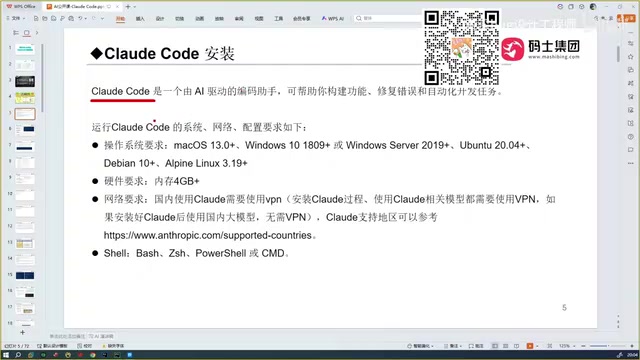
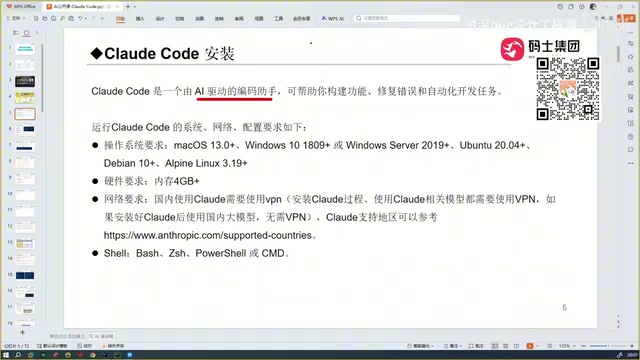
Claude Code is an AI programming assistant developed by Anthropic. There's no need to log into a website — just install it on your local machine and start using it within your development environment. Unlike traditional conversational AI coding tools, Claude Code can truly understand and process the full code context of an entire project.
As a terminal-native AI programming tool, Claude Code's technical architecture is fundamentally different from traditional IDE plugins. Built on Anthropic's Claude large language model family, it interacts directly with the local file system through a command-line interface (CLI), recursively traversing project directory trees, parsing code dependency graphs, and building a complete semantic index of the project. This design frees it from IDE constraints, allowing it to run on any operating system with terminal support, including macOS, Linux, and Windows via WSL.
Put simply, when you use DeepSeek or ChatGPT for coding conversations, they can only give you code snippets that you need to manually copy into your project to test and run. If the code has errors, you have to go back and forth in conversation to fix them. What Claude Code can do is: read through every code file in your project, feed the complete context to the large language model, automatically generate business logic code, and even debug errors on its own — ultimately delivering an accurate, working version of the code.
The Evolution of AI Programming Tools
Looking back at the history of AI programming assistants, the trajectory of technological iteration is clear. The code generation capabilities of AI programming assistants fundamentally depend on how deeply large language models (LLMs) have learned from code corpora. During training, these models are exposed to massive open-source code repositories (such as public repos on GitHub), technical documentation, and Stack Overflow Q&A data. Through the Transformer architecture, models learn code syntax structures, design patterns, and logical relationships, enabling them to perform code completion, generation, and reasoning. Performance differences between models on code tasks mainly stem from variations in training data quality and scale, model parameter count, and fine-tuning strategies for code tasks (such as RLHF — Reinforcement Learning from Human Feedback).
The GitHub Copilot Era
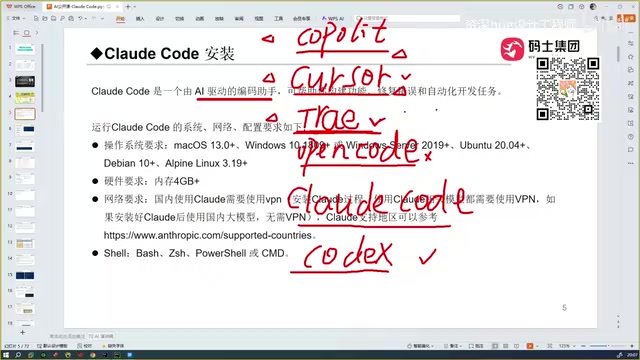
The earliest widely adopted tool was GitHub Copilot, an IDE plugin that delivered a groundbreaking experience for developers at the time — it could automatically complete code, dramatically boosting coding efficiency.
GitHub Copilot first appeared as a technical preview in 2021 and launched commercially in 2022, making it a pioneering product in the AI programming assistant space. It was initially powered by OpenAI's Codex model (a code-specific fine-tuned version of GPT-3) and has since progressively upgraded its underlying model. Copilot's core mechanism works by analyzing the code context in the current editor (including code before and after the cursor, related open files, comments, etc.) to predict what the developer is likely to write next and offer inline completion suggestions. This "pair programming" experience dramatically reduced the time spent writing boilerplate code and was considered a paradigm shift in software development.
The Rise of Cursor and Trae
Next came Cursor, which is smarter than Copilot and capable of automated coding — its functionality is now on par with today's Claude Code. Cursor is an AI-first code editor developed by Anysphere. Rather than being a simple IDE plugin, it's a standalone editor built on deep customization of the VS Code open-source core (Electron framework). Cursor's key innovation lies in deeply integrating AI capabilities into every interaction within the editor, including multi-file editing, codebase-level Q&A, and diff-based code review mechanisms. It supports multiple underlying models (including Claude, GPT-4, etc.) and uses a proprietary context retrieval engine to optimize code generation quality in long-context scenarios.
Trae comes in both an international version and a Chinese domestic version. The domestic version has been specifically optimized for Chinese language understanding, making it more friendly for Chinese-speaking developers, and the domestic version is free to use.
Other AI Programming Tools
There are also tools like OpenCode, but in practice, these tools are relatively difficult to use and aren't recommended for beginners. Additionally, there's OpenAI's Codex, which paired with GPT-5 is said to rival Claude Code.
Why Claude Code Is Currently the Strongest AI Programming Assistant
Core Advantage #1: Exceptionally High Code Accuracy
After extensive comparative testing across multiple tools, Claude Code stands out most prominently in code accuracy. Whether it's Cursor, Trae, or domestic models like Qwen or GLM, none match Claude Code in accuracy. The fundamental reason is that every programming assistant's capability depends on the strength of its underlying large language model, and the Sonnet model powering Claude Code is exceptionally powerful.
Claude Code's core engine is Anthropic's Claude Sonnet series. Anthropic was founded in 2021 by former OpenAI Research VP Dario Amodei and Daniela Amodei, with AI safety research as the company's core mission. Claude Sonnet is positioned as the optimal balance between performance and speed — compared to the flagship Claude Opus model, Sonnet maintains extremely high code generation quality while offering faster inference speeds and lower API costs, making it particularly well-suited for programming scenarios that require frequent interaction. Across multiple authoritative code benchmarks (such as SWE-bench and HumanEval), the Claude Sonnet series has consistently demonstrated industry-leading code comprehension and generation capabilities.
Core Advantage #2: Full Project Context Understanding
The biggest pain point of traditional conversational AI coding is this: your project might have 100 code files, and the AI simply can't read all of them — you have to manually explain the project structure. Claude Code can automatically scan and understand every file in the entire project, generating code based on the complete context. This is a qualitative leap.
This capability is closely tied to the "context window" technology of large language models. The context window refers to the maximum number of tokens a model can process in a single inference pass. Early models had context windows of only 4K–8K tokens, making it difficult to accommodate code from large projects. The Claude model family has expanded its context window to 200K tokens, meaning it can simultaneously "read" hundreds of thousands of characters of code. On top of this, Claude Code implements intelligent context management strategies — rather than blindly stuffing all files into the context, it uses techniques like code dependency analysis and file relevance ranking to intelligently select the code snippets most relevant to the current task, maximizing information density within the limited context window.
Core Advantage #3: Automated Debugging Loop
Claude Code doesn't just generate code — it can automatically execute it, detect errors, fix issues, and form a complete development loop. This makes it possible for even absolute beginners to quickly get started with project development.
The technical implementation of this automated debugging loop typically involves the following steps: First, Claude Code generates code based on user requirements and writes it to the corresponding files. Then, it executes compile or run commands through the terminal. Next, it captures information from standard output (stdout) and standard error (stderr). If errors are detected, it parses the stack trace, locates the problematic code, automatically generates a fix, and re-executes. This process can iterate through multiple rounds until the code runs successfully. This "generate-execute-feedback-fix" agent-style workflow essentially simulates a human developer's debugging process and represents a textbook application of AI Agent technology in software development.
Claude Code vs. Cursor, Trae, and Other Tools: A Side-by-Side Comparison
| Tool | Strengths | Weaknesses |
|---|---|---|
| Claude Code | Highest accuracy, strong context understanding | Requires some configuration |
| Cursor | Strong automated coding capabilities | Slightly less accurate than Claude Code |
| Trae (Domestic) | Free, excellent Chinese understanding | Code quality drops for niche tech stacks |
| Copilot | Great completion experience | Relatively basic functionality |
| Codex + GPT-5 | Powerful capabilities | Paid, high configuration barrier |
You might not have noticed, but while Trae is free and handles Chinese well, the quality of its generated code drops noticeably when dealing with niche or less common tech stacks. Claude Code, backed by its powerful underlying model, maintains high output quality even in complex scenarios.
Who Is Claude Code Best Suited For?
Claude Code's standout characteristic is that it's extremely beginner-friendly. You don't need to master advanced technical principles — just start using it. For experienced programmers, using Claude Code might trigger a deep sense of unease — because it genuinely can replace a significant amount of manual coding work in many scenarios.
Whether you want to rapidly prototype a project or handle repetitive tasks in day-to-day development, Claude Code can significantly boost your productivity. The key is learning how to configure the environment, choose the right model, and master effective prompting techniques to truly unlock its full potential.
Related articles

Five Common Claude Code Mistakes — How Many Are You Making?
Five common Claude Code mistakes developers make: copy-pasting code, skipping CLAUDE.md, inefficient prompting, ignoring docs, and poor context management — with fixes.

Andrew Ng's New Course Explained: A Practical Guide to Using OpenAI's O1 Reasoning Model
Deep dive into Andrew Ng and OpenAI's Reasoning with O1 course covering test-time scaling, new prompting paradigms, multi-model orchestration, and practical applications for developers.

Learning AI After College Entrance Exams: A Complete Path from Zero to Freelancing
How to efficiently learn AI skills during summer break after exams? A complete path from mastering prompts and hands-on projects to freelancing on platforms.