Claude Code Desktop Without an Account: Connect DeepSeek Models + Full Chinese Localization Guide
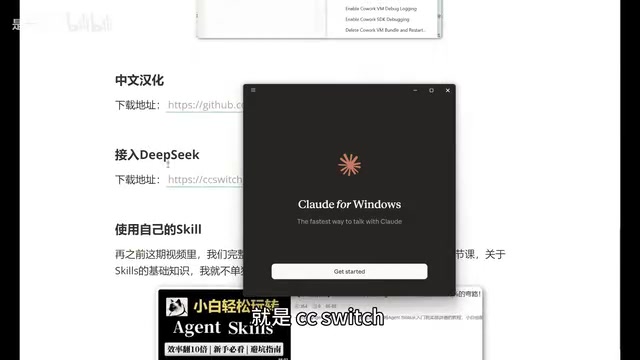
Use Claude Code Desktop for free by connecting DeepSeek models and applying Chinese localization.
This tutorial walks you through five steps to set up Claude Code Desktop without an Anthropic account. By enabling Developer Mode, installing CC Switch (v3.15.0+) as a local proxy, and connecting to DeepSeek's affordable API, you can slash costs while retaining powerful AI coding capabilities. The guide also covers applying community Chinese localization patches and uploading custom Skills to extend functionality.
Claude Code Desktop is officially available, but the steep cost of Anthropic's official models has put off many developers. The good news? With a complete configuration workflow, you can use it without an account, localize the interface to Chinese, and connect to DeepSeek and other domestic Chinese models — dramatically cutting costs. This guide walks you through the entire process from installation to real-world use.
1. Installing Claude Code Desktop
Claude Code is Anthropic's AI coding assistant built for developers, competing directly with GitHub Copilot, Cursor, and similar products. Its core strength lies in the powerful code comprehension and generation capabilities of the Claude model family, supporting multi-file, project-level code analysis, refactoring, and generation. The desktop release means developers no longer need to rely on terminal command lines or browsers — they get an experience much closer to a native IDE.
Installing Claude Code Desktop is straightforward. Visit the Anthropic official website and look for the "Get Claude Code" entry point, where you'll see multiple usage options. The first one — Desktop — is the desktop version.
Click through to the download page, and the system will automatically detect your OS and serve the matching version (Windows/Mac). After downloading, double-click the executable to install — the entire process is a standard one-click setup with no extra configuration needed.
Once installed, you'll see a login screen offering sign-in options like Google. But if you don't want to deal with account systems, you can skip this step entirely.
2. Account-Free Usage: Enable Developer Mode to Bypass Login
This is the most critical step in the entire workflow. You don't need to register any account — just enable Developer Mode to bypass the login requirement.
Developer Mode essentially bypasses Claude Code's OAuth authentication flow, putting the app into a state that allows custom API endpoints. In normal mode, Claude Code forces users to verify their identity through Anthropic's authentication server and bind a billing account. With Developer Mode enabled, the app exposes a third-party API configuration entry point, letting users specify custom model service addresses. This is the technical prerequisite for connecting to DeepSeek and other third-party models later on.
Steps:
- Click the hamburger menu (three horizontal lines) in the top-left corner
- Select "Help"
- Find the third option in the Help menu, scroll down to locate "Enable Developer Mode"
- Click to enable and confirm
- Wait for Claude Code to restart automatically
After the restart, the interface will change. Don't rush into anything yet — we need to install a key companion tool first.
3. Connect DeepSeek Models via CC Switch
Using Claude's official models can be quite expensive. Connecting to DeepSeek and other domestic Chinese models is a far more economical choice. To do this, we'll use a tool called CC Switch to handle model switching.
CC Switch's core mechanism is launching a local proxy service (typically listening on a localhost port) that intercepts API requests from Claude Code and forwards them to the user's chosen model provider. This "local routing" establishes a request forwarding layer on your machine that translates Anthropic API-formatted requests into the API format used by DeepSeek or other providers, achieving protocol-level compatibility. This middleware proxy architecture is very common in the AI tooling ecosystem — similar tools include OneAPI, LiteLLM, and others.
CC Switch is a unified management tool for AI tool workflows, with its core function being free switching between different models. Important: the version must be 3.15.0 or higher, as older versions don't support Claude Code Desktop configuration.
3.1 Installing and Configuring CC Switch
After downloading from GitHub and completing installation, you'll notice a new "Desktop" option at the top with a small computer icon, indicating Claude Code Desktop support.
Configuration steps:
- Click the "Settings" button on the left
- Go to the "Routing" tab
- Find "Local Routing" and click the arrow to enable it
- Return to the main interface and select "Desktop"
- Click the "Add" button on the right and select the DeepSeek model
3.2 Obtaining and Configuring a DeepSeek API Key
DeepSeek is a large language model series from the company DeepSeek (深度求索), with API pricing far below Anthropic's Claude family. Take DeepSeek-V3 as an example: input tokens cost roughly ¥1 per million tokens and output about ¥2, while Claude 3.5 Sonnet's input price is around ¥21 per million tokens. DeepSeek excels at code generation, mathematical reasoning, and similar tasks. The DeepSeek-Coder series in particular is optimized for programming scenarios and approaches or even surpasses GPT-4-level models on multiple code benchmarks, making it a highly practical alternative backend for Claude Code.
Next, you need to enter your DeepSeek API Key:
- Go to the DeepSeek official website's API documentation
- Navigate to the Key management page
- Create a new API Key (naming it something like "Claude Code Desktop" for easy identification is recommended)
- Copy the key and paste it into the corresponding input field in CC Switch
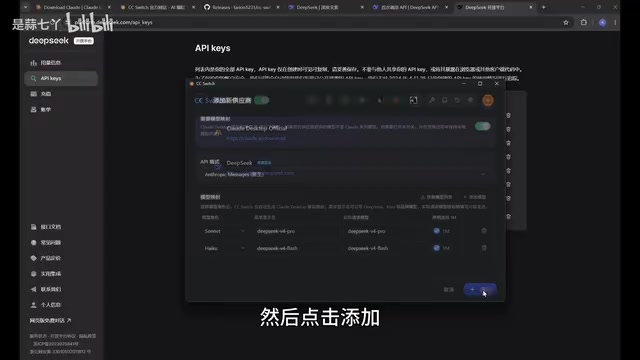
At the bottom of the configuration page, there's an optional setting for context size — checking it expands the context to 1MB. It's recommended to enable this for a better conversation experience. The context window is the maximum text length a large language model can process at once. Traditional models typically support 4K–32K tokens of context, while 1MB of context is roughly equivalent to 250,000 Chinese characters or 500,000 English tokens. For programming scenarios, a large context means the model can simultaneously "see" more source code files in your project, leading to more accurate understanding of code dependencies, function call chains, and project architecture — significantly improving the accuracy of code generation and refactoring.
Once configured, click "Add," then make sure to click Start — the configuration won't take effect otherwise. After starting, you can minimize CC Switch; it will continue running in the background.
3.3 Return to Claude Code to Complete Model Integration
Back in Claude Code Desktop:
- Click the hamburger menu in the top-left corner
- You'll now see a new "Developer" option
- Go to "Configure Third-Party"
- You'll find the information has been auto-filled (CC Switch handled the integration automatically)
- Click "Update" and restart
After restarting, you'll enter the Claude Code main interface with a model list that includes Flash, Pro, and 1M context versions. Select the Flash version to start chatting. Type "Who are you?" as a test — if you get a normal response, the configuration is successful.
4. Chinese Localization for Claude Code: Say Goodbye to the All-English Interface
By default, Claude Code Desktop has an all-English interface, which isn't very friendly for Chinese-speaking users. Fortunately, the community has provided localization patches.
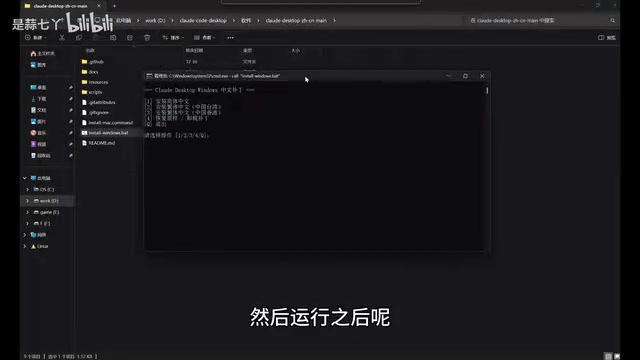
The localization package comes in both Mac and Windows versions. Download the appropriate version, extract the archive, and double-click the .bat file (Windows) to run it.
Localization options:
| Option | Description |
|---|---|
| 1 | Install Simplified Chinese |
| 2 | Install Traditional Chinese |
| 3 | Install Traditional Chinese (Hong Kong variant) |
| 4 | Restore original / Uninstall patch |
| 5 | Exit |
Select "1" and press Enter. The localization script will automatically close Claude Code (no manual action needed) and restart it after completion. When it reopens, you'll see menus like "New Task," "Project Plan," "Tasks," and "Customize" all displayed in Chinese.
5. Extend Claude Code with Custom Skills
Unlike the CLI version where you place Skill files directly in the Claude directory, the desktop version requires uploading Skills as compressed archives.
Skills are essentially predefined prompt templates or workflow instruction sets, similar to Instructions in GPTs or Rules in Cursor. Through Skills, users can package commonly used work patterns (such as code review standards, code generation templates for specific frameworks, documentation writing styles, etc.) into reusable modules. The desktop version manages Skills via archive uploads, which is more standardized than the CLI approach of placing .md files directly in the file system, and also makes Skills easier to share and distribute. The community has already produced a wealth of open-source Skill resources covering frontend development, backend architecture, data analysis, and many other domains.
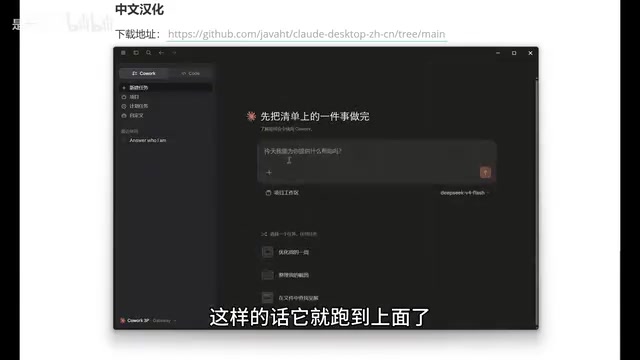
Steps:
- Create a new task
- Click the "+" icon, select "Skills" → "Manage Skills"
- Click "Add Skill" → "Upload Skill"
- Supported file formats:
.md, archives (.zip),.skillfiles - Compress your Skill files and drag-and-drop to upload
Once uploaded, type / (slash command) in the chat, select the corresponding skill name, and invoke your custom Skill. For example, invoking a creative generation Skill and entering your requirements will produce content following the preset Skill logic.
Summary
With these five steps, you now have a free, Chinese-localized Claude Code Desktop connected to domestic Chinese models. The core of this entire setup is CC Switch — the middleware tool that makes model switching incredibly simple. For developers on a budget who still want to experience Claude Code's powerful features, this solution offers exceptional value.
One thing to keep in mind: although you've connected DeepSeek models, different models still vary in code comprehension and generation capabilities. Choose the appropriate model version based on your task complexity. For simple code completion and everyday programming tasks, DeepSeek Flash is more than sufficient. For complex architecture design, large-scale code refactoring, and other demanding tasks, consider switching to the Pro version or enabling the 1M context for better results.
Related articles
OpenAI Secretly Files S-1: The Road to IPO Has Officially Begun
OpenAI has confidentially filed an S-1 with the SEC, officially launching IPO preparations. Explore the filing's significance, OpenAI's transformation from nonprofit to a $300B valuation, and the impact on AI investing.
OpenAI Reveals Its AI Policy Stance: Why Transparency Matters
OpenAI publicly outlines its AI policy stance and advocacy approach. This article analyzes the logic behind transparency, the challenges of tech policy lobbying, and implications for AI regulation.
Anthropic Releases AI Safety Policy Proposal to Advance U.S. Leadership in Frontier Safety
Anthropic CEO Dario Amodei releases AI safety policy proposals aimed at establishing U.S. leadership in frontier AI safety, with implications for global AI governance.