Claude Code Dynamic Workflows: Orchestrating Hundreds of Sub-Agents Working in Parallel
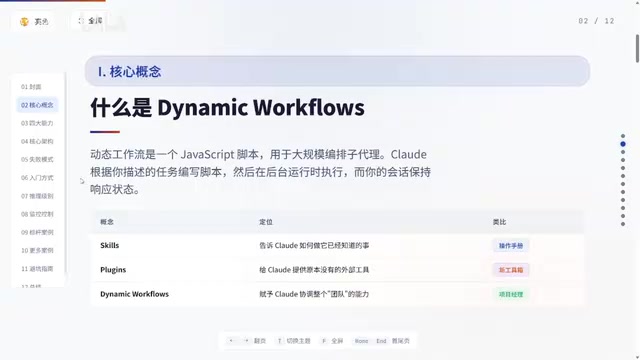
Claude Code's Dynamic Workflows lets you orchestrate hundreds of parallel AI sub-agents like a project manager.
Anthropic's Dynamic Workflows feature transforms Claude Code from a single-threaded assistant into a multi-agent orchestrator. Using three activation methods — Workflow keyword, Deep Research command, and Ultra Code mode — users can launch hundreds of parallel sub-agents for tasks like research, content production, and data analysis. The article covers monitoring, cost optimization, and practical pipeline design.
What Are Dynamic Workflows
Anthopic recently quietly rolled out an extremely powerful feature for Claude Code — Dynamic Workflows — but because the spotlight was stolen by new model releases, 99% of users completely overlooked it.
In simple terms, Dynamic Workflows upgrades Claude from a solo assistant into a project manager capable of directing hundreds of AI sub-agents to work simultaneously.
This design draws from the classic Orchestrator-Worker pattern in distributed computing. In traditional software engineering, this architecture is commonly seen in microservice orchestration systems (such as Apache Airflow for data pipeline scheduling and Kubernetes Jobs for containerized task management). Here, Claude plays the orchestrator role — responsible for task decomposition, dependency management, and result aggregation — while each sub-agent acts as an independent worker node. The key advantage of this architecture is fault tolerance: a single sub-agent failure won't crash the entire workflow, and the orchestrator can decide to retry, skip, or substitute with an alternative approach.
Previously, using Claude Code was a serial process: you'd ask it to do one thing, wait for it to finish, then move on to the next. Dynamic Workflows operates completely differently:
- Claude first writes an execution plan (script)
- Based on the plan, it simultaneously launches dozens or even hundreds of sub-agents
- These sub-agents work independently and can even cross-check each other's work
- Finally, results are aggregated and returned to you
The crucial point is that your main session never gets blocked — you can keep chatting with Claude. This is a qualitative leap from single-threaded to multi-threaded parallel processing.
Traditional LLM interaction is essentially a synchronous request-response model, similar to a single-threaded program — the user sends a prompt, waits for the model to complete inference and return results, and can't do anything else in the meantime. The bottleneck lies in the linear consumption of the context window and the linear growth of time costs. The parallel mechanism introduced by Dynamic Workflows is analogous to multi-threaded scheduling in operating systems: the main thread (user session) remains responsive while worker threads (sub-agents) execute concurrently in the background. Each sub-agent has its own independent context window without mutual interference, which fundamentally solves the problems of context pollution and attention dilution in long single-conversation sessions.
The Fundamental Differences Between Dynamic Workflows, Skills, and Plugins
Many people confuse Dynamic Workflows with Skills and Plugins. Here's the most intuitive way to distinguish them:
-
Skills: Tell Claude how to do things it can already do. It's like giving a veteran employee an operations manual — they already know how to do the work, you're just telling them the standard procedure. Technically speaking, Skills are essentially structured System Prompt extensions stored as Markdown files in the project's
.claude/directory, injected into the model's context at the start of each conversation. Skills don't expand the model's capability boundaries; instead, they standardize output quality by providing explicit instructions, templates, and constraints — similar to a persistent version of Few-shot Prompting. -
Plugins: Give Claude external tools it didn't originally have. It's like equipping an employee with a new wrench. Claude Code's Plugins are built on Anthropic's Model Context Protocol (MCP) standard. MCP is an open protocol that defines the communication interface between AI models and external tools, similar to how the USB protocol provides standardized connections for hardware devices. Through MCP, Claude can invoke external capabilities like database queries, API requests, and file system operations. Each Plugin is essentially an MCP Server that exposes specific tool functions for the model to call on demand.
-
Dynamic Workflows: Give Claude the ability to coordinate an entire team. It's like assigning an employee the role of project manager who can dispatch dozens of people to work simultaneously. It's not an enhancement of a single capability, but rather the orchestration of Skills and Plugins into complex multi-step, multi-agent collaborative processes.
Here's a concrete example — creating a market research report:
- With Skills: Claude can write a report following a template, but data sources are limited
- With Plugins: Claude can pull real-time data, but can only process one item at a time — slow
- With Dynamic Workflows: Simultaneously scan hundreds of sources, multiple agents cross-verify facts, automatically filter junk information, and deliver a verified, comprehensive report
Three Ways to Enable It: From Beginner to Advanced
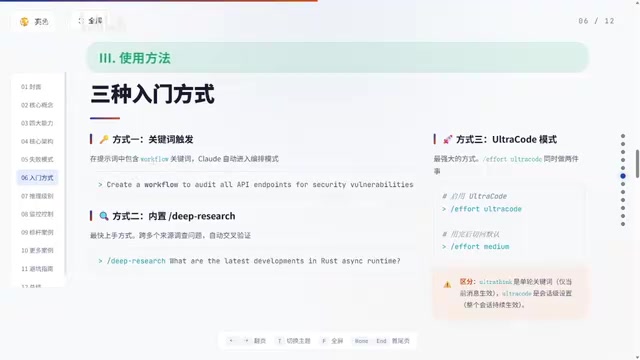
Method 1: Workflow Keyword Trigger (Simplest)
Just type the word "Workflow" directly in your prompt. When Claude sees this word, it automatically switches to orchestration mode — writing a script, displaying the plan, waiting for your approval, and then deploying parallel sub-agents.
Two quick tips:
- If Claude Code highlights your Workflow text but you don't want to trigger it, press
Alt+Wto dismiss - To completely disable keyword triggering, turn off the Workflow keyword trigger option in Config
Method 2: Deep Research Command (Fastest to Get Started)
Run the built-in Deep Research command directly. For example:
Deep Research 2026年DeFi协议TVL趋势分析
Claude will start planning, deploy sub-agents, scan in parallel, and within minutes you'll have a research report complete with cited sources. Work that might take three to four hours manually gets done in about ten minutes.
Method 3: Ultra Code Mode (Most Powerful)
Type effort ultra code in Claude Code and press Enter to activate it. Once enabled, Claude will automatically plan workflows for every substantive task — no need to manually type the Workflow keyword.
A word of caution: this mode consumes significantly more tokens because all sub-agents run in high-reasoning mode. Use Ultra Code for important tasks and stick to normal mode for routine small tasks.
Workflow Monitoring and Control
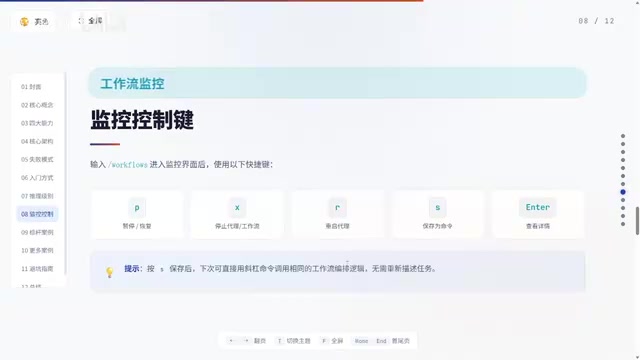
Once a workflow is running, type workflow to view real-time progress, including how many sub-agents are running at each stage, how many tokens have been consumed, and how much time has elapsed.
A few essential control shortcuts to remember:
| Shortcut | Function |
|---|---|
| P | Pause/resume the entire workflow |
| X | Stop the current sub-agent or the entire workflow |
| R | Restart a failed sub-agent |
| S | Save a successful workflow as a reusable command |
| Enter | Drill down to view details of a specific sub-agent |
The S key save function is particularly important — once saved, you can invoke it next time with a single slash command, essentially building yourself an automation factory.
Practical Example: Content Research and Production Pipeline
Here's a practical four-stage workflow design:
Stage 1: Information Gathering — 30 sub-agents scan news sources, social platforms, and research publications in parallel
Stage 2: Cross-Verification — Independent verification sub-agents cross-check information consistency and filter contradictory content
Stage 3: Noise Filtering — Filter low-quality content based on preset criteria
Stage 4: Ranked Output — Sort by importance and timeliness, generate an editorial briefing
Work that used to take a content team three to four hours gets done in about ten minutes with a single dynamic workflow.
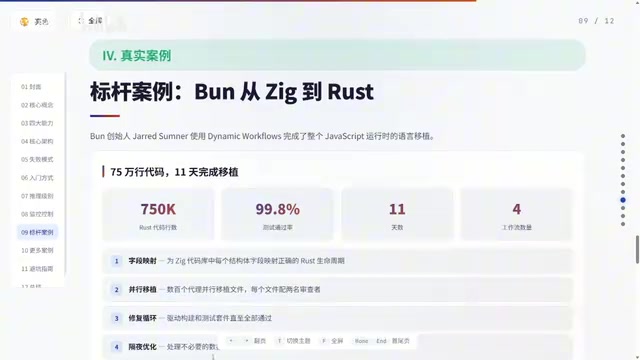
An even cooler use case is saving a Deep Research workflow to run on a schedule, automatically receiving a personalized market intelligence briefing every day — fully automated.
Practical Tips and Cost Optimization
Tip 1: Mind Your Model Selection and Cost Control
Always check which model you're using before running large tasks. Running 100 sub-agents on Opus is extremely expensive — for non-critical tasks, switch to Sonnet to save significantly.
Specifically, in Dynamic Workflows, each sub-agent is an independent API call with its own input and output token billing. Taking Claude Opus as an example, input tokens cost $15/million and output tokens cost $75/million. If a workflow launches 100 sub-agents, each consuming an average of 5,000 input tokens and 2,000 output tokens, the cost per workflow run is approximately $22.5. Using Sonnet (input $3/million, output $15/million), the same-scale workflow drops to about $4.5 — nearly a 5x difference. For stages like information gathering and initial screening that don't require the strongest reasoning capabilities, Sonnet is more than sufficient. Switching to Opus only for the final analysis and synthesis stages is the most cost-effective hybrid strategy.
Tip 2: Connect Professional MCP Data Sources
Before running research workflows, connect MCP data sources (such as CoinGecko, DeFiLlama, Nansen, etc.) — research quality will far exceed what you'd get from web searches alone.
These are specialized data platforms in their respective domains: CoinGecko provides comprehensive token price, market cap, and trading volume data; DeFiLlama aggregates TVL (Total Value Locked) data for DeFi protocols across multiple chains and is the de facto standard data source for DeFi research; Nansen provides on-chain wallet behavior analysis and Smart Money tracking. By connecting these data sources directly to workflows via MCP, sub-agents can access structured real-time data (precise values in JSON format) rather than relying on unstructured text snippets returned by web searches. Data accuracy, timeliness, and processability all improve dramatically, making research conclusions far more reliable.
Tip 3: Bundle Skills into Workflows
Chain your existing Skills (such as article writing, SEO optimization, etc.) into a complete content production pipeline to avoid manual invocation each time. For example, you could design a workflow where Stage 1 uses research sub-agents to gather material, Stage 2 uses a writing Skill to generate a first draft, Stage 3 uses an SEO optimization Skill to adjust keyword density and heading structure, and Stage 4 uses proofreading sub-agents for final review. The entire process triggers with one click — from topic selection to publish-ready article, fully automated.
Tip 4: Let Claude Recommend Workflows
If you're not sure what workflows to build, just ask Claude: "Based on everything you know about me, what workflows should we build?" It will give recommendations based on your usage habits and project context. This leverages Claude's contextual understanding of your conversation history and project files — it knows what types of tasks you frequently perform, which steps are repetitive, and which stages are most time-consuming, enabling it to offer automation suggestions that truly fit your work scenarios.
Conclusion
Dynamic Workflows transforms Claude Code from a solo assistant into an AI project manager. The core value lies in: parallel processing, automated management, and reusability. Start by trying Deep Research to experience the power of parallel sub-agents, then design your first custom workflow based on your own work scenarios.
From a broader perspective, Dynamic Workflows represents an important step in the evolution of AI applications from "single model, single task" to "multi-agent collaboration." This aligns closely with the Multi-Agent Systems direction the industry is exploring — Microsoft's AutoGen, Google's Agent Space, and the open-source community's CrewAI are all experimenting with similar multi-agent orchestration paradigms. Anthropic's unique approach is embedding this capability directly into the CLI tool developers use daily, lowering the barrier to entry so that ordinary users can enjoy the efficiency gains of multi-agent collaboration without needing to understand the underlying agent communication protocols.
Related articles
CodeGraph: The 50K-Star Open-Source Tool That Cuts AI Coding Token Usage in Half
CodeGraph is a 50K-star open-source tool that builds a code knowledge graph so AI coding assistants can locate code instantly—cutting Token usage by 47%, boosting speed by 22%, all running 100% locally.
VibeCoding Beginner's Guide: A Complete Guide to Building Software with Natural Language from Scratch
VibeCoding lets anyone build software through natural language conversations with AI. Learn the core concepts, learning path, and practical methods to get started.

Using UU Accelerator to Speed Up Cursor: A Compliant Solution for Stable AI Coding in China
Learn how to use NetEase UU Accelerator to speed up Cursor AI coding tool in China, with step-by-step setup including node selection and launch configuration.