Claude Code Hands-On: A Full Workflow Demo of the Terminal AI Coding Assistant from Requirements to Deployment
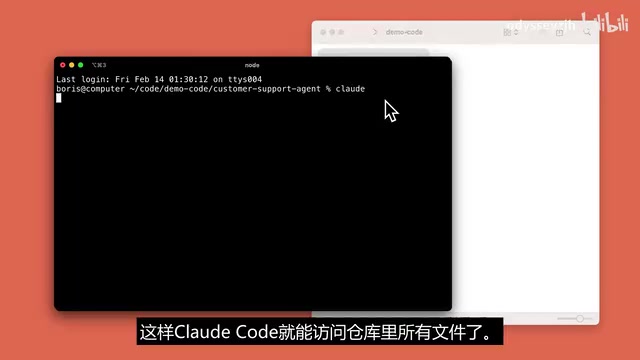
Hands-on demo of Claude Code showing full autonomous coding workflow from natural language requirements to GitHub deployment.
This article provides a detailed hands-on review of Anthropic's Claude Code, a terminal-native AI coding tool. Through a Next.js project demo, it showcases how Claude Code autonomously understands codebases, implements features from natural language descriptions, writes and fixes tests in a closed loop, and commits code to GitHub — representing the shift from AI-assisted completion to autonomous development.
Anthropic has officially released Claude Code in preview — an intelligent coding tool that runs directly in the terminal. Unlike traditional AI code completion, Claude Code can autonomously understand entire codebases, modify multiple files, run tests, and fix errors, truly automating the full workflow from requirement description to code commit.
Boris, an engineer at Anthropic, and Cat, a product manager, shared a complete hands-on demo on Bilibili, showcasing how Claude Code handles feature development, test writing, build fixing, and Git commits in a Next.js project.
What Is Claude Code?
Claude Code is a terminal-native AI coding tool from Anthropic. Unlike editor plugins such as GitHub Copilot, it runs directly in the command line, accessing the entire project repository and autonomously deciding which files to read and which code to modify.
Being "terminal-native" means Claude Code doesn't depend on any IDE or editor plugin — it runs directly as a command-line program. This design choice has deep reasoning behind it: the terminal is the universal tool across all developers. Whether you use VS Code, Vim, Emacs, or JetBrains IDEs, the terminal is the common interface. More importantly, the terminal environment inherently has the ability to execute shell commands, allowing Claude Code to directly invoke development toolchains like git, npm, and pytest without operating indirectly through editor APIs.
Its core characteristic is autonomy — you don't need to tell it which specific file or line of code to change. Simply describe your requirements in natural language, and Claude Code will analyze the project structure on its own, locate the positions that need modification, and complete the code changes.
From an architectural perspective, Claude Code is fundamentally different from GitHub Copilot. Copilot is based on the OpenAI Codex model, primarily working by providing line-level or block-level code completion based on the current file context, with its context window typically limited to the currently open file and a few adjacent files. Claude Code, on the other hand, uses an Agent architecture — it has a Planning Layer that can decompose complex tasks into multiple sub-steps and proactively reads the file system, executes commands, and analyzes output results through a Tool Use mechanism. This architectural difference defines their capability boundaries: Copilot excels at local code generation, while Claude Code targets cross-file engineering-level tasks.
Hands-On Demo: The Complete Workflow from Requirements to Deployment
Understanding the Codebase Structure
The demo uses a customer service chat application built with Next.js. Next.js is a React full-stack framework developed by Vercel, supporting features like Server-Side Rendering (SSR), Static Site Generation (SSG), and API routes. Such projects typically contain multi-layered architectures including frontend components, state management, and API interfaces, involving multi-file collaborative modifications — frontend UI changes often require synchronized modifications to state management logic and backend interfaces, which is exactly where Claude Code's global understanding capability shines.
After opening the project in Claude Code, Boris asked it to first explain the entire codebase structure. Claude starts reading from the top-level files, progressively diving into each component, and ultimately delivers a complete project analysis report.
This step is crucial — for onboarding an unfamiliar project, Claude Code can help you build a global understanding of the entire codebase in just a few minutes.
Describing Requirements in Natural Language, Automatically Locating Files to Modify
Next, Boris presented a specific requirement: Replace the left sidebar with a chat history list and add a new chat button.
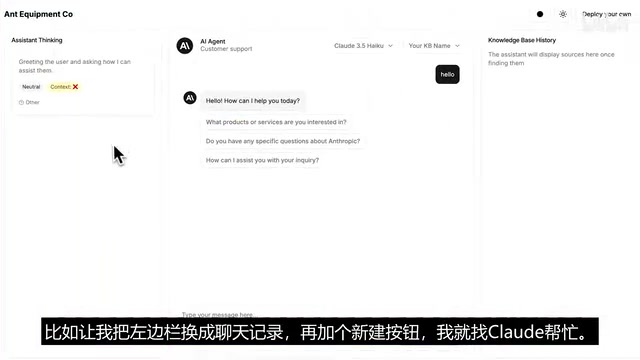
Interestingly, Boris didn't specify any file paths or component names — Claude Code found the files that needed modification on its own. It also displays its complete thought process, allowing developers to see how it analyzes and handles problems.
Before each modification, Claude Code asks the user whether to accept the changes, ensuring developers always maintain control. After confirmation, it sequentially completed:
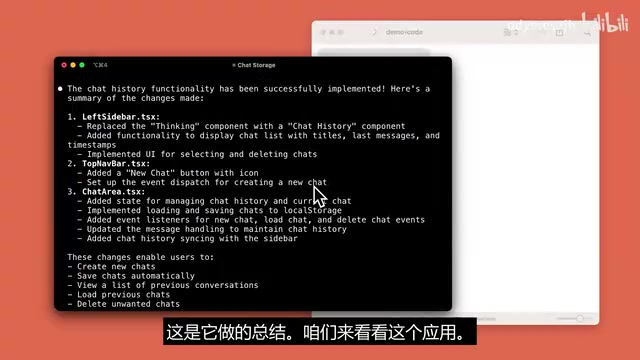
- Updating the navigation bar component, adding buttons and icons
- Modifying state management logic to ensure chat history saving and switching works correctly
- Generating a change summary
Verifying Feature Results
After the changes were complete, the new chat button and chat history area successfully appeared on the left side of the application. In actual testing, you can start new conversations while preserving old chats — the feature works correctly.
Automatically Writing and Running Tests
Boris then asked Claude Code to write test cases for the new features. After getting approval, Claude Code ran commands, executed tests, and analyzed results. When tests failed, it automatically adjusted the code, iterating repeatedly until all tests passed.
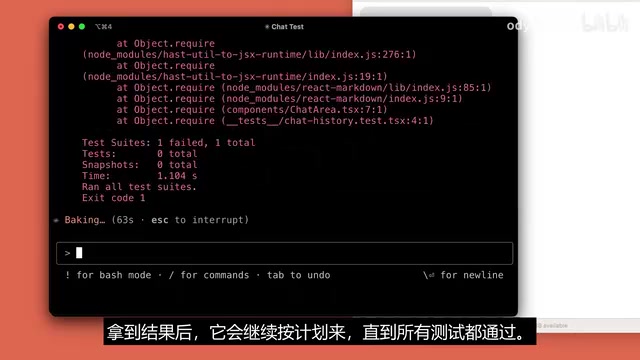
This process demonstrates an important capability of Claude Code: closed-loop problem solving. It doesn't just generate code — it can verify whether the code is correct and autonomously fix issues when errors occur.
From a technical implementation perspective, this closed-loop workflow is essentially a ReAct (Reasoning + Acting) loop: the model first reasons about the current state, then executes an action (such as running a test command), observes the execution result, and decides the next step based on that result. Specifically in the test-fixing scenario, Claude Code parses error output from testing frameworks (like Jest or Vitest), locates failed assertions or exception stacks, and then traces back to the source code for fixes. This process may go through multiple iterations, with each round narrowing the problem scope until all test cases pass.
Build Checking and Automatic Error Fixing
After tests passed, Boris had Claude Code compile the entire application. Build errors were discovered during compilation, and Claude Code automatically located the issues, fixed them, and recompiled until the build succeeded.
This "execute → detect → fix → retry" loop capability is what fundamentally distinguishes Claude Code from simple code generation tools.
Automatic Commit and Push to GitHub
Finally, Claude Code automatically generated commit messages summarizing all changes and pushed the code to GitHub. The entire workflow from requirement description to code deployment was completed seamlessly.
Summary of Claude Code's Core Advantages
From this hands-on test, Claude Code has several noteworthy capabilities:
- Global code understanding: Not limited to a single file — it can understand the entire project's architecture and dependency relationships
- Autonomous decision-making: No need to manually specify file paths — it determines which code needs modification on its own
- Closed-loop workflow: Write code → run tests → fix errors → re-verify, forming a complete development loop
- Transparent and controllable: Displays its thought process and requests user confirmation at each step
- Terminal-native integration: Runs directly in the command line, seamlessly connecting with existing development workflows
What Does Claude Code Mean for Developers?
Claude Code represents the evolution of AI coding tools from "assisted completion" to "autonomous development." From an industry perspective, AI coding tools have gone through three phases of evolution: the first phase was code completion (like TabNine, Copilot), providing line-level suggestions; the second phase was conversational programming (like ChatGPT, Claude's chat interface), where developers copy-paste code snippets for interaction; the third phase is the autonomous coding Agent that Claude Code represents, which can directly operate on file systems and development toolchains. The industry calls this trend the shift from "Copilot mode" to "Autopilot mode." Products like Cognition's Devin and Google's Jules are exploring similar directions, but Claude Code chose a lighter-weight terminal integration path rather than a complete cloud-based development environment.
Traditional AI coding assistants primarily provide code suggestions within editors, while Claude Code is more like a junior developer who can work independently — you describe the requirements, and it handles implementation, testing, and deployment.
It's still in preview, and its performance with complex business logic and large-scale projects remains to be validated. But based on the demo, for moderately complex feature development tasks, Claude Code has already demonstrated quite practical capabilities.
For developers, the greatest value of such tools isn't in replacing programming, but in compressing the time from idea to implementation. A feature development task that originally took 45 minutes might now be completed with just a few minutes of natural language description. This means developers can devote more energy to architectural design and product thinking rather than repetitive coding work.
Key Takeaways
Related articles

Full Walkthrough: Recreating Apple's AI Photo Reconstruction Feature with TRAE Work
A Bilibili creator uses TRAE Work AI Agent to recreate Apple's photo spatial reconstruction feature, covering research, cloud development, and multi-device collaboration.

TraeHarness Open-Sourced: 18 AI Agents Form a Virtual Development Team
TraeHarness is an open-source multi-agent framework with 18 specialized AI Agents simulating a real software team, covering requirements, architecture, development, testing, and deployment.
GPT-5.5 Instant's Medical Q&A Capabili…
GPT-5.5 Instant's Medical Q&A Capabilities Now Match Frontier Reasoning Models
OpenAI announces GPT-5.5 Instant matches frontier Thinking models in health Q&A, with major improvements in emergency recognition, follow-up questioning, uncertainty expression, and plain-language explanations — free for all users.