Claude Code in Practice: A Real Development Workflow Completing a Full Feature in 18 Minutes

Use a four-part prompt template and iterative methods to code efficiently with Claude Code
Through a real case of completing a blog feature in 18 minutes, this article shares a methodology for using Claude Code effectively: a four-part prompt template (feature description + tech stack + constraints + output expectations) to improve generation quality, embracing multi-round error-fixing as normal workflow, conducting code reviews via Diff and AI explanations to avoid cognitive debt, and using a four-quadrant framework to decide when to use AI. The core message: AI replaces typing, not thinking.
Introduction: Why Is Your AI Coding Experience So Bad?
Many people use Claude Code like this: type one sentence, get the code, run it directly, curse the AI when it doesn't work, and conclude that AI is useless.
But that's like going to a restaurant, telling the waiter "I want food," and then being unhappy with what's served. The problem isn't the chef—it's that you didn't say what you wanted to eat.
In this video, a Bilibili creator shared a complete real-world case: using Claude Code to add a reading time estimation feature to a blog, going from requirements to deployment in just 18 minutes. The entire process was unedited—errors and wrong turns were all kept in. This is actually the most valuable part, because real AI-assisted development is never perfect on the first generation.
Phase 1: The Four-Part Prompt Template Makes or Breaks Everything
Why Most People's Prompts Aren't Good Enough
Many people's first prompt is "help me write a reading time feature," and then Claude Code gives a solution that uses a library not in the project, modifies files you don't want touched, and has no comments whatsoever. This isn't AI's fault—you didn't provide enough information.
It's like going to get glasses and only saying "I can't see clearly." The optician can't help you. You need to tell them your prescription, pupillary distance, and whether it's nearsightedness or astigmatism.

The creator summarized a four-part prompt template with this core structure:
- Feature Description: What you want to do
- Tech Stack: What frameworks and languages the project uses
- Constraints: What can't be done, which files can be modified
- Output Expectations: Expected code style and standards
The Principles Behind the Four-Part Template
This template is essentially the application of Prompt Engineering best practices to programming scenarios. Prompt Engineering is a discipline studying how to communicate efficiently with large language models, and its core principle is: LLM output quality is positively correlated with the degree of structure in the input. In academia, this is called "constraint-guided generation"—narrowing the model's search space through explicit boundary conditions, making it easier to converge on the desired output. Official documentation from both OpenAI and Anthropic emphasizes that specific, structured prompts yield significantly better results than vague natural language instructions. The "constraints" section in the four-part template is particularly critical—it leverages the LLM's instruction-following capability to transform open-ended problems into problems with a finite solution space.
The actual prompt used was under 150 characters, but extremely information-dense. Several key details are worth noting:
- "Do not add any new NPM dependencies"—this single sentence saves at least two rounds of back-and-forth, because AI defaults to recommending existing libraries
- "Only modify Article Header TSX"—explicitly limiting the scope of changes so AI won't touch other files
- Specifying reading speed standards for both Chinese and English—this is business logic that AI doesn't know about your user base, so you need to proactively provide it
Phase 2: Iterative Development—The Most Overlooked Yet Most Valuable Part
The Real Process of Three Rounds of Error Fixing
This is the step most people overlook. After receiving the prompt, Claude Code didn't generate perfect code on the first try. Instead, it went through three iterations:
- Round 1: TypeScript type error—Content field could be Undefined
- Round 2: Chinese character counting issue in unit tests
- Round 3: Success

Why TypeScript Errors Are Actually a Good Thing
TypeScript's static type system is a double-edged sword in AI code generation scenarios. On one hand, TypeScript's type definitions provide rich contextual information for AI, enabling it to more accurately understand code structure and interface contracts. On the other hand, TypeScript's strict type checking (like strictNullChecks) catches potential issues in AI-generated code—such as the Content field possibly being Undefined in this case. This actually embodies TypeScript's design philosophy: shifting runtime errors to compile time. For AI-assisted development, TypeScript's type errors serve as a safety net that exposes problems before code runs, making the cost of the "error-fix" iteration loop extremely low. This is one reason why TypeScript projects are particularly well-suited for AI-assisted development.
Many people give up at the first round of errors, thinking AI-generated code is unusable. But think about it—even when you write code yourself, how often does it run perfectly without any errors on the first try?
Errors aren't the endpoint; errors are information. You select and copy all the red text from the terminal, paste it to Claude Code exactly as-is without adding a single word of explanation, and it can fix it.
Efficiency Comparison Data
Final result: 18 minutes vs. 45 minutes the traditional way—saving 60% of the time. Token consumption was less than 2 cents (RMB).
The cost-effectiveness of token consumption is worth elaborating on: Tokens are the basic units that large language models use to process text. In English, each word corresponds to roughly 1-2 tokens; in Chinese, each character corresponds to roughly 1-2 tokens. Claude Code's billing is based on total input and output tokens, with output tokens typically costing 3-5x more per unit than input tokens. The "less than 2 cents" consumption in this case means the entire 18-minute development process used roughly several thousand to ten thousand tokens. In comparison, a mid-level developer's labor cost for 45 minutes (based on first-tier Chinese city salaries) is approximately 50-100 RMB. This means the ROI of AI-assisted development can reach hundreds of times, especially for repetitive tasks.
More importantly, your time shifts from "searching for information + typing" to "thinking + decision-making." Before, you were staring at error messages and browsing Stack Overflow. Now, you hand the error messages to Claude Code, and it does the searching.
Phase 3: Code Review—Don't Let AI Code Become Technical Debt
Here's a real case: a developer used AI to generate a bunch of code, the project ran fine, and they were happy. Three months later, when they wanted to add a new feature, they had no idea where to start because they'd never actually read that code.
It's like having someone else write an essay for you to submit, and then the teacher asks you what the essay is about on the exam—you can't answer.
Understanding Technical Debt in the AI Era
Technical Debt is a classic concept in software engineering, proposed by Ward Cunningham in 1992, referring to the hidden costs accumulated by sacrificing code quality for short-term speed. The AI code generation era makes this problem even more severe: developers can generate large amounts of code in extremely short timeframes, but if they don't understand the logic and design intent of that code, they form "cognitive debt"—a variant more dangerous than traditional technical debt. Traditional technical debt was at least written by the developers themselves, so they have a basic mental model of the code. AI-generated code that goes unreviewed means developers don't even know what the code does. This is why code review in AI-assisted development isn't an optional step—it's a necessary one.
Two Practical Review Methods
- Use the Diff command: It lists all file changes from the current conversation, letting you see at a glance which files were modified and how many lines changed
- Have AI explain in plain language: Simply ask "Explain the calculateReadingTime function you just wrote, in Chinese, as if explaining to someone who doesn't understand code"
When you can restate the logic in your own words, you truly own that code.
Claude Code Decision Framework: When to Use It and When Not To
The creator summarized a four-quadrant decision framework:
| Quadrant | Characteristics | Recommendation |
|---|---|---|
| Upper Right (Green) | High repetitiveness, low creativity | Claude Code's sweet spot: writing tests, documentation comments, boilerplate code |
| Upper Left (Suitable) | Complex but non-core logic | AI types, you review |
| Lower Left (Caution) | Involves security, payments, core business | AI drafts, you review line by line |
| Lower Right (Write yourself) | Tech selection, system architecture, product direction | This is an engineer's core value |
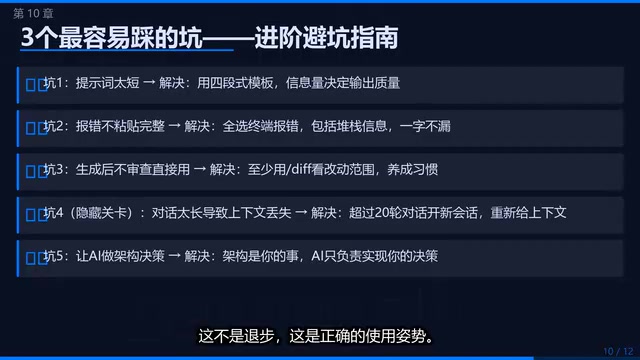
Five Common Pitfalls and Solutions
The Most Insidious Pitfall: Context Memory Decay
When your conversation with Claude Code exceeds a certain length, its memory of early context weakens, and generated code starts drifting from your project. It's like talking to someone for two hours and asking them to repeat what was said at the five-minute mark—they probably can't remember clearly.
The Technical Principles Behind Memory Decay
Context memory decay isn't AI "forgetting" earlier content—it's related to the attention mechanism in the Transformer architecture. Large language models process input sequences through Self-Attention mechanisms, where theoretically every token can attend to all other tokens within the context window. But in practice, as conversation length increases, the model's attention weights on earlier information get diluted—this is called "Attention Dilution." Although Claude's context window is very large (up to 200K tokens), its effective utilization isn't linear. Research shows that models have the weakest information retrieval ability for content in the middle of the context (the "Lost in the Middle" problem). Therefore, starting a new session and re-providing key context essentially helps the model re-establish a high-quality attention distribution.
Solution: After more than 20 rounds of conversation, start a new session and paste in the current file contents and new requirements. This isn't a step backward—it's the correct usage pattern.
The Most Fundamental Pitfall: Letting AI Make Decisions for You
AI shouldn't make "whether to do it" decisions for you—only "how to do it" execution. You're the product manager, it's the senior programmer. The division of labor must be clear.
Ten High-Frequency Use Cases
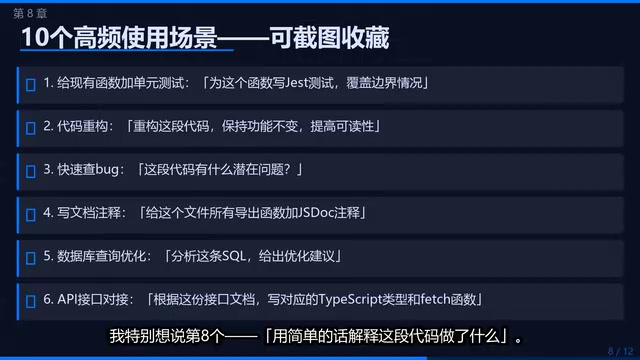
Here are ten scenarios the creator uses most frequently, each triggerable with a single sentence:
- Add unit tests to a function
- Generate documentation comments
- Refactor redundant code
- Handle edge cases
- Write boilerplate code
- Fix type errors
- Code formatting and standardization
- Explain what this code does in simple terms
- Generate mock data
- Add error handling
Number 8 deserves special emphasis—this isn't just for beginners; it's for everyone. When you're taking over unfamiliar code, or AI just generated a pattern you've never seen before, having it explain itself is ten times faster than looking up documentation.
Core Takeaway: AI Replaces Typing, Not Thinking
The core message of this series is: AI doesn't replace your thinking—it replaces your typing.
Your core value as an engineer—judgment, design, trade-offs, understanding of users—these won't be replaced, nor should they be. What Claude Code replaces is the part where you already know the answer but need to spend time typing it out.
Save that time and use it to think about harder problems.
Related articles
 Tutorials
Cursor + Codex Dual-IDE Collaboration: A Practical Methodology for Open-Source Project Customization
A complete methodology for open-source project customization based on real-world experience, detailing the Cursor+Codex dual-IDE workflow, seven-stage process, MVP validation, and AI source code reading techniques.
 Tutorials
Cursor Multi-Agent in Practice: Building a Full-Stack Next.js Blog in 50 Minutes
Build a full-stack blog in 50 minutes using Cursor IDE's multi-Agent mode with Next.js, Clerk auth, and Supabase. Learn the 4-phase AI Agent workflow and key integration pitfalls.
 Tutorials
Building an AI Software Factory from Scratch: A Cursor Engineer's Hands-On Experience with Multi-Agent Collaboration
Cursor engineer Eric shares practical insights on building an AI software factory: automation levels, guardrail design, parallel Agent management, and scaling to 1000+ Agents for 24/7 development.