Claude Code in Practice: Building a WebSocket Real-Time Chat Room from Scratch
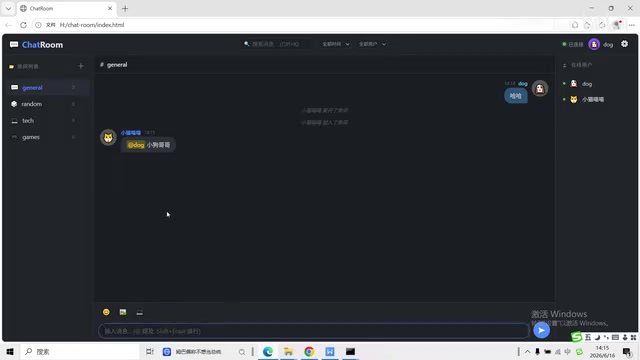
A hands-on guide to building a full-featured WebSocket chat room using Claude Code as your AI coding assistant.
This article walks through building a complete WebSocket real-time chat application using Claude Code, covering environment setup, server creation with Node.js and the ws library, multi-room systems, private messaging via @ mentions, rich media support (emojis, images, code blocks), and message search/export features. It also demonstrates the practical bug-fixing workflow where developers describe issues in natural language and let Claude Code handle the debugging.
Project Overview
Can Claude Code quickly build a fully-featured real-time chat application? Absolutely. Based on a hands-on video tutorial from Bilibili, this article breaks down step by step how to use Claude Code to build a WebSocket real-time chat room supporting multiple rooms, private messaging, and emoji/image sending.
The core features of this project include:
- Real-time communication: Bidirectional real-time messaging based on WebSocket
- Multi-room system: Create and join chat rooms with different topics
- User system: Nickname login, online status display, auto-generated avatars
- Rich message types: Text, emojis, images, code blocks
- Private messaging: One-on-one private conversations between users
- Message management: Search, export, and local storage of message history
The tech stack is remarkably simple: Node.js + the ws library for the backend, pure HTML/CSS/JavaScript for the frontend, and LocalStorage for message history persistence.
Environment Setup and Project Initialization
Creating the Project Directory and Initializing
The first step is creating the project folder and initializing the Node.js project. Run the following commands in your terminal:
# Navigate to your target directory and create the project folder
mkdir chat-room
cd chat-room

# Initialize the Node.js project
npm init -y

# Install the WebSocket library
npm install ws
The ws library installed here is one of the most popular WebSocket implementations in the Node.js ecosystem, known for being lightweight and high-performance. Unlike higher-level abstraction libraries like Socket.IO, ws strictly follows the WebSocket protocol specification (RFC 6455) and doesn't provide features like auto-reconnection or namespaces. However, this is precisely why it has a minimal footprint with no extra dependencies. Developers need to implement broadcasting, room routing, and other business logic themselves, making it an ideal learning tool for understanding the underlying WebSocket communication principles.
After installing the ws library, you can launch Claude Code. Simply type the claude command in your project directory, choose to trust the folder, and enter Claude Code's interactive interface.
Initializing Project Memory
Once inside Claude Code, enter the /init command to generate the CLAUDE.md file. This step is crucial—you need to paste your entire project's constraints and requirements into this file and save it.
CLAUDE.md is Claude Code's project context memory mechanism, similar to .cursorrules or .github/copilot-instructions.md in other AI coding tools. When Claude Code detects this file in the project directory, it automatically loads its contents as system-level context at the start of each conversation. You can define tech stack constraints, code style guidelines, architectural decisions, API design principles, and more. Claude Code will strictly reference these constraints in all subsequent code generation. This mechanism effectively solves the problem of large language models "forgetting" earlier instructions during long conversations, ensuring consistency throughout the development process.
Think of it as giving Claude Code a complete "project specification" so it always follows your design intent during code generation.
Building the WebSocket Server
The server is the heart of the entire chat room. Before diving into implementation, it's worth understanding how the WebSocket protocol works: WebSocket is a protocol for full-duplex communication over a single TCP connection, standardized by IETF in 2011. Unlike the traditional HTTP request-response model, WebSocket allows the server to proactively push data to clients without requiring repeated polling. During connection establishment, the client sends an HTTP upgrade request (Upgrade: websocket), and once the server confirms, both parties can freely send and receive data frames over the same TCP connection. Compared to Long Polling or Server-Sent Events (SSE), WebSocket has lower network overhead and latency, making it particularly suitable for real-time chat, online collaboration, gaming, and similar scenarios.
In Claude Code's input field, enter a prompt specifying the server's technical requirements:
- Use Node.js and the ws library
- Listen on port 3000
- Support multiple simultaneous client connections
- Handle message broadcasting, room management, and user status logic
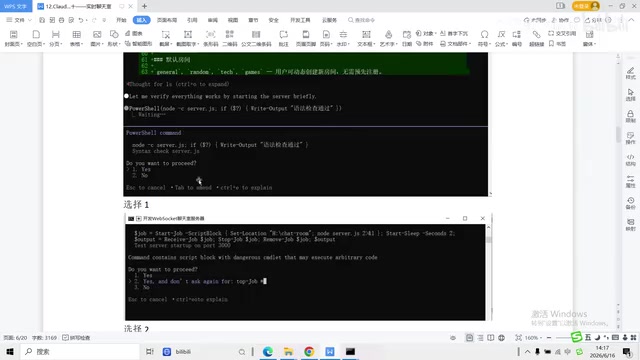
After inputting these requirements, Claude Code automatically generates the complete server.js file. During generation, it may present some confirmation options (typically selecting 1 or 2 is fine). Once the server code is generated, start it with:
node server.js
After successful startup, the server is ready and waiting for client connections on local port 3000.
Frontend Interface and User System
With the server ready, the next step is building the frontend page. Again, use prompts to tell Claude Code the page layout structure:
- Top: App title, settings button
- Left: Room list
- Center: Message display area
- Right: Online user list
- Bottom: Message input field and send button
Claude Code generates a complete HTML file including a login interface (enter nickname, choose avatar) and the main chat interface. The frontend establishes a connection with the server through the browser's native WebSocket API—just one line of new WebSocket('ws://localhost:3000') completes the handshake. Once users enter the chat room, they can send messages in default rooms like General or create custom rooms.
Multi-Room System and Bug Fixes
Room Feature Implementation
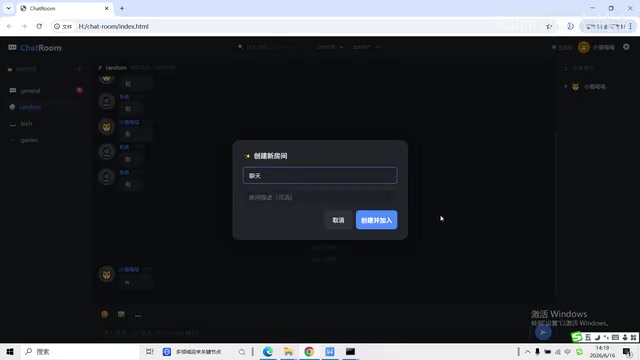
The multi-room system is one of this chat room's highlights. Each room has an independent message stream, supports unread message counts (red dot notifications), and the current room is highlighted. Beyond preset rooms, users can also create new ones.
From a technical implementation perspective, the core of multi-room functionality is the server maintaining a room-to-client mapping (typically using a Map or object structure). When a user sends a message, the server only broadcasts it to other clients in the same room, not all connected clients. When users switch rooms, they need to first "leave" the current room (removed from the mapping), then "join" the new room (added to the new mapping), while triggering corresponding system notifications.
Discovering and Fixing Issues
During actual testing, two typical problems emerged:
- Duplicate system messages: After each chat message was sent, the system would reply with an identical message
- Multi-client desync: Two browser windows couldn't see each other's messages
These two issues are very common in WebSocket development. "Duplicate system messages" typically stems from the server both echoing the message back to the sender and including the sender again during broadcast; or the client simultaneously listening to both local input events and server echo events, causing messages to render twice. "Multi-client desync" is likely due to incorrect room routing logic—messages are only sent to the sender's connection object rather than correctly iterating through all connections in the same room.
This is the essence of the Claude Code workflow—you don't need to debug the code yourself. Just describe the problem clearly and tell it: "Why does the system reply with the same content after sending a chat message? And why can't two clients see each other's messages?"
Claude Code automatically analyzes the code logic, locates the bugs in WebSocket message broadcasting and event handling, and completes the fix. After the fix, both clients can communicate in real-time normally.
Private Messaging and Rich Media Messages
Private Messaging
Private messaging is implemented through @ mentions. Typing the @ symbol in the message input field triggers a popup of currently online users, and selecting a target user initiates a private chat.
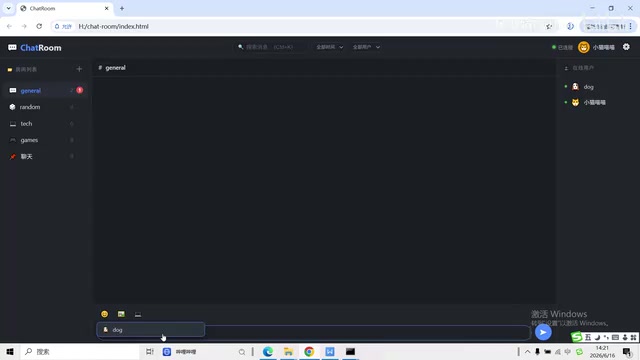
From an implementation perspective, the difference between private and group messages lies in the server's routing strategy: group messages are broadcast to all clients in a room, while private messages are sent only to the specific target client. The server needs to maintain a mapping from user IDs to WebSocket connections. Upon receiving a private message, it finds the corresponding connection object based on the target user ID and sends the message only to that connection. Meanwhile, the sender also needs to receive a copy for local display.
Note that private messaging requires multiple clients to be online simultaneously. If you can't see the user list, make sure other clients have refreshed and successfully connected to the server.
Emojis, Images, and Code Blocks
By continuing to input prompts to Claude Code, you can progressively add rich media message support:
- Emoji sending: Built-in emoji panel, click to insert
- Image sending: Support for selecting and uploading local image files
- Code blocks: Support for sending formatted code snippets, e.g.,
print("hello")displays in code block style
The technical implementation of image sending is worth mentioning: since this project doesn't have a dedicated file server, images are typically converted to Base64-encoded Data URLs and embedded directly in WebSocket messages for transmission. This approach is simple to implement but significantly increases message size (Base64 encoding inflates data by approximately 33%). In production environments, images would typically be uploaded to an object storage service (like AWS S3) first, then referenced via URL.
All these features are implemented by describing requirements in natural language, with Claude Code automatically generating the corresponding frontend and backend code.
Message Search and Data Management
Search Feature
The chat room provides a message search box at the top, supporting fuzzy search. After entering keywords, matching historical messages are filtered and displayed in real-time. You can also filter by time range (all time, this week, this month) and by user, making it easy to quickly locate past conversations.
The search feature is implemented entirely on the client side, iterating through the message array stored in LocalStorage and filtering using string matching (such as the includes() method). For scenarios with modest message volumes (like this project's default 200-message limit), this approach offers perfectly acceptable performance.
Settings and Export
Clicking the settings button provides the following options:
- Theme switching: Light and dark themes
- Message retention count: Default retention of 200 messages
- Export chat history: Export as a text file including complete timestamps, user join/leave records, and message content
- Import/clear records: Support for importing history or clearing all data with one click
All message history is stored in the browser's LocalStorage, requiring no additional database support. LocalStorage provides simple key-value persistence, with each origin typically having a 5-10MB storage quota, and data persists even after the browser is closed. The advantage of this approach is zero configuration and instant usability, but it also means data exists only in a single browser and cannot sync across devices. For learning projects and small-scale use cases, this is a very pragmatic choice; to scale into a production application, you'd need to introduce a server-side database (like MongoDB or PostgreSQL) for data persistence and multi-device synchronization.
Practical Takeaways and Lessons Learned
Through this project, you can see that Claude Code's workflow for full-stack development is very clear:
- Build the framework first: Initialize the project, install dependencies, configure project memory
- Progress module by module: Server → Frontend page → Core features → Extended features
- Test and fix immediately: Test after completing each module, describe any issues directly to Claude Code for fixing
- Progressive enhancement: Gradually add multi-room, private messaging, rich media, and other advanced features on top of basic chat
Throughout the process, the developer's role is more like "product manager + test engineer"—you define requirements and discover issues, while Claude Code writes and fixes the code. This human-AI collaboration model significantly lowers the barrier to full-stack development, allowing even Python-background developers to quickly get started with Node.js + WebSocket real-time application development.
It's worth noting that this development model doesn't mean developers can completely ignore underlying technologies. On the contrary, a basic understanding of concepts like the WebSocket protocol, event-driven architecture, and client-side storage helps you describe requirements more precisely and locate issues more accurately, enabling Claude Code to generate higher-quality code. The best practice for AI-assisted programming is: you provide domain knowledge and architectural judgment, while AI handles the concrete code implementation.
If you want to try this hands-on, start with the most basic server setup, progressively add features, and when you encounter issues, resist the urge to fix the code yourself—first try describing the problem in natural language and let Claude Code solve it.
Key Takeaways
Related articles
Vue3 NetEase Cloud Music Clone Tutorial: Core Feature Modules & Technical Highlights
In-depth analysis of a Vue3 NetEase Cloud Music clone project covering component development, QR code login, Vue Router, and Audio API playback with complete source code.

U.S. Congressional Candidate Responds to Controversy Over Deleting 3,500 Tweets: A Reflection on Rhetoric and Values
U.S. Congressional candidate Chevalier addresses the controversy over deleting 3,500 tweets, reflecting on past rhetoric and advocating for unifying, accessible, and kind political language.

Claude Code Workflow in Practice: Hundreds of Agents Automatically Migrating PHP to Golang
Deep dive into Claude Code Workflow's multi-Agent auto-orchestration: a real-world PHP to Golang migration running 14 hours with 100+ Agents, covering planning, execution, and Token cost analysis.