Claude Code Installation & Agent Hands-On Tutorial: Easy Enough for Non-Developers
Claude Code Installation & Agent Hands…
Use Claude Code with Chinese LLMs to let non-developers drive AI Agents via natural language for complex tasks.
This article explains how to use Claude Code as an Agent framework paired with Volcengine's GLM5.1 Chinese LLM to build a local AI Agent tool. It covers detailed installation guides for both Windows and Mac, and demonstrates the Agent's ability to transform complex technical operations into natural language interactions through two hands-on cases: automatically scraping Bilibili data and installing ComfyUI — enabling non-technical users to efficiently complete professional tasks.
Why Everyone Needs to Learn How to Use AI Agents
Many people still use AI at the "chat" level — opening a dialog box, typing a question, and getting an answer. But AI is capable of far more than that. Agents (intelligent agents) give AI real "execution power": they can automatically break down a big problem into smaller tasks, execute them step by step, monitor results, and iterate until a satisfactory outcome is achieved.
The Technical Principles Behind AI Agents: The core architecture of an Agent is built on a "Perceive-Plan-Execute" loop. Unlike single-turn Q&A with large language models, Agents introduce "Tool Use" and "Chain of Thought" mechanisms: the model doesn't just generate text — it can also call external functions, read and write files, and execute system commands. Most mainstream Agent frameworks today adopt the ReAct (Reasoning + Acting) paradigm, where the model reasons before acting at each step, feeds execution results back into the context, and forms a closed-loop iteration. This architecture enables Agents to handle complex tasks requiring multiple steps and cross-tool collaboration — the fundamental reason they far surpass simple chatting.
This workflow is much more complex than simple chatting, but it's also far more automated and time-saving. More importantly, Agents aren't just tools for programmers. For professionals and students in fields like new media research, design, film production, and music creation, Agents can deliver massive efficiency gains:
- Academic Research: Automatically collect materials, read papers, and write literature reviews
- Content Creation: Automatically generate scripts based on topics, or even complete short video productions
- Data Collection: Batch-scrape data from platforms like Bilibili and Douyin for analysis
- Environment Setup: Automatically install and configure complex open-source tools like ComfyUI
Why Choose Claude Code with Chinese LLMs
There are many mainstream Agent tools available today. This tutorial recommends using Claude Code as the Agent framework for the following reasons:
- Great integration with Chinese LLMs: Through the Volcengine platform, you can easily connect to Chinese models like GLM5.1
- Rich skill support: File operations, command execution, code writing — everything you need
- Local execution advantages: Can call local FFmpeg for video processing, OCR for document recognition, and vision models for image understanding, saving token costs
- Excellent overall performance: Claude Code ranks among the best-performing general-purpose Agent tools
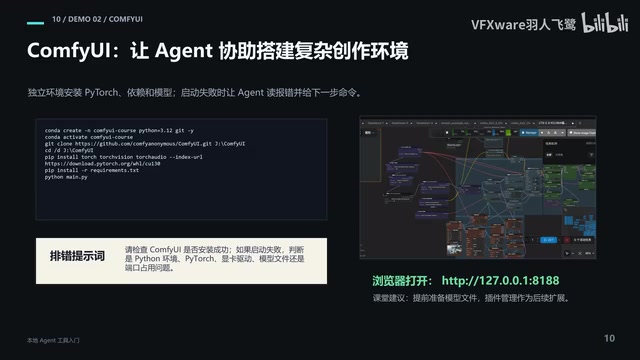
It's worth noting that we're using Claude Code's Agent framework, but the underlying LLM is replaced with the Chinese GLM5.1, implemented through Volcengine's Coding Plan. This avoids network issues while still providing high-quality model services.
Volcengine and the Chinese LLM Ecosystem: Volcengine is ByteDance's cloud service platform. Its "ARK" large model service aggregates multiple Chinese models including GLM and Doubao. The GLM (General Language Model) series was jointly developed by Tsinghua University's KEG Lab and Zhipu AI. GLM5.1 has been specifically optimized for code generation and instruction following, making it well-suited for Agent scenarios. Through an API compatibility layer (OpenAI Compatible API), developers can switch code originally calling GPT-4 to Chinese models with almost zero modifications. This is the core principle behind the arkhelper tool — it starts a local proxy service that translates Anthropic-format requests from Claude Code into Volcengine ARK's API format, achieving seamless integration.
Full Installation Guide for Windows
Step 1: Install Alacritty Terminal and MiniForge
Windows' built-in CMD and PowerShell offer a poor experience for development. We recommend using Alacritty as an alternative terminal. Additionally, we need MiniForge to manage Python virtual environments — it's a lightweight version of Anaconda that automatically installs Python-related software and environments.
An important tip when installing MiniForge: don't use the default installation path. Instead, create a C:\src\miniforge directory on your C drive to centralize all development-related content. This makes debugging much easier later on.
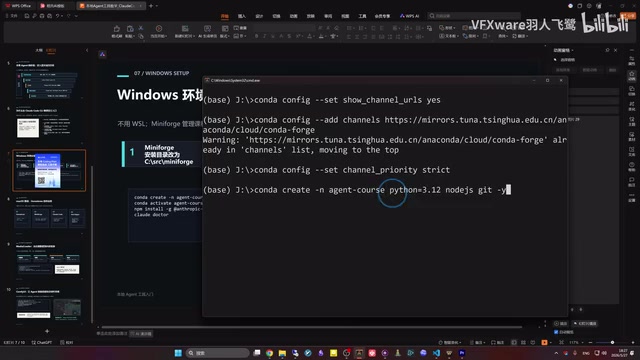
After installation, you need to configure Alacritty's startup settings. Create an Alacritty folder in your user directory and place a configured TOML file in it, pointing it to the MiniForge environment by default. When you open Alacritty, if you see (base) in parentheses, the environment has loaded correctly.
Step 2: Create a Virtual Environment and Configure Package Sources
Why You Need Virtual Environments: Python virtual environments are a fundamental practice in modern software development. Different projects often depend on different versions of the same library. If everything is installed in the system-level Python, you'll easily run into "dependency hell" — where conflicting dependencies across projects prevent programs from running. Conda (MiniForge is its community-maintained lightweight version) has an advantage over pip: it can manage both the Python version itself and non-Python dependencies (such as CUDA, FFmpeg, and other C libraries), which is especially important for AI/ML toolchains. The Tsinghua mirror (TUNA) is the standard solution for Chinese developers dealing with network access limitations. Maintained by Tsinghua University's Open Source Software Mirror, it covers mainstream package managers like Conda, pip, and npm, and can boost dependency download speeds several times over.
Execute the following steps in order:
- Set up Conda Tsinghua mirror: Accelerate downloads within China
- Create virtual environment:
conda create -n agent_course python=3.12 nodejs git— this installs Python 3.12, Node.js, and Git simultaneously - Activate environment:
conda activate agent_course - Verify installation: Check
node --version,python --version,git --version, andnpm --versionrespectively - Configure domestic mirrors for pip and npm: Speed up subsequent installations
The entire virtual environment creation process takes about 10 minutes.
Step 3: Install Claude Code and Configure Volcengine ARK
Navigate to your working directory (e.g., C:\src\agent_new) and install Claude Code using npm:
npm install -g @anthropic-ai/claude-code
After installation, the critical step is configuring Volcengine ARK. By default, Claude Code can only use Anthropic's models. We need to use the arkhelper tool to switch it to a Chinese model:
- Download and run arkhelper
- Select Chinese language, then select Volcengine ARK Coding Plan
- Automatically obtain the API Key via SSO login (scan the QR code with your phone to log into the Volcengine website)
- Create a new API Key in the Volcengine dashboard
- Select the corresponding Coding Key and configure the GLM5.1 model
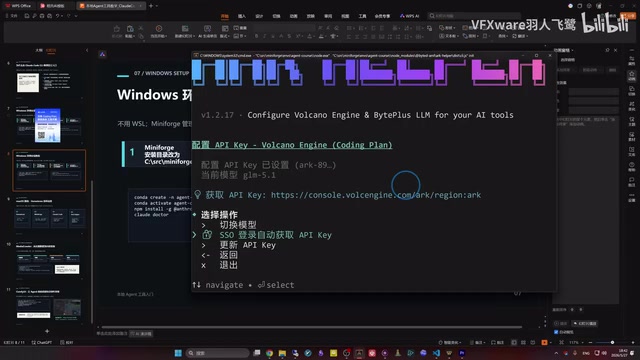
After configuration, launch Claude Code again — you should see that it has switched to the GLM5.1 model.
Mac Installation Guide
The installation process for Mac users is much simpler, since macOS comes with an excellent terminal, and installing Xcode command-line tools provides a built-in Python environment.
Core steps:
- Install Homebrew: The package manager for macOS
- Install MiniForge:
brew install miniforge - Modify terminal settings: Change the default shell from zsh to bash (enter
/bin/bashin terminal settings) - Create and activate virtual environment: Same as Windows
- Install Claude Code and configure Volcengine ARK: Identical to Windows
Hands-On Case 1: Using an Agent to Automatically Scrape Bilibili Data
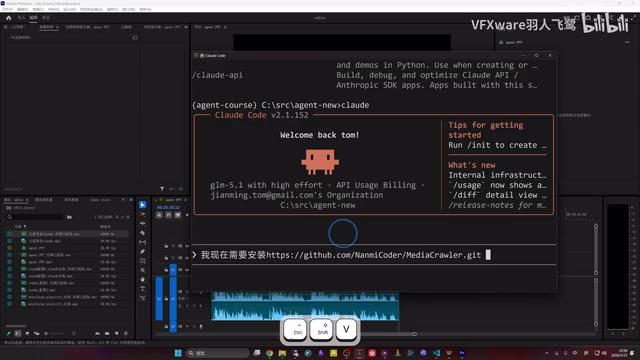
With Claude Code installed, let's look at a practical application. Using MediaCrawler to scrape data from Bilibili, the entire process only requires describing your needs in natural language:
"I need to install MediaCrawler, clone it to the current directory, and automatically install all the environments and tools required to run it."
Claude Code will automatically analyze the requirements, execute git clone, and install dependencies — the whole process takes about 6 minutes. Then type:
"Please use MediaCrawler to search Bilibili for 'AI micro-dramas', search for just one keyword, and save the data in the data directory."
Technical Principles of MediaCrawler: MediaCrawler is an open-source social media data collection framework supporting mainstream platforms like Xiaohongshu, Douyin, Bilibili, and Weibo. Its core technology uses Playwright (a browser automation library) to simulate real user browser behavior, bypassing platform anti-crawling mechanisms while leveraging mobile API endpoints to obtain structured data. Compared to traditional crawlers, this hybrid approach of "browser automation + API scraping" offers higher stability and more closely mimics real user behavior. Data is output in JSON format for easy subsequent analysis with pandas or database import. When using it, be sure to comply with each platform's user agreements and relevant laws and regulations, and use it only for legitimate academic research purposes.
The Agent will automatically pop up a Bilibili login QR code. After scanning, it begins scraping. The final result: 19 video entries and 159 comments, saved in JSON format. You don't need to understand any of MediaCrawler's technical details — the Agent handles everything.
Hands-On Case 2: Using an Agent to Install ComfyUI
ComfyUI is a powerful but complex-to-install AI image generation tool that typically requires considerable technical expertise. While "all-in-one packages" exist, the problem with them is that they don't allow flexible plugin adjustments or resolution of specific technical issues.
ComfyUI's Technical Positioning: ComfyUI is a node-based workflow AI image generation interface that calls diffusion models like Stable Diffusion under the hood. Unlike WebUI (AUTOMATIC1111)'s linear operation interface, ComfyUI exposes each processing step (VAE encoding, CLIP text encoding, sampler, decoder, etc.) as connectable nodes. Users can freely combine them to build complex generation pipelines, with fine-grained control over advanced features like ControlNet, LoRA, and IP-Adapter. Due to its high flexibility, ComfyUI installation involves multiple technical layers including CUDA drivers, PyTorch version matching, and custom node dependencies, creating a high barrier for beginners — making it one of the scenarios where automated Agent installation provides the most value.
To install ComfyUI with Claude Code, simply describe:
"I need to install ComfyUI locally, using the existing conda environment, clone it to the specified directory, and get it to a runnable state."
In about 4 minutes, the Agent completes cloning, dependency installation, and startup configuration. Without a pre-installed conda environment, the process takes longer (requiring several GB of dependencies to download), but it's still fully automated.
Summary and Recommendations
The value of local Agent tools lies in transforming complex technical operations into natural language interactions. For users without a technical background, the combination of Claude Code with GLM5.1 provides a low-barrier, high-efficiency solution.
Beginners are encouraged to start with simple tasks and gradually explore Agent applications in their own professional domains. Whether it's data collection for academic research or tool configuration for creative work, AI Agents can save you enormous amounts of repetitive technical effort, letting you focus your energy on what truly matters.
Key Takeaways
- AI Agents based on the ReAct paradigm give LLMs tool-calling and closed-loop iteration capabilities, far exceeding the efficiency of simple chatting
- Claude Code paired with Volcengine GLM5.1, using arkhelper for API format translation, is currently the best general-purpose Agent solution integrated with Chinese LLMs
- Windows installation requires Alacritty terminal + MiniForge virtual environment + arkhelper for Volcengine ARK configuration; Mac setup is simpler
- Hands-on demos showed Agents automatically installing MediaCrawler to scrape Bilibili data, and automatically configuring complex environments like ComfyUI
- Non-technical users (in new media, design, film, etc.) can equally drive Agents through natural language to complete professional technical operations
Related articles
 Tutorials
Cursor + Codex Dual-IDE Collaboration: A Practical Methodology for Open-Source Project Customization
A complete methodology for open-source project customization based on real-world experience, detailing the Cursor+Codex dual-IDE workflow, seven-stage process, MVP validation, and AI source code reading techniques.
 Tutorials
Cursor Multi-Agent in Practice: Building a Full-Stack Next.js Blog in 50 Minutes
Build a full-stack blog in 50 minutes using Cursor IDE's multi-Agent mode with Next.js, Clerk auth, and Supabase. Learn the 4-phase AI Agent workflow and key integration pitfalls.
 Tutorials
Building an AI Software Factory from Scratch: A Cursor Engineer's Hands-On Experience with Multi-Agent Collaboration
Cursor engineer Eric shares practical insights on building an AI software factory: automation levels, guardrail design, parallel Agent management, and scaling to 1000+ Agents for 24/7 development.