Claude Code Installation Guide: Complete Tutorial for Connecting to the DeepSeek Model
Install Claude Code and connect it to DeepSeek V4 Pro using the CC Switch proxy tool in 5 minutes.
This guide walks you through installing Claude Code — Anthropic's command-line AI programming tool — and connecting it to DeepSeek V4 Pro via the CC Switch proxy tool. It covers Node.js setup, Claude Code installation via npm, configuration file editing, obtaining a DeepSeek API key, and verifying the connection. The article also discusses the advantages (lower cost, no VPN needed) and limitations (reduced feature fidelity, stability risks) of using a third-party model instead of Claude's native API.
Introduction
Claude Code is a command-line AI programming tool developed by Anthropic that enables direct interaction with large language models in the terminal for code writing, debugging, and refactoring. Unlike traditional IDE-embedded AI plugins (such as GitHub Copilot's code completion mode), Claude Code adopts the Agentic Coding paradigm — it doesn't just generate code snippets but can autonomously read project files, execute terminal commands, run test cases, and even complete complex engineering tasks through multi-step reasoning. This model of "AI agents directly operating the development environment" represents an important evolution in AI-assisted programming, moving from "completion tools" to "programming partners."
However, due to factors like network restrictions and API costs, many developers in China prefer to connect Claude Code to domestic large language models.
This article introduces a straightforward method to connect Claude Code with the DeepSeek V4 Pro model using the CC Switch proxy tool. The entire process takes only about 5 minutes.
Prerequisites: Installing Required Dependencies
Before installing Claude Code, you'll need to prepare the following dependencies:
- Node.js Runtime Environment: Claude Code runs on Node.js, so you need to install the appropriate version beforehand. Node.js is a JavaScript runtime environment built on Chrome's V8 engine that allows JavaScript to run on servers and locally outside the browser. Installing Node.js automatically includes npm (Node Package Manager), which is used to install Claude Code. It's recommended to install Node.js 18.x or a higher LTS (Long-Term Support) version. You can download the installer directly from the Node.js website (nodejs.org) and keep the default options during installation. After installation, run
node -vandnpm -vin the command line to verify the installation was successful. - Command-Line Tool: CMD or PowerShell on Windows, Terminal on Mac
- CC Switch Proxy Tool: Responsible for connecting third-party LLM APIs with Claude Code
- Code Editor: VS Code or Cursor is recommended for use with visual plugins later
Once all the above tools are installed, you can proceed to the actual Claude Code installation.
Step-by-Step Claude Code Installation
Running the Installation Command
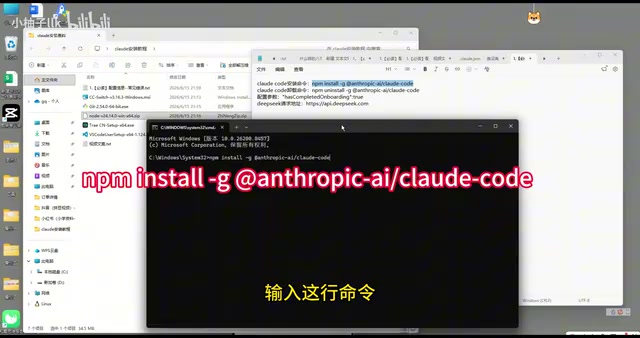
Open a command-line window and enter the following installation command:
npm install -g @anthropic-ai/claude-code
The -g flag means global installation, which installs Claude Code as a system-level command-line tool. Once installed, you can launch it using the claude command from any directory. If you encounter permission issues during installation, Windows users can try running the command line as administrator, while Mac/Linux users can prefix the command with sudo.
Wait for the installation process to complete.
Configuring the Claude Code File
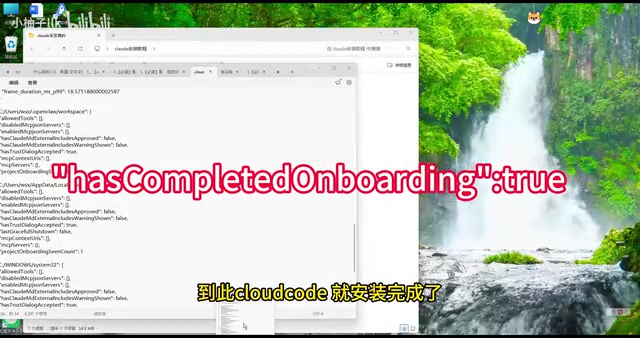
After installation, there's one crucial configuration step:
- Navigate to your C drive user directory (
C:\\Users\\your-username\\) - Locate the
claude.jsonconfiguration file - Open the file with an editor and add the specified configuration content
Note: The configuration content is case-sensitive — incorrect casing may cause connection failures. This is a common pitfall for beginners, so be sure to carefully verify the spelling of each field.
Connecting to DeepSeek V4 Pro via CC Switch
What CC Switch Does
Claude Code natively only supports Anthropic's own Claude model API. To connect to third-party models like DeepSeek, you need a proxy tool like CC Switch. It acts as a "translation layer" that converts requests from Claude Code into a format the target model can understand, then converts the responses back into a format Claude Code can recognize.
From a technical perspective, the core of this proxy is API protocol conversion. Claude Code internally uses Anthropic's Messages API format (including specific request structures, tool_use call formats, streaming response protocols, etc.), while domestic models like DeepSeek typically follow the OpenAI-compatible Chat Completions API format. The two differ in message structure, role definitions, and function calling implementations. CC Switch starts a local proxy server that listens for Claude Code requests and performs real-time format mapping and protocol conversion, making it appear to Claude Code as if it's communicating with the official Anthropic API. Similar proxy solutions include open-source projects like one-api and litellm, but CC Switch has been specifically optimized for Claude Code compatibility, making configuration much simpler.
Obtaining a DeepSeek API Key and Completing the Setup
DeepSeek is a large language model series developed by DeepSeek AI. DeepSeek V4 Pro is their latest flagship model, excelling in code generation, mathematical reasoning, and long-text comprehension. Compared to earlier versions, V4 Pro shows significant improvements in instruction-following ability and multi-step reasoning for complex tasks, making it a competitive choice for integration with Claude Code. However, it's worth noting that DeepSeek models differ from Claude models in training data and capability focus — for example, Claude has undergone specialized RLHF tuning for code refactoring and large codebase comprehension, while DeepSeek may have stronger advantages in Chinese-language contexts and mathematical reasoning.
Here are the specific steps:
- Go to the DeepSeek Open Platform (platform.deepseek.com)
- Register an account and create an API Key
- Copy the generated API Key and the corresponding endpoint URL
- Enter the API Key and endpoint URL in the CC Switch tool
- Click create and start the proxy service
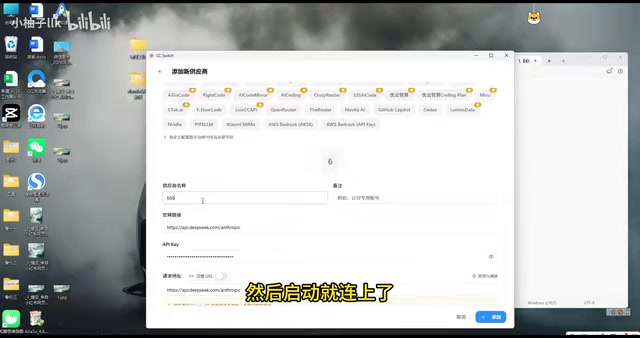
Once connected, CC Switch will start a local proxy service that automatically forwards Claude Code requests to DeepSeek's API endpoint.
Verifying the Installation
Enabling Claude Code in Your Editor
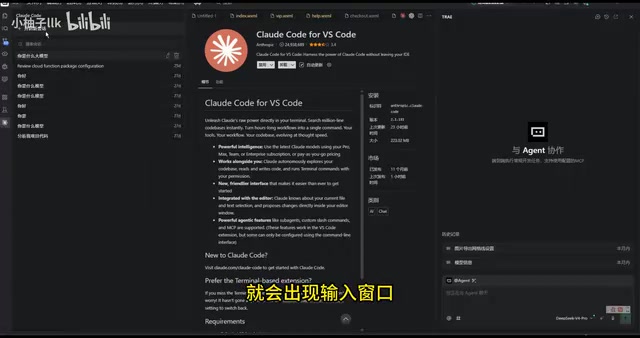
Open VS Code or Cursor, search for and install the Claude Code visual interface plugin from the extension marketplace. After installation, click to open it and you'll see the Claude Code interaction window.
Testing Model Connectivity
Type a simple test question in the input box, such as "What model are you?" If configured correctly, the system will return DeepSeek V4 Pro's model identification information, confirming that both the installation and connection are successful.
Advantages and Limitations of This Approach
Advantages
- Low Cost: DeepSeek API pricing is significantly lower than Claude's official API, making it suitable for individual developers and small teams. As a reference, DeepSeek V4 Pro API calls cost roughly one-fifth to one-tenth of Claude Sonnet. For developers who frequently use Claude Code for daily development, this can result in considerable savings over time.
- Network-Friendly: No VPN required — directly accessible from within China
- Low Barrier to Entry: With the toolkit and proxy tool, the entire configuration process is greatly simplified
Limitations
- Differences in Feature Experience: Some of Claude Code's advanced features (such as codebase indexing and multi-file collaborative editing) are optimized for the Claude model, and performance may be reduced when using third-party models. The fundamental reason is that Claude Code internally uses a carefully designed set of System Prompts and Tool Use protocols. Claude Code uses system prompts to guide the model on how to analyze code, when to invoke file read/write tools, and how to organize execution plans for multi-step tasks. These prompts are tailored to Claude's comprehension capabilities and response characteristics — such as specific XML tag formats, chain-of-thought guidance methods, and JSON Schema structures for tool calls. When the underlying model is replaced with DeepSeek, the model's precision in understanding these specific formats and instructions may not match Claude's native model, leading to higher tool call failure rates or interruptions in multi-step reasoning.
- Stability Risks: The proxy approach depends on third-party tools, which may introduce compatibility issues or unstable connections
- Version Update Concerns: When Claude Code is updated, proxy tools like CC Switch may need to be updated accordingly, creating a risk of temporary unavailability
Conclusion
For developers who want to experience Claude Code's programming workflow but are limited by network access or budget, connecting to DeepSeek via CC Switch is a pragmatic compromise. The entire installation and configuration process can indeed be completed within 5 minutes, making it ideal for beginners to get started quickly.
That said, it's important to be objective: if you're pursuing the best AI-assisted programming experience, using Claude's native model remains the top choice. After all, Claude Code's prompt engineering and tool-calling mechanisms are designed and optimized around the Claude model, so the native pairing has a higher performance ceiling. Looking at industry trends, Agentic Coding is becoming the mainstream direction in AI programming — whether it's Anthropic's Claude Code, OpenAI's Codex CLI, or similar tools from Chinese tech companies, all are evolving toward "AI agents autonomously completing development tasks." Choosing which model to use as the underlying engine is essentially a trade-off between cost, effectiveness, and convenience. For most everyday development tasks, DeepSeek V4 Pro already provides a sufficiently good experience; for complex large-scale project refactoring or high-precision code generation scenarios, the native Claude model's advantages become more apparent.
Key Takeaways
Related articles

Generate a Game with One Sentence: Hands-On Review of AI Coding Tools — No Experience Required
Hands-on review of AI coding tools: generate a complete mini-game in one minute with a single sentence. Supports iterative refinement via natural language. Exploring zero-code development trends.

Claude Code Desktop Hands-On: Transparent Context Window & CC Switch for Compute Freedom
Hands-on review of Claude Code Desktop's transparent context window, multi-project heatmap, efficiency panel, and CC Switch open-source routing gateway for model freedom.

New Book Breakdown: "Claude Code in Practice: The Way of Harness Engineering" — Master AI Programming Engineering in Ten Chapters
Deep breakdown of the new book on Claude Code engineering, covering Harness concepts, four-layer architecture, five-layer memory, sub-agents, hooks, MCP protocol, and CI/CD integration.