Claude Code /loop Command Explained: Usage, Limitations & Comparison of Three Scheduling Solutions
Claude Code /loop Command Explained: U…
Claude Code's /loop command is a short-term scheduling tool, not a 24/7 autonomous agent
Claude Code's new /loop command lets users repeatedly execute prompts at set intervals, but comes with hard limitations: session-bound (closing means losing), maximum three-day runtime, and task queue blocking. It's not the "24/7 autonomous agent" the community claims. This article compares it with desktop Scheduled Tasks and GitHub Actions, recommending /loop as a short-term monitoring power tool — spin it up when needed, walk away when done.
Claude Code recently released the /loop command, and the community quickly dubbed it a "24/7 autonomous agent." But is that really the case? This article dives deep into how /loop works, its limitations, and compares it side-by-side with Scheduled Tasks and GitHub Actions to help you figure out which tool fits which scenario.
What Is the /loop Command
/loop is a new feature in Claude Code that allows users to specify a prompt and set a time interval for automatic repeated execution. Think of it as a lightweight task scheduler that runs within a Claude Code session environment, with semi-autonomous capabilities and a maximum continuous runtime of three days.
The core concept is simple: you provide an instruction, set an execution interval (e.g., every 5 minutes, every 30 minutes, every 2 hours), and Claude Code will repeatedly execute that instruction at the specified cadence until the three-day limit is reached or you manually cancel it.
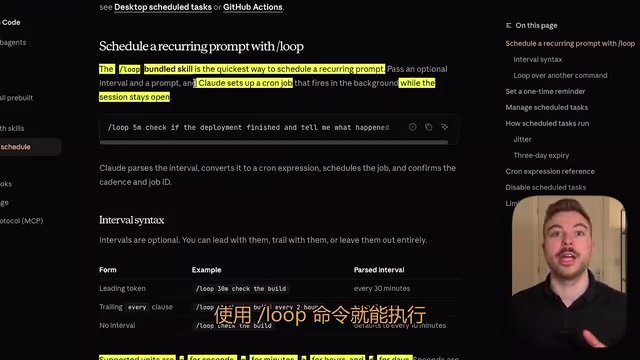
By default, the execution interval is 10 minutes, and it supports minutes (M), hours (H), or days (D) as units. For example:
- Check project build status every 30 minutes
- Run a code review every 2 hours
- Check for dependency updates once a day
/loop Command: Hands-On Demo
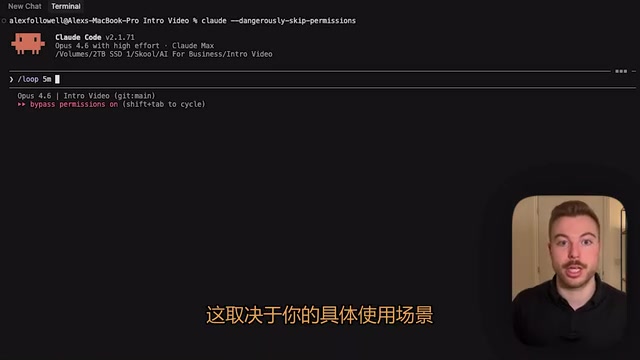
Using /loop in the command-line interface is very intuitive. Taking the CLI in Cursor editor as an example, after logging in, type /loop, select the top option and press Tab to load it into the conversation, and you'll see the interval configuration interface.
Enter 5M to execute every five minutes, then fill in the prompt you want to execute. For instance, we can set up a simple demo task: "Please summarize the latest AI news for me." After sending, the system returns the following information:
- Task description: The content of the scheduled task to execute
- Execution frequency: Every 5 minutes
- Task ID: For subsequent querying and management
- Auto-expiration time: Automatically expires after three days
If you want to check the current running status, you can query the scheduled task list. The system displays all configured recurring tasks in a table format, including ID, status, and next execution time. The system listens every second for tasks that are due, and automatically adds them to the execution queue when they expire.
Key Limitations of /loop: It's Not an Autonomous Agent
This is the most important part of understanding /loop. Despite community hype calling it a "24/7 autonomous agent," it has several hard limitations:
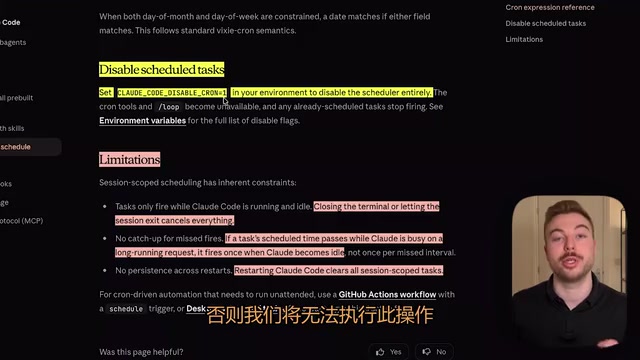
Session-Bound — Closing Means Losing
The task scope is strictly limited to the current Claude Code session. Once you close the terminal, cancel the session, or exit, all tasks immediately stop and are lost with no way to recover them. This means you must keep the terminal window open continuously.
Task Queue Blocking Issues
This is the most easily overlooked bottleneck. If your Claude Code instance is executing other tasks, scheduled /loop tasks must wait until the current task completes before they can run. When you have multiple loop tasks set up, this queuing significantly impacts execution punctuality.
Maximum Runtime of Three Days
Regardless of configuration, /loop can only run for a maximum of three days, after which tasks are automatically deleted. If you need to continue, you must re-execute the command.
Cannot Create New Sessions
/loop can only execute tasks sequentially within the current session — it cannot create new independent sessions like Scheduled Tasks can.
/loop vs. Scheduled Tasks vs. GitHub Actions: Side-by-Side Comparison
Within the Claude Code ecosystem, there are currently three scheduling solutions to choose from:
| Feature | /loop Command | Desktop Scheduled Tasks | GitHub Actions |
|---|---|---|---|
| Maximum runtime | 3 days | Longer (requires app to stay open) | Unlimited |
| Recovery after restart | ❌ Not supported | ✅ Supported | ✅ Supported |
| Create new sessions | ❌ Not supported | ✅ Supported | ✅ Supported |
| Learning curve | Low | Medium | Higher |
| Best for | Short-term monitoring | Daily scheduled tasks | CI/CD automation |
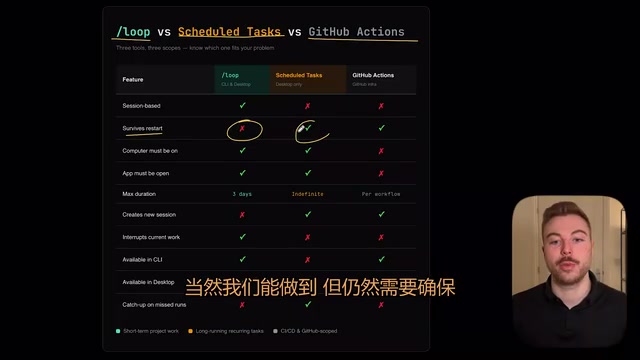
The desktop version's Scheduled Tasks feature can be found in the "Schedule" tab in the upper left corner. Similar to the previous collaborator feature, it can execute tasks at specified times with longer runtimes. However, it still requires your computer to be on and the application to remain open.
Tool Selection Recommendations for Different Scenarios
Choosing the right tool comes down to understanding the nature of your needs:
Scenarios Where /loop Fits Best
- Short-term monitoring after new feature releases: Just deployed a new service and need to check its running status every 30 minutes for 1-3 days
- Frequent change checks during short-term projects: During project sprints when you need to continuously monitor build status
- Temporary repetitive tasks: No need for long-term execution — use it and discard it
Scenarios Where Scheduled Tasks Fit Best
- Daily scheduled briefings: Check your calendar and send a briefing at the same time every day
- Long-term periodic checks: Weekly code quality reports, daily dependency security scans
- Tasks that need to persist across sessions
Scenarios Where GitHub Actions Fits Best
- Pure GitHub-related automation: PR reviews, Issue management, automated releases
- CI/CD pipelines: Complete automation of build, test, and deploy workflows
- Tasks requiring high reliability and traceability
Summary and Outlook
The /loop command is not a revolutionary autonomous agent, but it is an important step in the right direction. It fills a gap in Claude Code for short-term scheduled tasks, allowing developers to set up simple repeat execution logic without leaving the command line.
As you use it more, you'll find that the boundaries between /loop, Scheduled Tasks, and GitHub Actions are gradually blurring. Which tool to choose depends on your specific requirements for runtime duration, reliability, and complexity. For most developers, positioning /loop as a "short-term monitoring power tool" is the most pragmatic approach — spin it up quickly when needed, walk away when done, with no additional infrastructure overhead.
Related articles
 Tutorials
Cursor + Codex Dual-IDE Collaboration: A Practical Methodology for Open-Source Project Customization
A complete methodology for open-source project customization based on real-world experience, detailing the Cursor+Codex dual-IDE workflow, seven-stage process, MVP validation, and AI source code reading techniques.
 Tutorials
Cursor Multi-Agent in Practice: Building a Full-Stack Next.js Blog in 50 Minutes
Build a full-stack blog in 50 minutes using Cursor IDE's multi-Agent mode with Next.js, Clerk auth, and Supabase. Learn the 4-phase AI Agent workflow and key integration pitfalls.
 Tutorials
Building an AI Software Factory from Scratch: A Cursor Engineer's Hands-On Experience with Multi-Agent Collaboration
Cursor engineer Eric shares practical insights on building an AI software factory: automation levels, guardrail design, parallel Agent management, and scaling to 1000+ Agents for 24/7 development.