Claude Code Model Configuration & Cost Comparison: A Practical Money-Saving Guide

Cost comparison and configuration guide for AI models in Claude Code with money-saving tips
This article provides a detailed comparison of actual token consumption costs for various AI programming models in Claude Code, highlighting that programming scenarios consume far more tokens than regular chat due to large code context loading. Through real cases showing Qwen Coder burning 37 RMB in just two conversations while DeepSeek V4 Pro costs only a few cents per conversation during its 75%-off promotion, it identifies the best value options. The article also covers proxy vs direct connection setup and recommends Coding Plan subscriptions for heavy users.
Introduction: The Hidden Costs of AI Programming Tools
When using AI programming tools like Claude Code, many developers overlook a critical issue — the costs driven by token consumption. Tokens are the basic units that large language models use to process text, and they don't simply equate to a single character or word. For English, one token corresponds to roughly 4 characters or 0.75 words; for Chinese, a single character is typically encoded as 1-2 tokens. In programming scenarios, tokenization is even more complex — variable names, function signatures, indentation, comments, and more are all broken down into tokens. The reason tools like Claude Code consume tokens at an alarming rate is that they need to send entire project code files, directory structures, dependency configurations, and other context to the model simultaneously. A medium-sized project's context alone can easily consume tens or even hundreds of thousands of tokens.
This article is based on the real-world experience of a Bilibili content creator, breaking down the actual costs of various models in Claude Code and providing the most cost-effective configuration strategies.
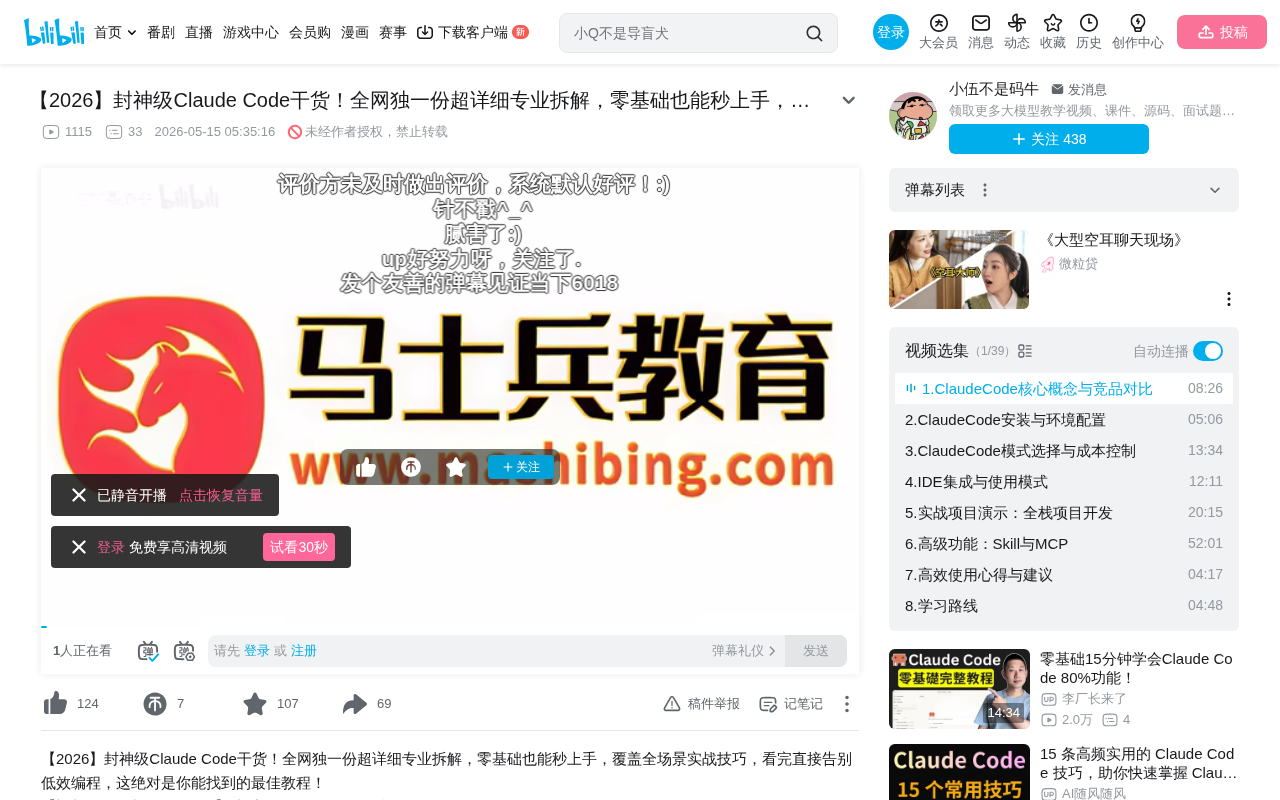
Mainstream Model Price Comparison
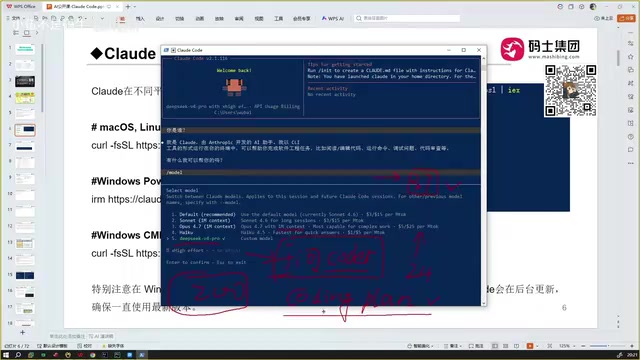
Anthropic Official Model Pricing
Among the high-end models currently supported by Claude Code, both Sonnet and Opus support a 1M (one million) context window with impressive capabilities, but their prices are equally substantial. The context window refers to the maximum number of tokens a model can process in a single inference. A 1M context window means the model can "read" approximately 750,000 English words or hundreds of thousands of lines of code in one go. This capability is crucial for programming scenarios because understanding a function's bug might require tracing the entire call chain, related type definitions, and configuration files. However, the larger the context window, the more tokens are sent per request, and the higher the cost — this explains why programming tools cost far more than regular chat. A normal conversation might only need a few hundred tokens of context, while code analysis routinely requires tens of thousands.
Specific pricing:
- Sonnet: $3 per million input tokens, $15 per million output tokens
- Opus: $5 per million input tokens, $25 per million output tokens
- Haiku (lightweight version): Approximately 1/5 the price of the above models, suitable for simple tasks
These numbers may seem abstract, but in real programming scenarios, token consumption far exceeds regular conversations due to large context windows and numerous code files. It's worth noting that output token prices are typically 3-5x higher than input tokens because generating text (output) requires more computational resources than understanding text (input) — each generated token requires a complete forward inference pass.
Lessons Learned from Domestic Models
The content creator shared a real case: he once configured the Qwen Coder model in Claude Code with a balance of 37 RMB, and it was completely depleted after just two conversations. Qwen Coder's tiered pricing charges approximately 24 RMB per million tokens, and slightly larger projects burn through credits rapidly.
Key lesson: Token consumption in programming tools is far higher than regular chat because large amounts of code context must be read. A seemingly simple request like "help me fix this bug" might involve sending dozens of code files, configuration files, and dependency declarations to the model, easily generating 100,000+ tokens of consumption.
DeepSeek V4 Pro: Currently the Best Value
DeepSeek is a large language model series developed by DeepSeek AI, a company incubated by the quantitative fund High-Flyer, with powerful computing resources and R&D capabilities. The DeepSeek model series is known for its open-source strategy and extreme inference efficiency. Its MoE (Mixture of Experts) architecture allows the model to significantly reduce inference costs while maintaining high performance. The core idea of MoE architecture is that the model contains multiple "expert" sub-networks, and only a small subset of experts is activated for each inference task rather than engaging all parameters — this significantly reduces computational consumption per inference without sacrificing model capacity. V4 Pro, as its latest flagship version, excels in code generation, mathematical reasoning, and other tasks.
DeepSeek V4 Pro is currently running a 75% off promotion:
- Input: ~3 RMB per million tokens
- Output: ~6 RMB per million tokens (original price 24 RMB)
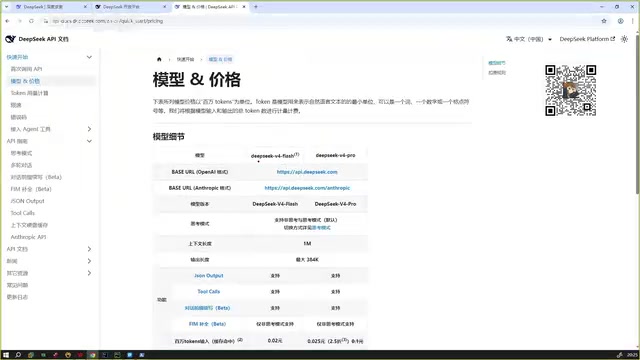
The content creator noted that a 12 RMB top-up can cover approximately two medium-complexity projects, with each conversation costing just a few cents (RMB). However, be aware that prices may increase after the promotional period ends. Since DeepSeek operates domestically in China, users can call the official API directly without proxies, resulting in lower latency and better stability — a key reason for its rapid adoption among Chinese developers.
Real-World Cost Reference
Based on the content creator's long-term usage experience, the approximate cost per conversation for each model in Claude Code is:
| Model | Cost Per Conversation | Notes |
|---|---|---|
| Qwen Coder | 15-20 RMB | Extremely expensive, pay-per-use not recommended |
| Sonnet (via proxy) | 1-2 RMB | Stable performance |
| DeepSeek V4 Pro | 0.1-0.5 RMB | Current promotional period, best value |
It's important to note that a "single conversation" in Claude Code is not a simple question-and-answer exchange. A complete programming conversation may involve multiple rounds of interaction: the model first reads the project structure, then analyzes relevant code files, generates a modification plan, and finally outputs complete code — each step generates token consumption that adds up to a considerable amount.
Money-Saving Strategy: Coding Plan vs Pay-Per-Use
For high-frequency users, prioritize a Coding Plan (programming subscription). A Coding Plan is essentially a "high-quota monthly subscription" pricing strategy, similar to a mobile data plan. For heavy users of AI programming tools, the pay-as-you-go model makes monthly costs highly unpredictable since every code generation, refactoring, and debugging session produces massive token consumption. A subscription locks costs at a fixed amount, allowing users to work freely without constantly worrying about their balance.
Specific plan references:
- Qwen offers a 200 RMB/month Coding Plan with 6,000 calls per 5-hour window, with quota automatically refreshing after use
- Compared to pay-per-use (37 RMB for two conversations), the monthly plan is clearly more economical
Using Qwen as an example, if you use pay-per-use 2-3 times daily, monthly costs could exceed 1,000 RMB — the subscription's cost advantage is obvious. The key to choosing between subscription and pay-per-use is evaluating your usage frequency — if you use Claude Code more than 10 times per week, a subscription is almost certainly more cost-effective.
Configuration Tutorial: How to Connect Third-Party Models in Claude Code
Environment Variable Configuration
No need to configure within the Claude Code interface — set it directly in system environment variables. Environment variables are OS-level key-value pair configurations that applications can read at runtime to obtain settings. Claude Code reads the ANTHROPIC_API_KEY and ANTHROPIC_BASE_URL environment variables to determine API authentication credentials and service endpoint addresses. This design follows the "Twelve-Factor App" configuration management principle — separating configuration from code so users can switch between different model providers without modifying the application itself.
# Set API Token
export ANTHROPIC_API_KEY=your_token

# Set Base URL (provided by proxy service)
export ANTHROPIC_BASE_URL=proxy_service_url
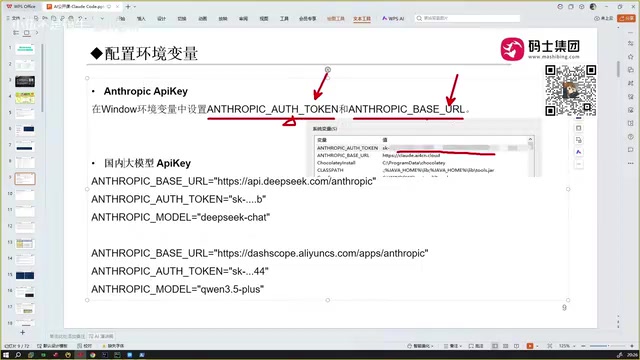
Windows Users Note: The
exportcommands above are for Linux/macOS bash/zsh terminals. Windows users need to use thesetxcommand (e.g.,setx ANTHROPIC_API_KEY "your_token") or manually add variables through "System Properties → Advanced → Environment Variables" panel. You'll need to restart your terminal after making changes.
Choosing Between Proxy and Direct Connection
Risks of Direct Connection:
- OpenAI/Anthropic strictly block Chinese IP addresses
- Even with identity verification completed, IP changes can trigger account bans
- The content creator mentioned that 4 accounts purchased through overseas friends were all banned
Pros and Cons of Proxy Services:
Proxy services are essentially API relay providers. They deploy servers overseas with legitimate Anthropic or OpenAI accounts, then forward API requests from domestic users to official service endpoints. Users simply point their API Base URL to the proxy server address to indirectly access official models. Proxy services profit by purchasing API quotas in bulk at discounts and reselling to end users at a markup.
- Pros: Stable and reliable, no ban risk
- Cons: Slightly slower (due to the additional network hop), need to vet reliable providers
- Privacy Warning: All request content passes through the proxy's servers, so exercise extra caution with projects involving sensitive code or trade secrets
- Recommendation: Available on Taobao, but choose vendors with good reputations
DeepSeek V4 Pro Configuration Example
If you choose DeepSeek (a domestic provider), configuration is relatively simple — use the official API directly without any proxy:
export ANTHROPIC_API_KEY=your_DeepSeek_API_Key
export ANTHROPIC_BASE_URL=DeepSeek_official_API_address
Model name: deepseek-v4-pro
Since DeepSeek's API servers are deployed domestically in China, latency for Chinese users is typically 50-200ms — far lower than accessing overseas models through proxies (usually 300-800ms). This difference is very noticeable in programming scenarios that require frequent interaction.
Programming Performance Evaluation
The content creator gave a clear ranking of each model's programming capabilities:
DeepSeek V4 Pro > Sonnet ≈ GPT series > MiniMax > Others
He specifically emphasized that DeepSeek V4 Pro excels in code generation accuracy and logical coherence. Combined with its current promotional pricing, it's the top configuration choice for Claude Code users.
It's worth adding that model programming capability evaluations are often closely tied to specific task types. For common tasks like frontend development and script writing, the gap between mainstream models may not be significant. However, in high-difficulty scenarios involving complex algorithm design, large-scale project refactoring, and multi-file coordinated modifications, the differences between models truly emerge. The creator's ranking primarily reflects the overall experience in daily medium-complexity project development — readers should conduct their own testing based on their tech stack and project characteristics.
Summary and Recommendations
- Beginners: Start with DeepSeek V4 Pro — low cost, great results
- Sufficient Budget: Consider Sonnet via proxy — strongest overall capabilities
- High-Frequency Users: Always choose a Coding Plan subscription to avoid "sky-high bills" from pay-per-use
- Avoid Pitfalls: Don't attempt direct connections to overseas APIs — ban probability is extremely high
- Cost Monitoring: Enable usage alerts on your API platform, set daily or monthly spending caps to avoid unexpected charges from forgotten sessions or code stuck in loop calls
Related articles
 Tutorials
Cursor + Codex Dual-IDE Collaboration: A Practical Methodology for Open-Source Project Customization
A complete methodology for open-source project customization based on real-world experience, detailing the Cursor+Codex dual-IDE workflow, seven-stage process, MVP validation, and AI source code reading techniques.
 Tutorials
Cursor Multi-Agent in Practice: Building a Full-Stack Next.js Blog in 50 Minutes
Build a full-stack blog in 50 minutes using Cursor IDE's multi-Agent mode with Next.js, Clerk auth, and Supabase. Learn the 4-phase AI Agent workflow and key integration pitfalls.
 Tutorials
Building an AI Software Factory from Scratch: A Cursor Engineer's Hands-On Experience with Multi-Agent Collaboration
Cursor engineer Eric shares practical insights on building an AI software factory: automation levels, guardrail design, parallel Agent management, and scaling to 1000+ Agents for 24/7 development.