Claude Code Multi-Agent Orchestration: The tmux Dilemma on Windows and Solutions

Claude Code's multi-Agent orchestration depends on tmux, creating a platform compatibility challenge for Windows users.
Claude Code's multi-Agent orchestration relies on the tmux terminal multiplexer, which only supports Linux and macOS. Windows users encounter cross-domain issues when installing tmux via WSL. The current workaround is installing both Claude Code and tmux inside WSL, but this creates dual environments and resource waste. Building a native Windows tmux alternative faces fundamental process model and terminal mechanism differences. Windows users are advised to fully migrate their development workflow to WSL.
Background: Infrastructure Dependencies of Multi-Agent Orchestration
Claude Code's multi-pane Agent orchestration is one of its most powerful capabilities—a primary Agent can control multiple sub-Agents working in concert, enabling complex task decomposition and parallel processing. This Multi-Agent Orchestration employs a hierarchical task decomposition pattern: the Orchestrator Agent understands the user's high-level intent, breaks complex tasks into parallelizable subtasks, and assigns each subtask to an independent sub-Agent. Each sub-Agent runs independently in its own terminal session with its own context and tool-calling capabilities. The advantages of this architecture include breaking through single context window limitations, enabling true parallel processing (such as modifying multiple files simultaneously or running tests while coding), and reducing inter-task interference through isolation.
However, this feature relies on tmux (terminal multiplexer) as its underlying infrastructure—and tmux happens to be a major pain point for Windows users.
tmux (Terminal Multiplexer) is an open-source terminal multiplexing tool created in 2007 by Nicholas Marriott, designed to replace the older GNU Screen. It uses a client-server architecture where the server process runs persistently in the background managing all session states, while clients communicate with the server through Unix domain sockets. This architecture ensures that running programs won't be interrupted even if the terminal connection drops—this is precisely why Claude Code chose it as the foundation for multi-Agent orchestration: each sub-Agent can run in an independent tmux session, while the primary Agent monitors and coordinates the state of each subprocess through tmux's command interface.
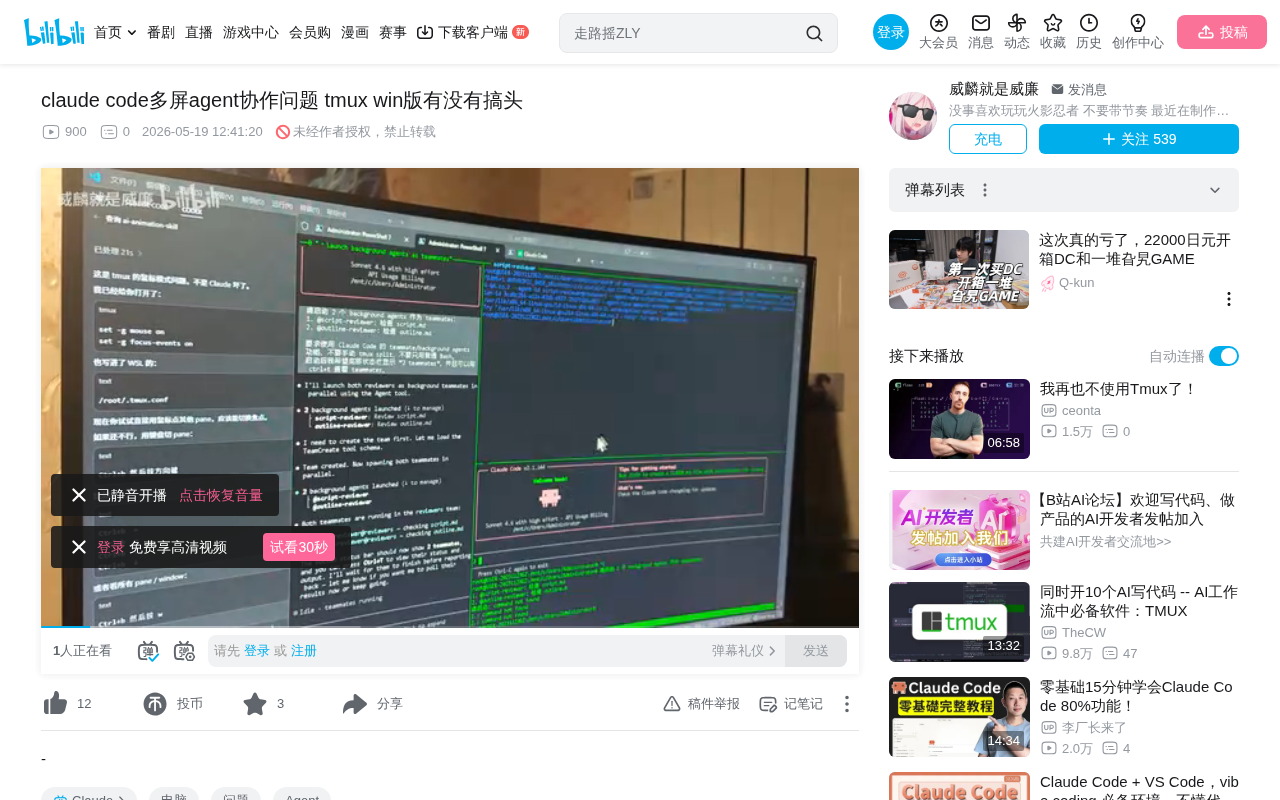
According to real-world testing feedback from a Bilibili content creator, tmux natively supports only Linux and macOS systems and cannot be installed directly on Windows. This means a large number of Windows users face an inherent platform barrier when trying to use Claude Code's multi-Agent orchestration features.
Attempting WSL: Efforts and Limitations
Cross-Domain Issues Are Unavoidable
The most intuitive solution is to install tmux through WSL (Windows Subsystem for Linux). WSL has gone through two architectural generations: WSL1 translates Linux system calls into Windows NT kernel calls through a syscall translation layer, while WSL2 runs a real Linux kernel inside a lightweight Hyper-V virtual machine. In theory, WSL provides a complete Linux environment, and installing tmux itself is straightforward. However, in practice, when you set environment variables to have Windows-side Claude Code invoke tmux within WSL, you encounter cross-domain issues—path mapping and permission management between the Windows file system and WSL file system cause various hard-to-diagnose bugs.
The root cause of cross-domain issues lies in the fundamental differences between the two file systems: the Windows file system is mounted into WSL via /mnt/c/, while WSL's file system is exposed to Windows through the \\\\wsl$\\ network path. When Windows-side Claude Code tries to point to the tmux binary in WSL via environment variables, it involves not just path conversion (e.g., C:\\Users\\ to /mnt/c/Users/), but also Unix domain sockets being unable to cross the WSL boundary, incompatible file permission models (NTFS doesn't support Unix permission bits), and broken inter-process communication mechanisms. The socket files created by the tmux server reside in WSL's /tmp directory, and Windows processes simply cannot directly access these sockets—this fundamentally breaks the cross-system tmux call chain.
According to the content creator, he spent "an extremely long time" debugging and ultimately confirmed that this path has technical obstacles that are nearly impossible to circumvent.
The Reluctant Workaround of Dual Installation
The currently viable workaround is to install Claude Code inside WSL as well. This way, tmux and Claude Code run in the same Linux environment, naturally eliminating cross-domain issues. But the costs are:
- Two copies of Claude Code in the system: one in the native Windows environment, one in WSL
- Doubled resource consumption: each environment consumes its own system resources
- Fragmented workflow: switching between different environments makes project file management complex
- Configuration sync difficulties: configurations for both environments must be maintained separately
Feasibility of Native Windows tmux
Why Do We Need a Windows Version of tmux?
The content creator raised a thought-provoking question: could a native Windows tmux be developed? The core requirements behind this idea are:
- Eliminate platform differences: Allow Windows users to use multi-Agent orchestration without extra configuration
- Simplify workflows: No longer need to maintain dual environments
- Lower the entry barrier: More friendly to non-Linux users
Technical Challenges
tmux's core functionality—terminal multiplexing and session management—deeply depends on Unix pseudo-terminal (PTY) mechanisms and the signal system. While Windows has improved terminal support in recent years through technologies like ConPTY (Windows Pseudo Console), creating a fully compatible tmux alternative still faces significant challenges.
ConPTY is a pseudo-terminal API introduced by Microsoft in Windows 10 version 1809, designed to bridge the gap between Windows and Unix terminal models. Traditional Windows consoles use Console API for character-level screen buffer operations, while Unix terminals are based on PTY (pseudo-terminal) device pairs and VT sequence streams. ConPTY provides a middle layer that allows applications to interact with terminals in a Unix-like manner (through VT/ANSI escape sequences)—Windows Terminal is built on ConPTY. However, ConPTY still cannot fully emulate all Unix PTY behaviors, particularly with fundamental differences in session detachment, signal delivery, and job control.
Specific technical obstacles include:
- Process model differences: Unix's
fork()system call creates a complete copy of the current process (copy-on-write), with the child process inheriting all parent state—including file descriptors, memory mappings, and signal handlers. tmux heavily relies on this mechanism to create and manage sub-sessions. Windows uses theCreateProcess()API, which creates an entirely new process rather than a copy of the current one, requiring explicit specification of the executable path and arguments. This fundamental difference means tmux's session management logic—particularly the server process forking child processes to host each pane's shell—cannot be simply ported to Windows. - Missing signal mechanisms: Unix signal mechanisms (such as SIGSTOP/SIGCONT for suspending/resuming processes, SIGWINCH for terminal resize notifications, SIGHUP for terminal disconnect notifications) have no direct equivalents in Windows and must be simulated through entirely different mechanisms like event objects and job objects.
- Different terminal abstraction layers: Session detachment and reconnection logic needs to be reimplemented, and ConPTY currently doesn't provide native session persistence support
Possible Alternatives
There are some noteworthy attempts in the community:
- Windows Terminal's multi-tab/split-pane features: While not fully equivalent to tmux (lacking session detachment and reconnection capabilities), it provides partial visual split-pane functionality
- Modern terminal multiplexers like Zellij: Zellij is a modern terminal multiplexer written in Rust, and some projects are exploring cross-platform support. Its plugin-based architecture may be more adaptable to different underlying terminal APIs
- Official Anthropic adaptation: The ideal solution would be for the Claude Code team to provide an alternative session management mechanism for Windows—for example, implementing a dedicated multi-Agent process manager based on ConPTY and Windows job objects, rather than relying on general-purpose terminal multiplexing tools
Practical Recommendations for Windows Developers
If you're a Windows user who needs Claude Code's multi-Agent orchestration features, the most reliable approach currently remains:
- Fully migrate to a WSL workflow: Move your entire development environment into WSL rather than trying to bridge the two systems. WSL2 offers near-native Linux performance, with excellent file system I/O when working within the Linux partition (rather than cross-filesystem access via /mnt/c)
- Use the VS Code Remote - WSL extension: Maintain the Windows-side editor experience while running all command-line tools in WSL. VS Code's Remote architecture runs a server process inside WSL that handles file operations and terminal commands, while UI rendering remains on the Windows side—achieving the best of both worlds
- Watch for official updates: Anthropic may address Windows compatibility in future releases. Given Windows' massive share of the developer market, this adaptation has clear commercial motivation
This issue fundamentally reflects the deep dependency of AI development toolchains on Unix-like environments, and reminds us to consider toolchain completeness when choosing development environments. From a broader perspective, as AI programming assistants evolve from simple code completion to autonomous Agent systems with execution capabilities, their dependency on OS-level capabilities will only deepen—process management, file system monitoring, network communication, and other system-level functions will all become critical components of the AI toolchain, making cross-platform compatibility issues increasingly prominent.
Key Takeaways
- Claude Code's multi-Agent orchestration depends on tmux, which doesn't support native Windows installation
- Installing tmux via WSL introduces cross-domain issues; the environment variable approach doesn't work properly
- The current viable solution is installing both Claude Code and tmux inside WSL, but this leads to resource waste from dual environments
- Developing a native Windows tmux alternative faces fundamental challenges in process model and terminal mechanism differences
- Windows users are recommended to migrate their entire development workflow to WSL for the best experience
Related articles
 Tutorials
Cursor + Codex Dual-IDE Collaboration: A Practical Methodology for Open-Source Project Customization
A complete methodology for open-source project customization based on real-world experience, detailing the Cursor+Codex dual-IDE workflow, seven-stage process, MVP validation, and AI source code reading techniques.
 Tutorials
Cursor Multi-Agent in Practice: Building a Full-Stack Next.js Blog in 50 Minutes
Build a full-stack blog in 50 minutes using Cursor IDE's multi-Agent mode with Next.js, Clerk auth, and Supabase. Learn the 4-phase AI Agent workflow and key integration pitfalls.
 Tutorials
Building an AI Software Factory from Scratch: A Cursor Engineer's Hands-On Experience with Multi-Agent Collaboration
Cursor engineer Eric shares practical insights on building an AI software factory: automation levels, guardrail design, parallel Agent management, and scaling to 1000+ Agents for 24/7 development.