Claude Code Practical Guide: From Installation & Configuration to Production-Grade Project Delivery
A hands-on guide to shipping production-grade projects with Claude Code + Opus in hours, not days.
This article provides a complete walkthrough of using Claude Code + Opus for real commercial development, covering CC Switch installation and configuration, engineering-minded requirements writing, and a real case study where a complex payment system integration was completed in 4 hours at ~$60 — with zero hand-written code. It also includes model selection advice and cost comparisons against traditional development.
Introduction: AI Coding Is Ready for Real-World Production
In an era where AI programming tools are flourishing, many developers remain stuck in the "experimenting" phase — writing demos, running small scripts, but never actually applying AI Coding to real commercial projects. Based on a seasoned developer's hands-on experience, this article walks through how to use the Claude Code + Opus combination to complete a complex payment system integration in just 4 hours, sharing the complete methodology from tool installation to engineering-minded thinking.
Three Mainstream AI Coding Approaches & Recommendations
There are currently three main ways to use AI Coding:
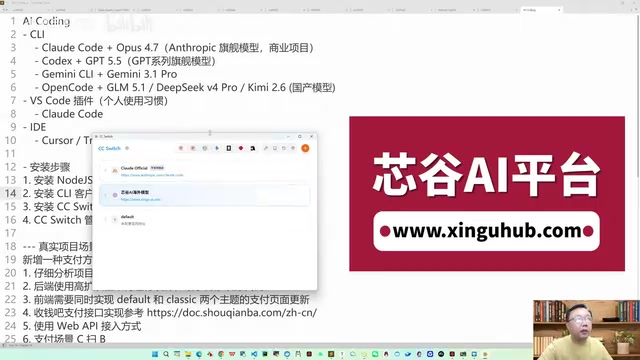
- CLI (Command Line) Approach: Pure terminal interaction, suitable for lightweight tasks
- VSCode + Plugin Approach: Integrating AI capabilities within a familiar IDE for the best development experience
- Dedicated IDE Tools: Such as Cursor, ByteDance's Trae, Alibaba's Coder, etc.
After extensive real-world testing, VSCode + Claude Code plugin is currently the most recommended approach. While Cursor has a bigger name, its Pro plan ($20/month) suffers from quota limitations and latency issues in actual projects; domestic tools like Trae also fall short of expectations. For developers who prioritize stable output, the Claude Code CLI + VSCode integration offers superior controllability and output quality.
Core Tool: Managing All CLI Models with CC Switch
Why You Need CC Switch
Many developers using CLI tools like Claude Code and Codex find account registration and login to be the biggest headache. CC Switch (full name: SysSwitch) was built to solve exactly this pain point — it provides unified management for all CLI tool model configurations and bypasses the login verification step.
CC Switch supports the following clients:
- Claude Code CLI and desktop version
- OpenAI Codex
- Google Gemini CLI
- Open Code
- As well as Lobechat, Hermes Agent, and more
Complete Installation Steps
Step 1: Install Node.js
This is the foundational dependency for all CLI tools. After installation, verify with:
node --version
npm --version
Step 2: Install CLI Clients
Install the tools you need:
# Claude Code
npm install -g @anthropic-ai/claude-code

# OpenAI Codex
npm install -g openai-codex-cli

# Open Code
npm install -g open-code-ai
Mac users can also install via brew install.
Step 3: Install CC Switch
Go to the CC Switch GitHub Release page, download the latest version (e.g., 301.5.0), and choose the installer for your operating system. Windows users should download the MSI installer.
Step 4: Configure Models
After opening CC Switch, click "Add Unified Provider" and configure the API address and API Key. Key configuration items include:
- API Address: The API endpoint of your aggregation platform
- API Key: The key obtained from the aggregation platform
- Model Mapping: Different model tiers such as Opus, Sonnet, Haiku, etc.
The most critical step: In CC Switch's settings, make sure to enable the "Skip Claude Code initial installation confirmation" option. This bypasses account verification and lets you start using it directly.
Real-World Case Study: Complex Payment System Integration in 4 Hours
Project Background
This was a real commercial project — upgrading the 6API aggregation platform to add Shouqianba (a Chinese payment gateway) functionality. The codebase was massive: the backend was written in Go, and the frontend needed to support both Default and Classic UI themes simultaneously, using ByteDance's UI component library.
Engineering-Minded Requirements Writing
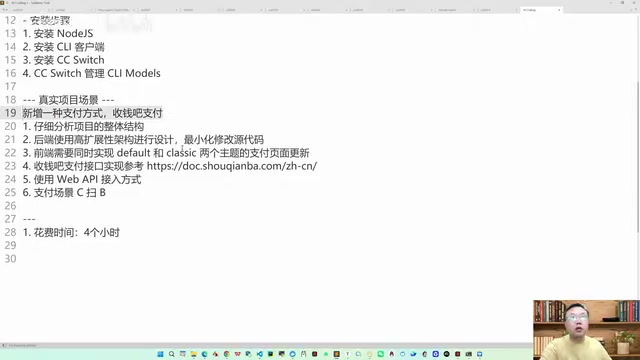
This is the most critical part of the entire workflow. If you simply write "Add a new payment method — Shouqianba payment," the AI will almost certainly fail to deliver satisfactory results. The correct approach is to write requirements as you would a technical design document:
- Step 1: Have the AI thoroughly read the project's overall structure
- Step 2: Specify backend requirements — use a highly extensible architecture design with minimal modifications to source code
- Step 3: Specify frontend requirements — implement payment pages for both Default and Classic themes
- Step 4: Provide reference documentation — Shouqianba's integration docs, Web API integration methods
- Step 5: Define payment scenarios — Customer-scan QR code (aggregated QR code supporting both Alipay and WeChat Pay)
This structured requirements description reflects engineering-minded architectural thinking — the most critical competitive advantage for developers in the AI Coding era.
Execution Process & Results
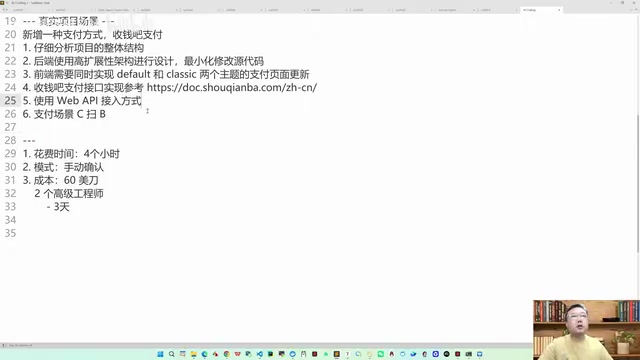
Key metrics from the development process:
| Metric | Data |
|---|---|
| Total Time | 4 hours |
| Lines of Hand-Written Code | 0 |
| Model Combination | Claude Code + Opus |
| Total Cost | ~$60 |
| Result | Worked on First Run |
The development used manual confirmation mode rather than fully automatic mode — manually clicking "Yes" to confirm at critical modification points, while letting the AI handle everything else automatically. In practice, the developer didn't even review the code line by line; it was essentially a series of "Yes, Yes, Yes" confirmations.
The final delivered features included:
- Complete Shouqianba payment gateway integration
- Flexible configuration system (merchant SN, secret key, activation code, dynamic terminal SA and terminal key generation)
- Payment pages for both Default and Classic frontend UI themes
- Order management and order reconciliation features
- Aggregated QR code payment (supporting both Alipay and WeChat Pay)
Why Claude Code + Opus Is a Must for Production-Grade Projects
Real-world experience provides a very clear conclusion: For production-grade commercial projects, Claude Code + Opus is currently the only viable choice.
The core reason: Claude Code is an Agent, and Anthropic has specifically applied reinforcement learning optimization for the Claude Code + Opus combination. This means the model has been specially trained within Claude Code's workflow, enabling it to better understand project structures, execute multi-step tasks, and generate high-quality production code.
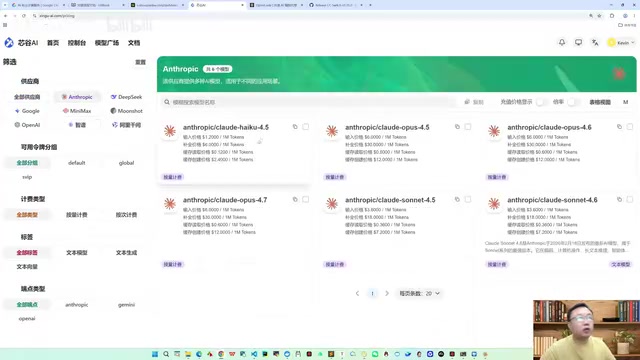
While it's technically possible to use models like DeepSeek or GLM with Claude Code, the results are significantly worse. After testing multiple combinations, other models clearly underperform compared to Opus on complex projects.
Recommended Model Combinations by Scenario
| Scenario | Recommended Combination | Notes |
|---|---|---|
| Complex Commercial Projects | Claude Code + Opus | Top choice, RL-optimized |
| Commercial Projects (Alternative) | Codex + GPT Series | Also capable for complex projects |
| General/Small Projects | Open Code + GLM | Best value with domestic models |
| General Projects (Alternative) | Open Code + Kimi | Domestic model alternative |
Cost Comparison: AI Coding vs. Traditional Development
Many people think $60 (roughly ¥400+ RMB) is expensive, but let's do the math:
Traditional Development:
- Requires 1 senior Go engineer + 1 senior frontend engineer
- Labor cost: At least ¥500 per person per day (total cost including benefits is much higher)
- Estimated timeline: At least 3 days
- Total cost: 500 × 2 × 3 = ¥3,000 minimum
AI Coding:
- 4 hours, $60, 0 lines of hand-written code, worked on first run
- Total cost: ~¥400 RMB
That's nearly a 90% cost reduction with several times the efficiency gain. No matter how you calculate it, the ROI is clear.
Claude Code's Engineering Artifacts & Project Management
During its workflow, Claude Code automatically generates two important files:
- agents.md: Records the Agent's working context and behavioral guidelines
- CLAUDE.md: Project-level configuration and documentation file
These files are essential for Claude Code to understand the project and maintain consistency. For new projects, developers need to clearly describe the project structure and development standards in these files. Additionally, Claude Code generates related skills files to further enhance its understanding of the project.
For team collaboration scenarios, these files can be committed to version control, allowing team members to share the AI's project context and avoid repeatedly "educating" the AI.
Practical Tips for Developers
-
Don't be stingy with token consumption: In the AI Coding era, capability is no longer measured by "how many lines of code you wrote" but by "how many tokens you consumed." Many major tech companies are already evaluating AI Coding experience and token consumption in interviews.
-
Go straight for the best model: The lower-end the model, the more likely you are to develop bad interaction habits, and the worse the code quality. Using the best model helps you build the right mental model for AI collaboration.
-
Your core competitive advantage is engineering thinking: AI can write code, but structured requirements description, architectural design philosophy, and technical solution planning still require human expertise.
-
Make good use of manual confirmation mode: Maintaining human review at critical checkpoints ensures code quality without excessively interrupting the AI's workflow.
-
Advocate for company resources: The cost of AI Coding is negligible compared to labor costs and is absolutely worth the investment as a productivity tool.
AI Coding is no longer the future — it's the present. By mastering the right tool combinations and engineering-minded thinking, every developer can multiply their productivity several times over.
Related articles
Building a WeChat Mini Program with AI from Scratch: How a Non-Coder Created a Poetry Memorization App in 7 Days
Non-coder Tao Qigu used AI to build and launch a WeChat Mini Program in 7 days. A full breakdown of AI-assisted development, debugging, and product design for elderly users.
SpaceX: A Multi-Dimensional Analysis of Engineering Marvels, Business Revolution, and the Mars Vision
A deep multi-dimensional analysis of SpaceX covering engineering breakthroughs, business revolution, organizational culture, and the Mars colonization vision that is redefining the boundaries of human space exploration.

Tutorial: Using Claude Code to Auto-Generate Video Chapter Progress Bar Animations
Use Claude Code's Skill mechanism and Remotion to auto-generate video chapter progress bar animations from subtitle files. Six built-in styles, custom stickers, and one-click rendering.